mirror of
https://github.com/ArthurSonzogni/FTXUI.git
synced 2025-12-16 01:48:56 +08:00
Compare commits
1 Commits
ebcf6a01be
...
36b83737bb
| Author | SHA1 | Date | |
|---|---|---|---|

|
36b83737bb |
@@ -35,26 +35,16 @@ foreach(example IN LISTS EXAMPLES)
|
||||
endforeach()
|
||||
|
||||
macro(write_example_list file title page examples)
|
||||
file(WRITE "${file}" "@page ${page} ${title}\n")
|
||||
file(APPEND "${file}" "@page ${page} ${title}\n")
|
||||
file(APPEND "${file}" "@tableofcontents\n")
|
||||
|
||||
foreach(example IN LISTS ${examples})
|
||||
get_filename_component(name "${example}" NAME_WE)
|
||||
file(APPEND "${file}" "# ${name}\n")
|
||||
|
||||
# Add a markdown to the demo. URL example:
|
||||
# https://arthursonzogni.github.io/FTXUI/examples/?file=component/canvas_animated
|
||||
file(APPEND "${file}" "[Demo](https://arthursonzogni.github.io/FTXUI/examples/?file=${example})\n")
|
||||
|
||||
file(APPEND "${file}" "@include examples/${example}.cpp\n")
|
||||
file(APPEND "${file}" "\n")
|
||||
endforeach()
|
||||
|
||||
# Reference to the examples
|
||||
foreach(example IN LISTS ${examples})
|
||||
get_filename_component(name "${example}" NAME_WE)
|
||||
file(APPEND "${file}" "@example examples/${example}.cpp\n")
|
||||
endforeach()
|
||||
|
||||
endmacro()
|
||||
|
||||
write_example_list("${CMAKE_CURRENT_BINARY_DIR}/dom_examples.md"
|
||||
|
||||
@@ -157,7 +157,7 @@ ABBREVIATE_BRIEF = "The $name class" \
|
||||
# description.
|
||||
# The default value is: NO.
|
||||
|
||||
ALWAYS_DETAILED_SEC = YES
|
||||
ALWAYS_DETAILED_SEC = NO
|
||||
|
||||
# If the INLINE_INHERITED_MEMB tag is set to YES, doxygen will show all
|
||||
# inherited members of a class in the documentation of that class as if those
|
||||
@@ -285,8 +285,6 @@ TAB_SIZE = 2
|
||||
# @} or use a double escape (\\{ and \\})
|
||||
|
||||
ALIASES =
|
||||
ALIASES += iframe{1}="<div class=\"iframe-wrapper\"><iframe src='\1' width='100%' height='400' frameborder='0' allowfullscreen></iframe></div>"
|
||||
|
||||
|
||||
# Set the OPTIMIZE_OUTPUT_FOR_C tag to YES if your project consists of C sources
|
||||
# only. Doxygen will then generate output that is more tailored for C. For
|
||||
@@ -294,7 +292,7 @@ ALIASES += iframe{1}="<div class=\"iframe-wrapper\"><iframe src='\1' width='100%
|
||||
# members will be omitted, etc.
|
||||
# The default value is: NO.
|
||||
|
||||
OPTIMIZE_OUTPUT_FOR_C = NO
|
||||
OPTIMIZE_OUTPUT_FOR_C = YES
|
||||
|
||||
# Set the OPTIMIZE_OUTPUT_JAVA tag to YES if your project consists of Java or
|
||||
# Python sources only. Doxygen will then generate output that is more tailored
|
||||
@@ -345,8 +343,7 @@ OPTIMIZE_OUTPUT_SLICE = NO
|
||||
#
|
||||
# Note see also the list of default file extension mappings.
|
||||
|
||||
EXTENSION_MAPPING =
|
||||
|
||||
EXTENSION_MAPPING = md=Markdown
|
||||
|
||||
# If the MARKDOWN_SUPPORT tag is enabled then doxygen pre-processes all comments
|
||||
# according to the Markdown format, which allows for more readable
|
||||
@@ -365,7 +362,7 @@ MARKDOWN_SUPPORT = YES
|
||||
# Minimum value: 0, maximum value: 99, default value: 5.
|
||||
# This tag requires that the tag MARKDOWN_SUPPORT is set to YES.
|
||||
|
||||
TOC_INCLUDE_HEADINGS = 5
|
||||
TOC_INCLUDE_HEADINGS = 3
|
||||
|
||||
# The MARKDOWN_ID_STYLE tag can be used to specify the algorithm used to
|
||||
# generate identifiers for the Markdown headings. Note: Every identifier is
|
||||
@@ -376,7 +373,7 @@ TOC_INCLUDE_HEADINGS = 5
|
||||
# The default value is: DOXYGEN.
|
||||
# This tag requires that the tag MARKDOWN_SUPPORT is set to YES.
|
||||
|
||||
MARKDOWN_ID_STYLE = GITHUB
|
||||
MARKDOWN_ID_STYLE = DOXYGEN
|
||||
|
||||
# When enabled doxygen tries to link words that correspond to documented
|
||||
# classes, or namespaces to their corresponding documentation. Such a link can
|
||||
@@ -400,7 +397,7 @@ BUILTIN_STL_SUPPORT = YES
|
||||
# enable parsing support.
|
||||
# The default value is: NO.
|
||||
|
||||
CPP_CLI_SUPPORT = NO
|
||||
CPP_CLI_SUPPORT = YES
|
||||
|
||||
# Set the SIP_SUPPORT tag to YES if your project consists of sip (see:
|
||||
# https://www.riverbankcomputing.com/software/sip/intro) sources only. Doxygen
|
||||
@@ -418,7 +415,7 @@ SIP_SUPPORT = NO
|
||||
# should set this option to NO.
|
||||
# The default value is: YES.
|
||||
|
||||
IDL_PROPERTY_SUPPORT = NO
|
||||
IDL_PROPERTY_SUPPORT = YES
|
||||
|
||||
# If member grouping is used in the documentation and the DISTRIBUTE_GROUP_DOC
|
||||
# tag is set to YES then doxygen will reuse the documentation of the first
|
||||
@@ -474,7 +471,7 @@ INLINE_SIMPLE_STRUCTS = NO
|
||||
# types are typedef'ed and only the typedef is referenced, never the tag name.
|
||||
# The default value is: NO.
|
||||
|
||||
TYPEDEF_HIDES_STRUCT = YES
|
||||
TYPEDEF_HIDES_STRUCT = NO
|
||||
|
||||
# The size of the symbol lookup cache can be set using LOOKUP_CACHE_SIZE. This
|
||||
# cache is used to resolve symbols given their name and scope. Since this can be
|
||||
@@ -500,7 +497,7 @@ LOOKUP_CACHE_SIZE = 0
|
||||
# DOT_NUM_THREADS setting.
|
||||
# Minimum value: 0, maximum value: 32, default value: 1.
|
||||
|
||||
NUM_PROC_THREADS = 4
|
||||
NUM_PROC_THREADS = 1
|
||||
|
||||
# If the TIMESTAMP tag is set different from NO then each generated page will
|
||||
# contain the date or date and time when the page was generated. Setting this to
|
||||
@@ -819,7 +816,7 @@ FILE_VERSION_FILTER =
|
||||
# DoxygenLayout.xml, doxygen will parse it automatically even if the LAYOUT_FILE
|
||||
# tag is left empty.
|
||||
|
||||
LAYOUT_FILE = @CMAKE_CURRENT_SOURCE_DIR@/DoxygenLayout.xml
|
||||
LAYOUT_FILE = @CMAKE_CURRENT_SOURCE_DIR@/doxygen_layout.xml
|
||||
|
||||
# The CITE_BIB_FILES tag can be used to specify one or more bib files containing
|
||||
# the reference definitions. This must be a list of .bib files. The .bib
|
||||
@@ -952,13 +949,11 @@ INPUT = \
|
||||
@CMAKE_CURRENT_SOURCE_DIR@/getting-started.md \
|
||||
@CMAKE_CURRENT_SOURCE_DIR@/installation.md \
|
||||
@CMAKE_CURRENT_SOURCE_DIR@/module.md \
|
||||
@CMAKE_CURRENT_SOURCE_DIR@/module-screen.md \
|
||||
@CMAKE_CURRENT_SOURCE_DIR@/module-dom.md \
|
||||
@CMAKE_CURRENT_SOURCE_DIR@/module-component.md \
|
||||
@CMAKE_CURRENT_SOURCE_DIR@ \
|
||||
@CMAKE_SOURCE_DIR@/include \
|
||||
@CMAKE_SOURCE_DIR@/src \
|
||||
@CMAKE_CURRENT_BINARY_DIR@ \
|
||||
@CMAKE_SOURCE_DIR@/CHANGELOG.md \
|
||||
@CMAKE_SOURCE_DIR@/examples \
|
||||
|
||||
# This tag can be used to specify the character encoding of the source files
|
||||
@@ -1171,7 +1166,7 @@ FILTER_SOURCE_PATTERNS =
|
||||
# (index.html). This can be useful if you have a project on for instance GitHub
|
||||
# and want to reuse the introduction page also for the doxygen output.
|
||||
|
||||
USE_MDFILE_AS_MAINPAGE = @CMAKE_CURRENT_SOURCE_DIR@/introduction.md
|
||||
USE_MDFILE_AS_MAINPAGE = introduction.md
|
||||
|
||||
# The Fortran standard specifies that for fixed formatted Fortran code all
|
||||
# characters from position 72 are to be considered as comment. A common
|
||||
@@ -1277,7 +1272,7 @@ VERBATIM_HEADERS = YES
|
||||
# classes, structs, unions or interfaces.
|
||||
# The default value is: YES.
|
||||
|
||||
ALPHABETICAL_INDEX = NO
|
||||
ALPHABETICAL_INDEX = YES
|
||||
|
||||
# The IGNORE_PREFIX tag can be used to specify a prefix (or a list of prefixes)
|
||||
# that should be ignored while generating the index headers. The IGNORE_PREFIX
|
||||
@@ -1730,7 +1725,7 @@ FULL_SIDEBAR = YES
|
||||
# Minimum value: 0, maximum value: 20, default value: 4.
|
||||
# This tag requires that the tag GENERATE_HTML is set to YES.
|
||||
|
||||
ENUM_VALUES_PER_LINE = 1
|
||||
ENUM_VALUES_PER_LINE = 4
|
||||
|
||||
# If the treeview is enabled (see GENERATE_TREEVIEW) then this tag can be used
|
||||
# to set the initial width (in pixels) of the frame in which the tree is shown.
|
||||
@@ -2232,7 +2227,7 @@ MAN_LINKS = NO
|
||||
# captures the structure of the code including all documentation.
|
||||
# The default value is: NO.
|
||||
|
||||
GENERATE_XML = NO
|
||||
GENERATE_XML = YES
|
||||
|
||||
# The XML_OUTPUT tag is used to specify where the XML pages will be put. If a
|
||||
# relative path is entered the value of OUTPUT_DIRECTORY will be put in front of
|
||||
@@ -2565,7 +2560,7 @@ CLASS_GRAPH = YES
|
||||
# The default value is: YES.
|
||||
# This tag requires that the tag HAVE_DOT is set to YES.
|
||||
|
||||
COLLABORATION_GRAPH = NO
|
||||
COLLABORATION_GRAPH = YES
|
||||
|
||||
# If the GROUP_GRAPHS tag is set to YES then doxygen will generate a graph for
|
||||
# groups, showing the direct groups dependencies. Explicit enabling a group
|
||||
@@ -2650,7 +2645,7 @@ INCLUDE_GRAPH = NO
|
||||
# The default value is: YES.
|
||||
# This tag requires that the tag HAVE_DOT is set to YES.
|
||||
|
||||
INCLUDED_BY_GRAPH = NO
|
||||
INCLUDED_BY_GRAPH = YES
|
||||
|
||||
# If the CALL_GRAPH tag is set to YES then doxygen will generate a call
|
||||
# dependency graph for every global function or class method.
|
||||
|
||||
@@ -1,271 +0,0 @@
|
||||
<?xml version="1.0" encoding="UTF-8"?>
|
||||
<doxygenlayout version="1.0">
|
||||
<!-- Generated by doxygen 1.12.0 -->
|
||||
<!-- Navigation index tabs for HTML output -->
|
||||
<navindex>
|
||||
<tab type="mainpage" visible="no" title=""/>
|
||||
<tab type="pages" visible="yes" title="Pages" intro=""/>
|
||||
<tab type="topics" visible="yes" title="Reference" intro=""/>
|
||||
<tab type="modules" visible="yes" title="" intro="">
|
||||
<tab type="modulelist" visible="yes" title="" intro=""/>
|
||||
<tab type="modulemembers" visible="yes" title="" intro=""/>
|
||||
</tab>
|
||||
<tab type="namespaces" visible="yes" title="">
|
||||
<tab type="namespacelist" visible="yes" title="" intro=""/>
|
||||
<tab type="namespacemembers" visible="yes" title="" intro=""/>
|
||||
</tab>
|
||||
<tab type="concepts" visible="yes" title="">
|
||||
</tab>
|
||||
<tab type="interfaces" visible="yes" title="">
|
||||
<tab type="interfacelist" visible="yes" title="" intro=""/>
|
||||
<tab type="interfaceindex" visible="$ALPHABETICAL_INDEX" title=""/>
|
||||
<tab type="interfacehierarchy" visible="yes" title="" intro=""/>
|
||||
</tab>
|
||||
<tab type="classes" visible="yes" title="">
|
||||
<tab type="classlist" visible="yes" title="" intro=""/>
|
||||
<tab type="classindex" visible="$ALPHABETICAL_INDEX" title=""/>
|
||||
<tab type="hierarchy" visible="yes" title="" intro=""/>
|
||||
<tab type="classmembers" visible="yes" title="" intro=""/>
|
||||
</tab>
|
||||
<tab type="structs" visible="yes" title="">
|
||||
<tab type="structlist" visible="yes" title="" intro=""/>
|
||||
<tab type="structindex" visible="$ALPHABETICAL_INDEX" title=""/>
|
||||
</tab>
|
||||
<tab type="exceptions" visible="yes" title="">
|
||||
<tab type="exceptionlist" visible="yes" title="" intro=""/>
|
||||
<tab type="exceptionindex" visible="$ALPHABETICAL_INDEX" title=""/>
|
||||
<tab type="exceptionhierarchy" visible="yes" title="" intro=""/>
|
||||
</tab>
|
||||
|
||||
<tab type="files" visible="yes" title="">
|
||||
<tab type="filelist" visible="yes" title="" intro=""/>
|
||||
<tab type="globals" visible="yes" title="" intro=""/>
|
||||
</tab>
|
||||
|
||||
<tab type="examples" visible="yes" title="" intro=""/>
|
||||
</navindex>
|
||||
|
||||
<!-- Layout definition for a class page -->
|
||||
<class>
|
||||
<briefdescription visible="yes"/>
|
||||
<includes visible="$SHOW_HEADERFILE"/>
|
||||
<inheritancegraph visible="yes"/>
|
||||
<collaborationgraph visible="yes"/>
|
||||
<memberdecl>
|
||||
<nestedclasses visible="yes" title=""/>
|
||||
<publictypes title=""/>
|
||||
<services title=""/>
|
||||
<interfaces title=""/>
|
||||
<publicslots title=""/>
|
||||
<signals title=""/>
|
||||
<publicmethods title=""/>
|
||||
<publicstaticmethods title=""/>
|
||||
<publicattributes title=""/>
|
||||
<publicstaticattributes title=""/>
|
||||
<protectedtypes title=""/>
|
||||
<protectedslots title=""/>
|
||||
<protectedmethods title=""/>
|
||||
<protectedstaticmethods title=""/>
|
||||
<protectedattributes title=""/>
|
||||
<protectedstaticattributes title=""/>
|
||||
<packagetypes title=""/>
|
||||
<packagemethods title=""/>
|
||||
<packagestaticmethods title=""/>
|
||||
<packageattributes title=""/>
|
||||
<packagestaticattributes title=""/>
|
||||
<properties title=""/>
|
||||
<events title=""/>
|
||||
<privatetypes title=""/>
|
||||
<privateslots title=""/>
|
||||
<privatemethods title=""/>
|
||||
<privatestaticmethods title=""/>
|
||||
<privateattributes title=""/>
|
||||
<privatestaticattributes title=""/>
|
||||
<friends title=""/>
|
||||
<related title="" subtitle=""/>
|
||||
<membergroups visible="yes"/>
|
||||
</memberdecl>
|
||||
<detaileddescription title=""/>
|
||||
<memberdef>
|
||||
<inlineclasses title=""/>
|
||||
<typedefs title=""/>
|
||||
<enums title=""/>
|
||||
<services title=""/>
|
||||
<interfaces title=""/>
|
||||
<constructors title=""/>
|
||||
<functions title=""/>
|
||||
<related title=""/>
|
||||
<variables title=""/>
|
||||
<properties title=""/>
|
||||
<events title=""/>
|
||||
</memberdef>
|
||||
<allmemberslink visible="yes"/>
|
||||
<usedfiles visible="$SHOW_USED_FILES"/>
|
||||
<authorsection visible="yes"/>
|
||||
</class>
|
||||
|
||||
<!-- Layout definition for a namespace page -->
|
||||
<namespace>
|
||||
<briefdescription visible="yes"/>
|
||||
<memberdecl>
|
||||
<nestednamespaces visible="yes" title=""/>
|
||||
<constantgroups visible="yes" title=""/>
|
||||
<interfaces visible="yes" title=""/>
|
||||
<classes visible="yes" title=""/>
|
||||
<concepts visible="yes" title=""/>
|
||||
<structs visible="yes" title=""/>
|
||||
<exceptions visible="yes" title=""/>
|
||||
<typedefs title=""/>
|
||||
<sequences title=""/>
|
||||
<dictionaries title=""/>
|
||||
<enums title=""/>
|
||||
<functions title=""/>
|
||||
<variables title=""/>
|
||||
<properties title=""/>
|
||||
<membergroups visible="yes"/>
|
||||
</memberdecl>
|
||||
<detaileddescription title=""/>
|
||||
<memberdef>
|
||||
<inlineclasses title=""/>
|
||||
<typedefs title=""/>
|
||||
<sequences title=""/>
|
||||
<dictionaries title=""/>
|
||||
<enums title=""/>
|
||||
<functions title=""/>
|
||||
<variables title=""/>
|
||||
<properties title=""/>
|
||||
</memberdef>
|
||||
<authorsection visible="yes"/>
|
||||
</namespace>
|
||||
|
||||
<!-- Layout definition for a concept page -->
|
||||
<concept>
|
||||
<briefdescription visible="yes"/>
|
||||
<includes visible="$SHOW_HEADERFILE"/>
|
||||
<definition visible="yes" title=""/>
|
||||
<detaileddescription title=""/>
|
||||
<authorsection visible="yes"/>
|
||||
</concept>
|
||||
|
||||
<!-- Layout definition for a file page -->
|
||||
<file>
|
||||
<briefdescription visible="yes"/>
|
||||
<includes visible="$SHOW_INCLUDE_FILES"/>
|
||||
<includegraph visible="yes"/>
|
||||
<includedbygraph visible="yes"/>
|
||||
<sourcelink visible="yes"/>
|
||||
<memberdecl>
|
||||
<interfaces visible="yes" title=""/>
|
||||
<classes visible="yes" title=""/>
|
||||
<structs visible="yes" title=""/>
|
||||
<exceptions visible="yes" title=""/>
|
||||
<namespaces visible="yes" title=""/>
|
||||
<concepts visible="yes" title=""/>
|
||||
<constantgroups visible="yes" title=""/>
|
||||
<defines title=""/>
|
||||
<typedefs title=""/>
|
||||
<sequences title=""/>
|
||||
<dictionaries title=""/>
|
||||
<enums title=""/>
|
||||
<functions title=""/>
|
||||
<variables title=""/>
|
||||
<properties title=""/>
|
||||
<membergroups visible="yes"/>
|
||||
</memberdecl>
|
||||
<detaileddescription title=""/>
|
||||
<memberdef>
|
||||
<inlineclasses title=""/>
|
||||
<defines title=""/>
|
||||
<typedefs title=""/>
|
||||
<sequences title=""/>
|
||||
<dictionaries title=""/>
|
||||
<enums title=""/>
|
||||
<functions title=""/>
|
||||
<variables title=""/>
|
||||
<properties title=""/>
|
||||
</memberdef>
|
||||
<authorsection/>
|
||||
</file>
|
||||
|
||||
<!-- Layout definition for a group page -->
|
||||
<group>
|
||||
<briefdescription visible="no"/>
|
||||
<authorsection visible="no"/>
|
||||
<detaileddescription title=""/>
|
||||
<groupgraph visible="yes"/>
|
||||
<memberdecl>
|
||||
<nestedgroups visible="yes" title=""/>
|
||||
<modules visible="yes" title=""/>
|
||||
<dirs visible="yes" title=""/>
|
||||
<files visible="yes" title=""/>
|
||||
<namespaces visible="yes" title=""/>
|
||||
<concepts visible="yes" title=""/>
|
||||
<classes visible="yes" title=""/>
|
||||
<defines title=""/>
|
||||
<typedefs title=""/>
|
||||
<sequences title=""/>
|
||||
<dictionaries title=""/>
|
||||
<enums title=""/>
|
||||
<enumvalues title=""/>
|
||||
<functions title=""/>
|
||||
<variables title=""/>
|
||||
<signals title=""/>
|
||||
<publicslots title=""/>
|
||||
<protectedslots title=""/>
|
||||
<privateslots title=""/>
|
||||
<events title=""/>
|
||||
<properties title=""/>
|
||||
<friends title=""/>
|
||||
<membergroups visible="yes"/>
|
||||
</memberdecl>
|
||||
<memberdef>
|
||||
<pagedocs/>
|
||||
<inlineclasses title=""/>
|
||||
<defines title=""/>
|
||||
<typedefs title=""/>
|
||||
<sequences title=""/>
|
||||
<dictionaries title=""/>
|
||||
<enums title=""/>
|
||||
<enumvalues title=""/>
|
||||
<functions title=""/>
|
||||
<variables title=""/>
|
||||
<signals title=""/>
|
||||
<publicslots title=""/>
|
||||
<protectedslots title=""/>
|
||||
<privateslots title=""/>
|
||||
<events title=""/>
|
||||
<properties title=""/>
|
||||
<friends title=""/>
|
||||
</memberdef>
|
||||
</group>
|
||||
|
||||
<!-- Layout definition for a C++20 module page -->
|
||||
<module>
|
||||
<briefdescription visible="yes"/>
|
||||
<exportedmodules visible="yes"/>
|
||||
<memberdecl>
|
||||
<concepts visible="yes" title=""/>
|
||||
<classes visible="yes" title=""/>
|
||||
<enums title=""/>
|
||||
<typedefs title=""/>
|
||||
<functions title=""/>
|
||||
<variables title=""/>
|
||||
<membergroups title=""/>
|
||||
</memberdecl>
|
||||
<detaileddescription title=""/>
|
||||
<memberdecl>
|
||||
<files visible="yes"/>
|
||||
</memberdecl>
|
||||
</module>
|
||||
|
||||
<!-- Layout definition for a directory page -->
|
||||
<directory>
|
||||
<briefdescription visible="yes"/>
|
||||
<directorygraph visible="yes"/>
|
||||
<memberdecl>
|
||||
<dirs visible="yes"/>
|
||||
<files visible="yes"/>
|
||||
</memberdecl>
|
||||
<detaileddescription title=""/>
|
||||
</directory>
|
||||
</doxygenlayout>
|
||||
@@ -20,78 +20,32 @@
|
||||
<script type="text/javascript" src="$relpath^doxygen-awesome-paragraph-link.js"></script>
|
||||
<script type="text/javascript" src="$relpath^doxygen-awesome-interactive-toc.js"></script>
|
||||
<script type="text/javascript" src="$relpath^doxygen-awesome-tabs.js"></script>
|
||||
<script type="module">
|
||||
<script type="text/javascript">
|
||||
DoxygenAwesomeFragmentCopyButton.init()
|
||||
DoxygenAwesomeParagraphLink.init()
|
||||
DoxygenAwesomeInteractiveToc.init()
|
||||
DoxygenAwesomeTabs.init()
|
||||
|
||||
await new Promise(r => window.addEventListener('DOMContentLoaded', r));
|
||||
window.addEventListener('DOMContentLoaded', function () {
|
||||
document.querySelectorAll(".headertitle").forEach(div => {
|
||||
|
||||
// Remove title when a img[alt='title-img'] is present.
|
||||
// Find an image with the alt "img-title".
|
||||
const img = document.querySelector("img[alt='title-img']");
|
||||
const header = document.querySelector(".headertitle");
|
||||
// Hide progressively the title.
|
||||
if (div.textContent != "Getting Started" &&
|
||||
div.textContent != "Installation" &&
|
||||
div.textContent != "Modules" &&
|
||||
true) {
|
||||
return;
|
||||
}
|
||||
div.style.display = "none";
|
||||
|
||||
if (img && header) {
|
||||
// Hide the header title progressively.
|
||||
header.style.display = "none";
|
||||
|
||||
// Show progressively the image.
|
||||
img.style.maxHeight = "40vh";
|
||||
img.style.maxWidth = "100%";
|
||||
img.style.objectFit = "contain";
|
||||
}
|
||||
|
||||
// In the "examples.html" page. Turn every link with text
|
||||
// "examples/<...>
|
||||
//
|
||||
// Add a "demo" link toward.
|
||||
// https://arthursonzogni.github.io/FTXUI/examples/?file=<...>
|
||||
const examples = document.querySelectorAll("a")
|
||||
examples.forEach((example) => {
|
||||
if (!example.textContent.startsWith("examples/")) {
|
||||
return;
|
||||
}
|
||||
|
||||
// Remove the ".cpp" extension from the example name.
|
||||
const exampleName = example.textContent.replace("examples/", "").replace(".cpp", "");
|
||||
|
||||
const a = document.createElement("a");
|
||||
a.textContent = "[demo]";
|
||||
a.href = "https://arthursonzogni.github.io/FTXUI/examples/?file=" + exampleName;
|
||||
a.style.marginRight= "1em";
|
||||
a.style.fontWeight = "bold";
|
||||
|
||||
example.parentElement.insertBefore(a, example)
|
||||
// Show progressively the image.
|
||||
const img = document.querySelector("img.inline");
|
||||
img.style.maxHeight = "40vh";
|
||||
img.style.maxWidth = "100%";
|
||||
img.style.objectFit = "contain";
|
||||
});
|
||||
});
|
||||
|
||||
// If the current URL ends with -example.html, we can add a link to the demo
|
||||
// as well using the div.title textContent.
|
||||
const url = new URL(window.location.href);
|
||||
if (url.pathname.endsWith("-example.html")) {
|
||||
// Get the title text.
|
||||
const title = document.querySelector("div.title").textContent;
|
||||
const example = title.replace("examples/", "").replace(".cpp", "");
|
||||
|
||||
// Create a link to the demo.
|
||||
const a = document.createElement("a");
|
||||
a.textContent = "[demo]";
|
||||
a.href = "https://arthursonzogni.github.io/FTXUI/examples/?file=" + example;
|
||||
a.style.marginLeft = "1em";
|
||||
a.style.fontWeight = "bold";
|
||||
a.style.display = "inline-block";
|
||||
|
||||
// Insert the link after the title.
|
||||
const titleDiv = document.querySelector("div.title");
|
||||
if (titleDiv) {
|
||||
titleDiv.insertBefore(a, titleDiv.nextSibling);
|
||||
}
|
||||
|
||||
}
|
||||
|
||||
</script>
|
||||
|
||||
$treeview
|
||||
$search
|
||||
$mathjax
|
||||
|
||||
@@ -73,16 +73,3 @@ Expected output:
|
||||
| [Getting Started](getting-started.html) |
|
||||
|
||||
</div>
|
||||
|
||||
@defgroup screen ftxui/screen
|
||||
|
||||
Please check the [tutorial](module-screen.html) of the `ftxui/screen` module.
|
||||
|
||||
@defgroup dom ftxui/dom
|
||||
|
||||
Please check the [tutorial](module-dom.html) of the `ftxui/dom` module.
|
||||
|
||||
@defgroup component ftxui/component
|
||||
|
||||
Please check the [tutorial](module-component.html) of the `ftxui/component`
|
||||
module.
|
||||
|
||||
@@ -1,8 +1,6 @@
|
||||
@page module-component ftxui / component
|
||||
@page module-component Module component
|
||||
@tableofcontents
|
||||
|
||||

|
||||
|
||||
The `ftxui::component` module defines the logic that produces interactive
|
||||
components that respond to user events (keyboard, mouse, etc.).
|
||||
|
||||
@@ -29,9 +27,9 @@ frame, and updating its state on events.
|
||||
All predefined components are available in
|
||||
["ftxui/dom/component.hpp"](./component_8hpp.html)
|
||||
|
||||
\include ftxui/component/component.hpp
|
||||
\include{strip ftxui/component/component.hpp
|
||||
|
||||
# Input {#component-input}
|
||||
## Input {#component-input}
|
||||
|
||||
[Example](https://arthursonzogni.github.io/FTXUI/examples_2component_2input_8cpp-example.html):
|
||||
|
||||
@@ -43,7 +41,7 @@ Produced by: `ftxui::Input()` from "ftxui/component/component.hpp"
|
||||
<script id="asciicast-223719" src="https://asciinema.org/a/223719.js" async></script>
|
||||
@endhtmlonly
|
||||
|
||||
## Filtered input
|
||||
### Filtered input
|
||||
|
||||
On can filter out the characters received by the input component, using
|
||||
`ftxui::CatchEvent`.
|
||||
@@ -63,7 +61,7 @@ input |= CatchEvent([&](Event event) {
|
||||
});
|
||||
```
|
||||
|
||||
# Menu {#component-menu}
|
||||
## Menu {#component-menu}
|
||||
|
||||
Defines a menu object. It contains a list of entries, one of them is selected.
|
||||
|
||||
@@ -78,7 +76,7 @@ Produced by: `ftxui::Menu()` from "ftxui/component/component.hpp"
|
||||
<script id="asciicast-223720" src="https://asciinema.org/a/223720.js" async></script>
|
||||
@endhtmlonly
|
||||
|
||||
# Toggle {#component-toggle}
|
||||
## Toggle {#component-toggle}
|
||||
|
||||
A special kind of menu. The entries are displayed horizontally.
|
||||
|
||||
@@ -92,7 +90,7 @@ Produced by: `ftxui::Toggle()` from "ftxui/component/component.hpp"
|
||||
<script id="asciicast-223722" src="https://asciinema.org/a/223722.js" async></script>
|
||||
@endhtmlonly
|
||||
|
||||
# CheckBox {#component-checkbox}
|
||||
## CheckBox {#component-checkbox}
|
||||
|
||||
This component defines a checkbox. It is a single entry that can be turned
|
||||
on/off.
|
||||
@@ -107,7 +105,7 @@ Produced by: `ftxui::Checkbox()` from "ftxui/component/component.hpp"
|
||||
<script id="asciicast-223724" src="https://asciinema.org/a/223724.js" async></script>
|
||||
@endhtmlonly
|
||||
|
||||
# RadioBox {#component-radiobox}
|
||||
## RadioBox {#component-radiobox}
|
||||
|
||||
A radiobutton component. This is a list of entries, where one can be turned on.
|
||||
|
||||
@@ -121,7 +119,7 @@ Produced by: `ftxui::Radiobox()` from "ftxui/component/component.hpp"
|
||||
<script id="asciicast-223725" src="https://asciinema.org/a/223725.js" async></script>
|
||||
@endhtmlonly
|
||||
|
||||
# Dropdown {#component-dropdown}
|
||||
## Dropdown {#component-dropdown}
|
||||
|
||||
A drop down menu is a component that when checked display a list of element for
|
||||
the user to select one.
|
||||
@@ -132,7 +130,7 @@ the user to select one.
|
||||
|
||||
Produced by: `ftxui::Dropdown()` from "ftxui/component/component.hpp"
|
||||
|
||||
# Slider {#component-slider}
|
||||
## Slider {#component-slider}
|
||||
|
||||
Represents a slider object that consists of a range with binned intermediate
|
||||
intervals. It can be created by `ftxui::Slider()`.
|
||||
@@ -143,7 +141,7 @@ intervals. It can be created by `ftxui::Slider()`.
|
||||
|
||||
Produced by: `ftxui::Slider()` from "ftxui/component/component.hpp"
|
||||
|
||||
# Renderer {#component-renderer}
|
||||
## Renderer {#component-renderer}
|
||||
|
||||
Produced by: `ftxui::Renderer()` from \ref ftxui/component/component.hpp. This
|
||||
component decorate another one by using a different function to render an
|
||||
@@ -172,7 +170,7 @@ auto component = [...]
|
||||
component = component | border | bold;
|
||||
```
|
||||
|
||||
# CatchEvent {#component-catchevent}
|
||||
## CatchEvent {#component-catchevent}
|
||||
|
||||
Produced by: `ftxui::CatchEvent()` from \ref ftxui/component/component.hpp.
|
||||
This component decorate others, catching events before the underlying component.
|
||||
@@ -202,7 +200,7 @@ component = component
|
||||
;
|
||||
```
|
||||
|
||||
# Collapsible {#component-collapsible}
|
||||
## Collapsible {#component-collapsible}
|
||||
|
||||
Useful for visual elements whose visibility can be toggle on/off by the user.
|
||||
Essentially, this the combination of the `ftxui::Checkbox()` and
|
||||
@@ -212,7 +210,7 @@ Essentially, this the combination of the `ftxui::Checkbox()` and
|
||||
auto collabsible = Collapsible("Show more", inner_element);
|
||||
```
|
||||
|
||||
# Maybe {#component-maybe}
|
||||
## Maybe {#component-maybe}
|
||||
|
||||
Produced by: `ftxui::Maybe()` from \ref ftxui/component/component.hpp.
|
||||
This component can be utilized to show/hide any other component via a boolean or
|
||||
@@ -239,21 +237,21 @@ component = component
|
||||
;
|
||||
```
|
||||
|
||||
# Container {#component-container}
|
||||
## Container {#component-container}
|
||||
|
||||
## Horizontal {#component-horizontal}
|
||||
### Horizontal {#component-horizontal}
|
||||
|
||||
Produced by: `ftxui::Container::Horizontal()` from
|
||||
"ftxui/component/component.hpp". It displays a list of components horizontally
|
||||
and handle keyboard/mouse navigation.
|
||||
|
||||
## Vertical {#component-vertical}
|
||||
### Vertical {#component-vertical}
|
||||
|
||||
Produced by: `ftxui::Container::Vertical()` from
|
||||
"ftxui/component/component.hpp". It displays a list of components vertically
|
||||
and handles keyboard/mouse navigation.
|
||||
|
||||
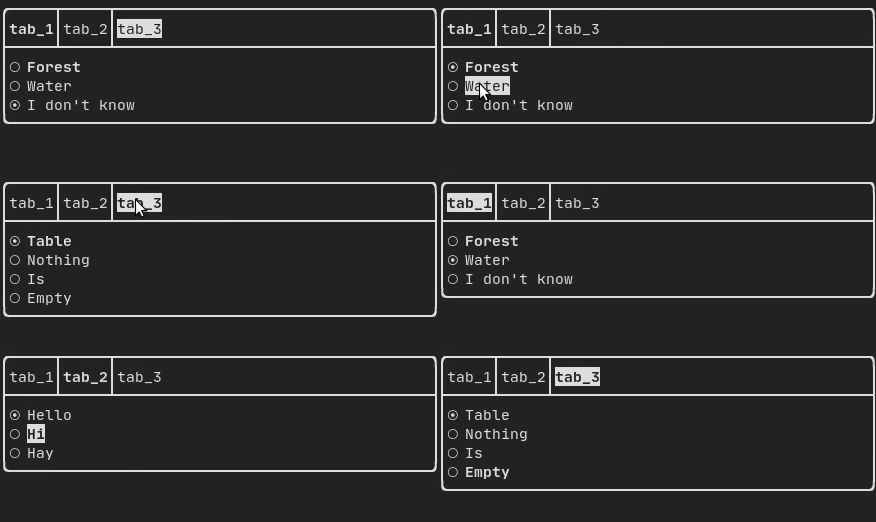
## Tab {#component-tab}
|
||||
### Tab {#component-tab}
|
||||
|
||||
Produced by: `ftxui::Container::Tab()` from
|
||||
"ftxui/component/component.hpp". It take a list of component and display only
|
||||
@@ -268,7 +266,7 @@ one of them. This is useful for implementing a tab bar.
|
||||
|
||||
|
||||
|
||||
# ResizableSplit {#component-resizable-split}
|
||||
## ResizableSplit {#component-resizable-split}
|
||||
|
||||
It defines a horizontal or vertical separation between two children components.
|
||||
The position of the split is variable and controllable using the mouse.
|
||||
@@ -287,7 +285,7 @@ from "ftxui/component/component.hpp"
|
||||
<script id="asciicast-tprMH2EdkUoMb7D2YxgMGgpzx" src="https://asciinema.org/a/tprMH2EdkUoMb7D2YxgMGgpzx.js" async></script>
|
||||
@endhtmlonly
|
||||
|
||||
# Force a frame redraw. {#component-force-redraw}
|
||||
## Force a frame redraw. {#component-force-redraw}
|
||||
|
||||
Typically, `ftxui::ScreenInteractive::Loop()` is responsible for drawing a new
|
||||
frame whenever a new group of events (e.g keyboard, mouse, window resize, etc.)
|
||||
|
||||
@@ -1,8 +1,6 @@
|
||||
@page module-dom ftxui / dom
|
||||
@page module-dom Module dom
|
||||
@tableofcontents
|
||||
|
||||

|
||||
|
||||
This module defines a hierarchical set of `ftxui::Element`. An element manages
|
||||
the layout and can be responsive to the terminal dimension changes. Note the
|
||||
following example where this module is used to create a simple layout with a
|
||||
@@ -45,7 +43,7 @@ corresponding header file:
|
||||
|
||||
\include{strip} "ftxui/dom/elements.hpp"
|
||||
|
||||
# text # {#dom-text}
|
||||
## text ## {#dom-text}
|
||||
|
||||
The most simple widget. It displays a text.
|
||||
```cpp
|
||||
@@ -55,7 +53,7 @@ text("I am a piece of text");
|
||||
I am a piece of text.
|
||||
```
|
||||
|
||||
# vtext {#dom-vtext}
|
||||
## vtext {#dom-vtext}
|
||||
|
||||
Identical to `ftxui::text`, but displayed vertically.
|
||||
|
||||
@@ -73,7 +71,7 @@ L
|
||||
O
|
||||
```
|
||||
|
||||
# paragraph {#dom-paragraph}
|
||||
## paragraph {#dom-paragraph}
|
||||
|
||||
Similar to `ftxui::text`, but the individual word are wrapped along multiple
|
||||
lines, depending on the width of its container.
|
||||
@@ -97,7 +95,7 @@ namespace ftxui {
|
||||
```
|
||||
|
||||
|
||||
# border {#dom-border}
|
||||
## border {#dom-border}
|
||||
|
||||
Adds a border around an element.
|
||||
|
||||
@@ -136,7 +134,7 @@ namespace ftxui {
|
||||
```
|
||||
|
||||
|
||||
# window # {#dom-window}
|
||||
## window ## {#dom-window}
|
||||
|
||||
A `ftxui::window` is a `ftxui::border`, but with an additional header. To add a
|
||||
window around an element, wrap it and specify a string as the header.
|
||||
@@ -152,7 +150,7 @@ Terminal output:
|
||||
└───────────┘
|
||||
```
|
||||
|
||||
# separator {#dom-separator}
|
||||
## separator {#dom-separator}
|
||||
|
||||
Displays a vertical/horizontal line to visually split the content of a
|
||||
container in two.
|
||||
@@ -198,7 +196,7 @@ namespace ftxui {
|
||||
}
|
||||
```
|
||||
|
||||
# gauge {#dom-gauge}
|
||||
## gauge {#dom-gauge}
|
||||
|
||||
This is a visual element that represents a ratio of progress.
|
||||
|
||||
@@ -226,7 +224,7 @@ namespace {
|
||||
}
|
||||
```
|
||||
|
||||
# graph {#dom-graph}
|
||||
## graph {#dom-graph}
|
||||
|
||||
@htmlonly
|
||||
<script id="asciicast-223726" src="https://asciinema.org/a/223726.js" async></script>
|
||||
@@ -237,7 +235,7 @@ See:
|
||||
Element graph(GraphFunction);
|
||||
```
|
||||
|
||||
# Colors {#dom-colors}
|
||||
## Colors {#dom-colors}
|
||||
|
||||
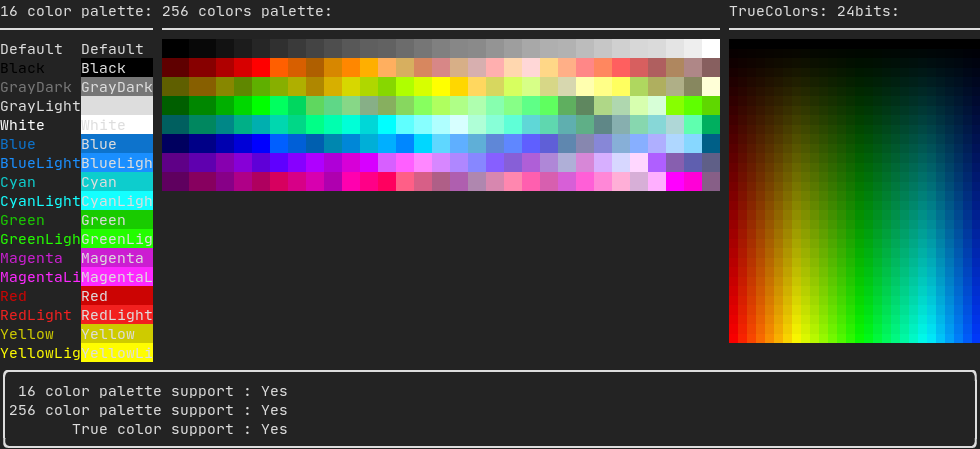
Most terminal consoles can display colored text and colored backgrounds. FTXUI
|
||||
supports every color palette:
|
||||
@@ -250,7 +248,7 @@ Decorator bgcolor(Color);
|
||||
Color [gallery](https://arthursonzogni.github.io/FTXUI/examples_2dom_2color_gallery_8cpp-example.html):
|
||||
|
||||
|
||||
## Palette16 #{#dom-colors-palette-16}
|
||||
### Palette16 #{#dom-colors-palette-16}
|
||||
|
||||
On most terminals the following colors are supported:
|
||||
- Default
|
||||
@@ -286,7 +284,7 @@ text("Blue background") | bgcolor(Color::Blue);
|
||||
text("Black on white") | color(Color::Black) | bgcolor(Color::White);
|
||||
```
|
||||
|
||||
## Palette256 #{#dom-colors-palette-256}
|
||||
### Palette256 #{#dom-colors-palette-256}
|
||||
|
||||
On terminal supporting 256 colors.
|
||||
@htmlonly
|
||||
@@ -297,7 +295,7 @@ On terminal supporting 256 colors.
|
||||
text("HotPink") | color(Color::HotPink);
|
||||
```
|
||||
|
||||
## TrueColor #{#dom-colors-true-color}
|
||||
### TrueColor #{#dom-colors-true-color}
|
||||
|
||||
On terminal supporting trueColor, you can directly use the 24bit RGB color
|
||||
space:
|
||||
@@ -316,7 +314,7 @@ ftxui::Color::HSV(uint8_t hue, uint8_t saturation, uint8_t value);
|
||||
<script id="asciicast-xwzzghmqcqzIuyLwCpQFEqbEu" src="https://asciinema.org/a/xwzzghmqcqzIuyLwCpQFEqbEu.js" async></script>
|
||||
@endhtmlonly
|
||||
|
||||
# LinearGradient #{#dom-linear-gradient}
|
||||
## LinearGradient #{#dom-linear-gradient}
|
||||
|
||||
FTXUI supports linear gradient. Either on the foreground or the background.
|
||||
|
||||
@@ -346,7 +344,7 @@ LinearGradient(45, Color::Red, Color::Blue);
|
||||
See [demo](https://arthursonzogni.github.io/FTXUI/examples/?file=component/linear_gradient_gallery).
|
||||
|
||||
|
||||
# Style {#dom-style}
|
||||
## Style {#dom-style}
|
||||
In addition to colored text and colored backgrounds. Many terminals support text
|
||||
effects such as: `bold`, `italic`, `dim`, `underlined`, `inverted`, `blink`.
|
||||
|
||||
@@ -379,7 +377,7 @@ Alternatively, use the pipe operator to chain it on your element:
|
||||
text("This text is bold") | bold | underlined
|
||||
```
|
||||
|
||||
# Layout {#dom-layout}
|
||||
## Layout {#dom-layout}
|
||||
|
||||
Enables elements to be arranged in the following ways:
|
||||
- **Horizontally** with `ftxui::hbox`
|
||||
@@ -440,7 +438,7 @@ Terminal output:
|
||||
└────┘└───────────────────────────────┘└───────────────────────────────┘
|
||||
```
|
||||
|
||||
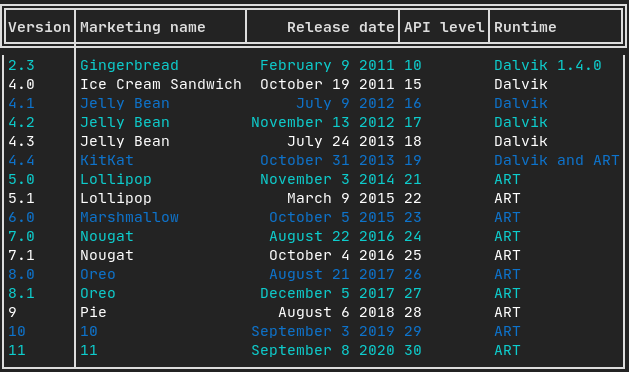
# Table {#dom-table}
|
||||
## Table {#dom-table}
|
||||
|
||||
Enables easy formatting of data into a neat table like visual form.
|
||||
|
||||
@@ -448,7 +446,7 @@ Enables easy formatting of data into a neat table like visual form.
|
||||
|
||||
|
||||
|
||||
# Canvas {#dom-canvas}
|
||||
## Canvas {#dom-canvas}
|
||||
|
||||
See the API [<ftxui/dom/canvas.hpp>](./canvas_8hpp_source.html)
|
||||
|
||||
|
||||
@@ -1,8 +1,6 @@
|
||||
@page module-screen ftxui / screen
|
||||
@page module-screen Module screen
|
||||
@tableofcontents
|
||||
|
||||
|
||||
|
||||
The `ftxui::screen` module is the low-level foundation. It can be used
|
||||
standalone, but it is primarily designed to be used together by
|
||||
[ftxui::dom](module-dom.html) and [ftxui::component](module-component.html)
|
||||
|
||||
@@ -4,13 +4,13 @@
|
||||
|
||||
FTXUI is organized into three modules, each building upon the previous:
|
||||
|
||||
1. [ftxui/screen](#module-screen) - Low-level rendering
|
||||
2. [ftxui/dom](#module-dom) - Layout and composition
|
||||
3. [ftxui/component](#module-component) - User interaction
|
||||
1. @subpage module-screen — low-level rendering
|
||||
2. @subpage module-dom — layout and composition
|
||||
3. @subpage module-component — user interaction
|
||||
|
||||
---
|
||||
|
||||
# ftxui/screen
|
||||
[ @subpage module-screen ]
|
||||
|
||||
Defines:
|
||||
|
||||
@@ -20,18 +20,9 @@ Defines:
|
||||
|
||||
Use for direct terminal drawing and styling.
|
||||
|
||||
<div class="section_buttons">
|
||||
|
||||
| Next |
|
||||
|--------------------------------------:|
|
||||
| [Documentation](module-screen.html) |
|
||||
|
||||
</div>
|
||||
|
||||
|
||||
---
|
||||
|
||||
# ftxui/dom
|
||||
[ @subpage module-dom ]
|
||||
|
||||
Provides:
|
||||
|
||||
@@ -41,17 +32,9 @@ Provides:
|
||||
|
||||
Ideal for structured, styled UIs.
|
||||
|
||||
<div class="section_buttons">
|
||||
|
||||
| Next |
|
||||
|--------------------------------------:|
|
||||
| [Documentation](module-dom.html) |
|
||||
|
||||
</div>
|
||||
|
||||
|
||||
---
|
||||
# ftxui/component
|
||||
|
||||
[ @subpage module-component ]
|
||||
|
||||
Adds:
|
||||
|
||||
@@ -61,14 +44,6 @@ Adds:
|
||||
|
||||
Use for interactive apps.
|
||||
|
||||
<div class="section_buttons">
|
||||
|
||||
| Next |
|
||||
|--------------------------------------:|
|
||||
| [Documentation](module-component.html) |
|
||||
|
||||
</div>
|
||||
|
||||
---
|
||||
|
||||
Modules can be used independently, or together: `screen → dom → component`.
|
||||
|
||||
@@ -22,7 +22,7 @@ html {
|
||||
--warning-color-darker: #f7768e;
|
||||
--bug-color: #f7768e;
|
||||
|
||||
--fragment-background: #222222;
|
||||
--fragment-background: #2c2e34;
|
||||
--fragment-foreground: #e2e2e3;
|
||||
--fragment-keyword: #f7768e; /* pink */
|
||||
--fragment-keywordtype: #7fbbb3; /* teal */
|
||||
|
||||
Reference in New Issue
Block a user