Introduction
Welcome to the FTXUI documentation!
This is a brief tutorial. You are also encouraged to learn, by reading the examples
Short example
To build a single frame, you need create an ftxui::Element, and display it on a ftxui::Screen.
main.cpp
#include <iostream>
int main(void) {
hbox({
text("left") | border,
text("middle") | border | flex,
text("right") | border,
});
auto screen = Screen::Create(
Dimension::Full(),
Dimension::Fit(document)
);
Render(screen, document);
screen.Print();
return EXIT_SUCCESS;
}
std::shared_ptr< Node > Element
output
┌────┐┌─────────────────────────────────────────────────────────────────┐┌─────┐
│left││middle ││right│
└────┘└─────────────────────────────────────────────────────────────────┘└─────┘
Build
Using CMake
CMakeLists.txt
cmake_minimum_required (VERSION 3.11)
# --- Fetch FTXUI --------------------------------------------------------------
include(FetchContent)
set(FETCHCONTENT_UPDATES_DISCONNECTED TRUE)
FetchContent_Declare(ftxui
GIT_REPOSITORY https://github.com/ArthurSonzogni/ftxui
# Important: Specify a GIT_TAG XXXXX here.
)
FetchContent_GetProperties(ftxui)
if(NOT ftxui_POPULATED)
FetchContent_Populate(ftxui)
add_subdirectory(${ftxui_SOURCE_DIR} ${ftxui_BINARY_DIR} EXCLUDE_FROM_ALL)
endif()
# ------------------------------------------------------------------------------
project(ftxui-starter
LANGUAGES CXX
VERSION 1.0.0
)
add_executable(ftxui-starter src/main.cpp)
target_include_directories(ftxui-starter PRIVATE src)
target_link_libraries(ftxui-starter
PRIVATE ftxui::screen
PRIVATE ftxui::dom
PRIVATE ftxui::component # Not needed for this example.
)
Build
mkdir build && cd build
cmake ..
make
./main
List of modules.
The project is made from into 3 modules:
- ftxui/screen defines a
ftxui::Screen, this is a grid of ftxui::Pixel.
- ftxui/dom is the main module. It defines a hierarchical set of
ftxui::Element. An element draws something on the ftxui::Screen. It is responsive to the size of its container.
- ftxui/component The part is only needed if you need to respond to the User input. It defines a set of
ftxui::Component. The use can navigates using the arrow keys and interact with widgets like checkbox/inputbox/... You can make you own components.
screen
It defines a ftxui::Screen. This is a grid of ftxui::Pixel. A Pixel represent a Unicode character and its associated style (bold, colors, etc...). The screen can be printed as a string using ftxui::Screen::ToString().
#include <iostream>
int main(void) {
auto screen = Screen::Create(Dimension::Fixed(32), Dimension::Fixed(10));
auto& pixel = screen.PixelAt(9,9);
pixel.character = U'A';
pixel.bold = true;
pixel.foreground_color = Color::Blue;
std::cout << screen.ToString();
return EXIT_SUCCESS;
}
dom
This module defines a hierarchical set of ftxui::Element. An element manages layout and can be responsive to the terminal dimensions.
Example:
text("The window") | bold | color(Color::Blue),
gauge(0.5)
text("The footer")
});
document = border(document);
document = document | border.
document |= border
List of elements
They are all defined inside:
#ifndef FTXUI_DOM_ELEMENTS_HPP
#define FTXUI_DOM_ELEMENTS_HPP
#include <functional>
#include <memory>
class Node;
using Element = std::shared_ptr<Node>;
float right,
Color unselected_color,
Color selected_color);
float down,
Color unselected_color,
Color selected_color);
Element canvas(
int width,
int height, std::function<
void(Canvas&)>);
namespace Dimension {
}
}
#include "ftxui/dom/take_any_args.hpp"
#endif
Dimensions Fit(Element &)
Decorator bgcolor(Color)
Decorate using a background color.
Element borderDouble(Element)
Draw a double border around the element.
Element xflex(Element)
Expand/Minimize if possible/needed on the X axis.
Decorator focusPositionRelative(float x, float y)
Used inside a frame, this force the view to be scrolled toward a a given position....
Element separatorStyled(BorderStyle)
Draw a vertical or horizontal separation in between two other elements.
Element xflex_grow(Element)
Expand if possible on the X axis.
std::function< Element(Element)> Decorator
Element clear_under(Element element)
Before drawing |child|, clear the pixels below. This is useful in.
Element separatorEmpty()
Draw a vertical or horizontal separation in between two other elements, using the EMPTY style.
Element vscroll_indicator(Element)
Add a filter that will invert the foreground and the background colors.
Element separatorVSelector(float up, float down, Color unselected_color, Color selected_color)
Draw an vertical bar, with the area in between up/downcolored differently.
Element flexbox(Elements, FlexboxConfig config=FlexboxConfig())
Element nothing(Element element)
A decoration doing absolutely nothing.
Element flex(Element)
Make a child element to expand proportionnally to the space left in a container.
Element paragraphAlignRight(const std::string &text)
Return an element drawing the paragraph on multiple lines, aligned on the right.
Element gaugeRight(float progress)
Draw a high definition progress bar progressing from left to right.
Element bold(Element)
Use a bold font, for elements with more emphasis.
Element separatorLight()
Draw a vertical or horizontal separation in between two other elements, using the LIGHT style.
Element spinner(int charset_index, size_t image_index)
Useful to represent the effect of time and/or events. This display an ASCII art "video".
Element borderRounded(Element)
Draw a rounded border around the element.
Element yflex(Element)
Expand/Minimize if possible/needed on the Y axis.
Element window(Element title, Element content)
Draw window with a title and a border around the element.
Element flex_shrink(Element)
Minimize if needed.
Element separatorHSelector(float left, float right, Color unselected_color, Color selected_color)
Draw an horizontal bar, with the area in between left/right colored differently.
Element hbox(Elements)
A container displaying elements horizontally one by one.
Element canvas(ConstRef< Canvas >)
Produce an element from a Canvas, or a reference to a Canvas.
Element underlined(Element)
Make the underlined element to be underlined.
Element center(Element)
Center an element horizontally and vertically.
std::vector< Element > Elements
Component operator|(Component component, ComponentDecorator decorator)
Element borderHeavy(Element)
Draw a heavy border around the element.
Element inverted(Element)
Add a filter that will invert the foreground and the background colors.
Element paragraphAlignCenter(const std::string &text)
Return an element drawing the paragraph on multiple lines, aligned on the center.
Element gaugeUp(float progress)
Draw a high definition progress bar progressing from bottom to top.
Element text(std::wstring text)
Display a piece of unicode text.
Element align_right(Element)
Align an element on the right side.
Decorator focusPosition(int x, int y)
Used inside a frame, this force the view to be scrolled toward a a given position....
Element yflex_grow(Element)
Expand if possible on the Y axis.
Element flex_grow(Element)
Expand if possible.
Element notflex(Element)
Make the element not flexible.
Element dbox(Elements)
Stack several element on top of each other.
Element xflex_shrink(Element)
Minimize if needed on the X axis.
Element gaugeLeft(float progress)
Draw a high definition progress bar progressing from right to left.
Element separatorCharacter(std::string)
Draw a vertical or horizontal separation in between two other elements.
Element vtext(std::wstring text)
Display a piece unicode text vertically.
Element borderLight(Element)
Draw a light border around the element.
Element paragraphAlignLeft(const std::string &text)
Return an element drawing the paragraph on multiple lines, aligned on the left.
Decorator borderWith(const Pixel &)
Same as border but with a constant Pixel around the element.
Decorator reflect(Box &box)
std::function< std::vector< int >(int, int)> GraphFunction
Decorator borderStyled(BorderStyle)
Same as border but with different styles.
Element gridbox(std::vector< Elements > lines)
A container displaying a grid of elements.
Element separator()
Draw a vertical or horizontal separation in between two other elements.
Element filler()
An element that will take expand proportionnally to the space left in a container.
Elements paragraph(std::wstring text)
Element dim(Element)
Use a light font, for elements with less emphasis.
Element automerge(Element child)
Enable character to be automatically merged with others nearby.
Element frame(Element)
Allow an element to be displayed inside a 'virtual' area. It size can be larger than its container....
Element blink(Element)
The text drawn alternates in between visible and hidden.
Element vcenter(Element)
Center an element vertically.
Decorator size(Direction, Constraint, int value)
Apply a constraint on the size of an element.
Element separatorDouble()
Draw a vertical or horizontal separation in between two other elements, using the DOUBLE style.
Component & operator|=(Component &component, ComponentDecorator decorator)
Element gauge(float progress)
Draw a high definition progress bar.
Element paragraphAlignJustify(const std::string &text)
Return an element drawing the paragraph on multiple lines, aligned using a justified alignment....
Element gaugeDirection(float progress, GaugeDirection)
Draw a high definition progress bar progressing in specified direction.
Element graph(GraphFunction)
Draw a graph using a GraphFunction.
Element border(Element)
Draw a border around the element.
Element separatorHeavy()
Draw a vertical or horizontal separation in between two other elements, using the HEAVY style.
Element borderEmpty(Element)
Draw an empty border around the element.
Decorator color(Color)
Decorate using a foreground color.
Element yflex_shrink(Element)
Minimize if needed on the Y axis.
Element hcenter(Element)
Center an element horizontally.
Element vbox(Elements)
A container displaying elements vertically one by one.
Element gaugeDown(float progress)
Draw a high definition progress bar progressing from top to bottom.
text
The most simple widget. It displays a text.
text("I am a piece of text");
vtext
Same as ftxui::text, but vertical.
paragraph
paragraph("A very long text")
Similar to ftxui::text, but this support line wrapping and alignments. The words are split by spaces
Paragraph example
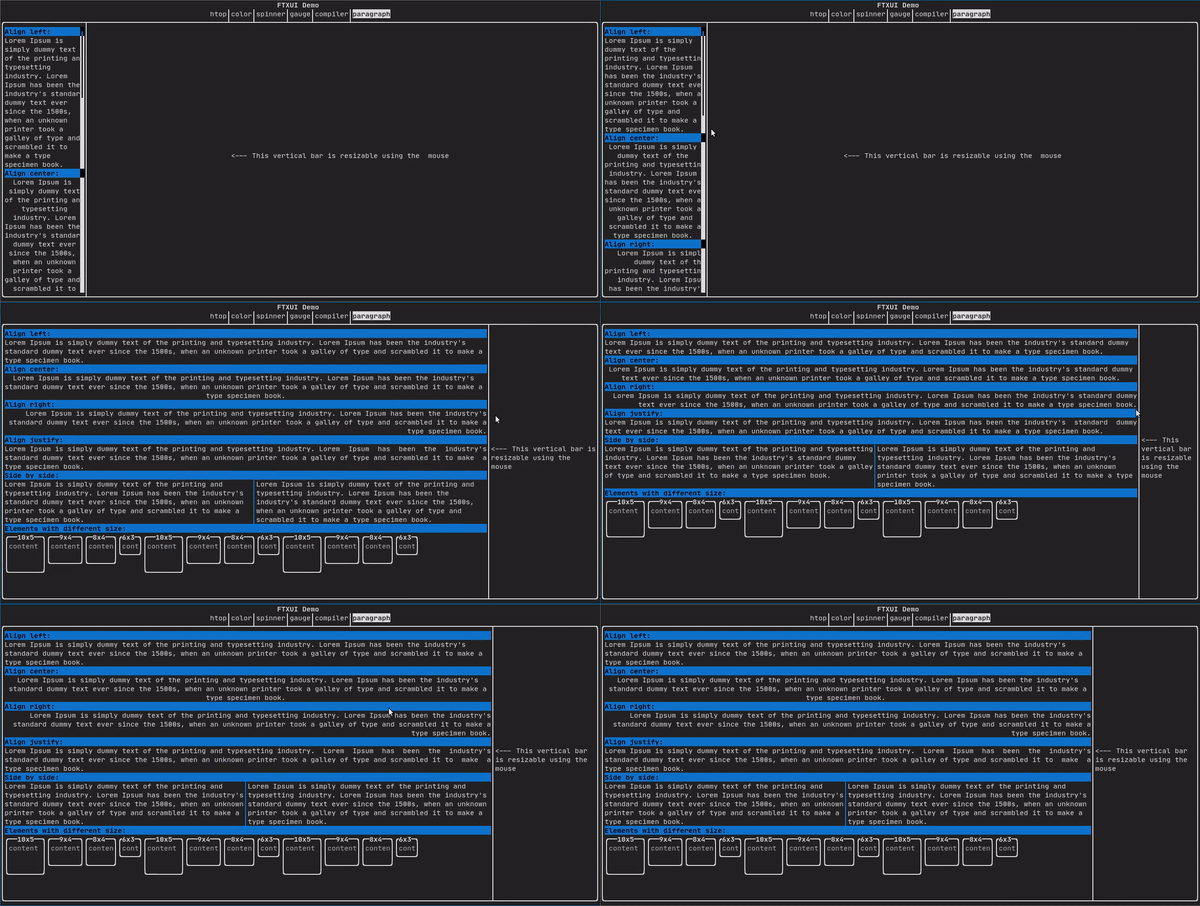
See:
Element paragraph(std::string text);
Element paragraphAlignLeft(std::string text);
Element paragraphAlignRight(std::string text);
Element paragraphAlignCenter(std::string text);
Element paragraphAlignJustify(std::string text);
border
Add a border around an element
border(text("The element"))
┌───────────┐
│The element│
└───────────┘
Same, with the pipe operator:
text("The element") | border
Border come with different styles. See:
A unicode character and its associated style.
window
A ftxui::window is a ftxui::border, but with some text on top of the border. Add a border around an element
window("The window", text("The element"))
┌The window─┐
│The element│
└───────────┘
separator
Display a vertical or horizontal line to visually split the content of a container in two.
border(
hbox({
text("Left"),
separator(),
text("Right")
})
)
┌────┬─────┐
│left│right│
└────┴─────┘
Separators come with different styles: See:
Element separatorCharacter(std::string);
Element separatorHSelector(
float left,
float right,
Element separatorVSelector(
float up,
float down,
A class representing terminal colors.
gauge
A gauge. It can be used to represent a progress bar.
┌────────────────────────────────────────────────────────────────────────────┐
│██████████████████████████████████████ │
└────────────────────────────────────────────────────────────────────────────┘
A gauge can be displayed into several directions. See:
graph
See:
Colors
A terminal console can usually display colored text and colored background.
FTXUI support every color palette:
Color gallery: 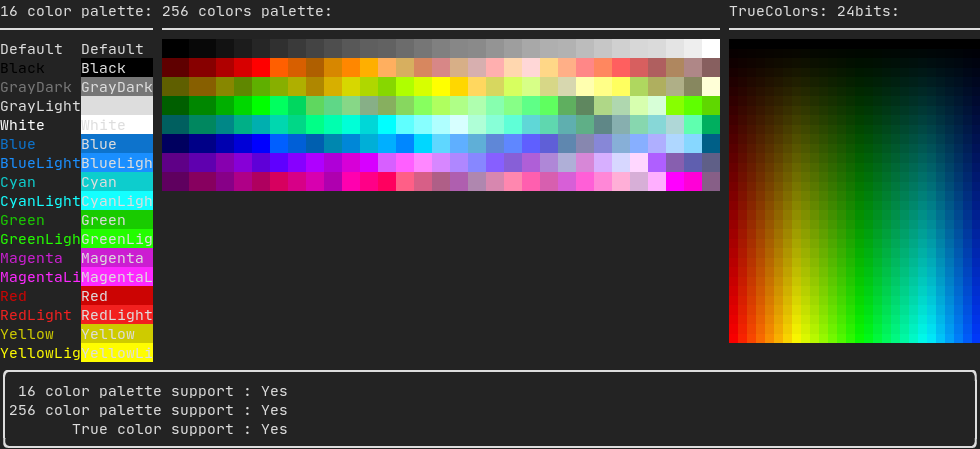
Palette16
On most terminal the following colors are supported:
- Default
- Black
- GrayDark
- GrayLight
- White
- Blue
- BlueLight
- Cyan
- CyanLight
- Green
- GreenLight
- Magenta
- MagentaLight
- Red
- RedLight
- Yellow
- YellowLight
Example:
text("Blue foreground") | color(Color::Blue);
text("Blue background") | bgcolor(Color::Blue);
text("Black on white") | color(Color::Black) | bgcolor(Color::White);
Palette256
On terminal supporting 256 colors.
text("HotPink") | color(Color::HotPink);
TrueColor
On terminal supporting trueColor, you can directly chose the 24bit RGB color:
There are two constructors:
static Color HSV(uint8_t hue, uint8_t saturation, uint8_t value)
Build a Color from its HSV representation. https://en.wikipedia.org/wiki/HSL_and_HSV.
static Color RGB(uint8_t red, uint8_t green, uint8_t blue)
Build a Color from its RGB representation. https://en.wikipedia.org/wiki/RGB_color_model.
Style
A terminal console can usually display colored text and colored background. The text can also have different effects: bold, dim, underlined, inverted, blink.
Example

Example:
underlined(bold(text("This text is bold and underlined")))
Tips: The pipe operator can be used to chain Decorator:
text("This text is bold")) | bold | underlined
Layout
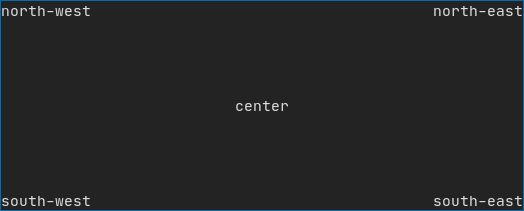
Element can be arranged together:
Example using ftxui::hbox, ftxui::vbox and ftxui::filler.
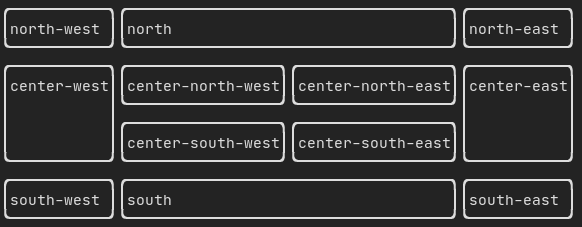
Example using ftxui::gridbox:
Example using flexbox:
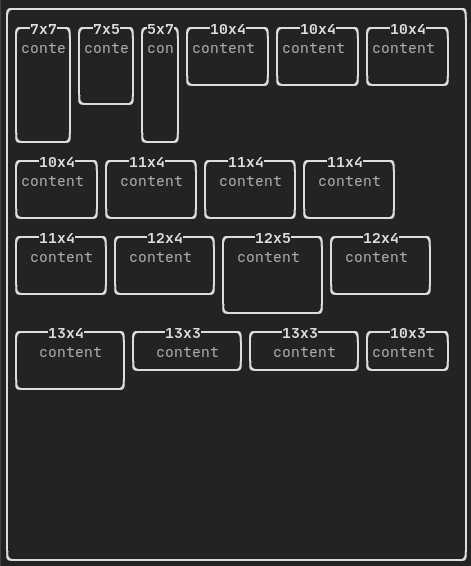
See also this demo.
Element can become flexible using the the ftxui::flex decorator.
Examples
hbox({
text("left") | border ,
text("middle") | border | flex,
text("right") | border,
});
┌────┐┌─────────────────────────────────────────────────────────────────┐┌─────┐
│left││middle ││right│
└────┘└─────────────────────────────────────────────────────────────────┘└─────┘
hbox({
text("left") | border ,
text("middle") | border | flex,
text("right") | border | flex,
});
┌────┐┌───────────────────────────────────┐┌───────────────────────────────────┐
│left││middle ││right │
└────┘└───────────────────────────────────┘└───────────────────────────────────┘
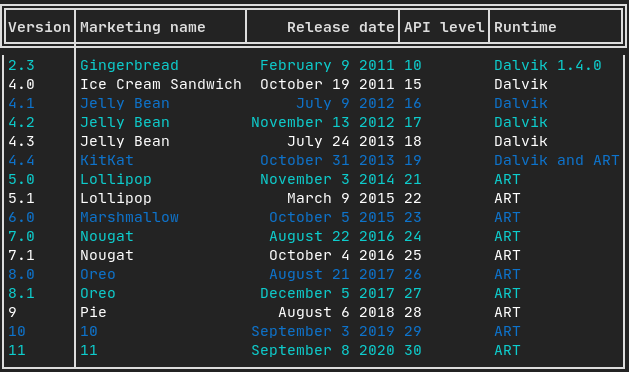
Table
A class to easily style a table of data.
Example:
Canvas
See <ftxui/dom/canvas.hpp>
c.DrawPointLine(10, 10, 80, 10, Color::Red);
auto element = canvas(c);
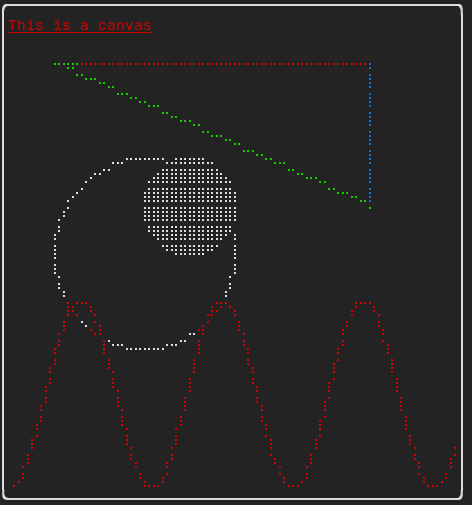
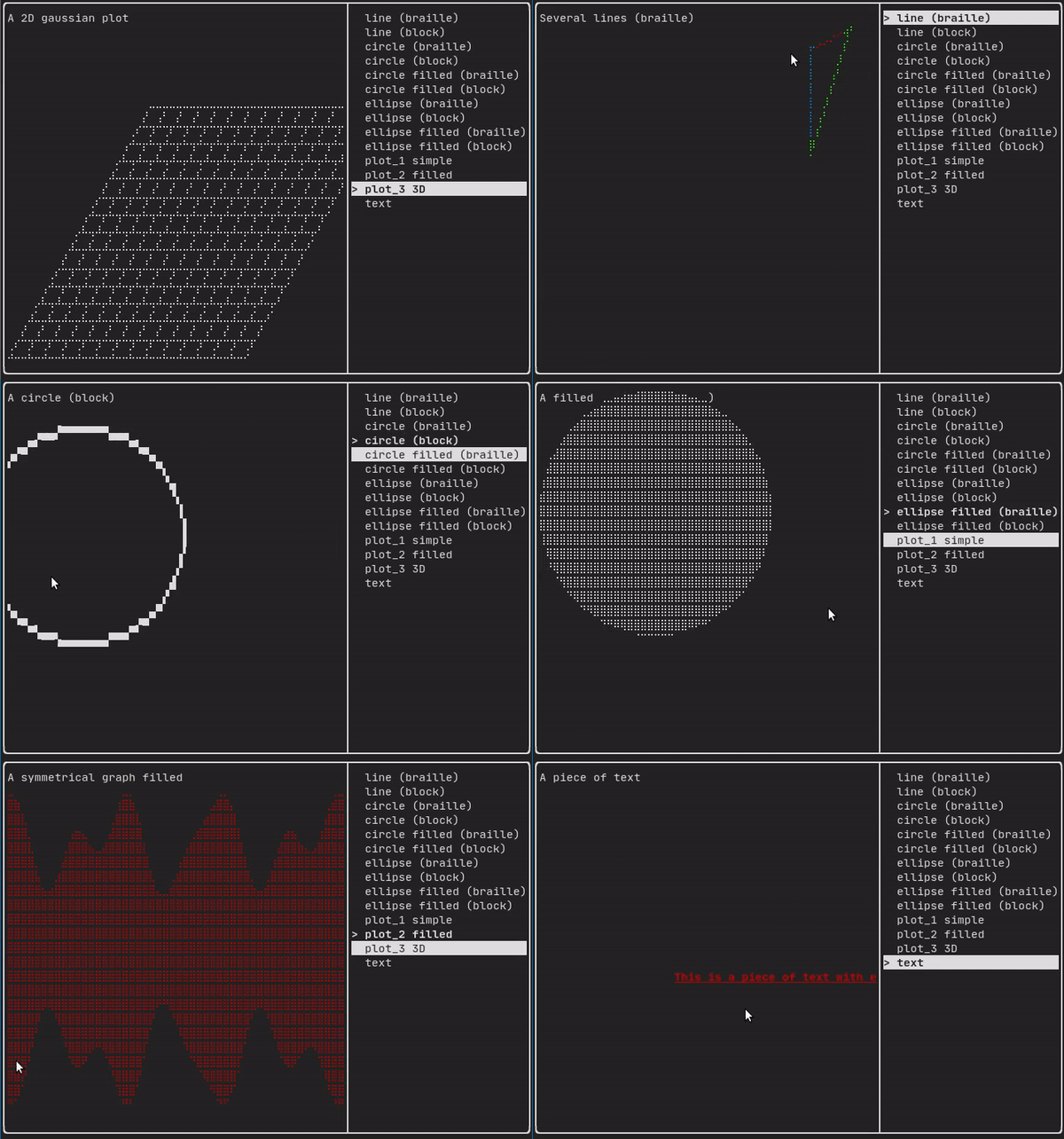
Drawing can be made on a ftxui::Canvas, using braille, block, or simple characters:
Simple example:
Complex examples:
component
The ftxui::componentmodule defines the logic to produce interactive component responding to user's events (keyboard, mouse, etc...)
A ftxui::ScreenInteractive defines a main loop to render a component.
A ftxui::Component is a shared pointer to a ftxui::ComponentBase. The later defines
ftxui::Element are used to render a single frame. On the other side ftxui::Component are used to render dynamic user interface, producing multiple frame, and updating its state on events.
Gallery of multiple components. (demo)
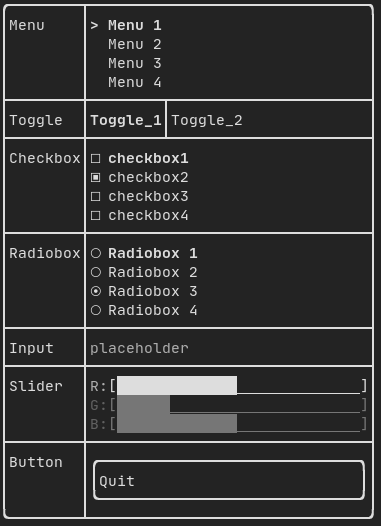
Predefined components are available in "ftxui/dom/component.hpp"
#ifndef FTXUI_COMPONENT_HPP
#define FTXUI_COMPONENT_HPP
#include <functional>
#include <memory>
#include <string>
#include <utility>
#include <vector>
struct ButtonOption;
struct CheckboxOption;
struct Event;
struct InputOption;
struct MenuOption;
struct RadioboxOption;
struct MenuEntryOption;
template <class T, class... Args>
std::shared_ptr<T>
Make(Args&&... args) {
return std::make_shared<T>(std::forward<Args>(args)...);
}
namespace Container {
}
std::function<void()> on_click,
bool* checked,
ConstStringRef placeholder,
Ref<InputOption> option = {});
int* selected_,
int* selected_,
Ref<RadioboxOption> option = {});
template <class T>
Component Slider(ConstStringRef label, T* value, T min, T max, T increment);
Ref<bool> show = false);
}
#endif
Component Horizontal(Components children)
A list of components, drawn one by one horizontally and navigated horizontally using left/right arrow...
Component Vertical(Components children)
A list of components, drawn one by one vertically and navigated vertically using up/down arrow key or...
Component Tab(Components children, int *selector)
A list of components, where only one is drawn and interacted with at a time. The |selector| gives the...
Component Checkbox(ConstStringRef label, bool *checked, Ref< CheckboxOption > option=CheckboxOption::Simple())
Draw checkable element.
Component Radiobox(ConstStringListRef entries, int *selected_, Ref< RadioboxOption > option={})
A list of element, where only one can be selected.
Component Maybe(Component, const bool *show)
Decorate a component |child|. It is shown only when |show| is true. @params child the compoennt to de...
Component ResizableSplitTop(Component main, Component back, int *main_size)
An vertical split in between two components, configurable using the mouse.
std::shared_ptr< T > Make(Args &&... args)
std::function< Element(Element)> ElementDecorator
Component Input(StringRef content, ConstStringRef placeholder, Ref< InputOption > option={})
An input box for editing text.
Component Toggle(ConstStringListRef entries, int *selected)
An horizontal list of elements. The user can navigate through them.
std::vector< Component > Components
Component MenuEntry(ConstStringRef label, Ref< MenuEntryOption >={})
A specific menu entry. They can be put into a Container::Vertical to form a menu.
Component Renderer(Component child, std::function< Element()>)
Return a new Component, similar to |child|, but using |render| as the Component::Render() event.
Component Button(ConstStringRef label, std::function< void()> on_click, Ref< ButtonOption >=ButtonOption::Simple())
Draw a button. Execute a function when clicked.
Component Menu(ConstStringListRef entries, int *selected_, Ref< MenuOption >=MenuOption::Vertical())
A list of text. The focused element is selected.
Component ResizableSplitRight(Component main, Component back, int *main_size)
An horizontal split in between two components, configurable using the mouse.
Component Dropdown(ConstStringListRef entries, int *selected)
Component ResizableSplitBottom(Component main, Component back, int *main_size)
An vertical split in between two components, configurable using the mouse.
Component Slider(ConstStringRef label, T *value, T min, T max, T increment)
An horizontal slider.
Component ResizableSplitLeft(Component main, Component back, int *main_size)
An horizontal split in between two components, configurable using the mouse.
std::function< Component(Component)> ComponentDecorator
std::shared_ptr< ComponentBase > Component
Component Collapsible(ConstStringRef label, Component child, Ref< bool > show=false)
Component CatchEvent(Component child, std::function< bool(Event)>)
static CheckboxOption Simple()
Option for standard Checkbox.
Input
Example:
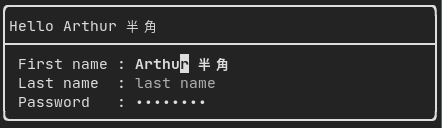
Produced by: ftxui::Input() from "ftxui/component/component.hpp"
Menu
Example:

Produced by: ftxui::Menu() from "ftxui/component/component.hpp"
Toggle
Example:

Produced by: ftxui::Toggle() from "ftxui/component/component.hpp"
CheckBox
Example:
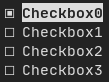
Produced by: ftxui::Checkbox() from "ftxui/component/component.hpp"
RadioBox
Example:
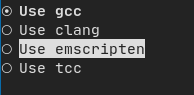
Produced by: ftxui::Radiobox() from "ftxui/component/component.hpp"
Dropdown
Example:

Produced by: ftxui::Dropdown() from "ftxui/component/component.hpp"
Slider
Example:
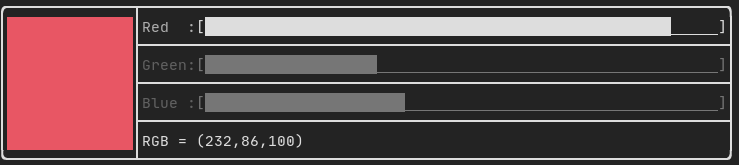
Produced by: ftxui::Slider() from "ftxui/component/component.hpp"
Renderer
Produced by: ftxui::Renderer() from 'ftxui/component/component.hpp'. This component decorate another one by using a different function to render an interface.
Example:
auto inner = [...]
auto renderer = Renderer(inner, [&] {
return inner->Render() | border
});
ftxui::Renderer also support the component decorator pattern:
auto component = [...]
component = component
| Renderer([] (
Element e) {
return e | border))
| Renderer(bold)
As a short hand, you can also compose a component with an element decorator:
auto component = [...]
component = component | border | bold;
CatchEvent
Produced by: ftxui::CatchEvent() from 'ftxui/component/component.hpp'. This component decorate another one and catch the events before the underlying component.
Examples:
auto screen = ScreenInteractive::TerminalOutput();
auto renderer = Renderer([] {
return text("My interface");
});
auto component = CatchEvent(renderer, [&](
Event event) {
if (event == Event::Character('q')) {
screen.ExitLoopClosure()();
return true;
}
return false;
});
screen.Loop(component);
Represent an event. It can be key press event, a terminal resize, or more ...
The ftxui::CatchEvent can also be used as a decorator:
component = component
| CatchEvent(handler_1)
| CatchEvent(handler_2)
| CatchEvent(handler_3)
;
Collapsible
Useful for section whose visibility can be toggle on/off by the user. This is basically, a combinaison of a ftxui::Checkbox and a ftxui::Maybe components.
auto collabsible = Collapsible("Show more", inner_element);
Maybe
Produced by: ftxui::Maybe() from `ftxui/component/component.hpp`. This component decorate another one, by showing/hiding it depending on a boolean or a predicate.
Example with a boolean:
bool show = true;
auto component = Renderer([]{ return "Hello World!"; });
auto maybe_component = Maybe(component, &show)
Example with a predicate:
auto component = Renderer([]{ return "Hello World!"; });
auto maybe_component = Maybe(component, [&] { return time > 10; })
ftxui::Maybe can be used as a decorator.
component = component
| Maybe(&a_boolean)
| Maybe([&] { return time > 10; })
;
Container
Horizontal
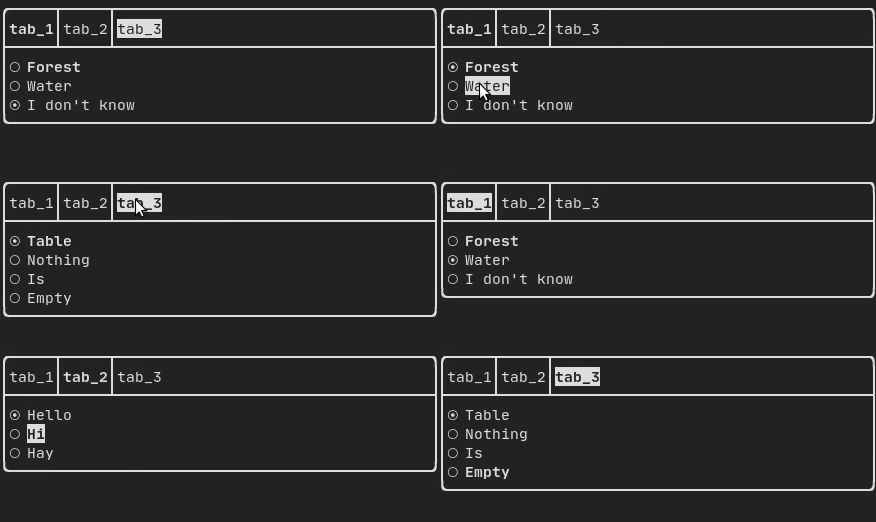
Produced by: ftxui::Container::Horizontal() from "ftxui/component/component.hpp". It displays a list of components horizontally and handle keyboard/mouse navigation.
Vertical
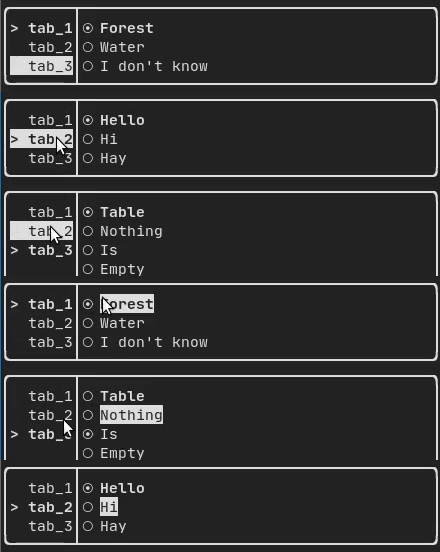
Produced by: ftxui::Container::Vertical() from "ftxui/component/component.hpp". It displays a list of components vertically and handles keyboard/mouse navigation.
Tab
Produced by: ftxui::Container::Tab() from "ftxui/component/component.hpp". It take a list of component and display only one of them. This is useful for implementing a tab bar.
Vertical:
Horizontal:
ResizableSplit::{Left, Right, Top, Bottom}
Example:
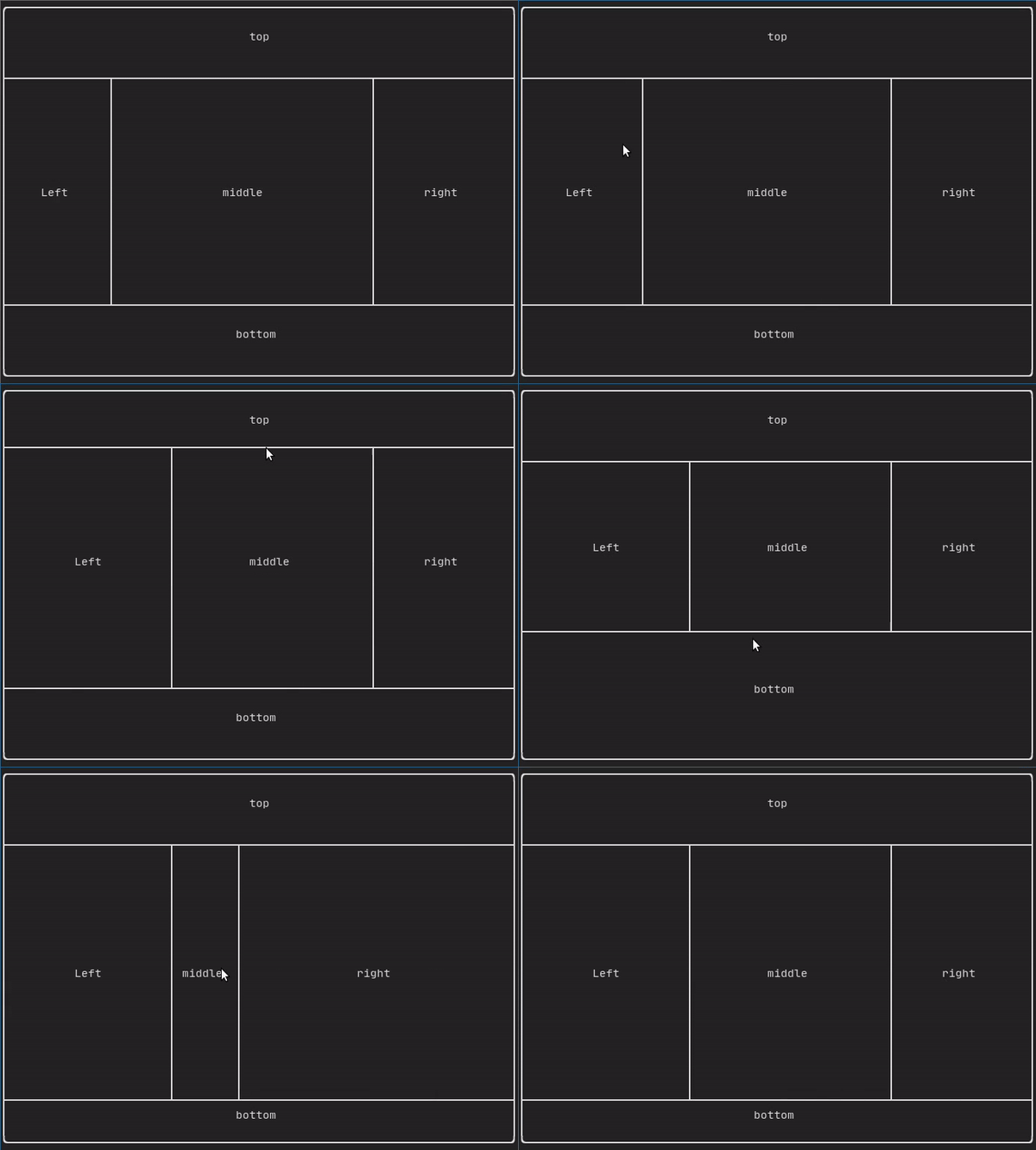
Produced by:
It defines an horizontal or vertical separation in between two children component. The position of the split is variable and controllable using the mouse.
Force a frame redraw.
Whenever a new group of events have been processed: keyboard, mouse, window resize, etc..., the ftxui::ScreenInteractive::Loop() is responsible for drawing a new frame.
You might want to react to arbitrary events that are unknown to FTXUI. This can be achieve by posting events via ftxui::ScreenInteractive::PostEvent, via a thread. You can post the eventftxui::Event::Custom.
screen->PostEvent(Event::Custom);
ftxui::ScreenInteractive::PostEvent is thread safe.