Detailed Description
ftxui/component` モジュールの チュートリアル をご確認ください。
Classes | |
| class | ComponentBase |
| ftxui::Elementとして自身のレンダリングを実装します。ftxui::Eventに応答してキーボードナビゲーションを実装します。 More... | |
| struct | UnderlineOption |
| 下線効果のオプション。 More... | |
| struct | AnimatedColorOption |
| アニメーション化された可能性のある色に関するオプション。 More... | |
| struct | MenuEntryOption |
| MenuEntryコンポーネントのオプション。 More... | |
| struct | MenuOption |
| Menuコンポーネントのオプション。 More... | |
| struct | ButtonOption |
| AnimatedButtonコンポーネントのオプション。 More... | |
| struct | CheckboxOption |
| Checkboxコンポーネントのオプション。 More... | |
| struct | InputOption |
| Inputコンポーネントのオプション。 More... | |
| struct | RadioboxOption |
| Radioboxコンポーネントのオプション。 More... | |
| struct | WindowRenderState |
Windowコンポーネントのレンダー関数に渡される状態。 More... | |
| struct | DropdownOption |
| ドロップダウンコンポーネントのオプション。ドロップダウンメニューは、ラジオボックスを開閉するチェックボックスです。 More... | |
| struct | Event |
| イベントを表します。キープレスイベント、ターミナルのリサイズなど、さまざまなイベントがあります。 More... | |
| class | Loop |
| Loopは、コンポーネントのイベントループを管理するクラスです。 More... | |
| struct | Mouse |
| マウスイベント。マウスの座標、押されたボタン、 および修飾子(shift, ctrl, meta)が含まれます。 More... | |
| class | ScreenInteractive |
ScreenInteractive はイベントを処理し、メインループを実行し、コンポーネントを管理できる Screen です。 More... | |
Functions | |
| void | RequestAnimationFrame () |
| RequestAnimationFrameは、次のアニメーションサイクルで新しいフレームが描画されるよう要求する関数です。 | |
| Component | Button (ButtonOption option) |
| Draw a button. Execute a function when clicked. (ja: ボタンを描画します。クリックされたときに機能を実行します。) | |
| Component | Button (ConstStringRef label, std::function< void()> on_click, ButtonOption option) |
| Draw a button. Execute a function when clicked. (ja: ボタンを描画します。クリックされたときに機能を実行します。) | |
| Component | CatchEvent (Component child, std::function< bool(Event event)> on_event) |
| イベントをキャッチするために|on_event|を使用するコンポーネントを返します。この関数は、イベントが処理された場合はtrueを返し、それ以外の場合はfalseを返す必要があります。 | |
| ComponentDecorator | CatchEvent (std::function< bool(Event)> on_event) |
| イベントをキャッチするために|on_event|を使用してコンポーネントを装飾します。この関数は、イベントが処理された場合はtrueを返し、それ以外の場合はfalseを返す必要があります。 | |
| Component | Checkbox (CheckboxOption option) |
| チェック可能な要素を描画します。 | |
| Component | Checkbox (ConstStringRef label, bool *checked, CheckboxOption option) |
| チェック可能な要素を描画します。 | |
| Component | Vertical (Components children) |
| コンポーネントのリスト。垂直方向に1つずつ描画され、上下の矢印キーまたは'j'/'k'キーを使用して垂直方向にナビゲートされます。 | |
| Component | Vertical (Components children, int *selector) |
| コンポーネントのリスト。垂直方向に1つずつ描画され、上下の矢印キーまたは'j'/'k'キーを使用して垂直方向にナビゲートされます。 これは例えばMenuを実装するのに便利です。 | |
| Component | Horizontal (Components children) |
| コンポーネントのリスト。水平方向に1つずつ描画され、左右の矢印キーまたは'h'/'l'キーを使用して水平方向にナビゲートされます。 | |
| Component | Horizontal (Components children, int *selector) |
| コンポーネントのリスト。水平方向に1つずつ描画され、左右の矢印キーまたは'h'/'l'キーを使用して水平方向にナビゲートされます。 | |
| Component | Tab (Components children, int *selector) |
| コンポーネントのリスト。一度に1つだけ描画され、操作されます。|selector|は選択されたコンポーネントのインデックスを提供します。これはタブを実装するのに便利です。 | |
| Component | Stacked (Components children) |
| 互いの上にスタックされるコンポーネントのリスト。 イベントは、最初のコンポーネントに伝播され、処理されない場合は2番目のコンポーネントに伝播されます。 コンポーネントは与えられた順序とは逆の順序で描画されます。 コンポーネントがフォーカスを取得すると、他の要素の相対的な順序を変更せずに前面に配置されます。 | |
| Component | Dropdown (ConstStringListRef entries, int *selected) |
| ドロップダウンメニュー。 | |
| Component | Dropdown (DropdownOption option) |
| ドロップダウンメニュー。 | |
| Component | Hoverable (Component component, bool *hover) |
| コンポーネントをラップします。マウスでホバーされているかどうかを知る機能を提供します。 | |
| Component | Hoverable (Component component, std::function< void()> on_enter, std::function< void()> on_leave) |
| コンポーネントをラップします。コールバックを使用します。 | |
| ComponentDecorator | Hoverable (bool *hover) |
| コンポーネントをラップします。マウスでホバーされているかどうかを知る機能を提供します。 | |
| ComponentDecorator | Hoverable (std::function< void()> on_enter, std::function< void()> on_leave) |
| コンポーネントをラップします。マウスでホバーされているかどうかを知る機能を提供します。 | |
| Component | Hoverable (Component component, std::function< void(bool)> on_change) |
| コンポーネントをラップします。マウスでホバーされているかどうかを知る機能を提供します。 | |
| ComponentDecorator | Hoverable (std::function< void(bool)> on_change) |
| コンポーネントをラップします。マウスでホバーされているかどうかを知る機能を提供します。 | |
| Component | Maybe (Component child, std::function< bool()> show) |
| コンポーネント|child|を装飾します。|show|がtrueを返す場合にのみ表示されます。 | |
| ComponentDecorator | Maybe (std::function< bool()> show) |
| コンポーネントを装飾します。|show|関数がtrueを返す場合にのみ表示されます。 | |
| Component | Maybe (Component child, const bool *show) |
| コンポーネント|child|を装飾します。|show|がtrueの場合にのみ表示されます。 | |
| ComponentDecorator | Maybe (const bool *show) |
| コンポーネントを装飾します。|show|がtrueの場合にのみ表示されます。 | |
| Component | Menu (MenuOption option) |
| テキストのリスト。フォーカスされた要素が選択されます。 | |
| Component | Menu (ConstStringListRef entries, int *selected, MenuOption option) |
| テキストのリスト。フォーカスされた要素が選択されます。 | |
| Component | Toggle (ConstStringListRef entries, int *selected) |
| 要素の水平リスト。ユーザーはこれらを操作できます。 | |
| Component | MenuEntry (ConstStringRef label, MenuEntryOption option) |
| 特定のメニューエントリ。これらはContainer::Verticalに入れてメニューを形成できます。 | |
| Component | MenuEntry (MenuEntryOption option) |
| 特定のメニューエントリ。これらはContainer::Verticalに入れてメニューを形成できます。 | |
| Component | Modal (Component main, Component modal, const bool *show_modal) |
| ComponentDecorator | Modal (Component modal, const bool *show_modal) |
| Component | Radiobox (RadioboxOption option) |
| 1つだけ選択できる要素のリスト。 | |
| Component | Radiobox (ConstStringListRef entries, int *selected, RadioboxOption option) |
| 1つだけ選択できる要素のリスト。 | |
| Component | Renderer (std::function< Element()> render) |
| インターフェースを描画するために|render|を使用するコンポーネントを返します。 | |
| Component | Renderer (Component child, std::function< Element()> render) |
| |child|に似ていますが、|render|をComponentRender()イベントとして使用する新しいコンポーネントを返します。 | |
| Component | Renderer (std::function< Element(bool)> render) |
| インターフェースを描画するために|render|を使用するフォーカス可能なコンポーネントを返します。 | |
| ComponentDecorator | Renderer (ElementDecorator decorator) |
| コンポーネントがレンダリングするものを装飾することによって、コンポーネントを装飾します。 | |
| Component | ResizableSplitLeft (Component main, Component back, int *main_size) |
| 2つのコンポーネント間の水平分割。マウスで設定可能。 | |
| Component | ResizableSplitRight (Component main, Component back, int *main_size) |
| 2つのコンポーネント間の水平分割。マウスで設定可能。 | |
| Component | ResizableSplitTop (Component main, Component back, int *main_size) |
| 2つのコンポーネント間の垂直分割。マウスで設定可能。 | |
| Component | ResizableSplitBottom (Component main, Component back, int *main_size) |
| 2つのコンポーネント間の垂直分割。マウスで設定可能。 | |
| Component | Slider (ConstStringRef label, Ref< int > value, ConstRef< int > min, ConstRef< int > max, ConstRef< int > increment) |
| 水平スライダー。 | |
| Component | Window (WindowOptions option) |
| ドラッグ可能/サイズ変更可能なウィンドウ。複数のウィンドウを使用するには、それらを Container::Stacked({...})コンポーネントを使用してスタックする必要があります。 | |
Class Documentation
◆ ftxui::ComponentBase
| class ftxui::ComponentBase |
ftxui::Elementとして自身のレンダリングを実装します。ftxui::Eventに応答してキーボードナビゲーションを実装します。
Definition at line 28 of file component_base.hpp.
Public Member Functions | |
| ComponentBase (Components children) | |
| virtual | ~ComponentBase () |
| ComponentBase ()=default | |
| ComponentBase (const ComponentBase &)=delete | |
| ComponentBase (ComponentBase &&)=delete | |
| ComponentBase & | operator= (const ComponentBase &)=delete |
| ComponentBase & | operator= (ComponentBase &&)=delete |
| ComponentBase * | Parent () const |
| 親のComponentBaseを返します。存在しない場合はnullを返します。 | |
| Component & | ChildAt (size_t i) |
インデックスiの子にアクセスします。 | |
| size_t | ChildCount () const |
| 子の数を返します。 | |
| int | Index () const |
| 親におけるコンポーネントのインデックスを返します。親がない場合は-1を返します。 | |
| void | Add (Component children) |
| 子を追加します。 @param child 添付する子。 | |
| void | Detach () |
| この子を親からデタッチします。 | |
| void | DetachAllChildren () |
| すべての子を削除します。 | |
| Element | Render () |
| コンポーネントを描画します。 このftxui::ComponentBaseを表すftxui::Screen上に描画されるftxui::Elementを構築します。レンダリングを変更するにはOnRender()をオーバーライドしてください。 | |
| virtual Element | OnRender () |
| コンポーネントを描画します。 このftxui::ComponentBaseを表すftxui::Screen上に描画されるftxui::Elementを構築します。この関数はオーバーライドされることを意図しています。 | |
| virtual bool | OnEvent (Event) |
| イベントに応じて呼び出されます。 | |
| virtual void | OnAnimation (animation::Params ¶ms) |
| アニメーションイベントに応じて呼び出されます。 | |
| virtual Component | ActiveChild () |
| 現在アクティブな子を返します。 | |
| virtual bool | Focusable () const |
| コンポーネントがフォーカス可能な要素を含んでいる場合にtrueを返します。 フォーカス不可能なコンポーネントは、キーボードでナビゲートする際にスキップされます。 | |
| bool | Active () const |
| 要素が現在親のアクティブな子であるかどうかを返します。 | |
| bool | Focused () const |
| 要素がユーザーによってフォーカスされているかどうかを返します。 ComponentBaseがユーザーによってフォーカスされている場合にtrueを返します。要素は、そのすべての子孫が親のActiveChild()であり、かつFocusable()である場合にフォーカスされます。 | |
| virtual void | SetActiveChild (ComponentBase *child) |
| void | SetActiveChild (Component child) |
| |child|を「アクティブ」にします。 | |
| void | TakeFocus () |
| このコンポーネントにフォーカスを与えるように、すべての祖先を設定します。 | |
Protected Member Functions | |
| CapturedMouse | CaptureMouse (const Event &event) |
| 利用可能であればCapturedMouseを取得します。コンポーネントは1つしかありません。これは他のコンポーネントよりも優先されるコンポーネントを表します。 | |
Protected Attributes | |
| Components | children_ |
Constructor & Destructor Documentation
◆ ComponentBase() [1/4]
|
inlineexplicit |
Definition at line 30 of file component_base.hpp.
◆ ~ComponentBase()
|
virtual |
Definition at line 30 of file component.cpp.
◆ ComponentBase() [2/4]
|
default |
◆ ComponentBase() [3/4]
|
delete |
◆ ComponentBase() [4/4]
|
delete |
Member Function Documentation
◆ operator=() [1/2]
|
delete |
◆ operator=() [2/2]
|
delete |
◆ Parent()
| ComponentBase * Parent | ( | ) | const |
親のComponentBaseを返します。存在しない場合はnullを返します。
Definition at line 37 of file component.cpp.
◆ ChildAt()
| Component & ChildAt | ( | size_t | i | ) |
インデックスiの子にアクセスします。
Definition at line 42 of file component.cpp.
◆ ChildCount()
| size_t ChildCount | ( | ) | const |
子の数を返します。
Definition at line 48 of file component.cpp.
◆ Index()
| int Index | ( | ) | const |
親におけるコンポーネントのインデックスを返します。親がない場合は-1を返します。
Definition at line 53 of file component.cpp.
◆ Add()
| void Add | ( | Component | children | ) |
子を追加します。 @param child 添付する子。
Definition at line 69 of file component.cpp.
◆ Detach()
| void Detach | ( | ) |
◆ DetachAllChildren()
| void DetachAllChildren | ( | ) |
すべての子を削除します。
Definition at line 93 of file component.cpp.
◆ Render()
| Element Render | ( | ) |
コンポーネントを描画します。 このftxui::ComponentBaseを表すftxui::Screen上に描画されるftxui::Elementを構築します。レンダリングを変更するにはOnRender()をオーバーライドしてください。
Definition at line 101 of file component.cpp.
◆ OnRender()
|
virtual |
コンポーネントを描画します。 このftxui::ComponentBaseを表すftxui::Screen上に描画されるftxui::Elementを構築します。この関数はオーバーライドされることを意図しています。
Definition at line 135 of file component.cpp.
◆ OnEvent()
|
virtual |
イベントに応じて呼び出されます。
- Parameters
-
event イベント。
- Returns
- イベントが処理された場合はtrue。 デフォルトの実装では、いずれかの子がtrueを返すまで、すべての子でOnEventを呼び出します。どれもtrueを返さない場合は、falseを返します。
Definition at line 147 of file component.cpp.
◆ OnAnimation()
|
virtual |
アニメーションイベントに応じて呼び出されます。
- Parameters
-
params アニメーションのパラメータ デフォルトの実装では、イベントをすべての子にディスパッチします。
Definition at line 159 of file component.cpp.
◆ ActiveChild()
|
virtual |
◆ Focusable()
|
virtual |
コンポーネントがフォーカス可能な要素を含んでいる場合にtrueを返します。 フォーカス不可能なコンポーネントは、キーボードでナビゲートする際にスキップされます。
Definition at line 178 of file component.cpp.
◆ Active()
| bool Active | ( | ) | const |
要素が現在親のアクティブな子であるかどうかを返します。
Definition at line 188 of file component.cpp.
◆ Focused()
| bool Focused | ( | ) | const |
要素がユーザーによってフォーカスされているかどうかを返します。 ComponentBaseがユーザーによってフォーカスされている場合にtrueを返します。要素は、そのすべての子孫が親のActiveChild()であり、かつFocusable()である場合にフォーカスされます。
Definition at line 194 of file component.cpp.
◆ SetActiveChild() [1/2]
|
virtual |
◆ SetActiveChild() [2/2]
| void SetActiveChild | ( | Component | child | ) |
|child|を「アクティブ」にします。
- Parameters
-
child アクティブにする子。
|child|を「アクティブ」にします。
- Parameters
-
child アクティブにする子。
Definition at line 207 of file component.cpp.
◆ TakeFocus()
| void TakeFocus | ( | ) |
このコンポーネントにフォーカスを与えるように、すべての祖先を設定します。
Definition at line 212 of file component.cpp.
◆ CaptureMouse()
|
protected |
利用可能であればCapturedMouseを取得します。コンポーネントは1つしかありません。これは他のコンポーネントよりも優先されるコンポーネントを表します。
- Parameters
-
event イベント
Definition at line 222 of file component.cpp.
Member Data Documentation
◆ children_
|
protected |
Definition at line 92 of file component_base.hpp.
◆ ftxui::UnderlineOption
| struct ftxui::UnderlineOption |
下線効果のオプション。
Definition at line 33 of file component_options.hpp.
Public Member Functions | |
| void | SetAnimation (animation::Duration d, animation::easing::Function f) |
| 下線のアニメーション方法を設定します。 | |
| void | SetAnimationDuration (animation::Duration d) |
| 下線のアニメーション方法を設定します。 | |
| void | SetAnimationFunction (animation::easing::Function f) |
| 下線のアニメーション方法を設定します。 | |
| void | SetAnimationFunction (animation::easing::Function f_leader, animation::easing::Function f_follower) |
| 下線のアニメーション方法を設定します。 これは、リーダーとフォロワーのアニメーションを非同期にするのに役立ちます。 | |
Public Attributes | |
| bool | enabled = false |
| Color | color_active = Color::White |
| Color | color_inactive = Color::GrayDark |
| animation::easing::Function | leader_function |
| animation::easing::Function | follower_function |
| animation::Duration | leader_duration = std::chrono::milliseconds(250) |
| animation::Duration | leader_delay = std::chrono::milliseconds(0) |
| animation::Duration | follower_duration = std::chrono::milliseconds(250) |
| animation::Duration | follower_delay = std::chrono::milliseconds(0) |
Member Function Documentation
◆ SetAnimation()
| void SetAnimation | ( | animation::Duration | d, |
| animation::easing::Function | f ) |
下線のアニメーション方法を設定します。
- Parameters
-
d アニメーションの期間。 f アニメーションのイージング関数。
Definition at line 34 of file component_options.cpp.
◆ SetAnimationDuration()
| void SetAnimationDuration | ( | animation::Duration | d | ) |
◆ SetAnimationFunction() [1/2]
| void SetAnimationFunction | ( | animation::easing::Function | f | ) |
下線のアニメーション方法を設定します。
- Parameters
-
f アニメーションのイージング関数。
Definition at line 49 of file component_options.cpp.
◆ SetAnimationFunction() [2/2]
| void SetAnimationFunction | ( | animation::easing::Function | f_leader, |
| animation::easing::Function | f_follower ) |
下線のアニメーション方法を設定します。 これは、リーダーとフォロワーのアニメーションを非同期にするのに役立ちます。
- Parameters
-
f_leader リーダーのアニメーション期間。 f_follower フォロワーのアニメーション期間。
Definition at line 58 of file component_options.cpp.
Member Data Documentation
◆ enabled
| bool enabled = false |
Definition at line 34 of file component_options.hpp.
◆ color_active
| Color color_active = Color::White |
Definition at line 36 of file component_options.hpp.
◆ color_inactive
| Color color_inactive = Color::GrayDark |
Definition at line 37 of file component_options.hpp.
◆ leader_function
| animation::easing::Function leader_function |
Definition at line 39 of file component_options.hpp.
◆ follower_function
| animation::easing::Function follower_function |
Definition at line 41 of file component_options.hpp.
◆ leader_duration
| animation::Duration leader_duration = std::chrono::milliseconds(250) |
Definition at line 44 of file component_options.hpp.
◆ leader_delay
| animation::Duration leader_delay = std::chrono::milliseconds(0) |
Definition at line 45 of file component_options.hpp.
◆ follower_duration
| animation::Duration follower_duration = std::chrono::milliseconds(250) |
Definition at line 46 of file component_options.hpp.
◆ follower_delay
| animation::Duration follower_delay = std::chrono::milliseconds(0) |
Definition at line 47 of file component_options.hpp.
◆ ftxui::AnimatedColorOption
| struct ftxui::AnimatedColorOption |
アニメーション化された可能性のある色に関するオプション。
Definition at line 58 of file component_options.hpp.
Public Member Functions | |
| void | Set (Color inactive, Color active, animation::Duration duration=std::chrono::milliseconds(250), animation::easing::Function function=animation::easing::QuadraticInOut) |
| アニメーション可能なカラーオプション。 @params _inactive コンポーネントが非アクティブな時の色。 @params _active コンポーネントがアクティブな時の色。 @params _duration アニメーションの期間。 @params _function アニメーションのイージング関数。 | |
Public Attributes | |
| bool | enabled = false |
| Color | inactive |
| Color | active |
| animation::Duration | duration = std::chrono::milliseconds(250) |
| animation::easing::Function | function = animation::easing::QuadraticInOut |
Member Function Documentation
◆ Set()
| void Set | ( | Color | inactive, |
| Color | active, | ||
| animation::Duration | duration = std::chrono::milliseconds(250), | ||
| animation::easing::Function | function = animation::easing::QuadraticInOut ) |
アニメーション可能なカラーオプション。 @params _inactive コンポーネントが非アクティブな時の色。 @params _active コンポーネントがアクティブな時の色。 @params _duration アニメーションの期間。 @params _function アニメーションのイージング関数。
Definition at line 20 of file component_options.cpp.
Member Data Documentation
◆ enabled
| bool enabled = false |
Definition at line 65 of file component_options.hpp.
◆ inactive
| Color inactive |
Definition at line 66 of file component_options.hpp.
◆ active
| Color active |
Definition at line 67 of file component_options.hpp.
◆ duration
| animation::Duration duration = std::chrono::milliseconds(250) |
Definition at line 68 of file component_options.hpp.
◆ function
| animation::easing::Function function = animation::easing::QuadraticInOut |
Definition at line 69 of file component_options.hpp.
◆ ftxui::MenuEntryOption
| struct ftxui::MenuEntryOption |
MenuEntryコンポーネントのオプション。
Definition at line 79 of file component_options.hpp.
Public Attributes | |
| ConstStringRef | label = "MenuEntry" |
| std::function< Element(const EntryState &state)> | transform |
| AnimatedColorsOption | animated_colors |
Member Data Documentation
◆ label
| ConstStringRef label = "MenuEntry" |
Definition at line 80 of file component_options.hpp.
◆ transform
| std::function<Element(const EntryState& state)> transform |
- Examples
- examples/component/menu_entries.cpp.
Definition at line 81 of file component_options.hpp.
◆ animated_colors
| AnimatedColorsOption animated_colors |
Definition at line 82 of file component_options.hpp.
◆ ftxui::MenuOption
| struct ftxui::MenuOption |
Menuコンポーネントのオプション。
- Examples
- examples/component/menu.cpp, and examples/component/menu2.cpp.
Definition at line 87 of file component_options.hpp.
Static Public Member Functions | |
| static MenuOption | Horizontal () |
| 水平メニューの標準オプション。 これはタブバーの実装に役立ちます。 | |
| static MenuOption | HorizontalAnimated () |
| アニメーション付き水平メニューの標準オプション。 これはタブバーの実装に役立ちます。 | |
| static MenuOption | Vertical () |
| 垂直メニューの標準オプション。 これは選択可能なアイテムのリストを実装するのに役立ちます。 | |
| static MenuOption | VerticalAnimated () |
| アニメーション付き垂直メニューの標準オプション。 これは選択可能なアイテムのリストを実装するのに役立ちます。 | |
| static MenuOption | Toggle () |
| セパレータ付き水平メニューの標準オプション。 これはタブバーの実装に役立ちます。 | |
Public Attributes | |
| ConstStringListRef | entries |
| Ref< int > | selected = 0 |
| UnderlineOption | underline |
| MenuEntryOption | entries_option |
| Direction | direction = Direction::Down |
| std::function< Element()> | elements_prefix |
| std::function< Element()> | elements_infix |
| std::function< Element()> | elements_postfix |
| std::function< void()> | on_change |
| std::function< void()> | on_enter |
| Ref< int > | focused_entry = 0 |
Member Function Documentation
◆ Horizontal()
|
static |
水平メニューの標準オプション。 これはタブバーの実装に役立ちます。
Definition at line 68 of file component_options.cpp.
◆ HorizontalAnimated()
|
static |
アニメーション付き水平メニューの標準オプション。 これはタブバーの実装に役立ちます。
Definition at line 92 of file component_options.cpp.
◆ Vertical()
|
static |
垂直メニューの標準オプション。 これは選択可能なアイテムのリストを実装するのに役立ちます。
Definition at line 101 of file component_options.cpp.
◆ VerticalAnimated()
|
static |
アニメーション付き垂直メニューの標準オプション。 これは選択可能なアイテムのリストを実装するのに役立ちます。
Definition at line 122 of file component_options.cpp.
◆ Toggle()
|
static |
セパレータ付き水平メニューの標準オプション。 これはタブバーの実装に役立ちます。
Definition at line 144 of file component_options.cpp.
Member Data Documentation
◆ entries
| ConstStringListRef entries |
Definition at line 95 of file component_options.hpp.
◆ selected
| Ref<int> selected = 0 |
エントリのリスト。
Definition at line 96 of file component_options.hpp.
◆ underline
| UnderlineOption underline |
選択されたエントリのインデックス。
Definition at line 99 of file component_options.hpp.
◆ entries_option
| MenuEntryOption entries_option |
Definition at line 100 of file component_options.hpp.
◆ direction
| Direction direction = Direction::Down |
Definition at line 101 of file component_options.hpp.
◆ elements_prefix
| std::function<Element()> elements_prefix |
Definition at line 102 of file component_options.hpp.
◆ elements_infix
| std::function<Element()> elements_infix |
Definition at line 103 of file component_options.hpp.
◆ elements_postfix
| std::function<Element()> elements_postfix |
Definition at line 104 of file component_options.hpp.
◆ on_change
| std::function<void()> on_change |
Definition at line 107 of file component_options.hpp.
◆ on_enter
| std::function<void()> on_enter |
選択されたエントリが変更されたときに呼び出されます。
- Examples
- examples/component/menu.cpp.
Definition at line 108 of file component_options.hpp.
◆ focused_entry
| Ref<int> focused_entry = 0 |
ユーザーがEnterを押したときに呼び出されます。
Definition at line 109 of file component_options.hpp.
◆ ftxui::ButtonOption
| struct ftxui::ButtonOption |
AnimatedButtonコンポーネントのオプション。
- Examples
- examples/component/button.cpp.
Definition at line 114 of file component_options.hpp.
Static Public Member Functions | |
| static ButtonOption | Ascii () |
| []文字を使用して強調表示されるButtonOptionを作成します。 | |
| static ButtonOption | Simple () |
| フォーカス時に反転するButtonOptionを作成します。 | |
| static ButtonOption | Border () |
| ButtonOptionを作成します。ボタンはボーダーを使用して表示され、 フォーカス時に反転します。これが現在のデフォルトです。 | |
| static ButtonOption | Animated () |
| アニメーションカラーを使用するButtonOptionを作成します。 | |
| static ButtonOption | Animated (Color color) |
| アニメーションカラーを使用するButtonOptionを作成します。 | |
| static ButtonOption | Animated (Color background, Color foreground) |
| アニメーションカラーを使用するButtonOptionを作成します。 | |
| static ButtonOption | Animated (Color background, Color foreground, Color background_active, Color foreground_active) |
| アニメーションカラーを使用するButtonOptionを作成します。 | |
Public Attributes | |
| ConstStringRef | label = "Button" |
| std::function< void()> | on_click = [] {} |
| std::function< Element(const EntryState &)> | transform |
| AnimatedColorsOption | animated_colors |
Member Function Documentation
◆ Ascii()
|
static |
[]文字を使用して強調表示されるButtonOptionを作成します。
Definition at line 152 of file component_options.cpp.
◆ Simple()
|
static |
フォーカス時に反転するButtonOptionを作成します。
Definition at line 164 of file component_options.cpp.
◆ Border()
|
static |
ButtonOptionを作成します。ボタンはボーダーを使用して表示され、 フォーカス時に反転します。これが現在のデフォルトです。
Definition at line 178 of file component_options.cpp.
◆ Animated() [1/4]
|
static |
アニメーションカラーを使用するButtonOptionを作成します。
Definition at line 195 of file component_options.cpp.
◆ Animated() [2/4]
|
static |
アニメーションカラーを使用するButtonOptionを作成します。
Definition at line 202 of file component_options.cpp.
◆ Animated() [3/4]
|
static |
アニメーションカラーを使用するButtonOptionを作成します。
Definition at line 212 of file component_options.cpp.
◆ Animated() [4/4]
|
static |
アニメーションカラーを使用するButtonOptionを作成します。
Definition at line 224 of file component_options.cpp.
Member Data Documentation
◆ label
| ConstStringRef label = "Button" |
Definition at line 127 of file component_options.hpp.
◆ on_click
| std::function<void()> on_click = [] {} |
Definition at line 128 of file component_options.hpp.
◆ transform
| std::function<Element(const EntryState&)> transform |
Definition at line 131 of file component_options.hpp.
◆ animated_colors
| AnimatedColorsOption animated_colors |
Definition at line 132 of file component_options.hpp.
◆ ftxui::CheckboxOption
| struct ftxui::CheckboxOption |
Checkboxコンポーネントのオプション。
Definition at line 137 of file component_options.hpp.
Static Public Member Functions | |
| static CheckboxOption | Simple () |
| 標準チェックボックスのオプション。 | |
Public Attributes | |
| ConstStringRef | label = "Checkbox" |
| Ref< bool > | checked = false |
| std::function< Element(const EntryState &)> | transform |
| std::function< void()> | on_change = [] {} |
| ユーザーが状態を変更したときに呼び出されます。 | |
Member Function Documentation
◆ Simple()
|
static |
標準チェックボックスのオプション。
Definition at line 243 of file component_options.cpp.
Member Data Documentation
◆ label
| ConstStringRef label = "Checkbox" |
Definition at line 141 of file component_options.hpp.
◆ checked
| Ref<bool> checked = false |
Definition at line 143 of file component_options.hpp.
◆ transform
| std::function<Element(const EntryState&)> transform |
Definition at line 146 of file component_options.hpp.
◆ on_change
| std::function<void()> on_change = [] {} |
ユーザーが状態を変更したときに呼び出されます。
Definition at line 150 of file component_options.hpp.
◆ ftxui::InputOption
| struct ftxui::InputOption |
Inputコンポーネントのオプション。
- Examples
- examples/component/homescreen.cpp, examples/component/input.cpp, and examples/component/input_style.cpp.
Definition at line 163 of file component_options.hpp.
Static Public Member Functions | |
| static InputOption | Default () |
| デフォルトの入力スタイルを作成します: | |
| static InputOption | Spacious () |
| 余白の広い、白地に黒のスタイル: | |
Public Attributes | |
| StringRef | content = "" |
| 入力の内容。 | |
| StringRef | placeholder = "" |
| 入力が空の場合の入力内容。 | |
| std::function< Element(InputState)> | transform |
| Ref< bool > | password = false |
| 入力内容を'*'で隠します。 | |
| Ref< bool > | multiline = true |
| 入力を複数行にできるかどうか。 | |
| Ref< bool > | insert = true |
| 文字の挿入または上書きモード。 | |
| std::function< void()> | on_change = [] {} |
| 内容が変更されたときに呼び出されます。 | |
| std::function< void()> | on_enter = [] {} |
| ユーザーがEnterを押したときに呼び出されます。 | |
| Ref< int > | cursor_position = 0 |
Member Function Documentation
◆ Default()
|
static |
◆ Spacious()
|
static |
Member Data Documentation
◆ content
| StringRef content = "" |
入力の内容。
Definition at line 172 of file component_options.hpp.
◆ placeholder
| StringRef placeholder = "" |
入力が空の場合の入力内容。
Definition at line 175 of file component_options.hpp.
◆ transform
| std::function<Element(InputState)> transform |
- Examples
- examples/component/input_style.cpp.
Definition at line 178 of file component_options.hpp.
◆ password
| Ref<bool> password = false |
入力内容を'*'で隠します。
- Examples
- examples/component/input.cpp.
Definition at line 179 of file component_options.hpp.
◆ multiline
| Ref<bool> multiline = true |
入力を複数行にできるかどうか。
Definition at line 180 of file component_options.hpp.
◆ insert
| Ref<bool> insert = true |
文字の挿入または上書きモード。
Definition at line 181 of file component_options.hpp.
◆ on_change
| std::function<void()> on_change = [] {} |
内容が変更されたときに呼び出されます。
Definition at line 184 of file component_options.hpp.
◆ on_enter
| std::function<void()> on_enter = [] {} |
ユーザーがEnterを押したときに呼び出されます。
Definition at line 186 of file component_options.hpp.
◆ cursor_position
| Ref<int> cursor_position = 0 |
Definition at line 189 of file component_options.hpp.
◆ ftxui::RadioboxOption
| struct ftxui::RadioboxOption |
Radioboxコンポーネントのオプション。
Definition at line 194 of file component_options.hpp.
Static Public Member Functions | |
| static RadioboxOption | Simple () |
| 標準ラジオボックスのオプション。 | |
Public Attributes | |
| ConstStringListRef | entries |
| Ref< int > | selected = 0 |
| std::function< Element(const EntryState &)> | transform |
| std::function< void()> | on_change = [] {} |
| 選択されたエントリが変更されたときに呼び出されます。 | |
| Ref< int > | focused_entry = 0 |
Member Function Documentation
◆ Simple()
|
static |
標準ラジオボックスのオプション。
Definition at line 267 of file component_options.cpp.
Member Data Documentation
◆ entries
| ConstStringListRef entries |
Definition at line 199 of file component_options.hpp.
◆ selected
| Ref<int> selected = 0 |
Definition at line 200 of file component_options.hpp.
◆ transform
| std::function<Element(const EntryState&)> transform |
Definition at line 203 of file component_options.hpp.
◆ on_change
| std::function<void()> on_change = [] {} |
選択されたエントリが変更されたときに呼び出されます。
Definition at line 207 of file component_options.hpp.
◆ focused_entry
| Ref<int> focused_entry = 0 |
Definition at line 208 of file component_options.hpp.
◆ ftxui::WindowRenderState
| struct ftxui::WindowRenderState |
Windowコンポーネントのレンダー関数に渡される状態。
Definition at line 241 of file component_options.hpp.
Public Attributes | |
| Element | inner |
| このウィンドウ内にラップされた要素。 | |
| const std::string & | title |
| ウィンドウのタイトル。 | |
| bool | active = false |
| ウィンドウがアクティブであるかどうか。 | |
| bool | drag = false |
| ウィンドウがドラッグされているかどうか。 | |
| bool | resize = false |
| ウィンドウがサイズ変更されているかどうか。 | |
| bool | hover_left = false |
| サイズ変更可能な左側がホバーされているかどうか。 | |
| bool | hover_right = false |
| サイズ変更可能な右側がホバーされているかどうか。 | |
| bool | hover_top = false |
| サイズ変更可能な上側がホバーされているかどうか。 | |
| bool | hover_down = false |
| サイズ変更可能な下側がホバーされているかどうか。 | |
Member Data Documentation
◆ inner
| Element inner |
このウィンドウ内にラップされた要素。
Definition at line 242 of file component_options.hpp.
◆ title
| const std::string& title |
ウィンドウのタイトル。
Definition at line 243 of file component_options.hpp.
◆ active
| bool active = false |
ウィンドウがアクティブであるかどうか。
Definition at line 244 of file component_options.hpp.
◆ drag
| bool drag = false |
ウィンドウがドラッグされているかどうか。
Definition at line 245 of file component_options.hpp.
◆ resize
| bool resize = false |
ウィンドウがサイズ変更されているかどうか。
Definition at line 246 of file component_options.hpp.
◆ hover_left
| bool hover_left = false |
サイズ変更可能な左側がホバーされているかどうか。
Definition at line 247 of file component_options.hpp.
◆ hover_right
| bool hover_right = false |
サイズ変更可能な右側がホバーされているかどうか。
Definition at line 248 of file component_options.hpp.
◆ hover_top
| bool hover_top = false |
サイズ変更可能な上側がホバーされているかどうか。
Definition at line 249 of file component_options.hpp.
◆ hover_down
| bool hover_down = false |
サイズ変更可能な下側がホバーされているかどうか。
Definition at line 250 of file component_options.hpp.
◆ ftxui::DropdownOption
| struct ftxui::DropdownOption |
ドロップダウンコンポーネントのオプション。
ドロップダウンメニューは、ラジオボックスを開閉するチェックボックスです。
Definition at line 276 of file component_options.hpp.
Public Attributes | |
| Ref< bool > | open = false |
| ドロップダウンが開いているか閉じているか: | |
| CheckboxOption | checkbox |
| RadioboxOption | radiobox |
| std::function< Element(bool open, Element checkbox, Element radiobox)> | transform |
Member Data Documentation
◆ open
| Ref<bool> open = false |
ドロップダウンが開いているか閉じているか:
Definition at line 278 of file component_options.hpp.
◆ checkbox
| CheckboxOption checkbox |
Definition at line 280 of file component_options.hpp.
◆ radiobox
| RadioboxOption radiobox |
Definition at line 282 of file component_options.hpp.
◆ transform
◆ ftxui::Event
| struct ftxui::Event |
イベントを表します。キープレスイベント、ターミナルのリサイズなど、さまざまなイベントがあります。
例:
- 表示可能な文字はEvent::Character('a')を使用して作成できます。
- Event::ArrowLeftのような特殊なイベントは事前に定義されています。
- 特別なイベントの任意のコードは、以下を使用して見つけることができます。 ./example/util/print_key_press 例えば、CTLR+AはEventSpecial({1})にマップされます。
xtermの仕様に関する役立つドキュメント: https://invisible-island.net/xterm/ctlseqs/ctlseqs.html
Public Member Functions | |
| bool | operator== (const Event &other) const |
| bool | operator!= (const Event &other) const |
| bool | operator< (const Event &other) const |
| const std::string & | input () const |
| bool | is_character () const |
| std::string | character () const |
| bool | is_mouse () const |
| struct Mouse & | mouse () |
| bool | is_cursor_position () const |
| int | cursor_x () const |
| int | cursor_y () const |
| bool | is_cursor_shape () const |
| int | cursor_shape () const |
| std::string | DebugString () const |
| イベントの文字列表現を返します。 | |
Static Public Member Functions | |
| static Event | Character (std::string) |
| 入力された文字に対応するイベント。 | |
| static Event | Character (char) |
| 入力された文字に対応するイベント。 | |
| static Event | Character (wchar_t) |
| 入力された文字に対応するイベント。 | |
| static Event | Special (std::string) |
| ライブラリのユーザーによって意味が定義されるカスタムイベント。 | |
| static Event | Mouse (std::string, Mouse mouse) |
| 入力された文字に対応するイベント。 | |
| static Event | CursorPosition (std::string, int x, int y) |
| static Event | CursorShape (std::string, int shape) |
| 端末のDCS(デバイス制御文字列)に対応するイベント。 | |
Public Attributes | |
| ScreenInteractive * | screen_ = nullptr |
Static Public Attributes | |
| static const Event | ArrowLeft = Event::Special("\x1B[D") |
| static const Event | ArrowRight = Event::Special("\x1B[C") |
| static const Event | ArrowUp = Event::Special("\x1B[A") |
| static const Event | ArrowDown = Event::Special("\x1B[B") |
| static const Event | ArrowLeftCtrl = Event::Special("\x1B[1;5D") |
| static const Event | ArrowRightCtrl = Event::Special("\x1B[1;5C") |
| static const Event | ArrowUpCtrl = Event::Special("\x1B[1;5A") |
| static const Event | ArrowDownCtrl = Event::Special("\x1B[1;5B") |
| static const Event | Backspace = Event::Special({127}) |
| static const Event | Delete = Event::Special("\x1B[3~") |
| static const Event | Return = Event::Special({10}) |
| static const Event | Escape = Event::Special("\x1B") |
| static const Event | Tab = Event::Special({9}) |
| static const Event | TabReverse = Event::Special({27, 91, 90}) |
| static const Event | Insert = Event::Special("\x1B[2~") |
| static const Event | Home = Event::Special({27, 91, 72}) |
| static const Event | End = Event::Special({27, 91, 70}) |
| static const Event | PageUp = Event::Special({27, 91, 53, 126}) |
| static const Event | PageDown = Event::Special({27, 91, 54, 126}) |
| static const Event | F1 = Event::Special("\x1BOP") |
| static const Event | F2 = Event::Special("\x1BOQ") |
| static const Event | F3 = Event::Special("\x1BOR") |
| static const Event | F4 = Event::Special("\x1BOS") |
| static const Event | F5 = Event::Special("\x1B[15~") |
| static const Event | F6 = Event::Special("\x1B[17~") |
| static const Event | F7 = Event::Special("\x1B[18~") |
| static const Event | F8 = Event::Special("\x1B[19~") |
| static const Event | F9 = Event::Special("\x1B[20~") |
| static const Event | F10 = Event::Special("\x1B[21~") |
| static const Event | F11 = Event::Special("\x1B[23~") |
| static const Event | F12 = Event::Special("\x1B[24~") |
| static const Event | a = Event::Character("a") |
| static const Event | A = Event::Character("A") |
| static const Event | CtrlA = Event::Special("\x01") |
| static const Event | AltA = Event::Special("\x1b""a") |
| static const Event | CtrlAltA = Event::Special("\x1b\x01") |
| static const Event | b = Event::Character("b") |
| static const Event | B = Event::Character("B") |
| static const Event | CtrlB = Event::Special("\x02") |
| static const Event | AltB = Event::Special("\x1b""b") |
| static const Event | CtrlAltB = Event::Special("\x1b\x02") |
| static const Event | c = Event::Character("c") |
| static const Event | C = Event::Character("C") |
| static const Event | CtrlC = Event::Special("\x03") |
| static const Event | AltC = Event::Special("\x1b""c") |
| static const Event | CtrlAltC = Event::Special("\x1b\x03") |
| static const Event | d = Event::Character("d") |
| static const Event | D = Event::Character("D") |
| static const Event | CtrlD = Event::Special("\x04") |
| static const Event | AltD = Event::Special("\x1b""d") |
| static const Event | CtrlAltD = Event::Special("\x1b\x04") |
| static const Event | e = Event::Character("e") |
| static const Event | E = Event::Character("E") |
| static const Event | CtrlE = Event::Special("\x05") |
| static const Event | AltE = Event::Special("\x1b""e") |
| static const Event | CtrlAltE = Event::Special("\x1b\x05") |
| static const Event | f = Event::Character("f") |
| static const Event | F = Event::Character("F") |
| static const Event | CtrlF = Event::Special("\x06") |
| static const Event | AltF = Event::Special("\x1b""f") |
| static const Event | CtrlAltF = Event::Special("\x1b\x06") |
| static const Event | g = Event::Character("g") |
| static const Event | G = Event::Character("G") |
| static const Event | CtrlG = Event::Special("\x07") |
| static const Event | AltG = Event::Special("\x1b""g") |
| static const Event | CtrlAltG = Event::Special("\x1b\x07") |
| static const Event | h = Event::Character("h") |
| static const Event | H = Event::Character("H") |
| static const Event | CtrlH = Event::Special("\x08") |
| static const Event | AltH = Event::Special("\x1b""h") |
| static const Event | CtrlAltH = Event::Special("\x1b\x08") |
| static const Event | i = Event::Character("i") |
| static const Event | I = Event::Character("I") |
| static const Event | CtrlI = Event::Special("\x09") |
| static const Event | AltI = Event::Special("\x1b""i") |
| static const Event | CtrlAltI = Event::Special("\x1b\x09") |
| static const Event | j = Event::Character("j") |
| static const Event | J = Event::Character("J") |
| static const Event | CtrlJ = Event::Special("\x0a") |
| static const Event | AltJ = Event::Special("\x1b""j") |
| static const Event | CtrlAltJ = Event::Special("\x1b\x0a") |
| static const Event | k = Event::Character("k") |
| static const Event | K = Event::Character("K") |
| static const Event | CtrlK = Event::Special("\x0b") |
| static const Event | AltK = Event::Special("\x1b""k") |
| static const Event | CtrlAltK = Event::Special("\x1b\x0b") |
| static const Event | l = Event::Character("l") |
| static const Event | L = Event::Character("L") |
| static const Event | CtrlL = Event::Special("\x0c") |
| static const Event | AltL = Event::Special("\x1b""l") |
| static const Event | CtrlAltL = Event::Special("\x1b\x0c") |
| static const Event | m = Event::Character("m") |
| static const Event | M = Event::Character("M") |
| static const Event | CtrlM = Event::Special("\x0d") |
| static const Event | AltM = Event::Special("\x1b""m") |
| static const Event | CtrlAltM = Event::Special("\x1b\x0d") |
| static const Event | n = Event::Character("n") |
| static const Event | N = Event::Character("N") |
| static const Event | CtrlN = Event::Special("\x0e") |
| static const Event | AltN = Event::Special("\x1b""n") |
| static const Event | CtrlAltN = Event::Special("\x1b\x0e") |
| static const Event | o = Event::Character("o") |
| static const Event | O = Event::Character("O") |
| static const Event | CtrlO = Event::Special("\x0f") |
| static const Event | AltO = Event::Special("\x1b""o") |
| static const Event | CtrlAltO = Event::Special("\x1b\x0f") |
| static const Event | p = Event::Character("p") |
| static const Event | P = Event::Character("P") |
| static const Event | CtrlP = Event::Special("\x10") |
| static const Event | AltP = Event::Special("\x1b""p") |
| static const Event | CtrlAltP = Event::Special("\x1b\x10") |
| static const Event | q = Event::Character("q") |
| static const Event | Q = Event::Character("Q") |
| static const Event | CtrlQ = Event::Special("\x11") |
| static const Event | AltQ = Event::Special("\x1b""q") |
| static const Event | CtrlAltQ = Event::Special("\x1b\x11") |
| static const Event | r = Event::Character("r") |
| static const Event | R = Event::Character("R") |
| static const Event | CtrlR = Event::Special("\x12") |
| static const Event | AltR = Event::Special("\x1b""r") |
| static const Event | CtrlAltR = Event::Special("\x1b\x12") |
| static const Event | s = Event::Character("s") |
| static const Event | S = Event::Character("S") |
| static const Event | CtrlS = Event::Special("\x13") |
| static const Event | AltS = Event::Special("\x1b""s") |
| static const Event | CtrlAltS = Event::Special("\x1b\x13") |
| static const Event | t = Event::Character("t") |
| static const Event | T = Event::Character("T") |
| static const Event | CtrlT = Event::Special("\x14") |
| static const Event | AltT = Event::Special("\x1b""t") |
| static const Event | CtrlAltT = Event::Special("\x1b\x14") |
| static const Event | u = Event::Character("u") |
| static const Event | U = Event::Character("U") |
| static const Event | CtrlU = Event::Special("\x15") |
| static const Event | AltU = Event::Special("\x1b""u") |
| static const Event | CtrlAltU = Event::Special("\x1b\x15") |
| static const Event | v = Event::Character("v") |
| static const Event | V = Event::Character("V") |
| static const Event | CtrlV = Event::Special("\x16") |
| static const Event | AltV = Event::Special("\x1b""v") |
| static const Event | CtrlAltV = Event::Special("\x1b\x16") |
| static const Event | w = Event::Character("w") |
| static const Event | W = Event::Character("W") |
| static const Event | CtrlW = Event::Special("\x17") |
| static const Event | AltW = Event::Special("\x1b""w") |
| static const Event | CtrlAltW = Event::Special("\x1b\x17") |
| static const Event | x = Event::Character("x") |
| static const Event | X = Event::Character("X") |
| static const Event | CtrlX = Event::Special("\x18") |
| static const Event | AltX = Event::Special("\x1b""x") |
| static const Event | CtrlAltX = Event::Special("\x1b\x18") |
| static const Event | y = Event::Character("y") |
| static const Event | Y = Event::Character("Y") |
| static const Event | CtrlY = Event::Special("\x19") |
| static const Event | AltY = Event::Special("\x1b""y") |
| static const Event | CtrlAltY = Event::Special("\x1b\x19") |
| static const Event | z = Event::Character("z") |
| static const Event | Z = Event::Character("Z") |
| static const Event | CtrlZ = Event::Special("\x1a") |
| static const Event | AltZ = Event::Special("\x1b""z") |
| static const Event | CtrlAltZ = Event::Special("\x1b\x1a") |
| static const Event | Custom = Event::Special({0}) |
Member Function Documentation
◆ Character() [1/3]
|
static |
◆ Character() [2/3]
|
static |
◆ Character() [3/3]
|
static |
◆ Special()
|
static |
◆ Mouse()
◆ CursorPosition()
|
static |
◆ CursorShape()
|
static |
◆ operator==()
◆ operator!=()
◆ operator<()
◆ input()
|
inline |
◆ is_character()
◆ character()
|
inline |
- Examples
- examples/component/input.cpp.
◆ is_mouse()
|
inline |
◆ mouse()
◆ is_cursor_position()
◆ cursor_x()
◆ cursor_y()
◆ is_cursor_shape()
◆ cursor_shape()
◆ DebugString()
Member Data Documentation
◆ ArrowLeft
|
static |
◆ ArrowRight
|
static |
◆ ArrowUp
|
static |
◆ ArrowDown
|
static |
◆ ArrowLeftCtrl
|
static |
◆ ArrowRightCtrl
|
static |
◆ ArrowUpCtrl
|
static |
◆ ArrowDownCtrl
|
static |
◆ Backspace
|
static |
◆ Delete
|
static |
◆ Return
|
static |
◆ Escape
|
static |
◆ Tab
|
static |
◆ TabReverse
|
static |
◆ Insert
|
static |
◆ Home
|
static |
◆ End
|
static |
◆ PageUp
|
static |
◆ PageDown
|
static |
◆ F1
|
static |
◆ F2
|
static |
◆ F3
|
static |
◆ F4
|
static |
◆ F5
|
static |
◆ F6
|
static |
◆ F7
|
static |
◆ F8
|
static |
◆ F9
|
static |
◆ F10
|
static |
◆ F11
|
static |
◆ F12
|
static |
◆ a
|
static |
◆ A
|
static |
◆ CtrlA
|
static |
◆ AltA
|
static |
◆ CtrlAltA
|
static |
◆ b
|
static |
◆ B
|
static |
◆ CtrlB
|
static |
◆ AltB
|
static |
◆ CtrlAltB
|
static |
◆ c
|
static |
◆ C
|
static |
◆ CtrlC
|
static |
◆ AltC
|
static |
◆ CtrlAltC
|
static |
◆ d
|
static |
◆ D
|
static |
◆ CtrlD
|
static |
◆ AltD
|
static |
◆ CtrlAltD
|
static |
◆ e
|
static |
◆ E
|
static |
◆ CtrlE
|
static |
◆ AltE
|
static |
◆ CtrlAltE
|
static |
◆ f
|
static |
◆ F
|
static |
◆ CtrlF
|
static |
◆ AltF
|
static |
◆ CtrlAltF
|
static |
◆ g
|
static |
◆ G
|
static |
◆ CtrlG
|
static |
◆ AltG
|
static |
◆ CtrlAltG
|
static |
◆ h
|
static |
◆ H
|
static |
◆ CtrlH
|
static |
◆ AltH
|
static |
◆ CtrlAltH
|
static |
◆ i
|
static |
◆ I
|
static |
◆ CtrlI
|
static |
◆ AltI
|
static |
◆ CtrlAltI
|
static |
◆ j
|
static |
◆ J
|
static |
◆ CtrlJ
|
static |
◆ AltJ
|
static |
◆ CtrlAltJ
|
static |
◆ k
|
static |
◆ K
|
static |
◆ CtrlK
|
static |
◆ AltK
|
static |
◆ CtrlAltK
|
static |
◆ l
|
static |
◆ L
|
static |
◆ CtrlL
|
static |
◆ AltL
|
static |
◆ CtrlAltL
|
static |
◆ m
|
static |
◆ M
|
static |
◆ CtrlM
|
static |
◆ AltM
|
static |
◆ CtrlAltM
|
static |
◆ n
|
static |
◆ N
|
static |
◆ CtrlN
|
static |
◆ AltN
|
static |
◆ CtrlAltN
|
static |
◆ o
|
static |
◆ O
|
static |
◆ CtrlO
|
static |
◆ AltO
|
static |
◆ CtrlAltO
|
static |
◆ p
|
static |
◆ P
|
static |
◆ CtrlP
|
static |
◆ AltP
|
static |
◆ CtrlAltP
|
static |
◆ q
|
static |
◆ Q
|
static |
◆ CtrlQ
|
static |
◆ AltQ
|
static |
◆ CtrlAltQ
|
static |
◆ r
|
static |
◆ R
|
static |
◆ CtrlR
|
static |
◆ AltR
|
static |
◆ CtrlAltR
|
static |
◆ s
|
static |
◆ S
|
static |
◆ CtrlS
|
static |
◆ AltS
|
static |
◆ CtrlAltS
|
static |
◆ t
|
static |
◆ T
|
static |
◆ CtrlT
|
static |
◆ AltT
|
static |
◆ CtrlAltT
|
static |
◆ u
|
static |
◆ U
|
static |
◆ CtrlU
|
static |
◆ AltU
|
static |
◆ CtrlAltU
|
static |
◆ v
|
static |
◆ V
|
static |
◆ CtrlV
|
static |
◆ AltV
|
static |
◆ CtrlAltV
|
static |
◆ w
|
static |
◆ W
|
static |
◆ CtrlW
|
static |
◆ AltW
|
static |
◆ CtrlAltW
|
static |
◆ x
|
static |
◆ X
|
static |
◆ CtrlX
|
static |
◆ AltX
|
static |
◆ CtrlAltX
|
static |
◆ y
|
static |
◆ Y
|
static |
◆ CtrlY
|
static |
◆ AltY
|
static |
◆ CtrlAltY
|
static |
◆ z
|
static |
◆ Z
|
static |
◆ CtrlZ
|
static |
◆ AltZ
|
static |
◆ CtrlAltZ
|
static |
◆ Custom
|
static |
◆ screen_
| ScreenInteractive* screen_ = nullptr |
◆ mouse
| struct Mouse mouse |
◆ cursor
◆ cursor_shape
◆ ftxui::Loop
| class ftxui::Loop |
Loopは、コンポーネントのイベントループを管理するクラスです。
コンポーネントの実行、イベントの処理、および画面の更新を担当します。
Loopクラスは、ターミナル画面を表すScreenInteractiveオブジェクトと共に使用するように設計されています。
例
Public Member Functions | |
| Loop (ScreenInteractive *screen, Component component) | |
| LoopはComponentとScreenInteractiveのラッパーです。 これはターミナルでコンポーネントを実行するために使用されます。 | |
| ~Loop () | |
| bool | HasQuitted () |
| ループが終了したかどうか。 | |
| void | RunOnce () |
ループを実行します。componentに保留中のすべてのタスク/イベントを処理させます。 前のフレームが無効になった場合、新しいフレームが描画される可能性があります。 ループが完了するまでtrueを返します。 | |
| void | RunOnceBlocking () |
少なくとも1つのイベントが処理されるのを待ち、Loop::RunOnce()を実行します。 | |
| void | Run () |
| ループが終了するまで、現在のスレッドをブロックしてループを実行します。 | |
| Loop (const Loop &)=default | |
| Loop (Loop &&)=delete | |
| Loop & | operator= (Loop &&)=delete |
| Loop (const ScreenInteractive &)=delete | |
| Loop & | operator= (const Loop &)=delete |
Constructor & Destructor Documentation
◆ Loop() [1/4]
| Loop | ( | ScreenInteractive * | screen, |
| Component | component ) |
LoopはComponentとScreenInteractiveのラッパーです。 これはターミナルでコンポーネントを実行するために使用されます。
- See also
- Component, ScreenInteractive.
- ScreenInteractive::Loop().
- ScreenInteractive::ExitLoop().
- Parameters
-
[in] screen 使用するスクリーン。 [in] component 実行するコンポーネント。
◆ ~Loop()
◆ Loop() [2/4]
◆ Loop() [3/4]
◆ Loop() [4/4]
|
delete |
Member Function Documentation
◆ HasQuitted()
◆ RunOnce()
| void RunOnce | ( | ) |
◆ RunOnceBlocking()
| void RunOnceBlocking | ( | ) |
少なくとも1つのイベントが処理されるのを待ち、Loop::RunOnce()を実行します。
◆ Run()
◆ operator=() [1/2]
◆ operator=() [2/2]
◆ ftxui::Mouse
| struct ftxui::Mouse |
Public Types | |
| enum | Button { Left = 0 , Middle = 1 , Right = 2 , None = 3 , WheelUp = 4 , WheelDown = 5 , WheelLeft = 6 , WheelRight = 7 } |
| enum | Motion { Released = 0 , Pressed = 1 , Moved = 2 } |
Public Attributes | |
| Button | button = Button::None |
| Motion | motion = Motion::Pressed |
| bool | shift = false |
| bool | meta = false |
| bool | control = false |
| int | x = 0 |
| int | y = 0 |
Member Enumeration Documentation
◆ Button
| enum Button |
◆ Motion
Member Data Documentation
◆ button
| Button button = Button::None |
◆ motion
| Motion motion = Motion::Pressed |
◆ shift
◆ meta
◆ control
◆ x
◆ y
◆ ftxui::ScreenInteractive
| class ftxui::ScreenInteractive |
ScreenInteractive はイベントを処理し、メインループを実行し、コンポーネントを管理できる Screen です。
Definition at line 34 of file screen_interactive.hpp.
 Inheritance diagram for ScreenInteractive: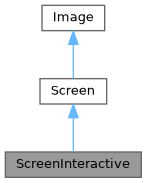
Public Types | |
| using | SelectionStyle = std::function<void(Pixel&)> |
Public Member Functions | |
| ~ScreenInteractive () override | |
| void | TrackMouse (bool enable=true) |
マウスが追跡され、イベントが報告されるかどうかを設定します。 メインループの外側で呼び出されます。例: ScreenInteractive::Loop(...)。 | |
| void | HandlePipedInput (bool enable=true) |
自動パイプ入力処理を有効または無効にします。 有効にすると、FTXUIはパイプ入力を検出し、キーボード入力のためにstdinを/dev/ttyからリダイレクトし、アプリケーションがパイプデータを読み取りながら、対話型キーボードイベントを引き続き受信できるようにします。 | |
| void | Loop (Component) |
| メインループを実行します。 | |
| void | Exit () |
| メインループを終了します。 | |
| Closure | ExitLoopClosure () |
| メインループを終了する関数を返します。 | |
| void | Post (Task task) |
| メインループにタスクを追加します。 これは、他のすべてのスケジュールされたタスクの後に実行されます。 | |
| void | PostEvent (Event event) |
| メインループにイベントを追加します。 これは、他のすべてのスケジュールされたイベントの後に実行されます。 | |
| void | RequestAnimationFrame () |
| すべてのアニメーションが完了するまで、画面をもう一度描画するタスクを追加します。 | |
| CapturedMouse | CaptureMouse () |
| マウスをキャプチャできることに関するユニークロックを取得しようとします。 | |
| Closure | WithRestoredIO (Closure) |
| 関数を装飾します。それは同じように実行されますが、実行中に現在アクティブなスクリーンターミナルフックは一時的にアンインストールされます。 | |
| void | ForceHandleCtrlC (bool force) |
コンポーネントがEvent::CtrlCをキャッチした場合でも、FTXUIにCtrl-Cを処理させるか処理させないかを強制します。 | |
| void | ForceHandleCtrlZ (bool force) |
コンポーネントがEvent::CtrlZをキャッチした場合でも、FTXUIにCtrl-Zを処理させるか処理させないかを強制します。 | |
| std::string | GetSelection () |
| 現在の選択内容を返します | |
| void | SelectionChange (std::function< void()> callback) |
| std::string | ToString () const |
| void | Print () const |
| void | Clear () |
| 画面からすべてのピクセルをクリアします。 | |
| std::string | ResetPosition (bool clear=false) const |
| カーソル位置を画面の先頭にリセットするために出力する文字列を返します。 | |
| void | ApplyShader () |
| Cursor | cursor () const |
| void | SetCursor (Cursor cursor) |
| uint8_t | RegisterHyperlink (const std::string &link) |
| const std::string & | Hyperlink (uint8_t id) const |
| const SelectionStyle & | GetSelectionStyle () const |
| 現在の選択スタイルを返します。 | |
| void | SetSelectionStyle (SelectionStyle decorator) |
| 現在の選択スタイルを設定します。 | |
| std::string & | at (int x, int int y) |
| const std::string & | at (int x, int y) const |
| 指定された位置のセル内の文字にアクセスします。 | |
| Pixel & | PixelAt (int x, int y) |
| 指定された位置のセル (ピクセル) にアクセスします。 | |
| const Pixel & | PixelAt (int x, int y) const |
| 指定された位置のセル (ピクセル) にアクセスします。 | |
| int | dimx () const |
| int | dimy () const |
Static Public Member Functions | |
| static ScreenInteractive | FixedSize (int dimx, int dimy) |
| static ScreenInteractive | Fullscreen () |
| static ScreenInteractive | FullscreenPrimaryScreen () |
| ターミナルサイズの全体を使用するScreenInteractiveを作成します。プライマリスクリーンバッファが使用されます。これは、ターミナルがリサイズされた場合、以前のコンテンツがターミナルコンテンツを乱す可能性があることを意味します。 | |
| static ScreenInteractive | FullscreenAlternateScreen () |
| ターミナルサイズの全体を使用するScreenInteractiveを作成します。これは、ターミナルコンテンツを乱すことを避けるために、代替スクリーンバッファを使用します。 | |
| static ScreenInteractive | FitComponent () |
| 描画されるコンポーネントの幅と高さに一致するScreenInteractiveを作成します。 | |
| static ScreenInteractive | TerminalOutput () |
| ターミナル出力の幅に一致し、描画されるコンポーネントの高さに一致するScreenInteractiveを作成します。 | |
| static ScreenInteractive * | Active () |
| 現在アクティブな画面を返します。アクティブな画面がない場合はヌルを返します。 | |
| static Screen | Create (Dimensions dimension) |
| 指定された次元を持つスクリーンを作成します。 | |
| static Screen | Create (Dimensions width, Dimensions height) |
| X軸とY軸に沿って指定された次元を持つスクリーンを作成します。 | |
Public Attributes | |
| friend | Private |
| Box | stencil |
Protected Attributes | |
| Cursor | cursor_ |
| std::vector< std::string > | hyperlinks_ = {""} |
| SelectionStyle | selection_style_ |
| int | dimx_ |
| int | dimy_ |
| std::vector< std::vector< Pixel > > | pixels_ |
Member Typedef Documentation
◆ SelectionStyle
|
inherited |
Definition at line 71 of file screen.hpp.
Constructor & Destructor Documentation
◆ ~ScreenInteractive()
|
overridedefault |
Member Function Documentation
◆ FixedSize()
|
static |
Definition at line 283 of file screen_interactive.cpp.
◆ Fullscreen()
|
static |
ターミナルサイズの全体を使用するScreenInteractiveを作成します。これは、ターミナルコンテンツを乱すことを避けるために、代替スクリーンバッファを使用します。
- Note
- これは
ScreenInteractive::FullscreenAlternateScreen()と同じです。
Definition at line 295 of file screen_interactive.cpp.
◆ FullscreenPrimaryScreen()
|
static |
ターミナルサイズの全体を使用するScreenInteractiveを作成します。プライマリスクリーンバッファが使用されます。これは、ターミナルがリサイズされた場合、以前のコンテンツがターミナルコンテンツを乱す可能性があることを意味します。
Definition at line 301 of file screen_interactive.cpp.
◆ FullscreenAlternateScreen()
|
static |
ターミナルサイズの全体を使用するScreenInteractiveを作成します。これは、ターミナルコンテンツを乱すことを避けるために、代替スクリーンバッファを使用します。
Definition at line 313 of file screen_interactive.cpp.
◆ FitComponent()
|
static |
描画されるコンポーネントの幅と高さに一致するScreenInteractiveを作成します。
Definition at line 339 of file screen_interactive.cpp.
◆ TerminalOutput()
|
static |
ターミナル出力の幅に一致し、描画されるコンポーネントの高さに一致するScreenInteractiveを作成します。
Definition at line 325 of file screen_interactive.cpp.
◆ TrackMouse()
| void TrackMouse | ( | bool | enable = true | ) |
マウスが追跡され、イベントが報告されるかどうかを設定します。 メインループの外側で呼び出されます。例: ScreenInteractive::Loop(...)。
- Parameters
-
enable マウスイベントの追跡を有効にするかどうか。
- Note
- これはメインループの外側で呼び出す必要があります。例:
ScreenInteractive::Loopを呼び出す前。 - マウストラッキングはデフォルトで有効になっています。
- マウストラッキングは、それをサポートする端末でのみサポートされています。
例
Definition at line 363 of file screen_interactive.cpp.
◆ HandlePipedInput()
| void HandlePipedInput | ( | bool | enable = true | ) |
自動パイプ入力処理を有効または無効にします。 有効にすると、FTXUIはパイプ入力を検出し、キーボード入力のためにstdinを/dev/ttyからリダイレクトし、アプリケーションがパイプデータを読み取りながら、対話型キーボードイベントを引き続き受信できるようにします。
- Parameters
-
enable パイプ入力処理を有効にするかどうか。デフォルトはtrueです。
- Note
- これは
Loop()の前に呼び出す必要があります。 - この機能はデフォルトで有効になっています。
- この機能はPOSIXシステム(Linux/macOS)でのみ利用可能です。
Definition at line 373 of file screen_interactive.cpp.
◆ Active()
|
static |
現在アクティブな画面を返します。アクティブな画面がない場合はヌルを返します。
Definition at line 512 of file screen_interactive.cpp.
◆ Loop()
メインループを実行します。
- Parameters
-
component 描画するコンポーネント。
Definition at line 417 of file screen_interactive.cpp.
◆ Exit()
| void Exit | ( | ) |
メインループを終了します。
Definition at line 993 of file screen_interactive.cpp.
◆ ExitLoopClosure()
| Closure ExitLoopClosure | ( | ) |
メインループを終了する関数を返します。
Definition at line 988 of file screen_interactive.cpp.
◆ Post()
| void Post | ( | Task | task | ) |
メインループにタスクを追加します。 これは、他のすべてのスケジュールされたタスクの後に実行されます。
Definition at line 379 of file screen_interactive.cpp.
◆ PostEvent()
| void PostEvent | ( | Event | event | ) |
メインループにイベントを追加します。 これは、他のすべてのスケジュールされたイベントの後に実行されます。
Definition at line 387 of file screen_interactive.cpp.
◆ RequestAnimationFrame()
| void RequestAnimationFrame | ( | ) |
すべてのアニメーションが完了するまで、画面をもう一度描画するタスクを追加します。
Definition at line 392 of file screen_interactive.cpp.
◆ CaptureMouse()
| CapturedMouse CaptureMouse | ( | ) |
マウスをキャプチャできることに関するユニークロックを取得しようとします。
- Returns
- マウスがまだキャプチャされていない場合はユニークロック、それ以外の場合はヌル。
Definition at line 406 of file screen_interactive.cpp.
◆ WithRestoredIO()
関数を装飾します。それは同じように実行されますが、実行中に現在アクティブなスクリーンターミナルフックは一時的にアンインストールされます。
- Parameters
-
fn 装飾する関数。
Definition at line 480 of file screen_interactive.cpp.
◆ ForceHandleCtrlC()
| void ForceHandleCtrlC | ( | bool | force | ) |
コンポーネントがEvent::CtrlCをキャッチした場合でも、FTXUIにCtrl-Cを処理させるか処理させないかを強制します。
Definition at line 489 of file screen_interactive.cpp.
◆ ForceHandleCtrlZ()
| void ForceHandleCtrlZ | ( | bool | force | ) |
コンポーネントがEvent::CtrlZをキャッチした場合でも、FTXUIにCtrl-Zを処理させるか処理させないかを強制します。
Definition at line 494 of file screen_interactive.cpp.
◆ GetSelection()
| std::string GetSelection | ( | ) |
現在の選択内容を返します
Definition at line 499 of file screen_interactive.cpp.
◆ SelectionChange()
| void SelectionChange | ( | std::function< void()> | callback | ) |
Definition at line 506 of file screen_interactive.cpp.
◆ Create() [1/2]
|
staticinherited |
指定された次元を持つスクリーンを作成します。
Definition at line 394 of file screen.cpp.
◆ Create() [2/2]
|
staticinherited |
X軸とY軸に沿って指定された次元を持つスクリーンを作成します。
Definition at line 388 of file screen.cpp.
◆ ToString()
|
inherited |
ターミナルにScreenを表示するために使用できるstd::stringを生成します。
- Note
- stdoutをフラッシュすることを忘れないでください。または、Screen::Print()を使用できます。
Definition at line 410 of file screen.cpp.
◆ Print()
|
inherited |
Definition at line 447 of file screen.cpp.
◆ Clear()
|
inherited |
画面からすべてのピクセルをクリアします。
Definition at line 487 of file screen.cpp.
◆ ResetPosition()
|
inherited |
カーソル位置を画面の先頭にリセットするために出力する文字列を返します。
- Returns
- カーソル位置を先頭にリセットするために出力する文字列。
Definition at line 468 of file screen.cpp.
◆ ApplyShader()
|
inherited |
Definition at line 499 of file screen.cpp.
◆ cursor()
|
inlineinherited |
Definition at line 64 of file screen.hpp.
◆ SetCursor()
|
inlineinherited |
Definition at line 65 of file screen.hpp.
◆ RegisterHyperlink()
|
inherited |
Definition at line 526 of file screen.cpp.
◆ Hyperlink()
|
inherited |
Definition at line 539 of file screen.cpp.
◆ GetSelectionStyle()
|
inherited |
◆ SetSelectionStyle()
|
inherited |
◆ at() [1/2]
|
inherited |
◆ at() [2/2]
|
inherited |
◆ PixelAt() [1/2]
|
inherited |
◆ PixelAt() [2/2]
|
inherited |
◆ dimx()
◆ dimy()
Member Data Documentation
◆ Private
| friend Private |
Definition at line 182 of file screen_interactive.hpp.
◆ cursor_
|
protectedinherited |
Definition at line 76 of file screen.hpp.
◆ hyperlinks_
|
protectedinherited |
Definition at line 77 of file screen.hpp.
◆ selection_style_
|
protectedinherited |
Definition at line 80 of file screen.hpp.
◆ stencil
◆ dimx_
◆ dimy_
◆ pixels_
Function Documentation
◆ RequestAnimationFrame()
| void RequestAnimationFrame | ( | ) |
RequestAnimationFrameは、次のアニメーションサイクルで新しいフレームが描画されるよう要求する関数です。
- Note
- この関数は、アニメーションやトランジションなど、時間とともに状態や外観を更新する必要があるコンポーネントによって通常呼び出されます。 これは、変更が端末によって検出されるイベントに依存せず、時間の経過に依存する場合に役立ちます。
アニメーションが完了していないコンポーネントは、この関数を呼び出して、後で新しいフレームが描画されるよう要求できます。
新しいイベントがなく、完了するアニメーションがない場合、新しいフレームは描画されません。
Definition at line 76 of file screen_interactive.cpp.
◆ Button() [1/2]
| Component Button | ( | ButtonOption | option | ) |
Draw a button. Execute a function when clicked. (ja: ボタンを描画します。クリックされたときに機能を実行します。)
- Parameters
-
option Additional optional parameters. (ja: その他のオプションパラメーター。)
- See also
- ButtonBase
Example (ja: 例)
Output (ja: 出力)
Definition at line 175 of file src/ftxui/component/button.cpp.
◆ Button() [2/2]
| Component Button | ( | ConstStringRef | label, |
| std::function< void()> | on_click, | ||
| ButtonOption | option ) |
Draw a button. Execute a function when clicked. (ja: ボタンを描画します。クリックされたときに機能を実行します。)
- Parameters
-
label The label of the button. (ja: ボタンのラベル。) on_click The action to execute when clicked. (ja: クリックされたときに実行するアクション。) option Additional optional parameters. (ja: その他のオプションパラメーター。)
- See also
- ButtonBase
Example (ja: 例)
Output (ja: 出力)
Definition at line 203 of file src/ftxui/component/button.cpp.
◆ CatchEvent() [1/2]
イベントをキャッチするために|on_event|を使用するコンポーネントを返します。この関数は、イベントが処理された場合はtrueを返し、それ以外の場合はfalseを返す必要があります。
- Parameters
-
child ラップされたコンポーネント。 on_event インターフェースを描画する関数。
例
Definition at line 53 of file catch_event.cpp.
◆ CatchEvent() [2/2]
| ComponentDecorator CatchEvent | ( | std::function< bool(Event)> | on_event | ) |
イベントをキャッチするために|on_event|を使用してコンポーネントを装飾します。この関数は、イベントが処理された場合はtrueを返し、それ以外の場合はfalseを返す必要があります。
- Parameters
-
on_event インターフェースを描画する関数。
例
Definition at line 78 of file catch_event.cpp.
◆ Checkbox() [1/2]
| Component Checkbox | ( | CheckboxOption | option | ) |
チェック可能な要素を描画します。
- Parameters
-
option 追加のオプションパラメーター。
- See also
- CheckboxBase
例
出力
Definition at line 107 of file src/ftxui/component/checkbox.cpp.
◆ Checkbox() [2/2]
| Component Checkbox | ( | ConstStringRef | label, |
| bool * | checked, | ||
| CheckboxOption | option ) |
チェック可能な要素を描画します。
- Parameters
-
label チェックボックスのラベル。 checked チェックボックスがチェックされているかどうか。 option 追加のオプションパラメーター。
- See also
- CheckboxBase
例
出力
Definition at line 134 of file src/ftxui/component/checkbox.cpp.
◆ Vertical() [1/2]
| Component Vertical | ( | Components | children | ) |
コンポーネントのリスト。垂直方向に1つずつ描画され、上下の矢印キーまたは'j'/'k'キーを使用して垂直方向にナビゲートされます。
- Parameters
-
children コンポーネントのリスト。
- See also
- ContainerBase
Example
Definition at line 314 of file container.cpp.
◆ Vertical() [2/2]
| Component Vertical | ( | Components | children, |
| int * | selector ) |
コンポーネントのリスト。垂直方向に1つずつ描画され、上下の矢印キーまたは'j'/'k'キーを使用して垂直方向にナビゲートされます。 これは例えばMenuを実装するのに便利です。
- Parameters
-
children コンポーネントのリスト。 selector 選択された子のインデックスへの参照。
- See also
- ContainerBase
- ContainerBase
Example
Definition at line 337 of file container.cpp.
◆ Horizontal() [1/2]
| Component Horizontal | ( | Components | children | ) |
コンポーネントのリスト。水平方向に1つずつ描画され、左右の矢印キーまたは'h'/'l'キーを使用して水平方向にナビゲートされます。
- Parameters
-
children コンポーネントのリスト。
- See also
- ContainerBase
Example
Definition at line 357 of file container.cpp.
◆ Horizontal() [2/2]
| Component Horizontal | ( | Components | children, |
| int * | selector ) |
コンポーネントのリスト。水平方向に1つずつ描画され、左右の矢印キーまたは'h'/'l'キーを使用して水平方向にナビゲートされます。
- Parameters
-
children コンポーネントのリスト。 selector 選択された子のインデックスへの参照。
- See also
- ContainerBase
- ContainerBase
Example
Definition at line 380 of file container.cpp.
◆ Tab()
| Component Tab | ( | Components | children, |
| int * | selector ) |
コンポーネントのリスト。一度に1つだけ描画され、操作されます。|selector|は選択されたコンポーネントのインデックスを提供します。これはタブを実装するのに便利です。
- Parameters
-
children コンポーネントのリスト。 selector 描画される子のインデックス。
- See also
- ContainerBase
- ContainerBase
Example
Definition at line 403 of file container.cpp.
◆ Stacked()
| Component Stacked | ( | Components | children | ) |
互いの上にスタックされるコンポーネントのリスト。 イベントは、最初のコンポーネントに伝播され、処理されない場合は2番目のコンポーネントに伝播されます。 コンポーネントは与えられた順序とは逆の順序で描画されます。 コンポーネントがフォーカスを取得すると、他の要素の相対的な順序を変更せずに前面に配置されます。
これはWindowコンポーネントと一緒に使用する必要があります。
- Parameters
-
children コンポーネントのリスト。
- See also
- Window
- Window
Example
Definition at line 430 of file container.cpp.
◆ Dropdown() [1/2]
| Component Dropdown | ( | ConstStringListRef | entries, |
| int * | selected ) |
ドロップダウンメニュー。
- Parameters
-
entries 表示するエントリのリスト。 selected 選択されたエントリのインデックス。
Definition at line 21 of file src/ftxui/component/dropdown.cpp.
◆ Dropdown() [2/2]
| Component Dropdown | ( | DropdownOption | option | ) |
ドロップダウンメニュー。
- Parameters
-
option ドロップダウンのオプション。
Definition at line 32 of file src/ftxui/component/dropdown.cpp.
◆ Hoverable() [1/6]
コンポーネントをラップします。マウスでホバーされているかどうかを知る機能を提供します。
- Parameters
-
component ラップされたコンポーネント。 hover コンポーネントがホバーされているかどうかを反映する値。
例
Definition at line 42 of file hoverable.cpp.
◆ Hoverable() [2/6]
| Component Hoverable | ( | Component | component, |
| std::function< void()> | on_enter, | ||
| std::function< void()> | on_leave ) |
コンポーネントをラップします。コールバックを使用します。
- Parameters
-
component ラップされたコンポーネント。 on_enter OnEnterコールバック on_leave OnLeaveコールバック
例
Definition at line 85 of file hoverable.cpp.
◆ Hoverable() [3/6]
| ComponentDecorator Hoverable | ( | bool * | hover | ) |
コンポーネントをラップします。マウスでホバーされているかどうかを知る機能を提供します。
- Parameters
-
hover コンポーネントがホバーされているかどうかを反映する値。
例
Definition at line 139 of file hoverable.cpp.
◆ Hoverable() [4/6]
| ComponentDecorator Hoverable | ( | std::function< void()> | on_enter, |
| std::function< void()> | on_leave ) |
コンポーネントをラップします。マウスでホバーされているかどうかを知る機能を提供します。
- Parameters
-
on_enter マウスがコンポーネントをホバーしたときに呼び出されます。 on_leave マウスがコンポーネントから離れたときに呼び出されます。
例
Definition at line 162 of file hoverable.cpp.
◆ Hoverable() [5/6]
コンポーネントをラップします。マウスでホバーされているかどうかを知る機能を提供します。
- Parameters
-
component ラップされたコンポーネント。 on_change マウスがコンポーネントに入ったとき、または離れたときに呼び出されます。
例
Definition at line 184 of file hoverable.cpp.
◆ Hoverable() [6/6]
| ComponentDecorator Hoverable | ( | std::function< void(bool)> | on_change | ) |
コンポーネントをラップします。マウスでホバーされているかどうかを知る機能を提供します。
- Parameters
-
on_change マウスがコンポーネントに入ったとき、または離れたときに呼び出されます。
例
Definition at line 204 of file hoverable.cpp.
◆ Maybe() [1/4]
コンポーネント|child|を装飾します。|show|がtrueを返す場合にのみ表示されます。
- Parameters
-
child 装飾するコンポーネント。 show |child|を表示するかどうかを返す関数。
Definition at line 19 of file src/ftxui/component/maybe.cpp.
◆ Maybe() [2/4]
| ComponentDecorator Maybe | ( | std::function< bool()> | show | ) |
コンポーネントを装飾します。|show|関数がtrueを返す場合にのみ表示されます。
- Parameters
-
show 装飾されたコンポーネントを表示するかどうかを返す関数。
例
Definition at line 52 of file src/ftxui/component/maybe.cpp.
◆ Maybe() [3/4]
コンポーネント|child|を装飾します。|show|がtrueの場合にのみ表示されます。
- Parameters
-
child 装飾するコンポーネント。 show 論理値。|show|がtrueの場合に|child|が表示されます。
例
Definition at line 69 of file src/ftxui/component/maybe.cpp.
◆ Maybe() [4/4]
| ComponentDecorator Maybe | ( | const bool * | show | ) |
コンポーネントを装飾します。|show|がtrueの場合にのみ表示されます。
- Parameters
-
show 論理値。|show|がtrueの場合に|child|が表示されます。
例
Definition at line 83 of file src/ftxui/component/maybe.cpp.
◆ Menu() [1/2]
| Component Menu | ( | MenuOption | option | ) |
テキストのリスト。フォーカスされた要素が選択されます。
- Parameters
-
option すべてのパラメータを含む構造体。
例
出力
Definition at line 512 of file src/ftxui/component/menu.cpp.
◆ Menu() [2/2]
| Component Menu | ( | ConstStringListRef | entries, |
| int * | selected, | ||
| MenuOption | option ) |
テキストのリスト。フォーカスされた要素が選択されます。
- Parameters
-
entries メニューのエントリのリスト。 selected 現在選択されている要素のインデックス。 option 追加のオプションパラメータ。
例
出力
Definition at line 543 of file src/ftxui/component/menu.cpp.
◆ Toggle()
| Component Toggle | ( | ConstStringListRef | entries, |
| int * | selected ) |
要素の水平リスト。ユーザーはこれらを操作できます。
- Parameters
-
entries 表示する選択可能なエントリのリスト。 selected 選択されたエントリを参照します。 関連項目 |Menu|。
Definition at line 554 of file src/ftxui/component/menu.cpp.
◆ MenuEntry() [1/2]
| Component MenuEntry | ( | ConstStringRef | label, |
| MenuEntryOption | option ) |
特定のメニューエントリ。これらはContainer::Verticalに入れてメニューを形成できます。
- Parameters
-
label この要素を表す描画されたテキスト。 option 追加のオプションパラメータ。
例
出力
Definition at line 583 of file src/ftxui/component/menu.cpp.
◆ MenuEntry() [2/2]
| Component MenuEntry | ( | MenuEntryOption | option | ) |
特定のメニューエントリ。これらはContainer::Verticalに入れてメニューを形成できます。
- Parameters
-
option パラメータ。
例
出力
Definition at line 612 of file src/ftxui/component/menu.cpp.
◆ Modal() [1/2]
◆ Modal() [2/2]
| ComponentDecorator Modal | ( | Component | modal, |
| const bool * | show_modal ) |
◆ Radiobox() [1/2]
| Component Radiobox | ( | RadioboxOption | option | ) |
1つだけ選択できる要素のリスト。
- Parameters
-
option パラメータ
- See also
- RadioboxBase
例
出力
NOLINTNEXTLINE
Definition at line 202 of file src/ftxui/component/radiobox.cpp.
◆ Radiobox() [2/2]
| Component Radiobox | ( | ConstStringListRef | entries, |
| int * | selected, | ||
| RadioboxOption | option ) |
1つだけ選択できる要素のリスト。
- Parameters
-
entries リスト内のエントリのリスト。 selected 現在選択されている要素のインデックス。 option その他のオプションパラメータ。
- See also
- RadioboxBase
例
出力
Definition at line 234 of file src/ftxui/component/radiobox.cpp.
◆ Renderer() [1/4]
インターフェースを描画するために|render|を使用するコンポーネントを返します。
- Parameters
-
render インターフェースを描画する関数。
例
Definition at line 29 of file src/ftxui/component/renderer.cpp.
◆ Renderer() [2/4]
|child|に似ていますが、|render|をComponentRender()イベントとして使用する新しいコンポーネントを返します。
- Parameters
-
child イベントを転送するコンポーネント。 render インターフェースを描画する関数。
例
Definition at line 60 of file src/ftxui/component/renderer.cpp.
◆ Renderer() [3/4]
インターフェースを描画するために|render|を使用するフォーカス可能なコンポーネントを返します。
- Parameters
-
render コンポーネントがフォーカスされているかどうかを示すブール値を受け取るインターフェースを描画する関数。
例
Definition at line 82 of file src/ftxui/component/renderer.cpp.
◆ Renderer() [4/4]
| ComponentDecorator Renderer | ( | ElementDecorator | decorator | ) |
コンポーネントがレンダリングするものを装飾することによって、コンポーネントを装飾します。
- Parameters
-
decorator 要素をレンダリングする関数。
例
Definition at line 123 of file src/ftxui/component/renderer.cpp.
◆ ResizableSplitLeft()
2つのコンポーネント間の水平分割。マウスで設定可能。
- Parameters
-
main 左側の|main_size|サイズのメインコンポーネント。 back 右側に残りのサイズを占めるバックコンポーネント。 main_size |main|コンポーネントのサイズ。
例
出力
Definition at line 198 of file src/ftxui/component/resizable_split.cpp.
◆ ResizableSplitRight()
2つのコンポーネント間の水平分割。マウスで設定可能。
- Parameters
-
main 右側の|main_size|サイズのメインコンポーネント。 back 左側に残りのサイズを占めるバックコンポーネント。 main_size |main|コンポーネントのサイズ。
例
出力
Definition at line 231 of file src/ftxui/component/resizable_split.cpp.
◆ ResizableSplitTop()
2つのコンポーネント間の垂直分割。マウスで設定可能。
- Parameters
-
main 上部の|main_size|サイズのメインコンポーネント。 back 下部に残りのサイズを占めるバックコンポーネント。 main_size |main|コンポーネントのサイズ。
例
出力
Definition at line 264 of file src/ftxui/component/resizable_split.cpp.
◆ ResizableSplitBottom()
2つのコンポーネント間の垂直分割。マウスで設定可能。
- Parameters
-
main 下部の|main_size|サイズのメインコンポーネント。 back 上部に残りのサイズを占めるバックコンポーネント。 main_size |main|コンポーネントのサイズ。
例
出力
Definition at line 297 of file src/ftxui/component/resizable_split.cpp.
◆ Slider()
| Component Slider | ( | ConstStringRef | label, |
| Ref< int > | value, | ||
| ConstRef< int > | min, | ||
| ConstRef< int > | max, | ||
| ConstRef< int > | increment ) |
水平スライダー。
- Parameters
-
label スライダーの名前。 value スライダーの現在の値。 min 最小値。 max 最大値。 increment カーソルによる増分値。
例
出力
Definition at line 258 of file src/ftxui/component/slider.cpp.
◆ Window()
| Component Window | ( | WindowOptions | option | ) |
ドラッグ可能/サイズ変更可能なウィンドウ。複数のウィンドウを使用するには、それらを Container::Stacked({...})コンポーネントを使用してスタックする必要があります。
- Parameters
-
option すべてのパラメータを保持する構造体。
- See also
- Window
例
Definition at line 311 of file src/ftxui/component/window.cpp.