Detailed Description
ftxui/screen` モジュールの チュートリアル をご確認ください。
Namespaces | |
| namespace | ftxui::Dimension |
| スクリーンがどのように見えるべきかを定義します。 | |
Classes | |
| struct | Box |
| Boxは、2D空間における矩形領域を表す構造体です。 More... | |
| class | Color |
| Colorは、ターミナルユーザーインターフェースにおける色を表すクラスです。 More... | |
| struct | ColorInfo |
| ColorInfoは、ターミナルのカラーパレットに関する情報を含む構造体です。 More... | |
| class | Image |
| ピクセルの長方形グリッド。 More... | |
| struct | Pixel |
| Unicode文字とそれに関連付けられたスタイル。 More... | |
| class | Screen |
| ピクセルの長方形グリッド。 More... | |
| struct | Dimensions |
| Dimensionsは、ターミナルのサイズを表す構造体です。 More... | |
Enumerations | |
| enum | Color { Palette1 , Palette16 , Palette256 , TrueColor } |
| Colorは、ターミナルの色サポートを表す列挙型です。 More... | |
Functions | |
| Dimensions | Size () |
| ターミナルサイズを取得します。 | |
| Color | ColorSupport () |
| ターミナルの色サポートを取得します。 | |
Class Documentation
◆ ftxui::Box
| struct ftxui::Box |
Boxは、2D空間における矩形領域を表す構造体です。
これは、x軸とy軸に沿った最小座標と最大座標によって定義されます。 座標は包括的であり、ボックスには最小値と最大値の両方が含まれることに注意してください。
Public Member Functions | |
| void | Shift (int x, int y) |
| bool | Contain (int x, int y) const |
| bool | IsEmpty () const |
| bool | operator== (const Box &other) const |
| bool | operator!= (const Box &other) const |
Static Public Member Functions | |
| static auto | Intersection (Box a, Box b) -> Box |
| static auto | Union (Box a, Box b) -> Box |
Public Attributes | |
| int | x_min = 0 |
| int | x_max = 0 |
| int | y_min = 0 |
| int | y_max = 0 |
Member Function Documentation
◆ Intersection()
◆ Union()
◆ Shift()
| void Shift | ( | int | x, |
| int | y ) |
◆ Contain()
| bool Contain | ( | int | x, |
| int | y ) const |
◆ IsEmpty()
◆ operator==()
| bool operator== | ( | const Box & | other | ) | const |
◆ operator!=()
| bool operator!= | ( | const Box & | other | ) | const |
Member Data Documentation
◆ x_min
◆ x_max
◆ y_min
◆ y_max
◆ ftxui::Color
| class ftxui::Color |
Colorは、ターミナルユーザーインターフェースにおける色を表すクラスです。
Public Types | |
| enum | Palette1 : uint8_t { Default } |
| enum | Palette16 : uint8_t { Black = 0 , Red = 1 , Green = 2 , Yellow = 3 , Blue = 4 , Magenta = 5 , Cyan = 6 , GrayLight = 7 , GrayDark = 8 , RedLight = 9 , GreenLight = 10 , YellowLight = 11 , BlueLight = 12 , MagentaLight = 13 , CyanLight = 14 , White = 15 } |
| enum | Palette256 : uint8_t { Aquamarine1 = 122 , Aquamarine1Bis = 86 , Aquamarine3 = 79 , Blue1 = 21 , Blue3 = 19 , Blue3Bis = 20 , BlueViolet = 57 , CadetBlue = 72 , CadetBlueBis = 73 , Chartreuse1 = 118 , Chartreuse2 = 112 , Chartreuse2Bis = 82 , Chartreuse3 = 70 , Chartreuse3Bis = 76 , Chartreuse4 = 64 , CornflowerBlue = 69 , Cornsilk1 = 230 , Cyan1 = 51 , Cyan2 = 50 , Cyan3 = 43 , DarkBlue = 18 , DarkCyan = 36 , DarkGoldenrod = 136 , DarkGreen = 22 , DarkKhaki = 143 , DarkMagenta = 90 , DarkMagentaBis = 91 , DarkOliveGreen1 = 191 , DarkOliveGreen1Bis = 192 , DarkOliveGreen2 = 155 , DarkOliveGreen3 = 107 , DarkOliveGreen3Bis = 113 , DarkOliveGreen3Ter = 149 , DarkOrange = 208 , DarkOrange3 = 130 , DarkOrange3Bis = 166 , DarkRed = 52 , DarkRedBis = 88 , DarkSeaGreen = 108 , DarkSeaGreen1 = 158 , DarkSeaGreen1Bis = 193 , DarkSeaGreen2 = 151 , DarkSeaGreen2Bis = 157 , DarkSeaGreen3 = 115 , DarkSeaGreen3Bis = 150 , DarkSeaGreen4 = 65 , DarkSeaGreen4Bis = 71 , DarkSlateGray1 = 123 , DarkSlateGray2 = 87 , DarkSlateGray3 = 116 , DarkTurquoise = 44 , DarkViolet = 128 , DarkVioletBis = 92 , DeepPink1 = 198 , DeepPink1Bis = 199 , DeepPink2 = 197 , DeepPink3 = 161 , DeepPink3Bis = 162 , DeepPink4 = 125 , DeepPink4Bis = 89 , DeepPink4Ter = 53 , DeepSkyBlue1 = 39 , DeepSkyBlue2 = 38 , DeepSkyBlue3 = 31 , DeepSkyBlue3Bis = 32 , DeepSkyBlue4 = 23 , DeepSkyBlue4Bis = 24 , DeepSkyBlue4Ter = 25 , DodgerBlue1 = 33 , DodgerBlue2 = 27 , DodgerBlue3 = 26 , Gold1 = 220 , Gold3 = 142 , Gold3Bis = 178 , Green1 = 46 , Green3 = 34 , Green3Bis = 40 , Green4 = 28 , GreenYellow = 154 , Grey0 = 16 , Grey100 = 231 , Grey11 = 234 , Grey15 = 235 , Grey19 = 236 , Grey23 = 237 , Grey27 = 238 , Grey3 = 232 , Grey30 = 239 , Grey35 = 240 , Grey37 = 59 , Grey39 = 241 , Grey42 = 242 , Grey46 = 243 , Grey50 = 244 , Grey53 = 102 , Grey54 = 245 , Grey58 = 246 , Grey62 = 247 , Grey63 = 139 , Grey66 = 248 , Grey69 = 145 , Grey7 = 233 , Grey70 = 249 , Grey74 = 250 , Grey78 = 251 , Grey82 = 252 , Grey84 = 188 , Grey85 = 253 , Grey89 = 254 , Grey93 = 255 , Honeydew2 = 194 , HotPink = 205 , HotPink2 = 169 , HotPink3 = 132 , HotPink3Bis = 168 , HotPinkBis = 206 , IndianRed = 131 , IndianRed1 = 203 , IndianRed1Bis = 204 , IndianRedBis = 167 , Khaki1 = 228 , Khaki3 = 185 , LightCoral = 210 , LightCyan1Bis = 195 , LightCyan3 = 152 , LightGoldenrod1 = 227 , LightGoldenrod2 = 186 , LightGoldenrod2Bis = 221 , LightGoldenrod2Ter = 222 , LightGoldenrod3 = 179 , LightGreen = 119 , LightGreenBis = 120 , LightPink1 = 217 , LightPink3 = 174 , LightPink4 = 95 , LightSalmon1 = 216 , LightSalmon3 = 137 , LightSalmon3Bis = 173 , LightSeaGreen = 37 , LightSkyBlue1 = 153 , LightSkyBlue3 = 109 , LightSkyBlue3Bis = 110 , LightSlateBlue = 105 , LightSlateGrey = 103 , LightSteelBlue = 147 , LightSteelBlue1 = 189 , LightSteelBlue3 = 146 , LightYellow3 = 187 , Magenta1 = 201 , Magenta2 = 165 , Magenta2Bis = 200 , Magenta3 = 127 , Magenta3Bis = 163 , Magenta3Ter = 164 , MediumOrchid = 134 , MediumOrchid1 = 171 , MediumOrchid1Bis = 207 , MediumOrchid3 = 133 , MediumPurple = 104 , MediumPurple1 = 141 , MediumPurple2 = 135 , MediumPurple2Bis = 140 , MediumPurple3 = 97 , MediumPurple3Bis = 98 , MediumPurple4 = 60 , MediumSpringGreen = 49 , MediumTurquoise = 80 , MediumVioletRed = 126 , MistyRose1 = 224 , MistyRose3 = 181 , NavajoWhite1 = 223 , NavajoWhite3 = 144 , NavyBlue = 17 , Orange1 = 214 , Orange3 = 172 , Orange4 = 58 , Orange4Bis = 94 , OrangeRed1 = 202 , Orchid = 170 , Orchid1 = 213 , Orchid2 = 212 , PaleGreen1 = 121 , PaleGreen1Bis = 156 , PaleGreen3 = 114 , PaleGreen3Bis = 77 , PaleTurquoise1 = 159 , PaleTurquoise4 = 66 , PaleVioletRed1 = 211 , Pink1 = 218 , Pink3 = 175 , Plum1 = 219 , Plum2 = 183 , Plum3 = 176 , Plum4 = 96 , Purple = 129 , Purple3 = 56 , Purple4 = 54 , Purple4Bis = 55 , PurpleBis = 93 , Red1 = 196 , Red3 = 124 , Red3Bis = 160 , RosyBrown = 138 , RoyalBlue1 = 63 , Salmon1 = 209 , SandyBrown = 215 , SeaGreen1 = 84 , SeaGreen1Bis = 85 , SeaGreen2 = 83 , SeaGreen3 = 78 , SkyBlue1 = 117 , SkyBlue2 = 111 , SkyBlue3 = 74 , SlateBlue1 = 99 , SlateBlue3 = 61 , SlateBlue3Bis = 62 , SpringGreen1 = 48 , SpringGreen2 = 42 , SpringGreen2Bis = 47 , SpringGreen3 = 35 , SpringGreen3Bis = 41 , SpringGreen4 = 29 , SteelBlue = 67 , SteelBlue1 = 75 , SteelBlue1Bis = 81 , SteelBlue3 = 68 , Tan = 180 , Thistle1 = 225 , Thistle3 = 182 , Turquoise2 = 45 , Turquoise4 = 30 , Violet = 177 , Wheat1 = 229 , Wheat4 = 101 , Yellow1 = 226 , Yellow2 = 190 , Yellow3 = 148 , Yellow3Bis = 184 , Yellow4 = 100 , Yellow4Bis = 106 } |
Public Member Functions | |
| Color () | |
| 透明な色を構築します。 | |
| Color (Palette1 index) | |
| 透明な色を構築します。 | |
| Color (Palette16 index) | |
| Palette16の色を使用して色を構築します。 | |
| Color (Palette256 index) | |
| Palette256の色を使用して色を構築します。 | |
| Color (uint8_t red, uint8_t green, uint8_t blue, uint8_t alpha=255) | |
| RGB表現から色を構築します。 https://en.wikipedia.org/wiki/RGB_color_model. | |
| bool | operator== (const Color &rhs) const |
| bool | operator!= (const Color &rhs) const |
| std::string | Print (bool is_background_color) const |
| bool | IsOpaque () const |
Static Public Member Functions | |
| static Color | RGB (uint8_t red, uint8_t green, uint8_t blue) |
| RGB表現から色を構築します。 https://en.wikipedia.org/wiki/RGB_color_model. | |
| static Color | HSV (uint8_t hue, uint8_t saturation, uint8_t value) |
| HSV表現から色を構築します。 https://en.wikipedia.org/wiki/HSL_and_HSV. | |
| static Color | RGBA (uint8_t red, uint8_t green, uint8_t blue, uint8_t alpha) |
| RGBA表現から色を構築します。 https://en.wikipedia.org/wiki/RGB_color_model. | |
| static Color | HSVA (uint8_t hue, uint8_t saturation, uint8_t value, uint8_t alpha) |
| HSV表現から色を構築します。 https://en.wikipedia.org/wiki/HSL_and_HSV. | |
| static Color | Interpolate (float t, const Color &a, const Color &b) |
| static Color | Blend (const Color &lhs, const Color &rhs) |
| アルファチャンネルを使用して2つの色をブレンドします。 | |
Member Enumeration Documentation
◆ Palette1
◆ Palette16
| enum Palette16 : uint8_t |
◆ Palette256
| enum Palette256 : uint8_t |
Constructor & Destructor Documentation
◆ Color() [1/5]
|
default |
透明な色を構築します。
◆ Color() [2/5]
透明な色を構築します。
Definition at line 79 of file screen/color.cpp.
◆ Color() [3/5]
Palette16の色を使用して色を構築します。
Definition at line 82 of file screen/color.cpp.
◆ Color() [4/5]
| Color | ( | Palette256 | index | ) |
Palette256の色を使用して色を構築します。
Definition at line 86 of file screen/color.cpp.
◆ Color() [5/5]
| Color | ( | uint8_t | red, |
| uint8_t | green, | ||
| uint8_t | blue, | ||
| uint8_t | alpha = 255 ) |
RGB表現から色を構築します。 https://en.wikipedia.org/wiki/RGB_color_model.
- Parameters
-
red 赤の量 [0,255] green 緑の量 [0,255] blue 青の量 [0,255] alpha アルファの量 [0,255]
Definition at line 102 of file screen/color.cpp.
Member Function Documentation
◆ RGB()
|
static |
RGB表現から色を構築します。 https://en.wikipedia.org/wiki/RGB_color_model.
- Parameters
-
red 赤の量 [0,255] green 緑の量 [0,255] blue 青の量 [0,255]
Definition at line 146 of file screen/color.cpp.
◆ HSV()
|
static |
HSV表現から色を構築します。 https://en.wikipedia.org/wiki/HSL_and_HSV.
- Parameters
-
h 色相 [0,255] s 彩度 [0,255]。 v 明度 [0,255]
Definition at line 197 of file screen/color.cpp.
◆ RGBA()
|
static |
RGBA表現から色を構築します。 https://en.wikipedia.org/wiki/RGB_color_model.
- Parameters
-
red 赤の量 [0,255] green 緑の量 [0,255] blue 青の量 [0,255] alpha アルファの量 [0,255]
- See also
- Color::RGB
Definition at line 158 of file screen/color.cpp.
◆ HSVA()
|
static |
HSV表現から色を構築します。 https://en.wikipedia.org/wiki/HSL_and_HSV.
- Parameters
-
h 色相 [0,255] s 彩度 [0,255]。 v 明度 [0,255] alpha アルファの量 [0,255]
Definition at line 170 of file screen/color.cpp.
◆ Interpolate()
Definition at line 202 of file screen/color.cpp.
◆ Blend()
アルファチャンネルを使用して2つの色をブレンドします。
Definition at line 271 of file screen/color.cpp.
◆ operator==()
| bool operator== | ( | const Color & | rhs | ) | const |
Definition at line 36 of file screen/color.cpp.
◆ operator!=()
| bool operator!= | ( | const Color & | rhs | ) | const |
Definition at line 41 of file screen/color.cpp.
◆ Print()
| std::string Print | ( | bool | is_background_color | ) | const |
Definition at line 45 of file screen/color.cpp.
◆ IsOpaque()
◆ ftxui::ColorInfo
| struct ftxui::ColorInfo |
ColorInfoは、ターミナルのカラーパレットに関する情報を含む構造体です。
Definition at line 14 of file color_info.hpp.
Public Attributes | |
| const char * | name |
| uint8_t | index_256 |
| uint8_t | index_16 |
| uint8_t | red |
| uint8_t | green |
| uint8_t | blue |
| uint8_t | hue |
| uint8_t | saturation |
| uint8_t | value |
Member Data Documentation
◆ name
| const char* name |
Definition at line 15 of file color_info.hpp.
◆ index_256
| uint8_t index_256 |
Definition at line 16 of file color_info.hpp.
◆ index_16
| uint8_t index_16 |
Definition at line 17 of file color_info.hpp.
◆ red
| uint8_t red |
Definition at line 18 of file color_info.hpp.
◆ green
| uint8_t green |
Definition at line 19 of file color_info.hpp.
◆ blue
| uint8_t blue |
Definition at line 20 of file color_info.hpp.
◆ hue
| uint8_t hue |
Definition at line 21 of file color_info.hpp.
◆ saturation
| uint8_t saturation |
Definition at line 22 of file color_info.hpp.
◆ value
| uint8_t value |
Definition at line 23 of file color_info.hpp.
◆ ftxui::Image
| class ftxui::Image |
 Inheritance diagram for Image: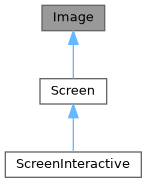
Public Member Functions | |
| Image ()=delete | |
| Image (int dimx, int dimy) | |
| virtual | ~Image ()=default |
| std::string & | at (int x, int int y) |
| const std::string & | at (int x, int y) const |
| 指定された位置のセル内の文字にアクセスします。 | |
| Pixel & | PixelAt (int x, int y) |
| 指定された位置のセル (ピクセル) にアクセスします。 | |
| const Pixel & | PixelAt (int x, int y) const |
| 指定された位置のセル (ピクセル) にアクセスします。 | |
| int | dimx () const |
| int | dimy () const |
| void | Clear () |
| 画面からすべてのピクセルをクリアします。 | |
Public Attributes | |
| Box | stencil |
Protected Attributes | |
| int | dimx_ |
| int | dimy_ |
| std::vector< std::vector< Pixel > > | pixels_ |
Constructor & Destructor Documentation
◆ Image() [1/2]
|
delete |
◆ Image() [2/2]
◆ ~Image()
|
virtualdefault |
Member Function Documentation
◆ at() [1/2]
| std::string & at | ( | int | x, |
| int int | y ) |
◆ at() [2/2]
| const std::string & at | ( | int | x, |
| int | y ) const |
◆ PixelAt() [1/2]
| Pixel & PixelAt | ( | int | x, |
| int | y ) |
◆ PixelAt() [2/2]
| const Pixel & PixelAt | ( | int | x, |
| int | y ) const |
◆ dimx()
◆ dimy()
◆ Clear()
Member Data Documentation
◆ stencil
◆ dimx_
◆ dimy_
◆ pixels_
◆ ftxui::Pixel
| struct ftxui::Pixel |
Unicode文字とそれに関連付けられたスタイル。
Public Member Functions | |
| Pixel () | |
Public Attributes | |
| bool | blink: 1 |
| bool | bold: 1 |
| bool | dim: 1 |
| bool | italic: 1 |
| bool | inverted: 1 |
| bool | underlined: 1 |
| bool | underlined_double: 1 |
| bool | strikethrough: 1 |
| bool | automerge: 1 |
| uint8_t | hyperlink = 0 |
| std::string | character = "" |
| Color | background_color = Color::Default |
| Color | foreground_color = Color::Default |
Constructor & Destructor Documentation
◆ Pixel()
Member Data Documentation
◆ blink
◆ bold
| bool bold |
◆ dim
◆ italic
◆ inverted
◆ underlined
| bool underlined |
◆ underlined_double
| bool underlined_double |
- Examples
- examples/component/selection.cpp.
◆ strikethrough
◆ automerge
◆ hyperlink
◆ character
◆ background_color
| Color background_color = Color::Default |
◆ foreground_color
| Color foreground_color = Color::Default |
◆ ftxui::Screen
| class ftxui::Screen |
ピクセルの長方形グリッド。
- Examples
- examples/dom/gauge.cpp, and examples/dom/gauge_direction.cpp.
Definition at line 25 of file screen.hpp.
Inheritance diagram for Screen: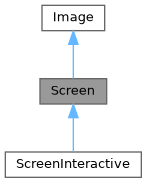
Public Types | |
| using | SelectionStyle = std::function<void(Pixel&)> |
Public Member Functions | |
| Screen (int dimx, int dimy) | |
| ~Screen () override=default | |
| std::string | ToString () const |
| void | Print () const |
| void | Clear () |
| 画面からすべてのピクセルをクリアします。 | |
| std::string | ResetPosition (bool clear=false) const |
| カーソル位置を画面の先頭にリセットするために出力する文字列を返します。 | |
| void | ApplyShader () |
| Cursor | cursor () const |
| void | SetCursor (Cursor cursor) |
| uint8_t | RegisterHyperlink (const std::string &link) |
| const std::string & | Hyperlink (uint8_t id) const |
| const SelectionStyle & | GetSelectionStyle () const |
| 現在の選択スタイルを返します。 | |
| void | SetSelectionStyle (SelectionStyle decorator) |
| 現在の選択スタイルを設定します。 | |
| std::string & | at (int x, int int y) |
| const std::string & | at (int x, int y) const |
| 指定された位置のセル内の文字にアクセスします。 | |
| Pixel & | PixelAt (int x, int y) |
| 指定された位置のセル (ピクセル) にアクセスします。 | |
| const Pixel & | PixelAt (int x, int y) const |
| 指定された位置のセル (ピクセル) にアクセスします。 | |
| int | dimx () const |
| int | dimy () const |
Static Public Member Functions | |
| static Screen | Create (Dimensions dimension) |
| 指定された次元を持つスクリーンを作成します。 | |
| static Screen | Create (Dimensions width, Dimensions height) |
| X軸とY軸に沿って指定された次元を持つスクリーンを作成します。 | |
Public Attributes | |
| Box | stencil |
Protected Attributes | |
| Cursor | cursor_ |
| std::vector< std::string > | hyperlinks_ = {""} |
| SelectionStyle | selection_style_ |
| int | dimx_ |
| int | dimy_ |
| std::vector< std::vector< Pixel > > | pixels_ |
Member Typedef Documentation
◆ SelectionStyle
| using SelectionStyle = std::function<void(Pixel&)> |
Definition at line 71 of file screen.hpp.
Constructor & Destructor Documentation
◆ Screen()
| Screen | ( | int | dimx, |
| int | dimy ) |
Definition at line 398 of file screen.cpp.
◆ ~Screen()
|
overridedefault |
Member Function Documentation
◆ Create() [1/2]
|
static |
指定された次元を持つスクリーンを作成します。
Definition at line 394 of file screen.cpp.
◆ Create() [2/2]
|
static |
X軸とY軸に沿って指定された次元を持つスクリーンを作成します。
Definition at line 388 of file screen.cpp.
◆ ToString()
| std::string ToString | ( | ) | const |
ターミナルにScreenを表示するために使用できるstd::stringを生成します。
- Note
- stdoutをフラッシュすることを忘れないでください。または、Screen::Print()を使用できます。
Definition at line 410 of file screen.cpp.
◆ Print()
| void Print | ( | ) | const |
Definition at line 447 of file screen.cpp.
◆ Clear()
| void Clear | ( | ) |
画面からすべてのピクセルをクリアします。
Definition at line 487 of file screen.cpp.
◆ ResetPosition()
| std::string ResetPosition | ( | bool | clear = false | ) | const |
カーソル位置を画面の先頭にリセットするために出力する文字列を返します。
- Returns
- カーソル位置を先頭にリセットするために出力する文字列。
Definition at line 468 of file screen.cpp.
◆ ApplyShader()
| void ApplyShader | ( | ) |
Definition at line 499 of file screen.cpp.
◆ cursor()
|
inline |
Definition at line 64 of file screen.hpp.
◆ SetCursor()
|
inline |
Definition at line 65 of file screen.hpp.
◆ RegisterHyperlink()
| std::uint8_t RegisterHyperlink | ( | const std::string & | link | ) |
Definition at line 526 of file screen.cpp.
◆ Hyperlink()
| const std::string & Hyperlink | ( | uint8_t | id | ) | const |
Definition at line 539 of file screen.cpp.
◆ GetSelectionStyle()
| const Screen::SelectionStyle & GetSelectionStyle | ( | ) | const |
◆ SetSelectionStyle()
| void SetSelectionStyle | ( | SelectionStyle | decorator | ) |
◆ at() [1/2]
|
inherited |
◆ at() [2/2]
|
inherited |
◆ PixelAt() [1/2]
|
inherited |
◆ PixelAt() [2/2]
|
inherited |
◆ dimx()
◆ dimy()
Member Data Documentation
◆ cursor_
|
protected |
Definition at line 76 of file screen.hpp.
◆ hyperlinks_
|
protected |
Definition at line 77 of file screen.hpp.
◆ selection_style_
|
protected |
Definition at line 80 of file screen.hpp.
◆ stencil
◆ dimx_
◆ dimy_
◆ pixels_
◆ ftxui::Dimensions
| struct ftxui::Dimensions |
Dimensionsは、ターミナルのサイズを表す構造体です。
Definition at line 10 of file terminal.hpp.
Public Attributes | |
| int | dimx |
| int | dimy |
Member Data Documentation
◆ dimx
| int dimx |
Definition at line 11 of file terminal.hpp.
◆ dimy
| int dimy |
Definition at line 12 of file terminal.hpp.
Enumeration Type Documentation
◆ Color
| enum Color |
Colorは、ターミナルの色サポートを表す列挙型です。
| Enumerator | |
|---|---|
| Palette1 | |
| Palette16 | |
| Palette256 | |
| TrueColor | |
Definition at line 21 of file terminal.hpp.
Function Documentation
◆ Size()
| Dimensions Size | ( | ) |
◆ ColorSupport()
| Color ColorSupport | ( | ) |
ターミナルの色サポートを取得します。
Definition at line 120 of file terminal.cpp.