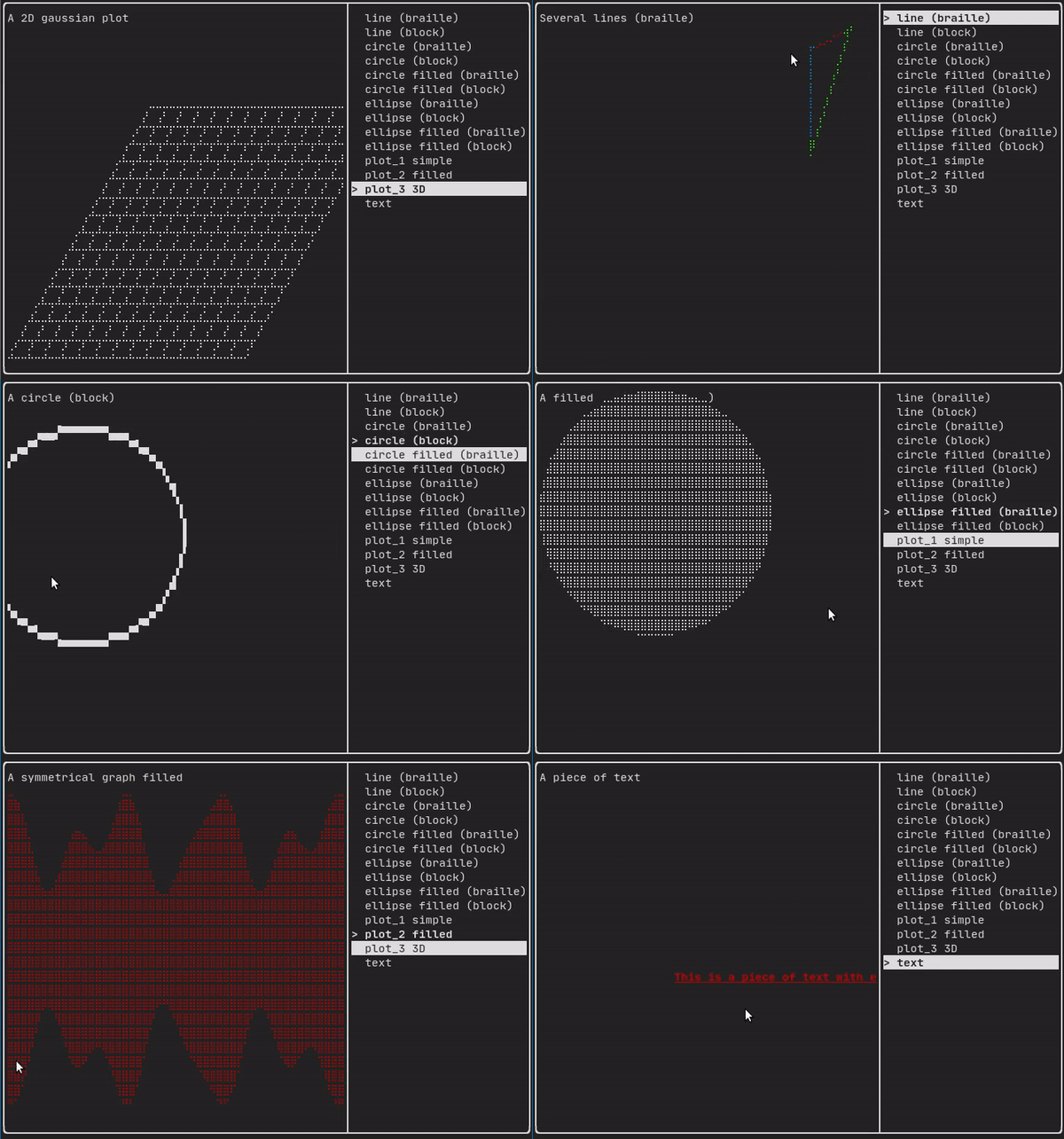
このモジュールは、ftxui::Elementの階層セットを定義します。要素はレイアウトを管理し、ターミナルの寸法変更に反応できます。このモジュールが多数の演算子を使用してシンプルなレイアウトを作成するために使用される以下の例に注目してください。
Example セクションには、例のコレクションが用意されています。
例:
...
Element document =
vbox({
text("The footer")
});
document = border(document);
document = document | border.
document |= border
...
}
Element text(std::wstring text)
ユニコードテキストを表示します。
Element gauge(float progress)
高精細プログレスバーを描画します。
Decorator color(Color)
前景色を使用して装飾します。
Element vbox(Elements)
要素を縦に一つずつ表示するコンテナ。
要素リスト
すべての要素は含まれており、対応するヘッダーファイルを含めることでアクセスできます。
#ifndef FTXUI_DOM_ELEMENTS_HPP
#define FTXUI_DOM_ELEMENTS_HPP
#include <functional>
#include <memory>
class Node;
using Element = std::shared_ptr<Node>;
};
Color unselected_color,
Color selected_color);
Color unselected_color,
Color selected_color);
Element canvas(
int width,
int height, std::function<
void(Canvas&)>);
Dimensions
Fit(
Element&,
bool extend_beyond_screen =
false);
}
}
#include "ftxui/dom/take_any_args.hpp"
#endif
Decorator bgcolor(Color)
背景色を使用して装飾します。
Element focusCursorBarBlinking(Element)
focus と同じですが、カーソル形状を点滅バーに設定します。
Element xflex(Element)
必要に応じてX軸上で拡大・縮小します。
Element gaugeDirection(float progress, Direction direction)
指定された方向に進行する高精細プログレスバーを描画します。
Decorator focusPositionRelative(float x, float y)
frame内で使用され、ビューを特定の位置にスクロールさせます。位置は要求されたサイズの割合で表されます。
Element separatorStyled(BorderStyle)
他の2つの要素の間に垂直または水平の区切り線を描画します。
Element xflex_grow(Element)
可能であればX軸上で拡大します。
Element underlinedDouble(Element)
テキストに二重下線を適用します。
Element clear_under(Element element)
|child|を描画する前に、下にあるピクセルをクリアします。これは、 dboxと組み合わせて使用すると便利です。
Element separatorEmpty()
他の2つの要素の間にEMPTYスタイルで垂直または水平の区切り線を描画します。
Element vscroll_indicator(Element)
右側に垂直スクロールバーを表示します。 色はコンテンツに従います。
Element nothing(Element element)
何も行わないデコレーションです。
Direction
Directionは、東西南北の4つの基本方向を表す列挙型です。
Element flex(Element)
子要素をコンテナに残されたスペースに比例して拡大させます。
Element paragraphAlignRight(const std::string &text)
段落を複数行にわたって右揃えで描画する要素を返します。
Element gaugeRight(float progress)
左から右へ進行する高精細プログレスバーを描画します。
Element focusCursorUnderlineBlinking(Element)
focus と同じですが、カーソル形状を点滅下線に設定します。
Element bold(Element)
より強調したい要素に、太字フォントを使用します。
Element spinner(int charset_index, size_t image_index)
時間やイベントの効果を表現するのに便利です。これはアスキーアートの「ビデオ」を表示します。
Element yflex(Element)
必要に応じてY軸上で拡大・縮小します。
Element flex_shrink(Element)
必要であれば最小化します。
Element focusCursorBar(Element)
focus と同じですが、カーソル形状を静止ブロックに設定します。
Element focusCursorBlock(Element)
focus と同じですが、カーソル形状を静止ブロックに設定します。
Element underlined(Element)
指定された要素に下線を追加します。
Element center(Element)
要素を水平方向および垂直方向に中央揃えします。
Element focusCursorUnderline(Element)
focus と同じですが、カーソル形状を静止下線に設定します。
Element inverted(Element)
前景色と背景色を反転させるフィルターを追加します。
Element paragraphAlignCenter(const std::string &text)
段落を複数行にわたって中央揃えで描画する要素を返します。
Element gaugeUp(float progress)
下から上へ進行する高精細プログレスバーを描画します。
Element align_right(Element)
要素を右側に揃えます。
Decorator focusPosition(int x, int y)
frame内で使用され、ビューを特定の位置にスクロールさせます。位置はセル数で表されます。
Element yflex_grow(Element)
可能であればY軸上で拡大します。
Element hscroll_indicator(Element)
下部に水平スクロールバーを表示します。 色はコンテンツに従います。
Element flex_grow(Element)
可能であれば拡大します。
Element separatorDashed()
他の2つの要素の間にLIGHTスタイルで垂直または水平の区切り線を描画します。
Element notflex(Element)
要素を柔軟にしないようにします。
Element strikethrough(Element)
テキストに打ち消し線を適用します。
Element italic(Element)
テキストに斜体を適用します。
Element dbox(Elements)
複数の要素を重ねて表示します。
Element xflex_shrink(Element)
必要であればX軸上で最小化します。
Element gaugeLeft(float progress)
右から左へ進行する高精細プログレスバーを描画します。
Element vtext(std::wstring text)
ユニコードテキストを垂直に表示します。
Element focus(Element)
子要素を兄弟要素の中でフォーカスされたものとして設定します。
Element paragraphAlignLeft(const std::string &text)
段落を複数行にわたって左揃えで描画する要素を返します。
Element filler()
コンテナに残されたスペースに比例して拡大する要素。
Element dim(Element)
強調を抑えたい要素に、明るいフォントを使用します。
Element automerge(Element child)
文字が近くの他の文字と自動的にマージされるようにします。
Decorator hyperlink(std::string link)
ハイパーリンクを使用して装飾します。 ユーザーがクリックするとリンクが開きます。 これは、限られたターミナルエミュレータでのみサポートされています。 リスト: https://github....
Element blink(Element)
描画されたテキストは、可視と非可視の間で交互に切り替わります。
Element vcenter(Element)
要素を垂直方向に中央揃えします。
Element separatorDouble()
他の2つの要素の間にHEAVYスタイルで垂直または水平の区切り線を描画します。
Element focusCursorBlockBlinking(Element)
focus と同じですが、カーソル形状を点滅ブロックに設定します。
Element paragraphAlignJustify(const std::string &text)
段落を複数行にわたって両端揃えで描画する要素を返します。 中央に。
Element yflex_shrink(Element)
必要であればY軸上で最小化します。
Element hcenter(Element)
要素を水平方向に中央揃えします。
BorderStyle
BorderStyleは、ターミナルUIの要素に適用できる様々なボーダースタイルを表す列挙型です。
Element gaugeDown(float progress)
上から下へ進行する高精細プログレスバーを描画します。
FTXUI ftxui::Dimension::名前空間
Dimensions Fit(Element &, bool extend_beyond_screen=false)
std::function< Element(Element)> Decorator
Element flexbox(Elements, FlexboxConfig config=FlexboxConfig())
行/列に要素を表示し、一杯になると次の列/行に折り返すことができるコンテナ。
Element separatorVSelector(float up, float down, Color unselected_color, Color selected_color)
std::shared_ptr< Node > Element
Element xframe(Element)
frame と同じですが、x軸のみに適用されます。
Element hflow(Elements)
要素を左から右へ行で表示するコンテナ。一杯になると、下の新しい行から開始します。
Decorator selectionStyle(std::function< void(Pixel &)> style)
要素が選択されたときのスタイルを設定します。
Element borderEmpty(Element)
Element separatorHSelector(float left, float right, Color unselected_color, Color selected_color)
Element hbox(Elements)
要素を水平方向に1つずつ表示するコンテナ。
Element canvas(ConstRef< Canvas >)
CanvasまたはCanvasへの参照から要素を生成します。
std::vector< Element > Elements
Decorator selectionForegroundColor(Color foreground)
要素が選択されたときの描画色を設定します。 スタイルは既存のスタイルに重ねて適用されることに注意してください。
Element separatorCharacter(std::string)
Decorator selectionBackgroundColor(Color foreground)
要素が選択されたときの背景色を設定します。 スタイルは既存のスタイルに重ねて適用されることに注意してください。
Element borderHeavy(Element)
Element borderRounded(Element)
Element yframe(Element)
frame と同じですが、y軸のみに適用されます。
Element window(Element title, Element content, BorderStyle border=ROUNDED)
Decorator selectionColor(Color foreground)
要素が選択されたときの色を設定します。
Decorator borderStyled(BorderStyle)
Component operator|(Component component, ElementDecorator decorator)
Element select(Element e)
子要素を兄弟要素の中でフォーカスされたものとして設定します。
Element borderDashed(Element)
Element selectionStyleReset(Element)
要素の選択スタイルをリセットします。
Element borderDouble(Element)
Decorator reflect(Box &box)
std::function< std::vector< int >(int, int)> GraphFunction
Element gridbox(std::vector< Elements > lines)
要素のグリッドを表示するコンテナ。
Decorator borderWith(const Pixel &)
Elements paragraph(std::wstring text)
Element frame(Element)
要素を「仮想」領域内に表示できるようにします。そのサイズはコンテナよりも大きくすることができます。 この場合、より小さい部分のみが表示されます。フォーカスされた要素を表示するためにビューはスクロール可能...
Component & operator|=(Component &component, ComponentDecorator decorator)
Element vflow(Elements)
要素を上から下へ行で表示するコンテナ。一杯になると、右側の新しい列から開始します。
Element graph(GraphFunction)
GraphFunctionを使用してグラフを描画します。
Element borderLight(Element)
text
最もシンプルなウィジェット。テキストを表示します。
text("I am a piece of text");
vtext
ftxui::textと同じですが、垂直に表示されます。
コード:
ターミナル出力:
paragraph
ftxui::textに似ていますが、個々の単語はコンテナの幅に応じて複数行に折り返されます。
サンプルコード:
paragraph("A very long text")
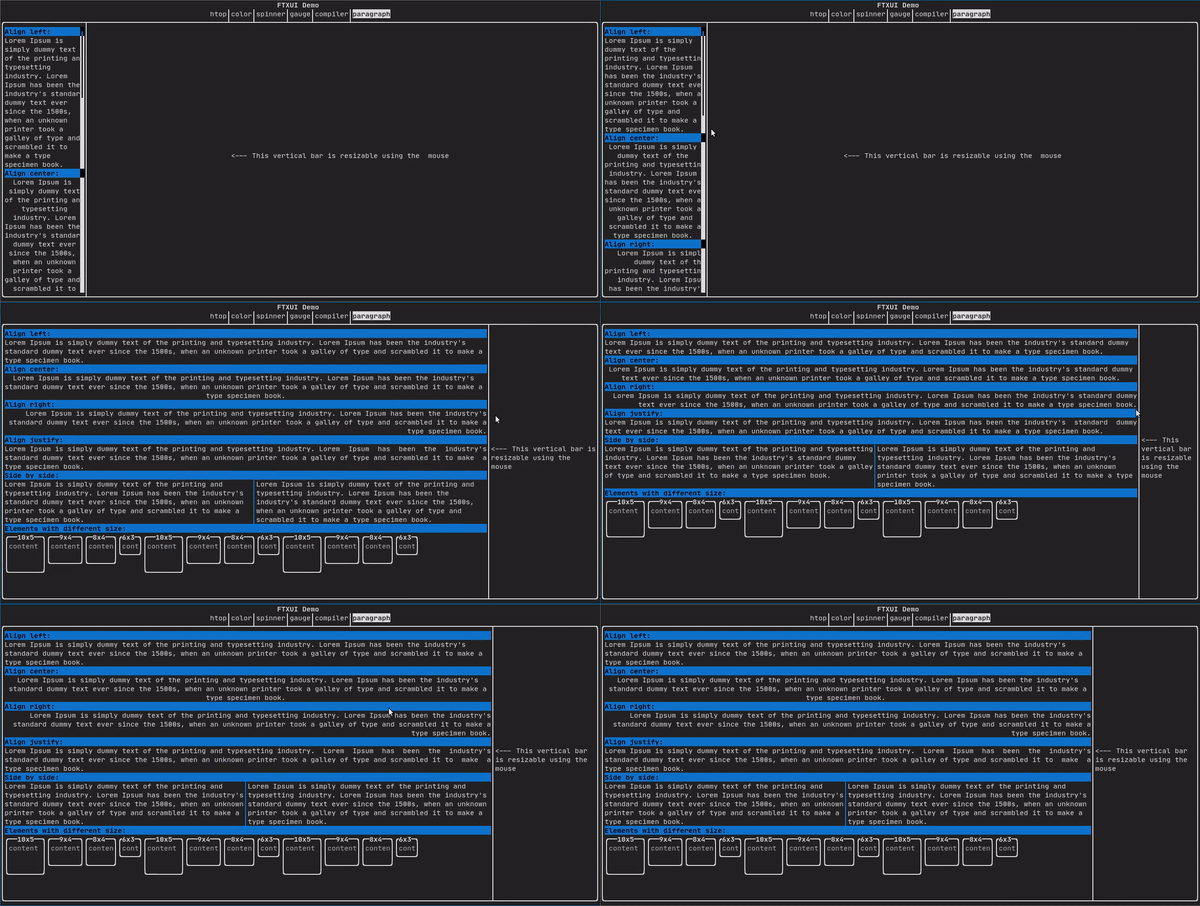
より詳細な例については、詳細な例を参照してください。Paragraphには、以下に示す他のバリアントも含まれています。
border
要素の周囲に境界線を追加します。
コード:
Element border(Element child)
要素の周囲にボーダーを描画します。
ターミナル出力:
┌───────────┐
│The element│
└───────────┘
- Note
- パイプ演算子を使用しても同じ動作を実現できます。
コード: text("The element") | border
Borderには、以下に示すさまざまなスタイルもあります。
window
ftxui::windowはftxui::borderですが、追加のヘッダーがあります。要素の周囲にウィンドウを追加するには、それをラップし、ヘッダーとして文字列を指定します。 コード:
window(
"The window", text(
"The element"))
Element window(Element title, Element content, BorderStyle border)
要素の周囲にタイトルとボーダーを持つウィンドウを描画します。
ターミナル出力:
┌The window─┐
│The element│
└───────────┘
separator
コンテナの内容を視覚的に2つに分割する垂直/水平線を表示します。
コード:
hbox({
text("Left"),
separator(),
text("Right")
})
)
ターミナル出力:
┌────┬─────┐
│left│right│
└────┴─────┘
Separatorsには、以下に示すさまざまなフレーバーがあります。
Color background,
Color foreground);
Color background,
Color foreground);
}
gauge
これは、進行状況の比率を表す視覚要素です。
コード:
ターミナル出力:
┌────────────────────────────────────────────────────────────────────────────┐
│██████████████████████████████████████ │
└────────────────────────────────────────────────────────────────────────────┘
ゲージは、以下に示すように多くの向きで表示できます。
namespace {
Element gauge(float ratio);
Element gaugeLeft(float ratio);
Element gaugeRight(float ratio);
Element gaugeUp(float ratio);
Element gaugeDown(float ratio);
Element gaugeDirection(float ratio, GaugeDirection);
}
graph
参照:
Element graph(GraphFunction);
Colors
ほとんどのターミナルコンソールは、色付きのテキストと色付きの背景を表示できます。FTXUIはすべてのカラーパレットをサポートしています。
Decorator color(Color);
Decorator bgcolor(Color);
カラーギャラリー: 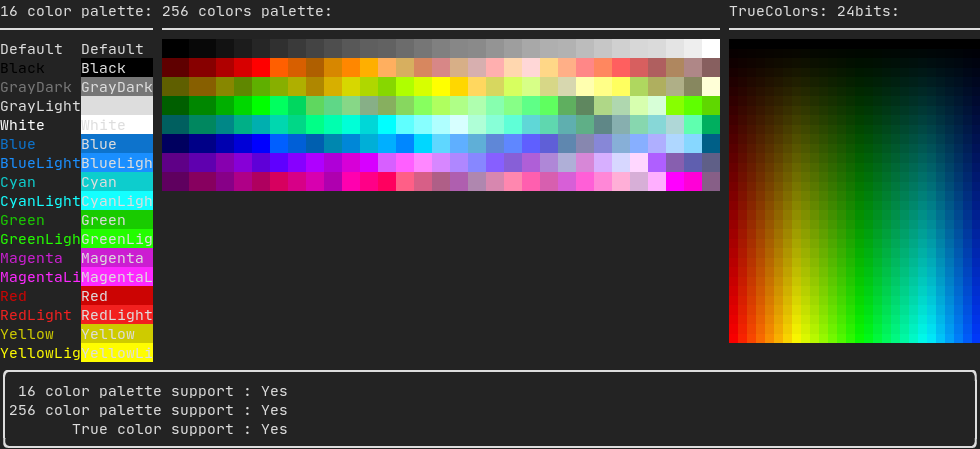
Palette16
ほとんどのターミナルでは、以下の色がサポートされています。
- Default
- Black
- GrayDark
- GrayLight
- White
- Blue
- BlueLight
- Cyan
- CyanLight
- Green
- GreenLight
- Magenta
- MagentaLight
- Red
- RedLight
- Yellow
- YellowLight
パイプ演算子を使用した上記の色の使用例:
text("Blue foreground") | color(Color::Blue);
text("Blue background") | bgcolor(Color::Blue);
text("Black on white") | color(Color::Black) | bgcolor(Color::White);
Palette256
256色をサポートするターミナルで。
text("HotPink") | color(Color::HotPink);
TrueColor
TrueColorをサポートするターミナルでは、24ビットRGB色空間を直接使用できます。
以下のコンストラクタを使用して、色の**RGB**または**HSV**値を指定します。
2つのコンストラクタがあります。
static Color HSV(uint8_t hue, uint8_t saturation, uint8_t value)
HSV表現から色を構築します。 https://en.wikipedia.org/wiki/HSL_and_HSV.
static Color RGB(uint8_t red, uint8_t green, uint8_t blue)
RGB表現から色を構築します。 https://en.wikipedia.org/wiki/RGB_color_model.
LinearGradient
FTXUIは線形グラデーションをサポートしています。前景または背景のいずれかです。
Decorator color(const LinearGradient&);
Decorator bgcolor(const LinearGradient&);
ftxui::LinearGradientは、角度(度数)と色の停止点のリストによって定義されます。
auto gradient = LinearGradient()
.Angle(45)
.AddStop(0.0, Color::Red)
.AddStop(0.5, Color::Green)
.AddStop(1.0, Color::Blue);
簡略化されたコンストラクタも使用できます。
LinearGradient(Color::Red, Color::Blue);
LinearGradient(45, Color::Red, Color::Blue);
デモを参照してください。
Style
色付きのテキストと色付きの背景に加えて、多くのターミナルはbold、italic、dim、underlined、inverted、blinkなどのテキスト効果をサポートしています。
Element bold(Element);
Element italic(Element);
Element dim(Element);
Element inverted(Element);
Element underlined(Element);
Element underlinedDouble(Element);
Element strikethrough(Element);
Element blink(Element);
Decorator color(Color);
Decorator bgcolor(Color);
Decorator colorgrad(LinearGradient);
Decorator bgcolorgrad(LinearGradient);
例

これらの効果を使用するには、要素を目的の効果でラップするだけです。
underlined(bold(text("This text is bold and underlined")))
または、パイプ演算子を使用して要素にチェーンすることもできます。
text("This text is bold") | bold | underlined
Layout
要素を次の方法で配置できます。
ftxui::hboxで**水平に**ftxui::vboxで**垂直に**ftxui::gridboxで**グリッド内に**ftxui::flexboxを使用して**一方向に折り返し**
ftxui::hbox、ftxui::vbox、ftxui::fillerを使用した例。
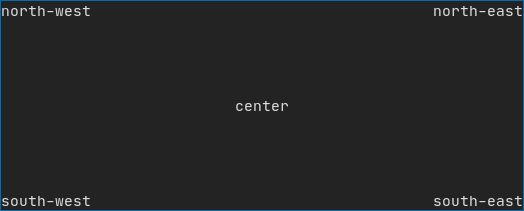
ftxui::gridboxを使用した例。
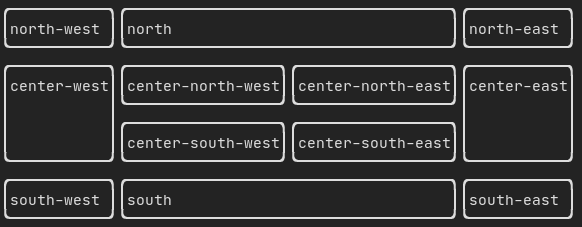
flexboxを使用した例。
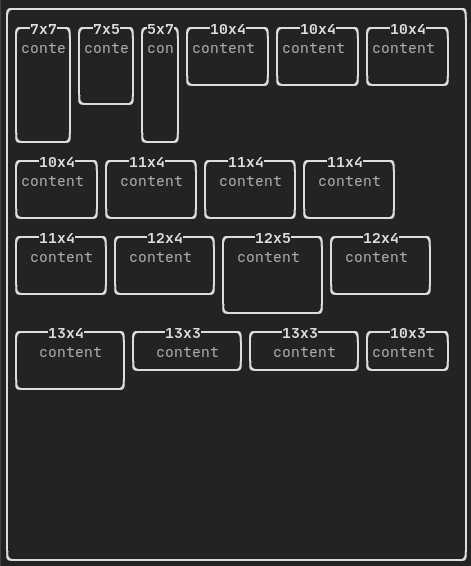
この例と関連するデモを確認してください。
要素はftxui::flexデコレータを使用して柔軟にすることもできます。
コード:
hbox({
text("middle") | border | flex,
});
ターミナル出力:
┌────┐┌─────────────────────────────────────────────────────┐┌─────┐
│left││middle ││right│
└────┘└─────────────────────────────────────────────────────┘└─────┘
コード:
hbox({
text("middle") | border | flex,
text("right") | border | flex,
});
ターミナル出力:
┌────┐┌───────────────────────────────┐┌───────────────────────────────┐
│left││middle ││right │
└────┘└───────────────────────────────┘└───────────────────────────────┘
Table
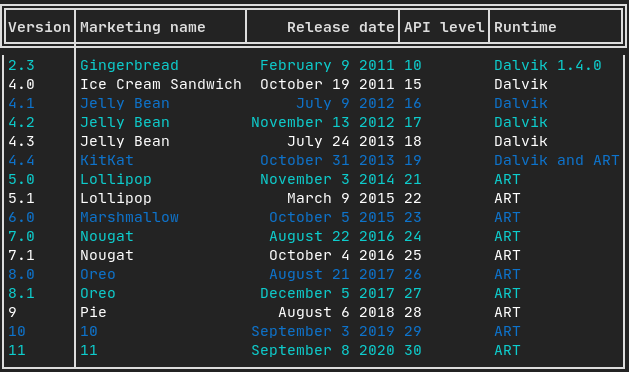
データをきれいにテーブルのような視覚形式に簡単にフォーマットできます。
コード例:
Canvas
API <ftxui/dom/canvas.hpp>を参照してください。
auto c = Canvas(100, 100);
c.DrawPointLine(10, 10, 80, 10, Color::Red);
auto element = canvas(c);
描画はftxui::Canvasで、点字、ブロック、または単純な文字を使用して実行できます。
単純な例:
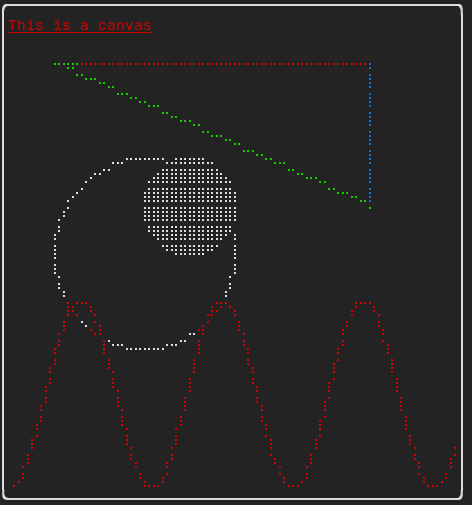
複雑な例: