详细描述
请查看 ftxui/component 模块的 教程。
类 | |
| class | ComponentBase |
| 它将自身实现为 ftxui::Element。它通过响应 ftxui::Event 来实现键盘导航。 更多... | |
| struct | UnderlineOption |
| 下划线效果的选项。 更多... | |
| struct | AnimatedColorOption |
| 可能是动画颜色的选项。 更多... | |
| struct | MenuEntryOption |
| MenuEntry 组件的选项。 更多... | |
| struct | MenuOption |
| Menu 组件的选项。 更多... | |
| struct | ButtonOption |
| AnimatedButton 组件的选项。 更多... | |
| struct | CheckboxOption |
| Checkbox 组件的选项。 更多... | |
| struct | InputOption |
| Input 组件的选项。 更多... | |
| struct | RadioboxOption |
| Radiobox 组件的选项。 更多... | |
| struct | WindowRenderState |
传递给 Window 组件渲染函数的 State。 更多... | |
| struct | DropdownOption |
| Dropdown 组件的选项。下拉菜单是打开/关闭单选框的复选框。 更多... | |
| struct | Event |
| 代表一个事件。它可以是按键事件、终端大小调整等等... 更多... | |
| class | Loop |
| Loop 是一个管理组件事件循环的类。 更多... | |
| struct | Mouse |
| 一个鼠标事件。它包含鼠标的坐标、按下的按钮以及修饰符(shift、ctrl、meta)。 更多... | |
| class | ScreenInteractive |
ScreenInteractive 是一个可以处理事件、运行主循环和管理组件的 Screen。 更多... | |
函数 | |
| void | RequestAnimationFrame () |
| RequestAnimationFrame 是一个请求在下一个动画周期中绘制新帧的函数。 | |
| Component | Button (ButtonOption option) |
| 绘制一个按钮。点击时执行一个函数。 | |
| Component | Button (ConstStringRef label, std::function< void()> on_click, ButtonOption option) |
| 绘制一个按钮。点击时执行一个函数。 | |
| Component | CatchEvent (Component child, std::function< bool(Event event)> on_event) |
| 返回一个组件,使用|on_event|捕获事件。当事件已被处理时,此函数必须返回true,否则返回false。 | |
| ComponentDecorator | CatchEvent (std::function< bool(Event)> on_event) |
| 装饰一个组件,使用|on_event|捕获事件。当事件已被处理时,此函数必须返回true,否则返回false。 | |
| Component | Checkbox (CheckboxOption option) |
| 绘制可勾选元素。 | |
| Component | Checkbox (ConstStringRef label, bool *checked, CheckboxOption option) |
| 绘制可勾选元素。 | |
| Component | Vertical (Components children) |
| 一个组件列表,垂直逐个绘制,并使用上/下箭头键或“j”/“k”键垂直导航。 | |
| Component | Vertical (Components children, int *selector) |
| 一个组件列表,垂直逐个绘制,并使用上/下箭头键或“j”/“k”键垂直导航。 这对于实现菜单很有用。 | |
| Component | Horizontal (Components children) |
| 一个组件列表,水平逐个绘制,并使用左/右箭头键或“h”/“l”键水平导航。 | |
| Component | Horizontal (Components children, int *selector) |
| 一个组件列表,水平逐个绘制,并使用左/右箭头键或“h”/“l”键水平导航。 | |
| Component | Tab (Components children, int *selector) |
| 一个组件列表,一次只绘制并与其交互一个。|selector| 提供所选组件的索引。这对于实现选项卡很有用。 | |
| Component | Stacked (Components children) |
| 一个组件列表,它们相互堆叠。 事件传播到第一个组件,如果未处理,则传播到第二个,依此类推。 组件以给定顺序的相反顺序绘制。 当一个组件获得焦点时,它会被置于最前面,而不改变其他元素的相对顺序。 | |
| Component | Dropdown (ConstStringListRef entries, int *selected) |
| 一个下拉菜单。 | |
| Component | Dropdown (DropdownOption option) |
| 一个下拉菜单。 | |
| Component | Hoverable (Component component, bool *hover) |
| Component | Hoverable (Component component, std::function< void()> on_enter, std::function< void()> on_leave) |
| 包装一个组件。使用回调。 | |
| ComponentDecorator | Hoverable (bool *hover) |
| 包装一个组件。使其能够知道鼠标是否悬停在其上。 | |
| ComponentDecorator | Hoverable (std::function< void()> on_enter, std::function< void()> on_leave) |
| 包装一个组件。使其能够知道鼠标是否悬停在其上。 | |
| Component | Hoverable (Component component, std::function< void(bool)> on_change) |
| 包装一个组件。使其能够知道鼠标是否悬停在其上。 | |
| ComponentDecorator | Hoverable (std::function< void(bool)> on_change) |
| 包装一个组件。使其能够知道鼠标是否悬停在其上。 | |
| Component | Input (InputOption option) |
| 用于编辑文本的输入框。 | |
| Component | Input (StringRef content, InputOption option) |
| 用于编辑文本的输入框。 | |
| Component | Input (StringRef content, StringRef placeholder, InputOption option) |
| 用于编辑文本的输入框。 | |
| Component | Maybe (Component child, std::function< bool()> show) |
| 装饰一个组件 |child|。它仅在 |show| 返回 true 时显示。 true。 | |
| ComponentDecorator | Maybe (std::function< bool()> show) |
| 装饰一个组件。它仅在 |show| 函数返回 true 时显示。 返回 true。 | |
| Component | Maybe (Component child, const bool *show) |
| 装饰一个组件 |child|。它仅在 |show| 为 true 时显示。 | |
| ComponentDecorator | Maybe (const bool *show) |
| 装饰一个组件。它仅在 |show| 为 true 时显示。 | |
| Component | Menu (MenuOption option) |
| 文本列表。選定的元素是焦點。 | |
| Component | Menu (ConstStringListRef entries, int *selected, MenuOption option) |
| 文本列表。選定的元素是焦點。 | |
| Component | Toggle (ConstStringListRef entries, int *selected) |
| 元素的水平列表。用戶可以瀏覽它們。 | |
| Component | MenuEntry (ConstStringRef label, MenuEntryOption option) |
| 一個特定的菜單條目。它們可以放入 Container::Vertical 中形成一個菜單。 | |
| Component | MenuEntry (MenuEntryOption option) |
| 一個特定的菜單條目。它們可以放入 Container::Vertical 中形成一個菜單。 | |
| Component | Modal (Component main, Component modal, const bool *show_modal) |
| ComponentDecorator | Modal (Component modal, const bool *show_modal) |
| Component | Radiobox (RadioboxOption option) |
| 元素列表,其中只能选择一个。 | |
| Component | Radiobox (ConstStringListRef entries, int *selected, RadioboxOption option) |
| 元素列表,其中只能选择一个。 | |
| Component | Renderer (std::function< Element()> render) |
| 返回一个组件,使用 |render| 来渲染其界面。 | |
| Component | Renderer (Component child, std::function< Element()> render) |
| 返回一个新组件,类似于 |child|,但使用 |render| 作为 Component::Render() 事件。 | |
| Component | Renderer (std::function< Element(bool)> render) |
| 返回一个可聚焦的组件,使用 |render| 来渲染其界面。 | |
| ComponentDecorator | Renderer (ElementDecorator decorator) |
| 装饰一个组件,通过装饰其渲染内容。 | |
| Component | ResizableSplitLeft (Component main, Component back, int *main_size) |
| 两个组件之间的水平分割,可通过鼠标配置。 | |
| Component | ResizableSplitRight (Component main, Component back, int *main_size) |
| 两个组件之间的水平分割,可通过鼠标配置。 | |
| Component | ResizableSplitTop (Component main, Component back, int *main_size) |
| 两个组件之间的垂直分割,可通过鼠标配置。 | |
| Component | ResizableSplitBottom (Component main, Component back, int *main_size) |
| 两个组件之间的垂直分割,可通过鼠标配置。 | |
| Component | Slider (ConstStringRef label, Ref< int > value, ConstRef< int > min, ConstRef< int > max, ConstRef< int > increment) |
| 一个水平滑块。 | |
| Component | Window (WindowOptions option) |
一个可拖动/可调整大小的窗口。要使用多个窗口,它们必须 使用 Container::Stacked({...}) 组件进行堆叠; | |
类说明
◆ ftxui::ComponentBase
| class ftxui::ComponentBase |
它将自身实现为 ftxui::Element。它通过响应 ftxui::Event 来实现键盘导航。
在文件 component_base.hpp 第 28 行定义.
Public 成员函数 | |
| ComponentBase (Components children) | |
| virtual | ~ComponentBase () |
| ComponentBase ()=default | |
| ComponentBase (const ComponentBase &)=delete | |
| ComponentBase (ComponentBase &&)=delete | |
| ComponentBase & | operator= (const ComponentBase &)=delete |
| ComponentBase & | operator= (ComponentBase &&)=delete |
| ComponentBase * | Parent () const |
| 返回父 ComponentBase,如果没有则返回 null。 | |
| Component & | ChildAt (size_t i) |
访问索引 i 处的子项。 | |
| size_t | ChildCount () const |
| 返回子项的数量。 | |
| int | Index () const |
| 返回组件在其父级中的索引。如果没有父级,则返回 -1。 | |
| void | Add (Component children) |
| 添加一个子项。 @param child 要附加的子项。 | |
| void | Detach () |
| 将此子项从其父级分离。 | |
| void | DetachAllChildren () |
| 移除所有子项。 | |
| Element | Render () |
| 绘制组件。 构建一个 ftxui::Element,用于在表示此 ftxui::ComponentBase 的 ftxui::Screen 上绘制。 请覆盖 OnRender() 以修改渲染。 | |
| virtual Element | OnRender () |
| 绘制组件。 构建一个 ftxui::Element,用于在表示此 ftxui::ComponentBase 的 ftxui::Screen 上绘制。 此函数旨在被覆盖。 | |
| virtual bool | OnEvent (Event) |
| 响应事件时调用。 | |
| virtual void | OnAnimation (animation::Params ¶ms) |
| 响应动画事件时调用。 | |
| virtual Component | ActiveChild () |
| 返回当前活动的子项。 | |
| virtual bool | Focusable () const |
| 当组件包含可聚焦元素时返回 true。 使用键盘导航时,不可聚焦的组件将被跳过。 | |
| bool | Active () const |
| 返回该元素是否是其父级的当前活动子项。 | |
| bool | Focused () const |
| 返回元素是否被用户聚焦。 当 ComponentBase 被用户聚焦时返回 true。当一个元素及其所有祖先都是其父级的 ActiveChild() 并且它是 Focusable() 时,该元素被聚焦。 | |
| virtual void | SetActiveChild (ComponentBase *child) |
| 使 |child| 成为“活动”子项。 | |
| void | SetActiveChild (Component child) |
| 使 |child| 成为“活动”子项。 | |
| void | TakeFocus () |
| 配置所有祖先以将焦点赋予此组件。 | |
Protected 成员函数 | |
| CapturedMouse | CaptureMouse (const Event &event) |
| 如果可用,则捕获 CapturedMouse。只有一个组件可以捕获它。 它表示一个优先于其他组件的组件。 | |
Protected 属性 | |
| Components | children_ |
构造及析构函数说明
◆ ComponentBase() [1/4]
|
inlineexplicit |
在文件 component_base.hpp 第 30 行定义.
◆ ~ComponentBase()
|
virtual |
在文件 component.cpp 第 31 行定义.
◆ ComponentBase() [2/4]
|
default |
◆ ComponentBase() [3/4]
|
delete |
◆ ComponentBase() [4/4]
|
delete |
成员函数说明
◆ operator=() [1/2]
|
delete |
◆ operator=() [2/2]
|
delete |
◆ Parent()
| ComponentBase * Parent | ( | ) | const |
◆ ChildAt()
| Component & ChildAt | ( | size_t | i | ) |
访问索引 i 处的子项。
在文件 component.cpp 第 43 行定义.
◆ ChildCount()
| size_t ChildCount | ( | ) | const |
返回子项的数量。
在文件 component.cpp 第 49 行定义.
◆ Index()
| int Index | ( | ) | const |
返回组件在其父级中的索引。如果没有父级,则返回 -1。
在文件 component.cpp 第 54 行定义.
◆ Add()
| void Add | ( | Component | children | ) |
添加一个子项。 @param child 要附加的子项。
在文件 component.cpp 第 70 行定义.
◆ Detach()
| void Detach | ( | ) |
◆ DetachAllChildren()
| void DetachAllChildren | ( | ) |
移除所有子项。
在文件 component.cpp 第 94 行定义.
◆ Render()
| Element Render | ( | ) |
绘制组件。 构建一个 ftxui::Element,用于在表示此 ftxui::ComponentBase 的 ftxui::Screen 上绘制。 请覆盖 OnRender() 以修改渲染。
在文件 component.cpp 第 103 行定义.
◆ OnRender()
|
virtual |
绘制组件。 构建一个 ftxui::Element,用于在表示此 ftxui::ComponentBase 的 ftxui::Screen 上绘制。 此函数旨在被覆盖。
在文件 component.cpp 第 138 行定义.
◆ OnEvent()
|
virtual |
响应事件时调用。
- 参数
-
event 事件。
- 返回
- 当事件已处理时返回 true。 默认实现会在每个子项上调用 OnEvent,直到有一个返回 true。 如果都没有返回 true,则返回 false。
在文件 component.cpp 第 151 行定义.
◆ OnAnimation()
|
virtual |
◆ ActiveChild()
|
virtual |
◆ Focusable()
|
virtual |
当组件包含可聚焦元素时返回 true。 使用键盘导航时,不可聚焦的组件将被跳过。
在文件 component.cpp 第 182 行定义.
◆ Active()
| bool Active | ( | ) | const |
返回该元素是否是其父级的当前活动子项。
在文件 component.cpp 第 192 行定义.
◆ Focused()
| bool Focused | ( | ) | const |
返回元素是否被用户聚焦。 当 ComponentBase 被用户聚焦时返回 true。当一个元素及其所有祖先都是其父级的 ActiveChild() 并且它是 Focusable() 时,该元素被聚焦。
在文件 component.cpp 第 198 行定义.
◆ SetActiveChild() [1/2]
|
virtual |
◆ SetActiveChild() [2/2]
| void SetActiveChild | ( | Component | child | ) |
◆ TakeFocus()
| void TakeFocus | ( | ) |
配置所有祖先以将焦点赋予此组件。
在文件 component.cpp 第 217 行定义.
◆ CaptureMouse()
|
protected |
类成员变量说明
◆ children_
|
protected |
在文件 component_base.hpp 第 92 行定义.
◆ ftxui::UnderlineOption
| struct ftxui::UnderlineOption |
下划线效果的选项。
在文件 component_options.hpp 第 33 行定义.
Public 成员函数 | |
| void | SetAnimation (animation::Duration d, animation::easing::Function f) |
| 设置下划线应如何动画。 | |
| void | SetAnimationDuration (animation::Duration d) |
| 设置下划线应如何动画。 | |
| void | SetAnimationFunction (animation::easing::Function f) |
| 设置下划线应如何动画。 | |
| void | SetAnimationFunction (animation::easing::Function f_leader, animation::easing::Function f_follower) |
| 设置下划线应如何动画。 这对于解除leader和follower的动画同步非常有用。 | |
Public 属性 | |
| bool | enabled = false |
| Color | color_active = Color::White |
| Color | color_inactive = Color::GrayDark |
| animation::easing::Function | leader_function |
| animation::easing::Function | follower_function |
| animation::Duration | leader_duration = std::chrono::milliseconds(250) |
| animation::Duration | leader_delay = std::chrono::milliseconds(0) |
| animation::Duration | follower_duration = std::chrono::milliseconds(250) |
| animation::Duration | follower_delay = std::chrono::milliseconds(0) |
成员函数说明
◆ SetAnimation()
| void SetAnimation | ( | animation::Duration | d, |
| animation::easing::Function | f ) |
◆ SetAnimationDuration()
| void SetAnimationDuration | ( | animation::Duration | d | ) |
◆ SetAnimationFunction() [1/2]
| void SetAnimationFunction | ( | animation::easing::Function | f | ) |
◆ SetAnimationFunction() [2/2]
| void SetAnimationFunction | ( | animation::easing::Function | f_leader, |
| animation::easing::Function | f_follower ) |
设置下划线应如何动画。 这对于解除leader和follower的动画同步非常有用。
- 参数
-
f_leader leader的动画持续时间。 f_follower follower的动画持续时间。
在文件 component_options.cpp 第 57 行定义.
类成员变量说明
◆ enabled
| bool enabled = false |
在文件 component_options.hpp 第 34 行定义.
◆ color_active
| Color color_active = Color::White |
在文件 component_options.hpp 第 36 行定义.
◆ color_inactive
| Color color_inactive = Color::GrayDark |
在文件 component_options.hpp 第 37 行定义.
◆ leader_function
| animation::easing::Function leader_function |
在文件 component_options.hpp 第 39 行定义.
◆ follower_function
| animation::easing::Function follower_function |
在文件 component_options.hpp 第 41 行定义.
◆ leader_duration
| animation::Duration leader_duration = std::chrono::milliseconds(250) |
在文件 component_options.hpp 第 44 行定义.
◆ leader_delay
| animation::Duration leader_delay = std::chrono::milliseconds(0) |
在文件 component_options.hpp 第 45 行定义.
◆ follower_duration
| animation::Duration follower_duration = std::chrono::milliseconds(250) |
在文件 component_options.hpp 第 46 行定义.
◆ follower_delay
| animation::Duration follower_delay = std::chrono::milliseconds(0) |
在文件 component_options.hpp 第 47 行定义.
◆ ftxui::AnimatedColorOption
| struct ftxui::AnimatedColorOption |
可能是动画颜色的选项。
在文件 component_options.hpp 第 58 行定义.
Public 成员函数 | |
| void | Set (Color inactive, Color active, animation::Duration duration=std::chrono::milliseconds(250), animation::easing::Function function=animation::easing::QuadraticInOut) |
| 一个可动画的颜色选项。 @params _inactive 当组件不活动时的颜色。 @params _active 当组件活动时的颜色。 @params _duration 动画的持续时间。 @params _function 动画的缓动函数。 | |
Public 属性 | |
| bool | enabled = false |
| Color | inactive |
| Color | active |
| animation::Duration | duration = std::chrono::milliseconds(250) |
| animation::easing::Function | function = animation::easing::QuadraticInOut |
成员函数说明
◆ Set()
| void Set | ( | Color | inactive, |
| Color | active, | ||
| animation::Duration | duration = std::chrono::milliseconds(250), | ||
| animation::easing::Function | function = animation::easing::QuadraticInOut ) |
一个可动画的颜色选项。 @params _inactive 当组件不活动时的颜色。 @params _active 当组件活动时的颜色。 @params _duration 动画的持续时间。 @params _function 动画的缓动函数。
在文件 component_options.cpp 第 19 行定义.
类成员变量说明
◆ enabled
| bool enabled = false |
◆ inactive
| Color inactive |
◆ active
| Color active |
◆ duration
| animation::Duration duration = std::chrono::milliseconds(250) |
在文件 component_options.hpp 第 68 行定义.
◆ function
| animation::easing::Function function = animation::easing::QuadraticInOut |
在文件 component_options.hpp 第 69 行定义.
◆ ftxui::MenuEntryOption
| struct ftxui::MenuEntryOption |
MenuEntry 组件的选项。
在文件 component_options.hpp 第 79 行定义.
Public 属性 | |
| ConstStringRef | label = "MenuEntry" |
| std::function< Element(const EntryState &state)> | transform |
| AnimatedColorsOption | animated_colors |
类成员变量说明
◆ label
| ConstStringRef label = "MenuEntry" |
在文件 component_options.hpp 第 80 行定义.
◆ transform
| std::function<Element(const EntryState& state)> transform |
在文件 component_options.hpp 第 81 行定义.
◆ animated_colors
| AnimatedColorsOption animated_colors |
◆ ftxui::MenuOption
| struct ftxui::MenuOption |
Menu 组件的选项。
在文件 component_options.hpp 第 87 行定义.
静态 Public 成员函数 | |
| static MenuOption | Horizontal () |
| 水平菜单的标准选项。 这对于实现选项卡栏非常有用。 | |
| static MenuOption | HorizontalAnimated () |
| 动画水平菜单的标准选项。 这对于实现选项卡栏非常有用。 | |
| static MenuOption | Vertical () |
| 垂直菜单的标准选项。 这对于实现可选择项目列表非常有用。 | |
| static MenuOption | VerticalAnimated () |
| 动画垂直菜单的标准选项。 这对于实现可选择项目列表非常有用。 | |
| static MenuOption | Toggle () |
| 带有分隔符的水平菜单的标准选项。 这对于实现选项卡栏非常有用。 | |
Public 属性 | |
| ConstStringListRef | entries |
| Ref< int > | selected = 0 |
| UnderlineOption | underline |
| MenuEntryOption | entries_option |
| Direction | direction = Direction::Down |
| std::function< Element()> | elements_prefix |
| std::function< Element()> | elements_infix |
| std::function< Element()> | elements_postfix |
| std::function< void()> | on_change |
| std::function< void()> | on_enter |
| Ref< int > | focused_entry = 0 |
成员函数说明
◆ Horizontal()
|
static |
水平菜单的标准选项。 这对于实现选项卡栏非常有用。
在文件 component_options.cpp 第 67 行定义.
◆ HorizontalAnimated()
|
static |
动画水平菜单的标准选项。 这对于实现选项卡栏非常有用。
在文件 component_options.cpp 第 91 行定义.
◆ Vertical()
|
static |
垂直菜单的标准选项。 这对于实现可选择项目列表非常有用。
在文件 component_options.cpp 第 100 行定义.
◆ VerticalAnimated()
|
static |
动画垂直菜单的标准选项。 这对于实现可选择项目列表非常有用。
在文件 component_options.cpp 第 121 行定义.
◆ Toggle()
|
static |
带有分隔符的水平菜单的标准选项。 这对于实现选项卡栏非常有用。
在文件 component_options.cpp 第 143 行定义.
类成员变量说明
◆ entries
| ConstStringListRef entries |
在文件 component_options.hpp 第 95 行定义.
◆ selected
| Ref<int> selected = 0 |
条目列表。
在文件 component_options.hpp 第 96 行定义.
◆ underline
| UnderlineOption underline |
选中条目的索引。
在文件 component_options.hpp 第 99 行定义.
◆ entries_option
| MenuEntryOption entries_option |
在文件 component_options.hpp 第 100 行定义.
◆ direction
| Direction direction = Direction::Down |
在文件 component_options.hpp 第 101 行定义.
◆ elements_prefix
| std::function<Element()> elements_prefix |
在文件 component_options.hpp 第 102 行定义.
◆ elements_infix
| std::function<Element()> elements_infix |
在文件 component_options.hpp 第 103 行定义.
◆ elements_postfix
| std::function<Element()> elements_postfix |
在文件 component_options.hpp 第 104 行定义.
◆ on_change
| std::function<void()> on_change |
在文件 component_options.hpp 第 107 行定义.
◆ on_enter
| std::function<void()> on_enter |
◆ focused_entry
| Ref<int> focused_entry = 0 |
当用户按下回车键时调用。
在文件 component_options.hpp 第 109 行定义.
◆ ftxui::ButtonOption
| struct ftxui::ButtonOption |
静态 Public 成员函数 | |
| static ButtonOption | Ascii () |
| 创建一个ButtonOption,使用[]字符高亮显示。 | |
| static ButtonOption | Simple () |
| 创建一个ButtonOption,聚焦时反转显示。 | |
| static ButtonOption | Border () |
| 创建一个ButtonOption。按钮使用边框显示,聚焦时反转。这是当前的默认值。 | |
| static ButtonOption | Animated () |
| 创建一个使用动画颜色的ButtonOption。 | |
| static ButtonOption | Animated (Color color) |
| 创建一个使用动画颜色的ButtonOption。 | |
| static ButtonOption | Animated (Color background, Color foreground) |
| 创建一个使用动画颜色的ButtonOption。 | |
| static ButtonOption | Animated (Color background, Color foreground, Color background_active, Color foreground_active) |
| 创建一个使用动画颜色的ButtonOption。 | |
Public 属性 | |
| ConstStringRef | label = "Button" |
| std::function< void()> | on_click = [] {} |
| std::function< Element(const EntryState &)> | transform |
| AnimatedColorsOption | animated_colors |
成员函数说明
◆ Ascii()
|
static |
创建一个ButtonOption,使用[]字符高亮显示。
在文件 component_options.cpp 第 151 行定义.
◆ Simple()
|
static |
创建一个ButtonOption,聚焦时反转显示。
在文件 component_options.cpp 第 163 行定义.
◆ Border()
|
static |
创建一个ButtonOption。按钮使用边框显示,聚焦时反转。这是当前的默认值。
在文件 component_options.cpp 第 176 行定义.
◆ Animated() [1/4]
|
static |
创建一个使用动画颜色的ButtonOption。
在文件 component_options.cpp 第 193 行定义.
◆ Animated() [2/4]
|
static |
创建一个使用动画颜色的ButtonOption。
在文件 component_options.cpp 第 200 行定义.
◆ Animated() [3/4]
|
static |
创建一个使用动画颜色的ButtonOption。
在文件 component_options.cpp 第 210 行定义.
◆ Animated() [4/4]
|
static |
创建一个使用动画颜色的ButtonOption。
在文件 component_options.cpp 第 222 行定义.
类成员变量说明
◆ label
| ConstStringRef label = "Button" |
在文件 component_options.hpp 第 127 行定义.
◆ on_click
| std::function<void()> on_click = [] {} |
在文件 component_options.hpp 第 128 行定义.
◆ transform
| std::function<Element(const EntryState&)> transform |
在文件 component_options.hpp 第 131 行定义.
◆ animated_colors
| AnimatedColorsOption animated_colors |
在文件 component_options.hpp 第 132 行定义.
◆ ftxui::CheckboxOption
| struct ftxui::CheckboxOption |
Checkbox 组件的选项。
在文件 component_options.hpp 第 137 行定义.
静态 Public 成员函数 | |
| static CheckboxOption | Simple () |
| 标准Checkbox的选项。 | |
Public 属性 | |
| ConstStringRef | label = "Checkbox" |
| Ref< bool > | checked = false |
| std::function< Element(const EntryState &)> | transform |
| std::function< void()> | on_change = [] {} |
| 当用户改变状态时调用。 | |
成员函数说明
◆ Simple()
|
static |
标准Checkbox的选项。
在文件 component_options.cpp 第 241 行定义.
类成员变量说明
◆ label
| ConstStringRef label = "Checkbox" |
在文件 component_options.hpp 第 141 行定义.
◆ checked
| Ref<bool> checked = false |
在文件 component_options.hpp 第 143 行定义.
◆ transform
| std::function<Element(const EntryState&)> transform |
在文件 component_options.hpp 第 146 行定义.
◆ on_change
| std::function<void()> on_change = [] {} |
当用户改变状态时调用。
在文件 component_options.hpp 第 150 行定义.
◆ ftxui::InputOption
| struct ftxui::InputOption |
Input 组件的选项。
- 示例
- examples/component/homescreen.cpp, examples/component/input.cpp , 以及 examples/component/input_style.cpp.
在文件 component_options.hpp 第 163 行定义.
静态 Public 成员函数 | |
| static InputOption | Default () |
| 创建默认输入样式: | |
| static InputOption | Spacious () |
| 带有大边距的白底黑字样式: | |
Public 属性 | |
| StringRef | content = "" |
| 输入框的内容。 | |
| StringRef | placeholder = "" |
| 当输入框为空时显示的内容。 | |
| std::function< Element(InputState)> | transform |
| Ref< bool > | password = false |
| 使用 '*' 遮盖输入内容。 | |
| Ref< bool > | multiline = true |
| 输入框是否可以多行。 | |
| Ref< bool > | insert = true |
| 插入或覆盖字符模式。 | |
| std::function< void()> | on_change = [] {} |
| 当内容改变时调用。 | |
| std::function< void()> | on_enter = [] {} |
| 当用户按下回车键时调用。 | |
| Ref< int > | cursor_position = 0 |
成员函数说明
◆ Default()
|
static |
◆ Spacious()
|
static |
类成员变量说明
◆ content
| StringRef content = "" |
输入框的内容。
在文件 component_options.hpp 第 172 行定义.
◆ placeholder
| StringRef placeholder = "" |
当输入框为空时显示的内容。
在文件 component_options.hpp 第 175 行定义.
◆ transform
| std::function<Element(InputState)> transform |
在文件 component_options.hpp 第 178 行定义.
◆ password
| Ref<bool> password = false |
◆ multiline
| Ref<bool> multiline = true |
输入框是否可以多行。
在文件 component_options.hpp 第 180 行定义.
◆ insert
| Ref<bool> insert = true |
插入或覆盖字符模式。
在文件 component_options.hpp 第 181 行定义.
◆ on_change
| std::function<void()> on_change = [] {} |
当内容改变时调用。
在文件 component_options.hpp 第 184 行定义.
◆ on_enter
| std::function<void()> on_enter = [] {} |
当用户按下回车键时调用。
在文件 component_options.hpp 第 186 行定义.
◆ cursor_position
| Ref<int> cursor_position = 0 |
在文件 component_options.hpp 第 189 行定义.
◆ ftxui::RadioboxOption
| struct ftxui::RadioboxOption |
Radiobox 组件的选项。
在文件 component_options.hpp 第 194 行定义.
静态 Public 成员函数 | |
| static RadioboxOption | Simple () |
| 标准Radiobox的选项 | |
Public 属性 | |
| ConstStringListRef | entries |
| Ref< int > | selected = 0 |
| std::function< Element(const EntryState &)> | transform |
| std::function< void()> | on_change = [] {} |
| 当选中条目改变时调用。 | |
| Ref< int > | focused_entry = 0 |
成员函数说明
◆ Simple()
|
static |
标准Radiobox的选项
在文件 component_options.cpp 第 264 行定义.
类成员变量说明
◆ entries
| ConstStringListRef entries |
在文件 component_options.hpp 第 199 行定义.
◆ selected
| Ref<int> selected = 0 |
在文件 component_options.hpp 第 200 行定义.
◆ transform
| std::function<Element(const EntryState&)> transform |
在文件 component_options.hpp 第 203 行定义.
◆ on_change
| std::function<void()> on_change = [] {} |
当选中条目改变时调用。
在文件 component_options.hpp 第 207 行定义.
◆ focused_entry
| Ref<int> focused_entry = 0 |
在文件 component_options.hpp 第 208 行定义.
◆ ftxui::WindowRenderState
| struct ftxui::WindowRenderState |
传递给 Window 组件渲染函数的 State。
在文件 component_options.hpp 第 241 行定义.
Public 属性 | |
| Element | inner |
| 包装在此窗口内的元素。 | |
| const std::string & | title |
| 窗口的标题。 | |
| bool | active = false |
| 窗口是否为活动状态。 | |
| bool | drag = false |
| 窗口是否正在被拖动。 | |
| bool | resize = false |
| 窗口是否正在被调整大小。 | |
| bool | hover_left = false |
| 可调整大小的左侧是否被悬停。 | |
| bool | hover_right = false |
| 可调整大小的右侧是否被悬停。 | |
| bool | hover_top = false |
| 可调整大小的顶部是否被悬停。 | |
| bool | hover_down = false |
| 可调整大小的底部是否被悬停。 | |
类成员变量说明
◆ inner
| Element inner |
包装在此窗口内的元素。
在文件 component_options.hpp 第 242 行定义.
◆ title
| const std::string& title |
窗口的标题。
在文件 component_options.hpp 第 243 行定义.
◆ active
| bool active = false |
窗口是否为活动状态。
在文件 component_options.hpp 第 244 行定义.
◆ drag
| bool drag = false |
窗口是否正在被拖动。
在文件 component_options.hpp 第 245 行定义.
◆ resize
| bool resize = false |
窗口是否正在被调整大小。
在文件 component_options.hpp 第 246 行定义.
◆ hover_left
| bool hover_left = false |
可调整大小的左侧是否被悬停。
在文件 component_options.hpp 第 247 行定义.
◆ hover_right
| bool hover_right = false |
可调整大小的右侧是否被悬停。
在文件 component_options.hpp 第 248 行定义.
◆ hover_top
| bool hover_top = false |
可调整大小的顶部是否被悬停。
在文件 component_options.hpp 第 249 行定义.
◆ hover_down
| bool hover_down = false |
可调整大小的底部是否被悬停。
在文件 component_options.hpp 第 250 行定义.
◆ ftxui::DropdownOption
| struct ftxui::DropdownOption |
Public 属性 | |
| Ref< bool > | open = false |
| 下拉菜单是打开还是关闭: | |
| CheckboxOption | checkbox |
| RadioboxOption | radiobox |
| std::function< Element(bool open, Element checkbox, Element radiobox)> | transform |
类成员变量说明
◆ open
| Ref<bool> open = false |
下拉菜单是打开还是关闭:
在文件 component_options.hpp 第 278 行定义.
◆ checkbox
| CheckboxOption checkbox |
在文件 component_options.hpp 第 280 行定义.
◆ radiobox
| RadioboxOption radiobox |
在文件 component_options.hpp 第 282 行定义.
◆ transform
◆ ftxui::Event
| struct ftxui::Event |
代表一个事件。它可以是按键事件、终端大小调整等等...
例如:
- 可打印字符可以使用 Event::Character('a') 创建。
- 一些特殊事件是预定义的,例如 Event::ArrowLeft。
- 可以使用以下方法查找特殊事件的任意代码: ./example/util/print_key_press 例如,CTRL+A 映射到 Event::Special({1});
有关 xterm 规范的有用文档: https://invisible-island.net/xterm/ctlseqs/ctlseqs.html
Public 成员函数 | |
| bool | operator== (const Event &other) const |
| bool | operator!= (const Event &other) const |
| bool | operator< (const Event &other) const |
| const std::string & | input () const |
| bool | is_character () const |
| std::string | character () const |
| bool | is_mouse () const |
| struct Mouse & | mouse () |
| bool | is_cursor_position () const |
| int | cursor_x () const |
| int | cursor_y () const |
| bool | is_cursor_shape () const |
| int | cursor_shape () const |
| std::string | DebugString () const |
| 返回事件的字符串表示。 | |
静态 Public 成员函数 | |
| static Event | Character (std::string) |
| 对应于给定输入字符的事件。 | |
| static Event | Character (char) |
| 对应于给定输入字符的事件。 | |
| static Event | Character (wchar_t) |
| 对应于给定输入字符的事件。 | |
| static Event | Special (std::string) |
| 一个自定义事件,其含义由库用户定义。 | |
| static Event | Mouse (std::string, Mouse mouse) |
| 对应于给定输入字符序列的事件。 | |
| static Event | CursorPosition (std::string, int x, int y) |
| static Event | CursorShape (std::string, int shape) |
| 对应于终端 DCS(设备控制字符串)的事件。 | |
Public 属性 | |
| ScreenInteractive * | screen_ = nullptr |
静态 Public 属性 | |
| static const Event | ArrowLeft = Event::Special("\x1B[D") |
| static const Event | ArrowRight = Event::Special("\x1B[C") |
| static const Event | ArrowUp = Event::Special("\x1B[A") |
| static const Event | ArrowDown = Event::Special("\x1B[B") |
| static const Event | ArrowLeftCtrl = Event::Special("\x1B[1;5D") |
| static const Event | ArrowRightCtrl = Event::Special("\x1B[1;5C") |
| static const Event | ArrowUpCtrl = Event::Special("\x1B[1;5A") |
| static const Event | ArrowDownCtrl = Event::Special("\x1B[1;5B") |
| static const Event | Backspace = Event::Special({127}) |
| static const Event | Delete = Event::Special("\x1B[3~") |
| static const Event | Return = Event::Special({10}) |
| static const Event | Escape = Event::Special("\x1B") |
| static const Event | Tab = Event::Special({9}) |
| static const Event | TabReverse = Event::Special({27, 91, 90}) |
| static const Event | Insert = Event::Special("\x1B[2~") |
| static const Event | Home = Event::Special({27, 91, 72}) |
| static const Event | End = Event::Special({27, 91, 70}) |
| static const Event | PageUp = Event::Special({27, 91, 53, 126}) |
| static const Event | PageDown = Event::Special({27, 91, 54, 126}) |
| static const Event | F1 = Event::Special("\x1BOP") |
| static const Event | F2 = Event::Special("\x1BOQ") |
| static const Event | F3 = Event::Special("\x1BOR") |
| static const Event | F4 = Event::Special("\x1BOS") |
| static const Event | F5 = Event::Special("\x1B[15~") |
| static const Event | F6 = Event::Special("\x1B[17~") |
| static const Event | F7 = Event::Special("\x1B[18~") |
| static const Event | F8 = Event::Special("\x1B[19~") |
| static const Event | F9 = Event::Special("\x1B[20~") |
| static const Event | F10 = Event::Special("\x1B[21~") |
| static const Event | F11 = Event::Special("\x1B[23~") |
| static const Event | F12 = Event::Special("\x1B[24~") |
| static const Event | a = Event::Character("a") |
| static const Event | A = Event::Character("A") |
| static const Event | CtrlA = Event::Special("\x01") |
| static const Event | AltA = Event::Special("\x1b""a") |
| static const Event | CtrlAltA = Event::Special("\x1b\x01") |
| static const Event | b = Event::Character("b") |
| static const Event | B = Event::Character("B") |
| static const Event | CtrlB = Event::Special("\x02") |
| static const Event | AltB = Event::Special("\x1b""b") |
| static const Event | CtrlAltB = Event::Special("\x1b\x02") |
| static const Event | c = Event::Character("c") |
| static const Event | C = Event::Character("C") |
| static const Event | CtrlC = Event::Special("\x03") |
| static const Event | AltC = Event::Special("\x1b""c") |
| static const Event | CtrlAltC = Event::Special("\x1b\x03") |
| static const Event | d = Event::Character("d") |
| static const Event | D = Event::Character("D") |
| static const Event | CtrlD = Event::Special("\x04") |
| static const Event | AltD = Event::Special("\x1b""d") |
| static const Event | CtrlAltD = Event::Special("\x1b\x04") |
| static const Event | e = Event::Character("e") |
| static const Event | E = Event::Character("E") |
| static const Event | CtrlE = Event::Special("\x05") |
| static const Event | AltE = Event::Special("\x1b""e") |
| static const Event | CtrlAltE = Event::Special("\x1b\x05") |
| static const Event | f = Event::Character("f") |
| static const Event | F = Event::Character("F") |
| static const Event | CtrlF = Event::Special("\x06") |
| static const Event | AltF = Event::Special("\x1b""f") |
| static const Event | CtrlAltF = Event::Special("\x1b\x06") |
| static const Event | g = Event::Character("g") |
| static const Event | G = Event::Character("G") |
| static const Event | CtrlG = Event::Special("\x07") |
| static const Event | AltG = Event::Special("\x1b""g") |
| static const Event | CtrlAltG = Event::Special("\x1b\x07") |
| static const Event | h = Event::Character("h") |
| static const Event | H = Event::Character("H") |
| static const Event | CtrlH = Event::Special("\x08") |
| static const Event | AltH = Event::Special("\x1b""h") |
| static const Event | CtrlAltH = Event::Special("\x1b\x08") |
| static const Event | i = Event::Character("i") |
| static const Event | I = Event::Character("I") |
| static const Event | CtrlI = Event::Special("\x09") |
| static const Event | AltI = Event::Special("\x1b""i") |
| static const Event | CtrlAltI = Event::Special("\x1b\x09") |
| static const Event | j = Event::Character("j") |
| static const Event | J = Event::Character("J") |
| static const Event | CtrlJ = Event::Special("\x0a") |
| static const Event | AltJ = Event::Special("\x1b""j") |
| static const Event | CtrlAltJ = Event::Special("\x1b\x0a") |
| static const Event | k = Event::Character("k") |
| static const Event | K = Event::Character("K") |
| static const Event | CtrlK = Event::Special("\x0b") |
| static const Event | AltK = Event::Special("\x1b""k") |
| static const Event | CtrlAltK = Event::Special("\x1b\x0b") |
| static const Event | l = Event::Character("l") |
| static const Event | L = Event::Character("L") |
| static const Event | CtrlL = Event::Special("\x0c") |
| static const Event | AltL = Event::Special("\x1b""l") |
| static const Event | CtrlAltL = Event::Special("\x1b\x0c") |
| static const Event | m = Event::Character("m") |
| static const Event | M = Event::Character("M") |
| static const Event | CtrlM = Event::Special("\x0d") |
| static const Event | AltM = Event::Special("\x1b""m") |
| static const Event | CtrlAltM = Event::Special("\x1b\x0d") |
| static const Event | n = Event::Character("n") |
| static const Event | N = Event::Character("N") |
| static const Event | CtrlN = Event::Special("\x0e") |
| static const Event | AltN = Event::Special("\x1b""n") |
| static const Event | CtrlAltN = Event::Special("\x1b\x0e") |
| static const Event | o = Event::Character("o") |
| static const Event | O = Event::Character("O") |
| static const Event | CtrlO = Event::Special("\x0f") |
| static const Event | AltO = Event::Special("\x1b""o") |
| static const Event | CtrlAltO = Event::Special("\x1b\x0f") |
| static const Event | p = Event::Character("p") |
| static const Event | P = Event::Character("P") |
| static const Event | CtrlP = Event::Special("\x10") |
| static const Event | AltP = Event::Special("\x1b""p") |
| static const Event | CtrlAltP = Event::Special("\x1b\x10") |
| static const Event | q = Event::Character("q") |
| static const Event | Q = Event::Character("Q") |
| static const Event | CtrlQ = Event::Special("\x11") |
| static const Event | AltQ = Event::Special("\x1b""q") |
| static const Event | CtrlAltQ = Event::Special("\x1b\x11") |
| static const Event | r = Event::Character("r") |
| static const Event | R = Event::Character("R") |
| static const Event | CtrlR = Event::Special("\x12") |
| static const Event | AltR = Event::Special("\x1b""r") |
| static const Event | CtrlAltR = Event::Special("\x1b\x12") |
| static const Event | s = Event::Character("s") |
| static const Event | S = Event::Character("S") |
| static const Event | CtrlS = Event::Special("\x13") |
| static const Event | AltS = Event::Special("\x1b""s") |
| static const Event | CtrlAltS = Event::Special("\x1b\x13") |
| static const Event | t = Event::Character("t") |
| static const Event | T = Event::Character("T") |
| static const Event | CtrlT = Event::Special("\x14") |
| static const Event | AltT = Event::Special("\x1b""t") |
| static const Event | CtrlAltT = Event::Special("\x1b\x14") |
| static const Event | u = Event::Character("u") |
| static const Event | U = Event::Character("U") |
| static const Event | CtrlU = Event::Special("\x15") |
| static const Event | AltU = Event::Special("\x1b""u") |
| static const Event | CtrlAltU = Event::Special("\x1b\x15") |
| static const Event | v = Event::Character("v") |
| static const Event | V = Event::Character("V") |
| static const Event | CtrlV = Event::Special("\x16") |
| static const Event | AltV = Event::Special("\x1b""v") |
| static const Event | CtrlAltV = Event::Special("\x1b\x16") |
| static const Event | w = Event::Character("w") |
| static const Event | W = Event::Character("W") |
| static const Event | CtrlW = Event::Special("\x17") |
| static const Event | AltW = Event::Special("\x1b""w") |
| static const Event | CtrlAltW = Event::Special("\x1b\x17") |
| static const Event | x = Event::Character("x") |
| static const Event | X = Event::Character("X") |
| static const Event | CtrlX = Event::Special("\x18") |
| static const Event | AltX = Event::Special("\x1b""x") |
| static const Event | CtrlAltX = Event::Special("\x1b\x18") |
| static const Event | y = Event::Character("y") |
| static const Event | Y = Event::Character("Y") |
| static const Event | CtrlY = Event::Special("\x19") |
| static const Event | AltY = Event::Special("\x1b""y") |
| static const Event | CtrlAltY = Event::Special("\x1b\x19") |
| static const Event | z = Event::Character("z") |
| static const Event | Z = Event::Character("Z") |
| static const Event | CtrlZ = Event::Special("\x1a") |
| static const Event | AltZ = Event::Special("\x1b""z") |
| static const Event | CtrlAltZ = Event::Special("\x1b\x1a") |
| static const Event | Custom = Event::Special({0}) |
成员函数说明
◆ Character() [1/3]
◆ Character() [2/3]
◆ Character() [3/3]
◆ Special()
|
static |
◆ Mouse()
◆ CursorPosition()
◆ CursorShape()
|
static |
◆ operator==()
◆ operator!=()
◆ operator<()
◆ input()
|
inline |
◆ is_character()
◆ character()
|
inline |
◆ is_mouse()
|
inline |
◆ mouse()
◆ is_cursor_position()
◆ cursor_x()
◆ cursor_y()
◆ is_cursor_shape()
◆ cursor_shape()
◆ DebugString()
类成员变量说明
◆ ArrowLeft
|
static |
◆ ArrowRight
|
static |
◆ ArrowUp
|
static |
◆ ArrowDown
|
static |
◆ ArrowLeftCtrl
|
static |
◆ ArrowRightCtrl
|
static |
◆ ArrowUpCtrl
|
static |
◆ ArrowDownCtrl
|
static |
◆ Backspace
|
static |
◆ Delete
|
static |
◆ Return
|
static |
◆ Escape
|
static |
◆ Tab
|
static |
◆ TabReverse
|
static |
◆ Insert
|
static |
◆ Home
|
static |
◆ End
|
static |
◆ PageUp
|
static |
◆ PageDown
|
static |
◆ F1
|
static |
◆ F2
|
static |
◆ F3
|
static |
◆ F4
|
static |
◆ F5
|
static |
◆ F6
|
static |
◆ F7
|
static |
◆ F8
|
static |
◆ F9
|
static |
◆ F10
|
static |
◆ F11
|
static |
◆ F12
|
static |
◆ a
|
static |
◆ A
|
static |
◆ CtrlA
|
static |
◆ AltA
|
static |
◆ CtrlAltA
|
static |
◆ b
|
static |
◆ B
|
static |
◆ CtrlB
|
static |
◆ AltB
|
static |
◆ CtrlAltB
|
static |
◆ c
|
static |
◆ C
|
static |
◆ CtrlC
|
static |
◆ AltC
|
static |
◆ CtrlAltC
|
static |
◆ d
|
static |
◆ D
|
static |
◆ CtrlD
|
static |
◆ AltD
|
static |
◆ CtrlAltD
|
static |
◆ e
|
static |
◆ E
|
static |
◆ CtrlE
|
static |
◆ AltE
|
static |
◆ CtrlAltE
|
static |
◆ f
|
static |
◆ F
|
static |
◆ CtrlF
|
static |
◆ AltF
|
static |
◆ CtrlAltF
|
static |
◆ g
|
static |
◆ G
|
static |
◆ CtrlG
|
static |
◆ AltG
|
static |
◆ CtrlAltG
|
static |
◆ h
|
static |
◆ H
|
static |
◆ CtrlH
|
static |
◆ AltH
|
static |
◆ CtrlAltH
|
static |
◆ i
|
static |
◆ I
|
static |
◆ CtrlI
|
static |
◆ AltI
|
static |
◆ CtrlAltI
|
static |
◆ j
|
static |
◆ J
|
static |
◆ CtrlJ
|
static |
◆ AltJ
|
static |
◆ CtrlAltJ
|
static |
◆ k
|
static |
◆ K
|
static |
◆ CtrlK
|
static |
◆ AltK
|
static |
◆ CtrlAltK
|
static |
◆ l
|
static |
◆ L
|
static |
◆ CtrlL
|
static |
◆ AltL
|
static |
◆ CtrlAltL
|
static |
◆ m
|
static |
◆ M
|
static |
◆ CtrlM
|
static |
◆ AltM
|
static |
◆ CtrlAltM
|
static |
◆ n
|
static |
◆ N
|
static |
◆ CtrlN
|
static |
◆ AltN
|
static |
◆ CtrlAltN
|
static |
◆ o
|
static |
◆ O
|
static |
◆ CtrlO
|
static |
◆ AltO
|
static |
◆ CtrlAltO
|
static |
◆ p
|
static |
◆ P
|
static |
◆ CtrlP
|
static |
◆ AltP
|
static |
◆ CtrlAltP
|
static |
◆ q
|
static |
◆ Q
|
static |
◆ CtrlQ
|
static |
◆ AltQ
|
static |
◆ CtrlAltQ
|
static |
◆ r
|
static |
◆ R
|
static |
◆ CtrlR
|
static |
◆ AltR
|
static |
◆ CtrlAltR
|
static |
◆ s
|
static |
◆ S
|
static |
◆ CtrlS
|
static |
◆ AltS
|
static |
◆ CtrlAltS
|
static |
◆ t
|
static |
◆ T
|
static |
◆ CtrlT
|
static |
◆ AltT
|
static |
◆ CtrlAltT
|
static |
◆ u
|
static |
◆ U
|
static |
◆ CtrlU
|
static |
◆ AltU
|
static |
◆ CtrlAltU
|
static |
◆ v
|
static |
◆ V
|
static |
◆ CtrlV
|
static |
◆ AltV
|
static |
◆ CtrlAltV
|
static |
◆ w
|
static |
◆ W
|
static |
◆ CtrlW
|
static |
◆ AltW
|
static |
◆ CtrlAltW
|
static |
◆ x
|
static |
◆ X
|
static |
◆ CtrlX
|
static |
◆ AltX
|
static |
◆ CtrlAltX
|
static |
◆ y
|
static |
◆ Y
|
static |
◆ CtrlY
|
static |
◆ AltY
|
static |
◆ CtrlAltY
|
static |
◆ z
|
static |
◆ Z
|
static |
◆ CtrlZ
|
static |
◆ AltZ
|
static |
◆ CtrlAltZ
|
static |
◆ Custom
|
static |
◆ screen_
| ScreenInteractive* screen_ = nullptr |
◆ mouse
| struct Mouse mouse |
◆ cursor
◆ cursor_shape
◆ ftxui::Loop
| class ftxui::Loop |
Loop 是一个管理组件事件循环的类。
它负责运行组件、处理事件和更新屏幕。
Loop 类设计用于 ScreenInteractive 对象, 该对象表示终端屏幕。
示例
Public 成员函数 | |
| Loop (ScreenInteractive *screen, Component component) | |
| Loop 是 Component 和 ScreenInteractive 的包装器。 它用于在终端中运行 Component。 | |
| ~Loop () | |
| bool | HasQuitted () |
| 循环是否已退出。 | |
| void | RunOnce () |
执行循环。使 component 处理所有待处理的任务/事件。 如果前一帧无效,可能会绘制新帧。 在循环完成之前返回 true。 | |
| void | RunOnceBlocking () |
等待至少一个事件被处理并执行 Loop::RunOnce()。 | |
| void | Run () |
| 执行循环,阻塞当前线程,直到循环退出。 | |
| Loop (const Loop &)=default | |
| Loop (Loop &&)=delete | |
| Loop & | operator= (Loop &&)=delete |
| Loop (const ScreenInteractive &)=delete | |
| Loop & | operator= (const Loop &)=delete |
构造及析构函数说明
◆ Loop() [1/4]
| Loop | ( | ScreenInteractive * | screen, |
| Component | component ) |
Loop 是 Component 和 ScreenInteractive 的包装器。 它用于在终端中运行 Component。
- 参见
- Component, ScreenInteractive.
- ScreenInteractive::Loop().
- ScreenInteractive::ExitLoop().
- 参数
-
[in] screen 要使用的屏幕。 [in] component 要运行的组件。
◆ ~Loop()
◆ Loop() [2/4]
◆ Loop() [3/4]
◆ Loop() [4/4]
|
delete |
成员函数说明
◆ HasQuitted()
◆ RunOnce()
| void RunOnce | ( | ) |
◆ RunOnceBlocking()
| void RunOnceBlocking | ( | ) |
等待至少一个事件被处理并执行 Loop::RunOnce()。
◆ Run()
◆ operator=() [1/2]
◆ operator=() [2/2]
◆ ftxui::Mouse
| struct ftxui::Mouse |
Public 类型 | |
| enum | Button { Left = 0 , Middle = 1 , Right = 2 , None = 3 , WheelUp = 4 , WheelDown = 5 , WheelLeft = 6 , WheelRight = 7 } |
| enum | Motion { Released = 0 , Pressed = 1 , Moved = 2 } |
Public 属性 | |
| Button | button = Button::None |
| Motion | motion = Motion::Pressed |
| bool | shift = false |
| bool | meta = false |
| bool | control = false |
| int | x = 0 |
| int | y = 0 |
成员枚举类型说明
◆ Button
| enum Button |
◆ Motion
类成员变量说明
◆ button
| Button button = Button::None |
◆ motion
| Motion motion = Motion::Pressed |
◆ shift
◆ meta
◆ control
◆ x
◆ y
◆ ftxui::ScreenInteractive
| class ftxui::ScreenInteractive |
ScreenInteractive 是一个可以处理事件、运行主循环和管理组件的 Screen。
在文件 screen_interactive.hpp 第 33 行定义.
 类 ScreenInteractive 继承关系图: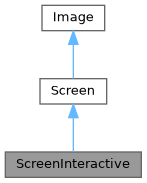
Public 类型 | |
| using | SelectionStyle = std::function<void(Pixel&)> |
Public 成员函数 | |
| ~ScreenInteractive () override | |
| void | TrackMouse (bool enable=true) |
设置是否跟踪鼠标并报告事件。 在主循环之外调用。例如 ScreenInteractive::Loop(...)。 | |
| void | HandlePipedInput (bool enable=true) |
| 启用或禁用自动管道输入处理。 启用后,FTXUI 将检测管道输入并将 stdin 从 /dev/tty 重定向 以进行键盘输入,从而允许应用程序读取管道数据,同时仍 接收交互式键盘事件。 | |
| void | Loop (Component) |
| 执行主循环。 | |
| void | Exit () |
| 退出主循环。 | |
| Closure | ExitLoopClosure () |
| 返回一个退出主循环的函数。 | |
| void | Post (Task task) |
| 向主循环添加一个任务。 它将在所有其他计划任务之后执行。 | |
| void | PostEvent (Event event) |
| 向主循环添加一个事件。 它将在所有其他计划事件之后执行。 | |
| void | RequestAnimationFrame () |
| 添加一个任务以再次绘制屏幕,直到所有动画完成。 | |
| CapturedMouse | CaptureMouse () |
| 尝试获取能够捕获鼠标的唯一锁。 | |
| Closure | WithRestoredIO (Closure) |
| 装饰一个函数。它以相同的方式执行,但在执行期间, 当前活动屏幕终端的钩子会被暂时卸载。 | |
| void | ForceHandleCtrlC (bool force) |
| 强制 FTXUI 处理或不处理 Ctrl-C,即使组件 捕获了 Event::CtrlC。 | |
| void | ForceHandleCtrlZ (bool force) |
| 强制 FTXUI 处理或不处理 Ctrl-Z,即使组件 捕获了 Event::CtrlZ。 | |
| std::string | GetSelection () |
| 返回当前选择的内容 | |
| void | SelectionChange (std::function< void()> callback) |
| std::string | ToString () const |
| void | Print () const |
| void | Clear () |
| 清除屏幕上的所有像素。 | |
| std::string | ResetPosition (bool clear=false) const |
| 返回一个字符串,用于将光标位置重置到屏幕开头。 | |
| void | ApplyShader () |
| Cursor | cursor () const |
| void | SetCursor (Cursor cursor) |
| uint8_t | RegisterHyperlink (const std::string &link) |
| const std::string & | Hyperlink (uint8_t id) const |
| const SelectionStyle & | GetSelectionStyle () const |
| 返回当前选择样式。 | |
| void | SetSelectionStyle (SelectionStyle decorator) |
| 设置当前选择样式。 | |
| std::string & | at (int x, int y) |
| 访问给定位置单元格中的字符。 | |
| const std::string & | at (int x, int y) const |
| 访问给定位置单元格中的字符。 | |
| Pixel & | PixelAt (int x, int y) |
| 访问给定位置的单元格 (Pixel)。 | |
| const Pixel & | PixelAt (int x, int y) const |
| 访问给定位置的单元格 (Pixel)。 | |
| int | dimx () const |
| int | dimy () const |
静态 Public 成员函数 | |
| static ScreenInteractive | FixedSize (int dimx, int dimy) |
| static ScreenInteractive | Fullscreen () |
| static ScreenInteractive | FullscreenPrimaryScreen () |
| static ScreenInteractive | FullscreenAlternateScreen () |
| static ScreenInteractive | FitComponent () |
| 创建一个 ScreenInteractive,其宽度和高度与正在绘制的组件匹配。 | |
| static ScreenInteractive | TerminalOutput () |
| static ScreenInteractive * | Active () |
| 返回当前活动屏幕,如果没有则返回空。 | |
| static Screen | Create (Dimensions dimension) |
| 创建一个具有给定维度的屏幕。 | |
| static Screen | Create (Dimensions width, Dimensions height) |
| 创建一个具有给定 x 轴和 y 轴维度的屏幕。 | |
Public 属性 | |
| friend | Private |
| Box | stencil |
Protected 属性 | |
| Cursor | cursor_ |
| std::vector< std::string > | hyperlinks_ = {""} |
| SelectionStyle | selection_style_ |
| int | dimx_ |
| int | dimy_ |
| std::vector< std::vector< Pixel > > | pixels_ |
成员类型定义说明
◆ SelectionStyle
|
inherited |
在文件 screen.hpp 第 74 行定义.
构造及析构函数说明
◆ ~ScreenInteractive()
|
overridedefault |
成员函数说明
◆ FixedSize()
|
static |
在文件 screen_interactive.cpp 第 284 行定义.
◆ Fullscreen()
|
static |
创建一个占据整个终端大小的 ScreenInteractive。这使用备用屏幕缓冲区, 以避免弄乱终端内容。
在文件 screen_interactive.cpp 第 297 行定义.
◆ FullscreenPrimaryScreen()
|
static |
创建一个占据整个终端大小的 ScreenInteractive。正在使用主屏幕缓冲区。 这意味着如果终端被调整大小,之前的内容可能会与终端内容混淆。
在文件 screen_interactive.cpp 第 304 行定义.
◆ FullscreenAlternateScreen()
|
static |
创建一个占据整个终端大小的 ScreenInteractive。这使用备用屏幕缓冲区, 以避免弄乱终端内容。
在文件 screen_interactive.cpp 第 317 行定义.
◆ FitComponent()
|
static |
创建一个 ScreenInteractive,其宽度和高度与正在绘制的组件匹配。
在文件 screen_interactive.cpp 第 344 行定义.
◆ TerminalOutput()
|
static |
创建一个 ScreenInteractive,其宽度与终端输出宽度匹配, 高度与正在绘制的组件匹配。
在文件 screen_interactive.cpp 第 330 行定义.
◆ TrackMouse()
| void TrackMouse | ( | bool | enable = true | ) |
设置是否跟踪鼠标并报告事件。 在主循环之外调用。例如 ScreenInteractive::Loop(...)。
- 参数
-
enable 是否启用鼠标事件跟踪。
- 注解
- 这必须在主循环之外调用。例如在调用
ScreenInteractive::Loop之前。 - 鼠标跟踪默认启用。
- 鼠标跟踪仅在支持的终端上受支持。
示例
在文件 screen_interactive.cpp 第 368 行定义.
◆ HandlePipedInput()
| void HandlePipedInput | ( | bool | enable = true | ) |
启用或禁用自动管道输入处理。 启用后,FTXUI 将检测管道输入并将 stdin 从 /dev/tty 重定向 以进行键盘输入,从而允许应用程序读取管道数据,同时仍 接收交互式键盘事件。
- 参数
-
enable 是否启用管道输入处理。默认为 true。
- 注解
- 这必须在 Loop() 之前调用。
- 此功能默认启用。
- 此功能仅在 POSIX 系统(Linux/macOS)上可用。
在文件 screen_interactive.cpp 第 380 行定义.
◆ Active()
|
static |
返回当前活动屏幕,如果没有则返回空。
在文件 screen_interactive.cpp 第 522 行定义.
◆ Loop()
◆ Exit()
| void Exit | ( | ) |
退出主循环。
在文件 screen_interactive.cpp 第 1019 行定义.
◆ ExitLoopClosure()
| Closure ExitLoopClosure | ( | ) |
返回一个退出主循环的函数。
在文件 screen_interactive.cpp 第 1014 行定义.
◆ Post()
| void Post | ( | Task | task | ) |
向主循环添加一个任务。 它将在所有其他计划任务之后执行。
在文件 screen_interactive.cpp 第 386 行定义.
◆ PostEvent()
| void PostEvent | ( | Event | event | ) |
向主循环添加一个事件。 它将在所有其他计划事件之后执行。
在文件 screen_interactive.cpp 第 394 行定义.
◆ RequestAnimationFrame()
| void RequestAnimationFrame | ( | ) |
添加一个任务以再次绘制屏幕,直到所有动画完成。
在文件 screen_interactive.cpp 第 399 行定义.
◆ CaptureMouse()
| CapturedMouse CaptureMouse | ( | ) |
◆ WithRestoredIO()
◆ ForceHandleCtrlC()
| void ForceHandleCtrlC | ( | bool | force | ) |
强制 FTXUI 处理或不处理 Ctrl-C,即使组件 捕获了 Event::CtrlC。
在文件 screen_interactive.cpp 第 498 行定义.
◆ ForceHandleCtrlZ()
| void ForceHandleCtrlZ | ( | bool | force | ) |
强制 FTXUI 处理或不处理 Ctrl-Z,即使组件 捕获了 Event::CtrlZ。
在文件 screen_interactive.cpp 第 504 行定义.
◆ GetSelection()
| std::string GetSelection | ( | ) |
返回当前选择的内容
在文件 screen_interactive.cpp 第 509 行定义.
◆ SelectionChange()
| void SelectionChange | ( | std::function< void()> | callback | ) |
在文件 screen_interactive.cpp 第 516 行定义.
◆ Create() [1/2]
|
staticinherited |
创建一个具有给定维度的屏幕。
在文件 screen.cpp 第 394 行定义.
◆ Create() [2/2]
|
staticinherited |
创建一个具有给定 x 轴和 y 轴维度的屏幕。
在文件 screen.cpp 第 388 行定义.
◆ ToString()
|
inherited |
生成一个可用于在终端上打印 Screen 的 std::string。
- 注解
- 不要忘记刷新 stdout。或者,您可以使用 Screen::Print();
在文件 screen.cpp 第 413 行定义.
◆ Print()
|
inherited |
在文件 screen.cpp 第 450 行定义.
◆ Clear()
|
inherited |
清除屏幕上的所有像素。
在文件 screen.cpp 第 490 行定义.
◆ ResetPosition()
|
inherited |
返回一个字符串,用于将光标位置重置到屏幕开头。
- 返回
- 用于将光标位置重置到屏幕开头的字符串。
在文件 screen.cpp 第 471 行定义.
◆ ApplyShader()
|
inherited |
在文件 screen.cpp 第 502 行定义.
◆ cursor()
|
inlineinherited |
在文件 screen.hpp 第 66 行定义.
◆ SetCursor()
|
inlineinherited |
在文件 screen.hpp 第 67 行定义.
◆ RegisterHyperlink()
|
inherited |
在文件 screen.cpp 第 529 行定义.
◆ Hyperlink()
|
inherited |
在文件 screen.cpp 第 542 行定义.
◆ GetSelectionStyle()
|
inherited |
◆ SetSelectionStyle()
|
inherited |
◆ at() [1/2]
|
inherited |
◆ at() [2/2]
|
inherited |
◆ PixelAt() [1/2]
|
inherited |
◆ PixelAt() [2/2]
|
inherited |
◆ dimx()
◆ dimy()
类成员变量说明
◆ Private
| friend Private |
在文件 screen_interactive.hpp 第 176 行定义.
◆ cursor_
|
protectedinherited |
在文件 screen.hpp 第 79 行定义.
◆ hyperlinks_
|
protectedinherited |
在文件 screen.hpp 第 80 行定义.
◆ selection_style_
|
protectedinherited |
在文件 screen.hpp 第 83 行定义.
◆ stencil
◆ dimx_
◆ dimy_
◆ pixels_
函数说明
◆ RequestAnimationFrame()
| void RequestAnimationFrame | ( | ) |
RequestAnimationFrame 是一个请求在下一个动画周期中绘制新帧的函数。
- 注解
- 此函数通常由需要随时间更新其状态或外观的组件调用,例如动画或过渡。当变化不依赖于终端接收到的事件,而是依赖于时间的推移时,这很有用。
尚未完成动画的组件可以调用此函数来请求稍后绘制新帧。
当没有新事件且没有动画需要完成时,不会绘制新帧。
在文件 screen_interactive.cpp 第 77 行定义.
◆ Button() [1/2]
| Component Button | ( | ButtonOption | option | ) |
绘制一个按钮。点击时执行一个函数。
- 参数
-
option 额外的可选参数。
- 参见
- ButtonBase
示例
Output
在文件 src/ftxui/component/button.cpp 第 175 行定义.
◆ Button() [2/2]
| Component Button | ( | ConstStringRef | label, |
| std::function< void()> | on_click, | ||
| ButtonOption | option ) |
绘制一个按钮。点击时执行一个函数。
- 参数
-
label 按钮的标签。 on_click 点击时执行的操作。 option 额外的可选参数。
- 参见
- ButtonBase
示例
Output
在文件 src/ftxui/component/button.cpp 第 203 行定义.
◆ CatchEvent() [1/2]
返回一个组件,使用|on_event|捕获事件。当事件已被处理时,此函数必须返回true,否则返回false。
- 参数
-
child 包装的组件。 on_event 绘制界面的函数。
示例
在文件 catch_event.cpp 第 53 行定义.
◆ CatchEvent() [2/2]
| ComponentDecorator CatchEvent | ( | std::function< bool(Event)> | on_event | ) |
装饰一个组件,使用|on_event|捕获事件。当事件已被处理时,此函数必须返回true,否则返回false。
- 参数
-
on_event 绘制界面的函数。
示例
在文件 catch_event.cpp 第 78 行定义.
◆ Checkbox() [1/2]
| Component Checkbox | ( | CheckboxOption | option | ) |
绘制可勾选元素。
- 参数
-
option 额外的可选参数。
- 参见
- CheckboxBase
示例
输出
在文件 src/ftxui/component/checkbox.cpp 第 108 行定义.
◆ Checkbox() [2/2]
| Component Checkbox | ( | ConstStringRef | label, |
| bool * | checked, | ||
| CheckboxOption | option ) |
绘制可勾选元素。
- 参数
-
label 复选框的标签。 checked 复选框是否被选中。 option 额外的可选参数。
- 参见
- CheckboxBase
示例
输出
在文件 src/ftxui/component/checkbox.cpp 第 135 行定义.
◆ Vertical() [1/2]
| Component Vertical | ( | Components | children | ) |
一个组件列表,垂直逐个绘制,并使用上/下箭头键或“j”/“k”键垂直导航。
- 参数
-
children 组件列表。
- 参见
- ContainerBase
Example
在文件 container.cpp 第 316 行定义.
◆ Vertical() [2/2]
| Component Vertical | ( | Components | children, |
| int * | selector ) |
一个组件列表,垂直逐个绘制,并使用上/下箭头键或“j”/“k”键垂直导航。 这对于实现菜单很有用。
- 参数
-
children 组件列表。 selector 对所选子组件索引的引用。
- 参见
- ContainerBase
Example
在文件 container.cpp 第 337 行定义.
◆ Horizontal() [1/2]
| Component Horizontal | ( | Components | children | ) |
一个组件列表,水平逐个绘制,并使用左/右箭头键或“h”/“l”键水平导航。
- 参数
-
children 组件列表。
- 参见
- ContainerBase
Example
在文件 container.cpp 第 357 行定义.
◆ Horizontal() [2/2]
| Component Horizontal | ( | Components | children, |
| int * | selector ) |
一个组件列表,水平逐个绘制,并使用左/右箭头键或“h”/“l”键水平导航。
- 参数
-
children 组件列表。 selector 对所选子组件索引的引用。
- 参见
- ContainerBase
Example
在文件 container.cpp 第 378 行定义.
◆ Tab()
| Component Tab | ( | Components | children, |
| int * | selector ) |
一个组件列表,一次只绘制并与其交互一个。|selector| 提供所选组件的索引。这对于实现选项卡很有用。
- 参数
-
children 组件列表。 selector 绘制的子组件的索引。
- 参见
- ContainerBase
Example
在文件 container.cpp 第 399 行定义.
◆ Stacked()
| Component Stacked | ( | Components | children | ) |
一个组件列表,它们相互堆叠。 事件传播到第一个组件,如果未处理,则传播到第二个,依此类推。 组件以给定顺序的相反顺序绘制。 当一个组件获得焦点时,它会被置于最前面,而不改变其他元素的相对顺序。
这应该与 Window 组件一起使用。
- 参数
-
children 组件列表。
- 参见
- Window
Example
在文件 container.cpp 第 424 行定义.
◆ Dropdown() [1/2]
| Component Dropdown | ( | ConstStringListRef | entries, |
| int * | selected ) |
◆ Dropdown() [2/2]
| Component Dropdown | ( | DropdownOption | option | ) |
◆ Hoverable() [1/6]
◆ Hoverable() [2/6]
| Component Hoverable | ( | Component | component, |
| std::function< void()> | on_enter, | ||
| std::function< void()> | on_leave ) |
包装一个组件。使用回调。
- 参数
-
component 被包装的组件。 on_enter 鼠标进入时的回调函数 on_leave 鼠标离开时的回调函数
示例
在文件 hoverable.cpp 第 82 行定义.
◆ Hoverable() [3/6]
| ComponentDecorator Hoverable | ( | bool * | hover | ) |
包装一个组件。使其能够知道鼠标是否悬停在其上。
- 参数
-
hover 反映组件是否被悬停的值。
示例
在文件 hoverable.cpp 第 136 行定义.
◆ Hoverable() [4/6]
| ComponentDecorator Hoverable | ( | std::function< void()> | on_enter, |
| std::function< void()> | on_leave ) |
包装一个组件。使其能够知道鼠标是否悬停在其上。
- 参数
-
on_enter 当鼠标悬停在组件上时调用。 on_leave 当鼠标离开组件时调用。
示例
在文件 hoverable.cpp 第 159 行定义.
◆ Hoverable() [5/6]
包装一个组件。使其能够知道鼠标是否悬停在其上。
- 参数
-
component 被包装的组件。 on_change 当鼠标进入或离开组件时调用。
示例
在文件 hoverable.cpp 第 181 行定义.
◆ Hoverable() [6/6]
| ComponentDecorator Hoverable | ( | std::function< void(bool)> | on_change | ) |
包装一个组件。使其能够知道鼠标是否悬停在其上。
示例
在文件 hoverable.cpp 第 200 行定义.
◆ Input() [1/3]
| Component Input | ( | InputOption | option | ) |
用于编辑文本的输入框。
- 参数
-
option 其他可选参数。
- 参见
- InputBase
示例
输出
在文件 src/ftxui/component/input.cpp 第 571 行定义.
◆ Input() [2/3]
| Component Input | ( | StringRef | content, |
| InputOption | option ) |
用于编辑文本的输入框。
- 参数
-
content 可编辑内容。 option 其他可选参数。
- 参见
- InputBase
示例
输出
在文件 src/ftxui/component/input.cpp 第 599 行定义.
◆ Input() [3/3]
| Component Input | ( | StringRef | content, |
| StringRef | placeholder, | ||
| InputOption | option ) |
用于编辑文本的输入框。
- 参数
-
content 可编辑内容。 placeholder 占位符文本。 option 其他可选参数。
- 参见
- InputBase
示例
输出
在文件 src/ftxui/component/input.cpp 第 626 行定义.
◆ Maybe() [1/4]
装饰一个组件 |child|。它仅在 |show| 返回 true 时显示。 true。
- 参数
-
child 要装饰的组件。 show 一个函数,返回 |child| 是否应该显示。
在文件 src/ftxui/component/maybe.cpp 第 21 行定义.
◆ Maybe() [2/4]
| ComponentDecorator Maybe | ( | std::function< bool()> | show | ) |
装饰一个组件。它仅在 |show| 函数返回 true 时显示。 返回 true。
- 参数
-
show 一个函数,返回被装饰的组件是否应该显示。 显示。
Example
在文件 src/ftxui/component/maybe.cpp 第 57 行定义.
◆ Maybe() [3/4]
装饰一个组件 |child|。它仅在 |show| 为 true 时显示。
- 参数
-
child 要装饰的组件。 show 一个布尔值。当 |show| 为 true 时,|child| 显示。
Example
在文件 src/ftxui/component/maybe.cpp 第 74 行定义.
◆ Maybe() [4/4]
| ComponentDecorator Maybe | ( | const bool * | show | ) |
装饰一个组件。它仅在 |show| 为 true 时显示。
- 参数
-
show 一个布尔值。当 |show| 为 true 时,|child| 显示。
Example
在文件 src/ftxui/component/maybe.cpp 第 88 行定义.
◆ Menu() [1/2]
| Component Menu | ( | MenuOption | option | ) |
文本列表。選定的元素是焦點。
- 参数
-
option 包含所有參數的結構體。
Example
Output
在文件 src/ftxui/component/menu.cpp 第 512 行定义.
◆ Menu() [2/2]
| Component Menu | ( | ConstStringListRef | entries, |
| int * | selected, | ||
| MenuOption | option ) |
文本列表。選定的元素是焦點。
- 参数
-
entries 菜單中的條目列表。 selected 當前選定元素的索引。 option 其他可選參數。
Example
Output
在文件 src/ftxui/component/menu.cpp 第 543 行定义.
◆ Toggle()
| Component Toggle | ( | ConstStringListRef | entries, |
| int * | selected ) |
元素的水平列表。用戶可以瀏覽它們。
- 参数
-
entries 要顯示的可選條目列表。 selected 參考選定的條目。 See also |Menu|.
在文件 src/ftxui/component/menu.cpp 第 554 行定义.
◆ MenuEntry() [1/2]
| Component MenuEntry | ( | ConstStringRef | label, |
| MenuEntryOption | option ) |
一個特定的菜單條目。它們可以放入 Container::Vertical 中形成一個菜單。
- 参数
-
label 代表此元素的文本。 option 其他可選參數。
Example
Output
在文件 src/ftxui/component/menu.cpp 第 583 行定义.
◆ MenuEntry() [2/2]
| Component MenuEntry | ( | MenuEntryOption | option | ) |
一個特定的菜單條目。它們可以放入 Container::Vertical 中形成一個菜單。
- 参数
-
option 參數。
Example
Output
在文件 src/ftxui/component/menu.cpp 第 612 行定义.
◆ Modal() [1/2]
◆ Modal() [2/2]
| ComponentDecorator Modal | ( | Component | modal, |
| const bool * | show_modal ) |
◆ Radiobox() [1/2]
| Component Radiobox | ( | RadioboxOption | option | ) |
元素列表,其中只能选择一个。
- 参数
-
option 参数
- 参见
- RadioboxBase
示例
输出
NOLINTNEXTLINE
在文件 src/ftxui/component/radiobox.cpp 第 203 行定义.
◆ Radiobox() [2/2]
| Component Radiobox | ( | ConstStringListRef | entries, |
| int * | selected, | ||
| RadioboxOption | option ) |
元素列表,其中只能选择一个。
- 参数
-
entries 列表中的条目列表。 selected 当前选定元素的索引。 option 其他可选参数。
- 参见
- RadioboxBase
示例
输出
在文件 src/ftxui/component/radiobox.cpp 第 235 行定义.
◆ Renderer() [1/4]
返回一个组件,使用 |render| 来渲染其界面。
- 参数
-
render 绘制界面的函数。
示例
在文件 src/ftxui/component/renderer.cpp 第 29 行定义.
◆ Renderer() [2/4]
返回一个新组件,类似于 |child|,但使用 |render| 作为 Component::Render() 事件。
- 参数
-
child 用于转发事件的组件。 render 绘制界面的函数。
示例
在文件 src/ftxui/component/renderer.cpp 第 61 行定义.
◆ Renderer() [3/4]
返回一个可聚焦的组件,使用 |render| 来渲染其界面。
- 参数
-
render 绘制界面的函数,接受一个布尔值,指示 该组件是否被聚焦。
示例
在文件 src/ftxui/component/renderer.cpp 第 84 行定义.
◆ Renderer() [4/4]
| ComponentDecorator Renderer | ( | ElementDecorator | decorator | ) |
装饰一个组件,通过装饰其渲染内容。
- 参数
-
decorator 修改其渲染元素的函数。
示例
在文件 src/ftxui/component/renderer.cpp 第 125 行定义.
◆ ResizableSplitLeft()
两个组件之间的水平分割,可通过鼠标配置。
- 参数
-
main 大小为 |main_size| 的主组件,位于左侧。 back 占用剩余大小的后备组件,位于右侧。 main_size |main| 组件的大小。
Example
Output
在文件 src/ftxui/component/resizable_split.cpp 第 197 行定义.
◆ ResizableSplitRight()
两个组件之间的水平分割,可通过鼠标配置。
- 参数
-
main 大小为 |main_size| 的主组件,位于右侧。 back 占用剩余大小的后备组件,位于左侧。 main_size |main| 组件的大小。
Example
Output
在文件 src/ftxui/component/resizable_split.cpp 第 230 行定义.
◆ ResizableSplitTop()
两个组件之间的垂直分割,可通过鼠标配置。
- 参数
-
main 大小为 |main_size| 的主组件,位于顶部。 back 占用剩余大小的后备组件,位于底部。 main_size |main| 组件的大小。
Example
Output
在文件 src/ftxui/component/resizable_split.cpp 第 263 行定义.
◆ ResizableSplitBottom()
两个组件之间的垂直分割,可通过鼠标配置。
- 参数
-
main 大小为 |main_size| 的主组件,位于底部。 back 占用剩余大小的后备组件,位于顶部。 main_size |main| 组件的大小。
Example
Output
在文件 src/ftxui/component/resizable_split.cpp 第 296 行定义.
◆ Slider()
| Component Slider | ( | ConstStringRef | label, |
| Ref< int > | value, | ||
| ConstRef< int > | min, | ||
| ConstRef< int > | max, | ||
| ConstRef< int > | increment ) |
一个水平滑块。
- 参数
-
label 滑块的名称。 value 滑块的当前值。 min 最小值。 max 最大值。 increment 当光标使用时增加量。
示例
输出
在文件 src/ftxui/component/slider.cpp 第 259 行定义.
◆ Window()
| Component Window | ( | WindowOptions | option | ) |
一个可拖动/可调整大小的窗口。要使用多个窗口,它们必须 使用 Container::Stacked({...}) 组件进行堆叠;
- 参数
-
option 包含所有参数的结构体。
- 参见
- Window
示例
在文件 src/ftxui/component/window.cpp 第 312 行定义.