详细描述
请查看 ftxui/dom 模块的 教程。
类 | |
| struct | Canvas |
| Canvas 是一个与绘图操作相关的可绘制缓冲区。 更多... | |
| struct | FlexboxConfig |
| FlexboxConfig 是一个配置结构体,定义了弹性盒子容器的布局属性。 更多... | |
| struct | LinearGradient |
| 一个表示线性渐变颜色效果设置的类。 更多... | |
| class | Node |
| Node 是 DOM 树中所有元素的基类。 更多... | |
| struct | Requirement |
| Requirement 是一个结构体,用于定义终端用户界面中 Node 的布局要求。 更多... | |
| class | Selection |
| 代表终端用户界面中的选择。 更多... | |
| class | Table |
| Table 是一个绘制表格的实用工具。 更多... | |
枚举 | |
| enum class | Direction { Up = 0 , Down = 1 , Left = 2 , Right = 3 } |
| Direction 是一个枚举,表示四个基本方向。 更多... | |
| enum | BorderStyle { LIGHT , DASHED , HEAVY , DOUBLE , ROUNDED , EMPTY } |
| BorderStyle 是一个枚举,表示可应用于终端 UI 中元素的不同边框样式。 更多... | |
函数 | |
| Element | automerge (Element child) |
| 启用字符自动与附近的其它字符合并。 | |
| Element | blink (Element child) |
| 绘制的文本在可见和隐藏之间交替。 | |
| Element | bold (Element child) |
| 使用粗体字体,用于强调元素。 | |
| Element | border (Element child) |
| 在元素周围绘制边框。 | |
| Decorator | borderWith (const Pixel &pixel) |
| 与 border 相同,但在元素周围使用一个常量像素。 | |
| Decorator | borderStyled (BorderStyle style) |
| 与 border 相同,但具有不同的样式。 | |
| Decorator | borderStyled (Color foreground_color) |
| 与 border 相同,但具有前景色。 | |
| Decorator | borderStyled (BorderStyle style, Color foreground_color) |
| 与 border 相同,但具有前景色和不同的样式。 | |
| Element | borderDashed (Element child) |
| 在元素周围绘制虚线边框。 | |
| Element | borderLight (Element child) |
| 在元素周围绘制细边框。 | |
| Element | borderHeavy (Element child) |
| 在元素周围绘制粗边框。 | |
| Element | borderDouble (Element child) |
| 在元素周围绘制双线边框。 | |
| Element | borderRounded (Element child) |
| 在元素周围绘制圆角边框。 | |
| Element | borderEmpty (Element child) |
| 在元素周围绘制一个空边框。 | |
| Element | window (Element title, Element content, BorderStyle border) |
| 绘制带有标题和边框的窗口。 | |
| Element | clear_under (Element element) |
| 在绘制 |child| 之前,清除下方的像素。这与 dbox 结合使用很有用。 | |
| Element | color (Color color, Element child) |
| 设置元素的前景颜色。 | |
| Element | bgcolor (Color color, Element child) |
| 设置元素的背景颜色。 | |
| Decorator | color (Color c) |
| 使用前景色进行装饰。 | |
| Decorator | bgcolor (Color color) |
| 使用背景色进行装饰。 | |
| Element | hcenter (Element child) |
| 水平居中一个元素。 | |
| Element | vcenter (Element child) |
| 垂直居中一个元素。 | |
| Element | center (Element child) |
| 水平并垂直居中一个元素。 | |
| Element | align_right (Element child) |
| 将元素右对齐。 | |
| Element | dbox (Elements children_) |
| 将多个元素堆叠在一起。 | |
| Element | dim (Element child) |
| 使用浅色字体,用于不那么重要的元素。 | |
| Element | filler () |
| 一个元素,它将按比例扩展以填充容器中剩余的空间。 | |
| Element | flex (Element child) |
| 使子元素按比例扩展以填充容器中剩余的空间。 | |
| Element | xflex (Element child) |
| 在 X 轴上尽可能地扩展/收缩。 | |
| Element | yflex (Element child) |
| 在 Y 轴上尽可能地扩展/收缩。 | |
| Element | flex_grow (Element child) |
| 如果可能,进行扩展。 | |
| Element | xflex_grow (Element child) |
| 如果可能,在 X 轴上进行扩展。 | |
| Element | yflex_grow (Element child) |
| 如果可能,在 Y 轴上进行扩展。 | |
| Element | flex_shrink (Element child) |
| 如果需要,进行收缩。 | |
| Element | xflex_shrink (Element child) |
| 如果需要,在 X 轴上进行收缩。 | |
| Element | yflex_shrink (Element child) |
| 如果需要,在 Y 轴上进行收缩。 | |
| Element | notflex (Element child) |
| 使元素不可伸缩。 | |
| Decorator | focusPositionRelative (float x, float y) |
在 frame 内部使用,这会强制视图滚动到给定位置。位置以请求大小的比例表示。 | |
| Decorator | focusPosition (int x, int y) |
在 frame 内部使用,这会强制视图滚动到给定位置。位置以单元格数量表示。 | |
| Element | focus (Element child) |
将 child 设置为其同级元素中获得焦点的元素。 | |
| Element | focusCursorBlockBlinking (Element child) |
与 focus 相同,但将光标形状设置为闪烁块。 | |
| Element | focusCursorBar (Element child) |
与 focus 相同,但将光标形状设置为静态竖线。 | |
| Element | focusCursorBarBlinking (Element child) |
与 focus 相同,但将光标形状设置为闪烁竖线。 | |
| Element | focusCursorUnderline (Element child) |
与 focus 相同,但将光标形状设置为静态下划线。 | |
| Element | focusCursorUnderlineBlinking (Element child) |
与 focus 相同,但将光标形状设置为闪烁下划线。 | |
| Element | gaugeDirection (float progress, Direction direction) |
| 绘制一个向指定方向推进的高清进度条。 | |
| Element | hyperlink (std::string link, Element child) |
| 使渲染区域可通过网络浏览器点击。 当用户点击时,链接将被打开。 这仅在有限的终端模拟器中受支持。 列表:https://github.com/Alhadis/OSC8-Adoption/ | |
| Decorator | hyperlink (std::string link) |
| 使用超链接进行装饰。 当用户点击时,链接将被打开。 这仅在有限的终端模拟器中受支持。 列表:https://github.com/Alhadis/OSC8-Adoption/ | |
| Element | inverted (Element child) |
| 添加一个过滤器,用于反转前景色和背景色。 | |
| Element | italic (Element child) |
| 对文本应用双下划线。 | |
| Element | color (const LinearGradient &gradient, Element child) |
| 使用线性渐变效果设置元素的前景色。 | |
| Element | bgcolor (const LinearGradient &gradient, Element child) |
| 使用线性渐变效果设置元素的背景色。 | |
| Decorator | color (const LinearGradient &gradient) |
| 使用线性渐变效果装饰前景色。 | |
| Decorator | bgcolor (const LinearGradient &gradient) |
| 使用线性渐变效果装饰背景色。 | |
| void | Render (Screen &screen, const Element &element) |
| 在 ftxui::Screen 上显示元素。 | |
| void | Render (Screen &screen, Node *node) |
| 在 ftxui::Screen 上显示元素。 | |
| Element | paragraph (const std::string &the_text) |
| 返回一个在多行上绘制段落的元素。 | |
| Element | paragraphAlignLeft (const std::string &the_text) |
| 返回一个在多行上绘制段落并左对齐的元素。 | |
| Element | paragraphAlignRight (const std::string &the_text) |
| 返回一个在多行上绘制段落并右对齐的元素。 | |
| Element | paragraphAlignCenter (const std::string &the_text) |
| 返回一个在多行上绘制段落并居中对齐的元素。 | |
| Element | paragraphAlignJustify (const std::string &the_text) |
| 返回一个在多行上绘制段落并使用两端对齐方式的元素。 居中对齐。 | |
| Element | vscroll_indicator (Element child) |
| 在右侧显示一个垂直滚动条。 颜色跟随内容。 | |
| Element | hscroll_indicator (Element child) |
| 在底部显示一个水平滚动条。 颜色跟随内容。 | |
| Element | separator () |
| 在两个其他元素之间绘制垂直或水平分隔线。 | |
| Element | separatorStyled (BorderStyle style) |
| 在两个其他元素之间绘制垂直或水平分隔线。 | |
| Element | separatorLight () |
| 使用 LIGHT 样式在两个其他元素之间绘制垂直或水平分隔线。 | |
| Element | separatorDashed () |
| 使用 DASHED 样式在两个其他元素之间绘制垂直或水平分隔线。 | |
| Element | separatorHeavy () |
| 使用 HEAVY 样式在两个其他元素之间绘制垂直或水平分隔线。 | |
| Element | separatorDouble () |
| 使用 DOUBLE 样式在两个其他元素之间绘制垂直或水平分隔线。 | |
| Element | separatorEmpty () |
| 使用 EMPTY 样式在两个其他元素之间绘制垂直或水平分隔线。 | |
| Element | separatorCharacter (std::string value) |
| 在两个其他元素之间绘制垂直或水平分隔线。 | |
| Element | separator (Pixel pixel) |
| 在两个元素之间绘制用给定像素填充的分隔线。 | |
| Decorator | size (WidthOrHeight direction, Constraint constraint, int value) |
| 对元素大小应用约束。 | |
| Element | spinner (int charset_index, size_t image_index) |
| 用于表示时间或事件的效果。这显示了一个 ASCII 艺术“视频”。 | |
| Element | strikethrough (Element child) |
| 对文本应用删除线。 | |
| Element | text (std::string text) |
| 显示一段UTF8编码的Unicode文本。 | |
| Element | text (std::wstring text) |
| 显示一段Unicode文本。 | |
| Element | vtext (std::string text) |
| 垂直显示一段Unicode文本。 | |
| Element | vtext (std::wstring text) |
| 垂直显示一段Unicode文本。 | |
| Element | underlined (Element child) |
| 给定元素加下划线。 | |
| Element | underlinedDouble (Element child) |
| 对文本应用双下划线。 | |
| Element | nothing (Element element) |
| 一个什么都不做的装饰器。 | |
| Decorator | operator| (Decorator a, Decorator b) |
| 将两个装饰器组合成一个。 | |
| Elements | operator| (Elements elements, Decorator decorator) |
| 从一组元素中,对每个元素应用一个装饰器。 | |
| Element | operator| (Element element, Decorator decorator) |
| 从一个元素中,应用一个装饰器。 | |
| Element & | operator|= (Element &e, Decorator d) |
| 对元素应用一个装饰器。 | |
| Element | emptyElement () |
| Element | vbox (Elements children) |
| 垂直一个接一个显示元素的容器。 | |
| void | SetColorSupport (Color color) |
| 在自动检测失败时覆盖终端颜色支持 | |
类说明
◆ ftxui::Canvas
| struct ftxui::Canvas |
Canvas 是一个与绘图操作相关的可绘制缓冲区。
Canvas 是一个可绘制区域,可用于创建复杂的图形。它 支持使用点、线、圆、椭圆、文本和图像进行绘制,使用 盲文、块或普通字符。
注意:终端包含单元格。一个单元格是以下单位:
- 2x4 盲文字符(1x1 像素)
- 2x2 块字符(2x2 像素)
- 2x4 普通字符(2x4 像素)
您需要将 x 坐标乘以 2,将 y 坐标乘以 4,以 获取终端中的正确位置。
在文件 canvas.hpp 第 38 行定义.
Public 类型 | |
| using | Stylizer = std::function<void(Pixel&)> |
Public 成员函数 | |
| Canvas ()=default | |
| Canvas (int width, int height) | |
| 构造函数。 | |
| int | width () const |
| int | height () const |
| Pixel | GetPixel (int x, int y) const |
| 获取单元格的内容。 | |
| void | DrawPointOn (int x, int y) |
| 绘制一个盲文点。 | |
| void | DrawPointOff (int x, int y) |
| 擦除一个盲文点。 | |
| void | DrawPointToggle (int x, int y) |
| 切换盲文点。已填充的将被擦除,另一个将被绘制。 | |
| void | DrawPoint (int x, int y, bool value) |
| 绘制一个盲文点。 | |
| void | DrawPoint (int x, int y, bool value, const Stylizer &s) |
| 绘制一个盲文点。 | |
| void | DrawPoint (int x, int y, bool value, const Color &color) |
| 绘制一个盲文点。 | |
| void | DrawPointLine (int x1, int y1, int x2, int y2) |
| 绘制由盲文点组成的线条。 | |
| void | DrawPointLine (int x1, int y1, int x2, int y2, const Stylizer &s) |
| 绘制由盲文点组成的线条。 | |
| void | DrawPointLine (int x1, int y1, int x2, int y2, const Color &color) |
| 绘制由盲文点组成的线条。 | |
| void | DrawPointCircle (int x, int y, int radius) |
| 绘制由盲文点组成的圆。 | |
| void | DrawPointCircle (int x, int y, int radius, const Stylizer &s) |
| 绘制由盲文点组成的圆。 | |
| void | DrawPointCircle (int x, int y, int radius, const Color &color) |
| 绘制由盲文点组成的圆。 | |
| void | DrawPointCircleFilled (int x, int y, int radius) |
| 绘制由盲文点组成的实心圆。 | |
| void | DrawPointCircleFilled (int x, int y, int radius, const Stylizer &s) |
| 绘制由盲文点组成的实心圆。 | |
| void | DrawPointCircleFilled (int x, int y, int radius, const Color &color) |
| 绘制由盲文点组成的实心圆。 | |
| void | DrawPointEllipse (int x, int y, int r1, int r2) |
| 绘制由盲文点组成的椭圆。 | |
| void | DrawPointEllipse (int x, int y, int r1, int r2, const Color &color) |
| 绘制由盲文点组成的椭圆。 | |
| void | DrawPointEllipse (int x, int y, int r1, int r2, const Stylizer &s) |
| 绘制由盲文点组成的椭圆。 | |
| void | DrawPointEllipseFilled (int x, int y, int r1, int r2) |
| 绘制由盲文点组成的实心椭圆。 | |
| void | DrawPointEllipseFilled (int x, int y, int r1, int r2, const Color &color) |
| 绘制由盲文点组成的实心椭圆。 | |
| void | DrawPointEllipseFilled (int x, int y, int r1, int r2, const Stylizer &s) |
| 绘制由盲文点组成的实心椭圆。 | |
| void | DrawBlockOn (int x, int y) |
| 绘制一个块。 | |
| void | DrawBlockOff (int x, int y) |
| 擦除一个块。 | |
| void | DrawBlockToggle (int x, int y) |
| 切换一个块。如果已填充,则擦除。如果为空, 将被填充。 | |
| void | DrawBlock (int x, int y, bool value) |
| 绘制一个块。 | |
| void | DrawBlock (int x, int y, bool value, const Stylizer &s) |
| 绘制一个块。 | |
| void | DrawBlock (int x, int y, bool value, const Color &color) |
| 绘制一个块。 | |
| void | DrawBlockLine (int x1, int y1, int x2, int y2) |
| 绘制由块字符组成的线条。 | |
| void | DrawBlockLine (int x1, int y1, int x2, int y2, const Stylizer &s) |
| 绘制由块字符组成的线条。 | |
| void | DrawBlockLine (int x1, int y1, int x2, int y2, const Color &color) |
| 绘制由块字符组成的线条。 | |
| void | DrawBlockCircle (int x1, int y1, int radius) |
| 绘制由块字符组成的圆。 | |
| void | DrawBlockCircle (int x1, int y1, int radius, const Stylizer &s) |
| 绘制由块字符组成的圆。 | |
| void | DrawBlockCircle (int x1, int y1, int radius, const Color &color) |
| 绘制由块字符组成的圆。 | |
| void | DrawBlockCircleFilled (int x1, int y1, int radius) |
| 绘制由块字符组成的实心圆。 | |
| void | DrawBlockCircleFilled (int x1, int y1, int radius, const Stylizer &s) |
| 绘制由块字符组成的实心圆。 | |
| void | DrawBlockCircleFilled (int x1, int y1, int radius, const Color &color) |
| 绘制由块字符组成的实心圆。 | |
| void | DrawBlockEllipse (int x1, int y1, int r1, int r2) |
| 绘制由块字符组成的椭圆。 | |
| void | DrawBlockEllipse (int x1, int y1, int r1, int r2, const Stylizer &s) |
| 绘制由块字符组成的椭圆。 | |
| void | DrawBlockEllipse (int x1, int y1, int r1, int r2, const Color &color) |
| 绘制由块字符组成的椭圆。 | |
| void | DrawBlockEllipseFilled (int x1, int y1, int r1, int r2) |
| 绘制由块字符组成的实心椭圆。 | |
| void | DrawBlockEllipseFilled (int x1, int y1, int r1, int r2, const Stylizer &s) |
| 绘制由块字符组成的实心椭圆。 | |
| void | DrawBlockEllipseFilled (int x1, int y1, int r1, int r2, const Color &color) |
| 绘制由块字符组成的实心椭圆。 | |
| void | DrawText (int x, int y, const std::string &value) |
| 绘制一段文本。 | |
| void | DrawText (int x, int y, const std::string &value, const Color &color) |
| 绘制一段文本。 | |
| void | DrawText (int x, int y, const std::string &value, const Stylizer &style) |
| 绘制一段文本。 | |
| void | DrawPixel (int x, int y, const Pixel &) |
| 在给定坐标处直接绘制预定义像素 | |
| void | DrawImage (int x, int y, const Image &) |
| 在给定坐标处绘制预定义图像,左上角位于该坐标 您可以提供负坐标来随意对齐图像 - 只会绘制“可见”部分 | |
| void | Style (int x, int y, const Stylizer &style) |
| 修改给定位置的像素。 | |
成员类型定义说明
◆ Stylizer
在文件 canvas.hpp 第 48 行定义.
构造及析构函数说明
◆ Canvas() [1/2]
|
default |
◆ Canvas() [2/2]
| Canvas | ( | int | width, |
| int | height ) |
成员函数说明
◆ width()
|
inline |
在文件 canvas.hpp 第 44 行定义.
◆ height()
|
inline |
在文件 canvas.hpp 第 45 行定义.
◆ GetPixel()
| Pixel GetPixel | ( | int | x, |
| int | y ) const |
◆ DrawPointOn()
| void DrawPointOn | ( | int | x, |
| int | y ) |
◆ DrawPointOff()
| void DrawPointOff | ( | int | x, |
| int | y ) |
◆ DrawPointToggle()
| void DrawPointToggle | ( | int | x, |
| int | y ) |
◆ DrawPoint() [1/3]
| void DrawPoint | ( | int | x, |
| int | y, | ||
| bool | value ) |
◆ DrawPoint() [2/3]
| void DrawPoint | ( | int | x, |
| int | y, | ||
| bool | value, | ||
| const Stylizer & | style ) |
◆ DrawPoint() [3/3]
| void DrawPoint | ( | int | x, |
| int | y, | ||
| bool | value, | ||
| const Color & | color ) |
◆ DrawPointLine() [1/3]
| void DrawPointLine | ( | int | x1, |
| int | y1, | ||
| int | x2, | ||
| int | y2 ) |
绘制由盲文点组成的线条。
- 参数
-
x1 第一个盲文点的x坐标。 y1 第一个盲文点的y坐标。 x2 第二个盲文点的x坐标。 y2 第二个盲文点的y坐标。
在文件 src/ftxui/dom/canvas.cpp 第 190 行定义.
◆ DrawPointLine() [2/3]
| void DrawPointLine | ( | int | x1, |
| int | y1, | ||
| int | x2, | ||
| int | y2, | ||
| const Stylizer & | style ) |
绘制由盲文点组成的线条。
- 参数
-
x1 第一个盲文点的x坐标。 y1 第一个盲文点的y坐标。 x2 第二个盲文点的x坐标。 y2 第二个盲文点的y坐标。 style 线条的样式。
在文件 src/ftxui/dom/canvas.cpp 第 211 行定义.
◆ DrawPointLine() [3/3]
| void DrawPointLine | ( | int | x1, |
| int | y1, | ||
| int | x2, | ||
| int | y2, | ||
| const Color & | color ) |
绘制由盲文点组成的线条。
- 参数
-
x1 第一个盲文点的x坐标。 y1 第一个盲文点的y坐标。 x2 第二个盲文点的x坐标。 y2 第二个盲文点的y坐标。 color 线条的颜色。
在文件 src/ftxui/dom/canvas.cpp 第 200 行定义.
◆ DrawPointCircle() [1/3]
| void DrawPointCircle | ( | int | x, |
| int | y, | ||
| int | radius ) |
◆ DrawPointCircle() [2/3]
| void DrawPointCircle | ( | int | x, |
| int | y, | ||
| int | radius, | ||
| const Stylizer & | style ) |
◆ DrawPointCircle() [3/3]
| void DrawPointCircle | ( | int | x, |
| int | y, | ||
| int | radius, | ||
| const Color & | color ) |
◆ DrawPointCircleFilled() [1/3]
| void DrawPointCircleFilled | ( | int | x, |
| int | y, | ||
| int | radius ) |
◆ DrawPointCircleFilled() [2/3]
| void DrawPointCircleFilled | ( | int | x, |
| int | y, | ||
| int | radius, | ||
| const Stylizer & | style ) |
◆ DrawPointCircleFilled() [3/3]
| void DrawPointCircleFilled | ( | int | x, |
| int | y, | ||
| int | radius, | ||
| const Color & | color ) |
◆ DrawPointEllipse() [1/3]
| void DrawPointEllipse | ( | int | x, |
| int | y, | ||
| int | r1, | ||
| int | r2 ) |
绘制由盲文点组成的椭圆。
- 参数
-
x 椭圆中心的x坐标。 y 椭圆中心的y坐标。 r1 椭圆沿x轴的半径。 r2 椭圆沿y轴的半径。
在文件 src/ftxui/dom/canvas.cpp 第 309 行定义.
◆ DrawPointEllipse() [2/3]
| void DrawPointEllipse | ( | int | x, |
| int | y, | ||
| int | r1, | ||
| int | r2, | ||
| const Color & | color ) |
绘制由盲文点组成的椭圆。
- 参数
-
x 椭圆中心的x坐标。 y 椭圆中心的y坐标。 r1 椭圆沿x轴的半径。 r2 椭圆沿y轴的半径。 color 椭圆的颜色。
在文件 src/ftxui/dom/canvas.cpp 第 319 行定义.
◆ DrawPointEllipse() [3/3]
| void DrawPointEllipse | ( | int | x1, |
| int | y1, | ||
| int | r1, | ||
| int | r2, | ||
| const Stylizer & | s ) |
绘制由盲文点组成的椭圆。
- 参数
-
x1 椭圆中心的x坐标。 y1 椭圆中心的y坐标。 r1 椭圆沿x轴的半径。 r2 椭圆沿y轴的半径。 s 椭圆的样式。
在文件 src/ftxui/dom/canvas.cpp 第 334 行定义.
◆ DrawPointEllipseFilled() [1/3]
| void DrawPointEllipseFilled | ( | int | x1, |
| int | y1, | ||
| int | r1, | ||
| int | r2 ) |
绘制由盲文点组成的实心椭圆。
- 参数
-
x1 椭圆中心的x坐标。 y1 椭圆中心的y坐标。 r1 椭圆沿x轴的半径。 r2 椭圆沿y轴的半径。
在文件 src/ftxui/dom/canvas.cpp 第 373 行定义.
◆ DrawPointEllipseFilled() [2/3]
| void DrawPointEllipseFilled | ( | int | x1, |
| int | y1, | ||
| int | r1, | ||
| int | r2, | ||
| const Color & | color ) |
绘制由盲文点组成的实心椭圆。
- 参数
-
x1 椭圆中心的x坐标。 y1 椭圆中心的y坐标。 r1 椭圆沿x轴的半径。 r2 椭圆沿y轴的半径。 color 椭圆的颜色。
在文件 src/ftxui/dom/canvas.cpp 第 383 行定义.
◆ DrawPointEllipseFilled() [3/3]
| void DrawPointEllipseFilled | ( | int | x1, |
| int | y1, | ||
| int | r1, | ||
| int | r2, | ||
| const Stylizer & | s ) |
绘制由盲文点组成的实心椭圆。
- 参数
-
x1 椭圆中心的x坐标。 y1 椭圆中心的y坐标。 r1 椭圆沿x轴的半径。 r2 椭圆沿y轴的半径。 s 椭圆的样式。
在文件 src/ftxui/dom/canvas.cpp 第 398 行定义.
◆ DrawBlockOn()
| void DrawBlockOn | ( | int | x, |
| int | y ) |
◆ DrawBlockOff()
| void DrawBlockOff | ( | int | x, |
| int | y ) |
◆ DrawBlockToggle()
| void DrawBlockToggle | ( | int | x, |
| int | y ) |
◆ DrawBlock() [1/3]
| void DrawBlock | ( | int | x, |
| int | y, | ||
| bool | value ) |
◆ DrawBlock() [2/3]
| void DrawBlock | ( | int | x, |
| int | y, | ||
| bool | value, | ||
| const Stylizer & | style ) |
◆ DrawBlock() [3/3]
| void DrawBlock | ( | int | x, |
| int | y, | ||
| bool | value, | ||
| const Color & | color ) |
◆ DrawBlockLine() [1/3]
| void DrawBlockLine | ( | int | x1, |
| int | y1, | ||
| int | x2, | ||
| int | y2 ) |
绘制由块字符组成的线条。
- 参数
-
x1 线条第一个点的x坐标。 y1 线条第一个点的y坐标。 x2 线条第二个点的x坐标。 y2 线条第二个点的y坐标。
在文件 src/ftxui/dom/canvas.cpp 第 530 行定义.
◆ DrawBlockLine() [2/3]
| void DrawBlockLine | ( | int | x1, |
| int | y1, | ||
| int | x2, | ||
| int | y2, | ||
| const Stylizer & | style ) |
绘制由块字符组成的线条。
- 参数
-
x1 线条第一个点的x坐标。 y1 线条第一个点的y坐标。 x2 线条第二个点的x坐标。 y2 线条第二个点的y坐标。 style 线条的样式。
在文件 src/ftxui/dom/canvas.cpp 第 551 行定义.
◆ DrawBlockLine() [3/3]
| void DrawBlockLine | ( | int | x1, |
| int | y1, | ||
| int | x2, | ||
| int | y2, | ||
| const Color & | color ) |
绘制由块字符组成的线条。
- 参数
-
x1 线条第一个点的x坐标。 y1 线条第一个点的y坐标。 x2 线条第二个点的x坐标。 y2 线条第二个点的y坐标。 color 线条的颜色。
在文件 src/ftxui/dom/canvas.cpp 第 540 行定义.
◆ DrawBlockCircle() [1/3]
| void DrawBlockCircle | ( | int | x, |
| int | y, | ||
| int | radius ) |
◆ DrawBlockCircle() [2/3]
| void DrawBlockCircle | ( | int | x, |
| int | y, | ||
| int | radius, | ||
| const Stylizer & | style ) |
◆ DrawBlockCircle() [3/3]
| void DrawBlockCircle | ( | int | x, |
| int | y, | ||
| int | radius, | ||
| const Color & | color ) |
◆ DrawBlockCircleFilled() [1/3]
| void DrawBlockCircleFilled | ( | int | x, |
| int | y, | ||
| int | radius ) |
◆ DrawBlockCircleFilled() [2/3]
| void DrawBlockCircleFilled | ( | int | x, |
| int | y, | ||
| int | radius, | ||
| const Stylizer & | s ) |
◆ DrawBlockCircleFilled() [3/3]
| void DrawBlockCircleFilled | ( | int | x, |
| int | y, | ||
| int | radius, | ||
| const Color & | color ) |
◆ DrawBlockEllipse() [1/3]
| void DrawBlockEllipse | ( | int | x, |
| int | y, | ||
| int | r1, | ||
| int | r2 ) |
绘制由块字符组成的椭圆。
- 参数
-
x 椭圆中心的x坐标。 y 椭圆中心的y坐标。 r1 椭圆沿x轴的半径。 r2 椭圆沿y轴的半径。
在文件 src/ftxui/dom/canvas.cpp 第 652 行定义.
◆ DrawBlockEllipse() [2/3]
| void DrawBlockEllipse | ( | int | x1, |
| int | y1, | ||
| int | r1, | ||
| int | r2, | ||
| const Stylizer & | s ) |
绘制由块字符组成的椭圆。
- 参数
-
x1 椭圆中心的x坐标。 y1 椭圆中心的y坐标。 r1 椭圆沿x轴的半径。 r2 椭圆沿y轴的半径。 s 椭圆的样式。
在文件 src/ftxui/dom/canvas.cpp 第 677 行定义.
◆ DrawBlockEllipse() [3/3]
| void DrawBlockEllipse | ( | int | x, |
| int | y, | ||
| int | r1, | ||
| int | r2, | ||
| const Color & | color ) |
绘制由块字符组成的椭圆。
- 参数
-
x 椭圆中心的x坐标。 y 椭圆中心的y坐标。 r1 椭圆沿x轴的半径。 r2 椭圆沿y轴的半径。 color 椭圆的颜色。
在文件 src/ftxui/dom/canvas.cpp 第 662 行定义.
◆ DrawBlockEllipseFilled() [1/3]
| void DrawBlockEllipseFilled | ( | int | x, |
| int | y, | ||
| int | r1, | ||
| int | r2 ) |
绘制由块字符组成的实心椭圆。
- 参数
-
x 椭圆中心的x坐标。 y 椭圆中心的y坐标。 r1 椭圆沿x轴的半径。 r2 椭圆沿y轴的半径。
在文件 src/ftxui/dom/canvas.cpp 第 718 行定义.
◆ DrawBlockEllipseFilled() [2/3]
| void DrawBlockEllipseFilled | ( | int | x1, |
| int | y1, | ||
| int | r1, | ||
| int | r2, | ||
| const Stylizer & | s ) |
绘制由块字符组成的实心椭圆。
- 参数
-
x1 椭圆中心的x坐标。 y1 椭圆中心的y坐标。 r1 椭圆沿x轴的半径。 r2 椭圆沿y轴的半径。 s 椭圆的样式。
在文件 src/ftxui/dom/canvas.cpp 第 743 行定义.
◆ DrawBlockEllipseFilled() [3/3]
| void DrawBlockEllipseFilled | ( | int | x, |
| int | y, | ||
| int | r1, | ||
| int | r2, | ||
| const Color & | color ) |
绘制由块字符组成的实心椭圆。
- 参数
-
x 椭圆中心的x坐标。 y 椭圆中心的y坐标。 r1 椭圆沿x轴的半径。 r2 椭圆沿y轴的半径。 color 椭圆的颜色。
在文件 src/ftxui/dom/canvas.cpp 第 728 行定义.
◆ DrawText() [1/3]
| void DrawText | ( | int | x, |
| int | y, | ||
| const std::string & | value ) |
◆ DrawText() [2/3]
| void DrawText | ( | int | x, |
| int | y, | ||
| const std::string & | value, | ||
| const Color & | color ) |
◆ DrawText() [3/3]
| void DrawText | ( | int | x, |
| int | y, | ||
| const std::string & | value, | ||
| const Stylizer & | style ) |
◆ DrawPixel()
| void DrawPixel | ( | int | x, |
| int | y, | ||
| const Pixel & | p ) |
◆ DrawImage()
| void DrawImage | ( | int | x, |
| int | y, | ||
| const Image & | image ) |
在给定坐标处绘制预定义图像,左上角位于该坐标 您可以提供负坐标来随意对齐图像 - 只会绘制“可见”部分
- 参数
-
x 图像左上角对应的x坐标。 y 图像左上角对应的y坐标。 image 要绘制的图像。
在文件 src/ftxui/dom/canvas.cpp 第 838 行定义.
◆ Style()
| void Style | ( | int | x, |
| int | y, | ||
| const Stylizer & | style ) |
◆ ftxui::FlexboxConfig
| struct ftxui::FlexboxConfig |
FlexboxConfig 是一个配置结构体,定义了弹性盒子容器的布局属性。
它允许您指定弹性项目的方向、是否应该换行、它们在主轴上如何对齐,以及它们在交叉轴上如何对齐。 它还包括弹性项目在主轴和交叉轴上间距的属性。 该结构体用于配置终端用户界面中弹性盒子容器的布局行为。
在文件 flexbox_config.hpp 第 26 行定义.
成员枚举类型说明
◆ Direction
|
strong |
这建立了主轴,从而定义了弹性项目在弹性容器中的放置方向。弹性盒子(除了换行)是单方向的 布局概念。可以将弹性项目主要视为水平行或垂直列的布局。
| 枚举值 | |
|---|---|
| Row | 弹性项目按行排列。 |
| RowInversed | 弹性项目按行反向排列。 |
| Column | 弹性项目按列排列。 |
| ColumnInversed | 弹性项目按列反向排列。 序。 |
在文件 flexbox_config.hpp 第 29 行定义.
◆ Wrap
|
strong |
默认情况下,弹性项目将全部尝试适应一行。您可以通过此属性更改它,并允许项目根据需要换行。
| 枚举值 | |
|---|---|
| NoWrap | 弹性项目将全部尝试适应一行。 |
| Wrap | 弹性项目将换行到多行。 |
| WrapInversed | 弹性项目将换行到多行,但顺序相反。 order. |
在文件 flexbox_config.hpp 第 39 行定义.
◆ JustifyContent
|
strong |
这定义了沿主轴的对齐方式。当一行上的所有弹性项目都是不可伸缩的, 或者它们是可伸缩的但已达到其最大大小时,它有助于分配剩余的额外可用空间。 它还对项目溢出线时的对齐方式施加一些控制。
在文件 flexbox_config.hpp 第 50 行定义.
◆ AlignItems
|
strong |
这定义了弹性项目在当前行上沿交叉轴的默认布局行为。 可以将其视为交叉轴(垂直于主轴)的 justify-content 版本。
| 枚举值 | |
|---|---|
| FlexStart | 项目放置在交叉轴的起始位置。 |
| FlexEnd | 项目放置在交叉轴的结束位置。 |
| Center | 项目沿交叉轴居中。 |
| Stretch | 项目拉伸以填充交叉轴。 |
在文件 flexbox_config.hpp 第 74 行定义.
◆ AlignContent
|
strong |
在文件 flexbox_config.hpp 第 84 行定义.
成员函数说明
◆ Set() [1/5]
| FlexboxConfig & Set | ( | FlexboxConfig::Direction | d | ) |
◆ Set() [2/5]
| FlexboxConfig & Set | ( | FlexboxConfig::Wrap | w | ) |
设置 flexbox 换行。
在文件 flexbox_config.cpp 第 15 行定义.
◆ Set() [3/5]
| FlexboxConfig & Set | ( | FlexboxConfig::JustifyContent | j | ) |
设置 flexbox justify content。
在文件 flexbox_config.cpp 第 21 行定义.
◆ Set() [4/5]
| FlexboxConfig & Set | ( | FlexboxConfig::AlignItems | a | ) |
设置 flexbox align items。
在文件 flexbox_config.cpp 第 27 行定义.
◆ Set() [5/5]
| FlexboxConfig & Set | ( | FlexboxConfig::AlignContent | a | ) |
设置 flexbox align content。
在文件 flexbox_config.cpp 第 33 行定义.
◆ SetGap()
| FlexboxConfig & SetGap | ( | int | gap_x, |
| int | gap_y ) |
类成员变量说明
◆ direction
| Direction direction = Direction::Row |
在文件 flexbox_config.hpp 第 36 行定义.
◆ wrap
| Wrap wrap = Wrap::Wrap |
在文件 flexbox_config.hpp 第 45 行定义.
◆ justify_content
| JustifyContent justify_content = JustifyContent::FlexStart |
在文件 flexbox_config.hpp 第 70 行定义.
◆ align_items
| AlignItems align_items = AlignItems::FlexStart |
在文件 flexbox_config.hpp 第 80 行定义.
◆ align_content
| AlignContent align_content = AlignContent::FlexStart |
在文件 flexbox_config.hpp 第 95 行定义.
◆ gap_x
| int gap_x = 0 |
在文件 flexbox_config.hpp 第 97 行定义.
◆ gap_y
| int gap_y = 0 |
在文件 flexbox_config.hpp 第 98 行定义.
◆ ftxui::LinearGradient
| struct ftxui::LinearGradient |
一个表示线性渐变颜色效果设置的类。
示例:
也有简写构造函数:
- 示例
- examples/component/input_style.cpp, examples/component/linear_gradient_gallery.cpp, examples/dom/linear_gradient.cpp , 以及 examples/dom/style_color.cpp.
在文件 linear_gradient.hpp 第 32 行定义.
Public 成员函数 | |
| LinearGradient & | Angle (float angle) |
| 设置渐变角度。 | |
| LinearGradient & | Stop (Color color, float position) |
| LinearGradient & | Stop (Color color) |
Public 属性 | |
| float | angle = 0.f |
| std::vector< Stop > | stops |
成员函数说明
◆ Angle()
| LinearGradient & Angle | ( | float | a | ) |
◆ Stop() [1/2]
| LinearGradient & Stop | ( | Color | color, |
| float | position ) |
◆ Stop() [2/2]
| LinearGradient & Stop | ( | Color | color | ) |
类成员变量说明
◆ angle
| float angle = 0.f |
在文件 linear_gradient.hpp 第 33 行定义.
◆ stops
| std::vector<Stop> stops |
在文件 linear_gradient.hpp 第 43 行定义.
◆ ftxui::Node
| class ftxui::Node |
Node 是 DOM 树中所有元素的基类。
它代表文档对象模型 (DOM) 中的单个节点,并提供布局和渲染的基本结构。 它包含用于计算布局要求、设置盒子尺寸、选择内容、渲染到屏幕以及检查布局状态的方法。 它通常包含子元素,这些子元素也是 Node 的实例。
用户应从该类派生以创建自定义元素。
内置元素的列表可在 elements.hpp 文件中找到。
 类 Node 继承关系图: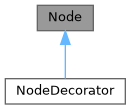
Public 成员函数 | |
| Node () | |
| Node (Elements children) | |
| Node (const Node &)=delete | |
| Node (const Node &&)=delete | |
| Node & | operator= (const Node &)=delete |
| Node & | operator= (const Node &&)=delete |
| virtual | ~Node () |
| virtual void | ComputeRequirement () |
| 计算元素所需的空间。 | |
| Requirement | requirement () |
| virtual void | SetBox (Box box) |
| 为绘图元素分配位置和尺寸。 | |
| virtual void | Select (Selection &selection) |
| 计算元素的选区。 | |
| virtual void | Render (Screen &screen) |
| 在 ftxui::Screen 上显示元素。 | |
| virtual std::string | GetSelectedContent (Selection &selection) |
| virtual void | Check (Status *status) |
Protected 属性 | |
| Elements | children_ |
| Requirement | requirement_ |
| Box | box_ |
构造及析构函数说明
◆ Node() [1/4]
|
default |
◆ Node() [2/4]
◆ Node() [3/4]
◆ Node() [4/4]
◆ ~Node()
|
virtualdefault |
成员函数说明
◆ operator=() [1/2]
◆ operator=() [2/2]
◆ ComputeRequirement()
|
virtual |
◆ requirement()
|
inline |
◆ SetBox()
|
virtual |
◆ Select()
◆ Render()
|
virtual |
在 ftxui::Screen 上显示元素。
◆ GetSelectedContent()
◆ Check()
类成员变量说明
◆ children_
◆ requirement_
|
protected |
◆ box_
◆ ftxui::Requirement
| struct ftxui::Requirement |
Public 属性 | |
| int | min_x = 0 |
| int | min_y = 0 |
| int | flex_grow_x = 0 |
| int | flex_grow_y = 0 |
| int | flex_shrink_x = 0 |
| int | flex_shrink_y = 0 |
| Focused | focused |
类成员变量说明
◆ min_x
| int min_x = 0 |
在文件 requirement.hpp 第 19 行定义.
◆ min_y
| int min_y = 0 |
在文件 requirement.hpp 第 20 行定义.
◆ flex_grow_x
| int flex_grow_x = 0 |
在文件 requirement.hpp 第 23 行定义.
◆ flex_grow_y
| int flex_grow_y = 0 |
在文件 requirement.hpp 第 24 行定义.
◆ flex_shrink_x
| int flex_shrink_x = 0 |
在文件 requirement.hpp 第 25 行定义.
◆ flex_shrink_y
| int flex_shrink_y = 0 |
在文件 requirement.hpp 第 26 行定义.
◆ focused
| Focused focused |
在文件 requirement.hpp 第 50 行定义.
◆ ftxui::Selection
| class ftxui::Selection |
Public 成员函数 | |
| Selection () | |
| 创建一个空选择。 | |
| Selection (int start_x, int start_y, int end_x, int end_y) | |
| 创建一个选择。 | |
| const Box & | GetBox () const |
| 获取选择框。 | |
| Selection | SaturateHorizontal (Box box) |
将选择饱和到框内。 这由 hbox 调用,以将选择传播到其子级。 | |
| Selection | SaturateVertical (Box box) |
将选择饱和到框内。 这由 vbox 调用,以将选择传播到其子级。 | |
| bool | IsEmpty () const |
| void | AddPart (const std::string &part, int y, int left, int right) |
| std::string | GetParts () |
构造及析构函数说明
◆ Selection() [1/2]
|
default |
创建一个空选择。
◆ Selection() [2/2]
| Selection | ( | int | start_x, |
| int | start_y, | ||
| int | end_x, | ||
| int | end_y ) |
创建一个选择。
- 参数
-
start_x 选择起始的x坐标。 start_y 选择起始的y坐标。 end_x 选择结束的x坐标。 end_y 选择结束的y坐标。
在文件 src/ftxui/dom/selection.cpp 第 33 行定义.
成员函数说明
◆ GetBox()
| const Box & GetBox | ( | ) | const |
◆ SaturateHorizontal()
将选择饱和到框内。 这由 hbox 调用,以将选择传播到其子级。
- 参数
-
box 用于饱和选择的框。
- 返回
- 饱和后的选择。
在文件 src/ftxui/dom/selection.cpp 第 74 行定义.
◆ SaturateVertical()
将选择饱和到框内。 这由 vbox 调用,以将选择传播到其子级。
- 参数
-
box 用于饱和选择的框。
- 返回
- 饱和后的选择。
在文件 src/ftxui/dom/selection.cpp 第 112 行定义.
◆ IsEmpty()
|
inline |
在文件 selection.hpp 第 29 行定义.
◆ AddPart()
| void AddPart | ( | const std::string & | part, |
| int | y, | ||
| int | left, | ||
| int | right ) |
在文件 src/ftxui/dom/selection.cpp 第 145 行定义.
◆ GetParts()
|
inline |
在文件 selection.hpp 第 32 行定义.
◆ ftxui::Table
| class ftxui::Table |
Table 是一个绘制表格的实用工具。
示例
Public 成员函数 | |
| Table () | |
| 创建一个空表格。 | |
| Table (std::vector< std::vector< std::string > >) | |
| 从字符串向量的向量创建表格。 | |
| Table (std::vector< std::vector< Element > >) | |
| 从 Element 向量的向量创建表格 | |
| Table (std::initializer_list< std::vector< std::string > > init) | |
| TableSelection | SelectAll () |
| 选择整个表格。 | |
| TableSelection | SelectCell (int column, int row) |
| 选择表格的一个单元格。 | |
| TableSelection | SelectRow (int row_index) |
| 选择表格的一行。 | |
| TableSelection | SelectRows (int row_min, int row_max) |
| 选择表格的行范围。 | |
| TableSelection | SelectColumn (int column_index) |
| 选择表格的一列。 | |
| TableSelection | SelectColumns (int column_min, int column_max) |
| 选择表格的列范围。 | |
| TableSelection | SelectRectangle (int column_min, int column_max, int row_min, int row_max) |
| 选择表格的一个矩形区域。 | |
| Element | Render () |
| 渲染表格。 | |
构造及析构函数说明
◆ Table() [1/4]
| Table | ( | ) |
创建一个空表格。
在文件 src/ftxui/dom/table.cpp 第 47 行定义.
◆ Table() [2/4]
|
explicit |
◆ Table() [3/4]
◆ Table() [4/4]
| Table | ( | std::initializer_list< std::vector< std::string > > | init | ) |
在文件 src/ftxui/dom/table.cpp 第 75 行定义.
成员函数说明
◆ SelectAll()
| TableSelection SelectAll | ( | ) |
◆ SelectCell()
| TableSelection SelectCell | ( | int | column, |
| int | row ) |
选择表格的一个单元格。
- 参数
-
column 要选择的单元格的列。 row 要选择的单元格的行。
- 注解
- 您可以使用负索引从末尾选择。
在文件 src/ftxui/dom/table.cpp 第 169 行定义.
◆ SelectRow()
| TableSelection SelectRow | ( | int | index | ) |
◆ SelectRows()
| TableSelection SelectRows | ( | int | row_min, |
| int | row_max ) |
选择表格的行范围。
- 参数
-
row_min 要选择的第一行。 row_max 要选择的最后一行。
- 注解
- 您可以使用负索引从末尾选择。
在文件 src/ftxui/dom/table.cpp 第 146 行定义.
◆ SelectColumn()
| TableSelection SelectColumn | ( | int | index | ) |
◆ SelectColumns()
| TableSelection SelectColumns | ( | int | column_min, |
| int | column_max ) |
选择表格的列范围。
- 参数
-
column_min 要选择的第一列。 column_max 要选择的最后一列。
- 注解
- 您可以使用负索引从末尾选择。
在文件 src/ftxui/dom/table.cpp 第 161 行定义.
◆ SelectRectangle()
| TableSelection SelectRectangle | ( | int | column_min, |
| int | column_max, | ||
| int | row_min, | ||
| int | row_max ) |
选择表格的一个矩形区域。
- 参数
-
column_min 要选择的第一列。 column_max 要选择的最后一列。 row_min 要选择的第一行。 row_max 要选择的最后一行。
- 注解
- 您可以使用负索引从末尾选择。
在文件 src/ftxui/dom/table.cpp 第 179 行定义.
◆ Render()
| Element Render | ( | ) |
枚举类型说明
◆ Direction
|
strong |
◆ BorderStyle
| enum BorderStyle |
BorderStyle 是一个枚举,表示可应用于终端 UI 中元素的不同边框样式。
BorderStyle 是一个枚举,表示可应用于终端 UI 中元素的不同边框样式。 它用于定义元素周围边框的视觉外观, 例如窗口、框架或分隔符。
| 枚举值 | |
|---|---|
| LIGHT | |
| DASHED | |
| HEAVY | |
| DOUBLE | |
| ROUNDED | |
| EMPTY | |
在文件 elements.hpp 第 33 行定义.
函数说明
◆ automerge()
启用字符自动与附近的其它字符合并。
在文件 automerge.cpp 第 16 行定义.
◆ blink()
◆ bold()
◆ border()
| Element border | ( | Element | child | ) |
在元素周围绘制边框。
- 参见
- border
- borderLight
- borderDashed
- borderDouble
- borderHeavy
- borderEmpty
- borderRounded
- borderStyled
- borderWith
在元素周围添加边框
示例
输出
- 示例
- examples/component/checkbox_in_frame.cpp, examples/component/flexbox_gallery.cpp, examples/component/gallery.cpp, examples/component/input_style.cpp, examples/component/menu_in_frame.cpp, examples/component/menu_style.cpp, examples/component/modal_dialog.cpp, examples/component/print_key_press.cpp, examples/component/radiobox_in_frame.cpp, examples/component/renderer.cpp, examples/component/resizable_split.cpp, examples/dom/canvas.cpp, examples/dom/graph.cpp, examples/dom/gridbox.cpp, examples/dom/html_like.cpp , 以及 examples/dom/spinner.cpp.
在文件 src/ftxui/dom/border.cpp 第 225 行定义.
◆ borderWith()
| Decorator borderWith | ( | const Pixel & | pixel | ) |
◆ borderStyled() [1/3]
| Decorator borderStyled | ( | BorderStyle | style | ) |
◆ borderStyled() [2/3]
| Decorator borderStyled | ( | Color | foreground_color | ) |
◆ borderStyled() [3/3]
| Decorator borderStyled | ( | BorderStyle | style, |
| Color | foreground_color ) |
◆ borderDashed()
| Element borderDashed | ( | Element | child | ) |
在元素周围绘制虚线边框。
- 参见
- border
- borderLight
- borderDashed
- borderDouble
- borderHeavy
- borderRounded
- borderEmpty
- borderStyled
- borderWith
在元素周围添加边框
示例
输出
在文件 src/ftxui/dom/border.cpp 第 300 行定义.
◆ borderLight()
| Element borderLight | ( | Element | child | ) |
在元素周围绘制细边框。
- 参见
- border
- borderLight
- borderDashed
- borderDouble
- borderHeavy
- borderRounded
- borderEmpty
- borderStyled
- borderWith
在元素周围添加边框
示例
输出
在文件 src/ftxui/dom/border.cpp 第 335 行定义.
◆ borderHeavy()
| Element borderHeavy | ( | Element | child | ) |
在元素周围绘制粗边框。
- 参见
- border
- borderLight
- borderDashed
- borderDouble
- borderHeavy
- borderRounded
- borderEmpty
- borderStyled
- borderWith
在元素周围添加边框
示例
输出
在文件 src/ftxui/dom/border.cpp 第 370 行定义.
◆ borderDouble()
| Element borderDouble | ( | Element | child | ) |
在元素周围绘制双线边框。
- 参见
- border
- borderLight
- borderDashed
- borderDouble
- borderHeavy
- borderRounded
- borderEmpty
- borderStyled
- borderWith
在元素周围添加边框
示例
输出
- 示例
- examples/component/input_style.cpp, examples/component/menu_style.cpp , 以及 examples/dom/border_style.cpp.
在文件 src/ftxui/dom/border.cpp 第 405 行定义.
◆ borderRounded()
| Element borderRounded | ( | Element | child | ) |
在元素周围绘制圆角边框。
- 参见
- border
- borderLight
- borderDashed
- borderDouble
- borderHeavy
- borderRounded
- borderEmpty
- borderStyled
- borderWith
在元素周围添加边框
示例
输出
在文件 src/ftxui/dom/border.cpp 第 440 行定义.
◆ borderEmpty()
| Element borderEmpty | ( | Element | child | ) |
在元素周围绘制一个空边框。
- 参见
- border
- borderLight
- borderDashed
- borderDouble
- borderHeavy
- borderRounded
- borderEmpty
- borderStyled
- borderWith
在元素周围添加边框
示例
输出
- 示例
- examples/component/dropdown_custom.cpp, examples/component/input_style.cpp, examples/component/menu_underline_animated_gallery.cpp , 以及 examples/component/with_restored_io.cpp.
在文件 src/ftxui/dom/border.cpp 第 475 行定义.
◆ window()
| Element window | ( | Element | title, |
| Element | content, | ||
| BorderStyle | border ) |
绘制带有标题和边框的窗口。
- 参数
-
title 窗口的标题。 content 要包装的元素。 border 边框的样式。默认为 ROUNDED。
- 参见
- border
示例
输出
- 示例
- examples/component/flexbox_gallery.cpp, examples/component/homescreen.cpp, examples/component/menu_multiple.cpp, examples/component/resizable_split_clamp.cpp, examples/component/selection.cpp, examples/dom/color_truecolor_RGB.cpp, examples/dom/hflow.cpp, examples/dom/package_manager.cpp, examples/dom/size.cpp , 以及 examples/dom/vflow.cpp.
在文件 src/ftxui/dom/border.cpp 第 507 行定义.
◆ clear_under()
◆ color() [1/4]
◆ bgcolor() [1/4]
◆ color() [2/4]
◆ bgcolor() [2/4]
◆ hcenter()
◆ vcenter()
◆ center()
◆ align_right()
◆ dbox()
◆ dim()
◆ filler()
◆ flex()
使子元素按比例扩展以填充容器中剩余的空间。
示例:
输出:
◆ xflex()
◆ yflex()
◆ flex_grow()
◆ xflex_grow()
◆ yflex_grow()
◆ flex_shrink()
◆ xflex_shrink()
◆ yflex_shrink()
◆ notflex()
◆ focusPositionRelative()
| Decorator focusPositionRelative | ( | float | x, |
| float | y ) |
在 frame 内部使用,这会强制视图滚动到给定位置。位置以请求大小的比例表示。
例如:
- (0, 0) 表示视图滚动到左上角。
- (1, 0) 表示视图滚动到右上角。
- (0, 1) 表示视图滚动到左下角。
示例
在文件 src/ftxui/dom/focus.cpp 第 28 行定义.
◆ focusPosition()
| Decorator focusPosition | ( | int | x, |
| int | y ) |
在 frame 内部使用,这会强制视图滚动到给定位置。位置以单元格数量表示。
示例
在文件 src/ftxui/dom/focus.cpp 第 65 行定义.
◆ focus()
◆ focusCursorBlockBlinking()
| Element focusCursorBlockBlinking | ( | Element | child | ) |
与 focus 相同,但将光标形状设置为闪烁块。
- 参见
- focus
- focusCursorBlock
- focusCursorBlockBlinking
- focusCursorBar
- focusCursorBarBlinking
- focusCursorUnderline
- focusCursorUnderlineBlinking
◆ focusCursorBar()
| Element focusCursorBar | ( | Element | child | ) |
与 focus 相同,但将光标形状设置为静态竖线。
- 参见
- focus
- focusCursorBlock
- focusCursorBlockBlinking
- focusCursorBar
- focusCursorBarBlinking
- focusCursorUnderline
- focusCursorUnderlineBlinking
◆ focusCursorBarBlinking()
| Element focusCursorBarBlinking | ( | Element | child | ) |
与 focus 相同,但将光标形状设置为闪烁竖线。
- 参见
- focus
- focusCursorBlock
- focusCursorBlockBlinking
- focusCursorBar
- focusCursorBarBlinking
- focusCursorUnderline
- focusCursorUnderlineBlinking
◆ focusCursorUnderline()
| Element focusCursorUnderline | ( | Element | child | ) |
与 focus 相同,但将光标形状设置为静态下划线。
- 参见
- focus
- focusCursorBlock
- focusCursorBlockBlinking
- focusCursorBar
- focusCursorBarBlinking
- focusCursorUnderline
- focusCursorUnderlineBlinking
◆ focusCursorUnderlineBlinking()
| Element focusCursorUnderlineBlinking | ( | Element | child | ) |
与 focus 相同,但将光标形状设置为闪烁下划线。
- 参见
- focus
- focusCursorBlock
- focusCursorBlockBlinking
- focusCursorBar
- focusCursorBarBlinking
- focusCursorUnderline
- focusCursorUnderlineBlinking
◆ gaugeDirection()
绘制一个向指定方向推进的高清进度条。
- 参数
-
progress 要填充区域的比例。范围在 [0,1] 之间。 direction 进度条的推进方向。
在文件 src/ftxui/dom/gauge.cpp 第 165 行定义.
◆ hyperlink() [1/2]
使渲染区域可通过网络浏览器点击。 当用户点击时,链接将被打开。 这仅在有限的终端模拟器中受支持。 列表:https://github.com/Alhadis/OSC8-Adoption/
- 参数
-
link 链接 child 输入元素。
- 返回
- 带有链接的输出元素。
示例
在文件 hyperlink.cpp 第 50 行定义.
◆ hyperlink() [2/2]
| Decorator hyperlink | ( | std::string | link | ) |
使用超链接进行装饰。 当用户点击时,链接将被打开。 这仅在有限的终端模拟器中受支持。 列表:https://github.com/Alhadis/OSC8-Adoption/
- 参数
-
link 重定向用户到的链接。
- 返回
- 应用超链接的 Decorator。
示例
在文件 hyperlink.cpp 第 69 行定义.
◆ inverted()
添加一个过滤器,用于反转前景色和背景色。
在文件 inverted.cpp 第 33 行定义.
◆ italic()
对文本应用双下划线。
在文件 italic.cpp 第 17 行定义.
◆ color() [3/4]
| Element color | ( | const LinearGradient & | gradient, |
| Element | child ) |
使用线性渐变效果设置元素的前景色。
- 参数
-
gradient 应用于输出元素的渐变效果。 child 输入元素。
- 返回
- 已着色的输出元素。
示例
- 示例
- examples/component/flexbox_gallery.cpp, examples/component/homescreen.cpp, examples/component/input_style.cpp, examples/component/maybe.cpp, examples/component/menu_entries.cpp, examples/component/menu_style.cpp, examples/component/renderer.cpp, examples/dom/border_colored.cpp, examples/dom/color_gallery.cpp, examples/dom/color_truecolor_HSV.cpp, examples/dom/graph.cpp, examples/dom/html_like.cpp, examples/dom/package_manager.cpp, examples/dom/style_color.cpp, examples/dom/style_gallery.cpp , 以及 examples/dom/table.cpp.
在文件 src/ftxui/dom/linear_gradient.cpp 第 239 行定义.
◆ bgcolor() [3/4]
| Element bgcolor | ( | const LinearGradient & | gradient, |
| Element | child ) |
使用线性渐变效果设置元素的背景色。
- 参数
-
gradient 应用于输出元素的渐变效果。 child 输入元素。
- 返回
- 已着色的输出元素。
示例
- 示例
- examples/component/dropdown_custom.cpp, examples/component/flexbox_gallery.cpp, examples/component/focus.cpp, examples/component/homescreen.cpp, examples/component/input_style.cpp, examples/component/linear_gradient_gallery.cpp, examples/component/menu_entries_animated.cpp, examples/component/menu_style.cpp, examples/component/slider_rgb.cpp, examples/dom/color_gallery.cpp, examples/dom/color_info_palette256.cpp, examples/dom/color_truecolor_HSV.cpp, examples/dom/color_truecolor_RGB.cpp, examples/dom/linear_gradient.cpp, examples/dom/style_color.cpp , 以及 examples/dom/style_gallery.cpp.
在文件 src/ftxui/dom/linear_gradient.cpp 第 255 行定义.
◆ color() [4/4]
| Decorator color | ( | const LinearGradient & | gradient | ) |
使用线性渐变效果装饰前景色。
- 参数
-
gradient 应用于输出元素的渐变效果。
- 返回
- 应用颜色的装饰器。
示例
在文件 src/ftxui/dom/linear_gradient.cpp 第 270 行定义.
◆ bgcolor() [4/4]
| Decorator bgcolor | ( | const LinearGradient & | gradient | ) |
使用线性渐变效果装饰背景色。
- 参数
-
gradient 应用于输出元素的渐变效果。
- 返回
- 应用颜色的装饰器。
示例
在文件 src/ftxui/dom/linear_gradient.cpp 第 285 行定义.
◆ Render() [1/2]
在 ftxui::Screen 上显示元素。
◆ Render() [2/2]
在 ftxui::Screen 上显示元素。
◆ paragraph()
| Element paragraph | ( | const std::string & | the_text | ) |
◆ paragraphAlignLeft()
| Element paragraphAlignLeft | ( | const std::string & | the_text | ) |
◆ paragraphAlignRight()
| Element paragraphAlignRight | ( | const std::string & | the_text | ) |
◆ paragraphAlignCenter()
| Element paragraphAlignCenter | ( | const std::string & | the_text | ) |
◆ paragraphAlignJustify()
| Element paragraphAlignJustify | ( | const std::string & | the_text | ) |
◆ vscroll_indicator()
在右侧显示一个垂直滚动条。 颜色跟随内容。
在文件 scroll_indicator.cpp 第 21 行定义.
◆ hscroll_indicator()
在底部显示一个水平滚动条。 颜色跟随内容。
在文件 scroll_indicator.cpp 第 76 行定义.
◆ separator() [1/2]
| Element separator | ( | ) |
在两个其他元素之间绘制垂直或水平分隔线。
- 参见
- separator
- separatorLight
- separatorDashed
- separatorDouble
- separatorHeavy
- separatorEmpty
- separatorRounded
- separatorStyled
- separatorCharacter
在两个元素之间添加视觉分隔。
示例
输出
在文件 src/ftxui/dom/separator.cpp 第 132 行定义.
◆ separatorStyled()
| Element separatorStyled | ( | BorderStyle | style | ) |
在两个其他元素之间绘制垂直或水平分隔线。
- 参数
-
style 分隔线的样式。
- 参见
- separator
- separatorLight
- separatorDashed
- separatorDouble
- separatorHeavy
- separatorEmpty
- separatorRounded
- separatorStyled
- separatorCharacter
在两个元素之间添加视觉分隔。
示例
输出
在文件 src/ftxui/dom/separator.cpp 第 169 行定义.
◆ separatorLight()
| Element separatorLight | ( | ) |
使用 LIGHT 样式在两个其他元素之间绘制垂直或水平分隔线。
- 参见
- separator
- separatorLight
- separatorDashed
- separatorDouble
- separatorHeavy
- separatorEmpty
- separatorRounded
- separatorStyled
- separatorCharacter
在两个元素之间添加视觉分隔。
示例
输出
在文件 src/ftxui/dom/separator.cpp 第 205 行定义.
◆ separatorDashed()
| Element separatorDashed | ( | ) |
使用 DASHED 样式在两个其他元素之间绘制垂直或水平分隔线。
- 参见
- separator
- separatorLight
- separatorDashed
- separatorDouble
- separatorHeavy
- separatorEmpty
- separatorRounded
- separatorStyled
- separatorCharacter
在两个元素之间添加视觉分隔。
示例
输出
在文件 src/ftxui/dom/separator.cpp 第 241 行定义.
◆ separatorHeavy()
| Element separatorHeavy | ( | ) |
使用 HEAVY 样式在两个其他元素之间绘制垂直或水平分隔线。
- 参见
- separator
- separatorLight
- separatorDashed
- separatorDouble
- separatorHeavy
- separatorEmpty
- separatorRounded
- separatorStyled
- separatorCharacter
在两个元素之间添加视觉分隔。
示例
输出
在文件 src/ftxui/dom/separator.cpp 第 277 行定义.
◆ separatorDouble()
| Element separatorDouble | ( | ) |
使用 DOUBLE 样式在两个其他元素之间绘制垂直或水平分隔线。
- 参见
- separator
- separatorLight
- separatorDashed
- separatorDouble
- separatorHeavy
- separatorEmpty
- separatorRounded
- separatorStyled
- separatorCharacter
在两个元素之间添加视觉分隔。
示例
输出
在文件 src/ftxui/dom/separator.cpp 第 313 行定义.
◆ separatorEmpty()
| Element separatorEmpty | ( | ) |
使用 EMPTY 样式在两个其他元素之间绘制垂直或水平分隔线。
- 参见
- separator
- separatorLight
- separatorDashed
- separatorDouble
- separatorHeavy
- separatorEmpty
- separatorRounded
- separatorStyled
- separatorCharacter
在两个元素之间添加视觉分隔。
示例
输出
在文件 src/ftxui/dom/separator.cpp 第 349 行定义.
◆ separatorCharacter()
| Element separatorCharacter | ( | std::string | value | ) |
在两个其他元素之间绘制垂直或水平分隔线。
- 参数
-
value 用于填充分隔区域的字符。
- 参见
- separator
- separatorLight
- separatorDashed
- separatorDouble
- separatorHeavy
- separatorEmpty
- separatorRounded
- separatorStyled
- separatorCharacter
在两个元素之间添加视觉分隔。
示例
输出
在文件 src/ftxui/dom/separator.cpp 第 386 行定义.
◆ separator() [2/2]
◆ size()
| Decorator size | ( | WidthOrHeight | direction, |
| Constraint | constraint, | ||
| int | value ) |
对元素大小应用约束。
- 参数
-
direction 元素的宽度 WIDTH 或高度 HEIGHT 是否必须受到约束。 约束。 constraint 约束的类型。 value 值。
在文件 src/ftxui/dom/size.cpp 第 89 行定义.
◆ spinner()
| Element spinner | ( | int | charset_index, |
| size_t | image_index ) |
用于表示时间或事件的效果。这显示了一个 ASCII 艺术“视频”。
- 参数
-
charset_index “视频”的类型。 image_index “视频”的“帧”。您需要为每个“步”增加此值。
在文件 src/ftxui/dom/spinner.cpp 第 279 行定义.
◆ strikethrough()
对文本应用删除线。
在文件 strikethrough.cpp 第 17 行定义.
◆ text() [1/2]
| Element text | ( | std::string | text | ) |
◆ text() [2/2]
| Element text | ( | std::wstring | text | ) |
◆ vtext() [1/2]
| Element vtext | ( | std::string | text | ) |
◆ vtext() [2/2]
| Element vtext | ( | std::wstring | text | ) |
◆ underlined()
给定元素加下划线。
在文件 underlined.cpp 第 33 行定义.
◆ underlinedDouble()
对文本应用双下划线。
在文件 underlined_double.cpp 第 17 行定义.
◆ nothing()
一个什么都不做的装饰器。
在文件 dom/util.cpp 第 28 行定义.
◆ operator|() [1/3]
◆ operator|() [2/3]
◆ operator|() [3/3]
◆ operator|=()
◆ emptyElement()
| Element emptyElement | ( | ) |
一个大小为 0x0 且不绘制任何内容的元素。
在文件 dom/util.cpp 第 140 行定义.
◆ vbox()
◆ SetColorSupport()
| void SetColorSupport | ( | Color | color | ) |
在自动检测失败时覆盖终端颜色支持
在文件 terminal.cpp 第 133 行定义.