Detailed Description
請查看 ftxui/component 模組的 教學。
Classes | |
| class | ComponentBase |
| 它將自己實作為 ftxui::Element 進行渲染。它透過回應 ftxui::Event 來實現鍵盤導航。 More... | |
| struct | UnderlineOption |
| 底線效果的選項。 More... | |
| struct | AnimatedColorOption |
| 關於潛在動畫顏色的選項。 More... | |
| struct | MenuEntryOption |
| MenuEntry 元件的選項。 More... | |
| struct | MenuOption |
| Menu 元件的選項。 More... | |
| struct | ButtonOption |
| AnimatedButton 元件的選項。 More... | |
| struct | CheckboxOption |
| 核取方塊元件的選項。 More... | |
| struct | InputOption |
| Input 元件的選項。 More... | |
| struct | RadioboxOption |
| Radiobox 元件的選項。 More... | |
| struct | WindowRenderState |
傳遞給 Window 元件渲染函式的狀態。 More... | |
| struct | DropdownOption |
| Dropdown 元件的選項。下拉式選單是開啟/關閉單選方塊的核取方塊。 More... | |
| struct | Event |
| 代表一個事件。它可以是按鍵事件、終端機大小調整,或更多... More... | |
| struct | Mouse |
| 滑鼠事件。它包含滑鼠的座標、按下的按鈕 以及修飾鍵(shift、ctrl、meta)。 More... | |
| class | ScreenInteractive |
ScreenInteractive 是一個可以處理事件、執行主迴圈並管理組件的 Screen。 More... | |
Functions | |
| void | RequestAnimationFrame () |
| RequestAnimationFrame 是一個函式,它請求在下一個動畫週期中繪製新畫面。 | |
| Component | Button (ButtonOption option) |
| 繪製一個按鈕。點擊時執行一個函數。 | |
| Component | Button (ConstStringRef label, std::function< void()> on_click, ButtonOption option) |
| 繪製一個按鈕。點擊時執行一個函數。 | |
| Component | CatchEvent (Component child, std::function< bool(Event event)> on_event) |
| 傳回一個元件,使用 |on_event| 捕捉事件。當事件已處理時,此函式必須傳回 true,否則傳回 false。 | |
| ComponentDecorator | CatchEvent (std::function< bool(Event)> on_event) |
| 裝飾一個元件,使用 |on_event| 捕捉事件。當事件已處理時,此函式必須傳回 true,否則傳回 false。 | |
| Component | Checkbox (CheckboxOption options) |
| Component | Checkbox (ConstStringRef label, bool *checked, CheckboxOption option) |
| 繪製可勾選元素。 | |
| Component | Vertical (Components children) |
| 一個元件列表,垂直地一個接一個繪製,並使用上/下箭頭鍵或 'j'/'k' 鍵進行垂直導航。 | |
| Component | Vertical (Components children, int *selector) |
| 一個元件列表,垂直地一個接一個繪製,並使用上/下箭頭鍵或 'j'/'k' 鍵進行垂直導航。 這對於實作選單很有用。 | |
| Component | Horizontal (Components children) |
| 一個元件列表,水平地一個接一個繪製,並使用左/右箭頭鍵或 'h'/'l' 鍵進行水平導航。 | |
| Component | Horizontal (Components children, int *selector) |
| 一個元件列表,水平地一個接一個繪製,並使用左/右箭頭鍵或 'h'/'l' 鍵進行水平導航。 | |
| Component | Tab (Components children, int *selector) |
| 一個元件列表,一次只繪製一個並與之互動。|selector| 給出所選元件的索引。這對於實作分頁很有用。 | |
| Component | Stacked (Components children) |
| 一個元件列表,將彼此堆疊。 事件會傳播到第一個元件,如果未處理則傳播到第二個,依此類推。 元件以給定的相反順序繪製。 當一個元件獲得焦點時,它會被放到最前面,而不改變其他元素的相對順序。 | |
| Component | Dropdown (ConstStringListRef entries, int *selected) |
| 下拉式選單。 | |
| Component | Dropdown (DropdownOption option) |
| 下拉式選單。 | |
| Component | Hoverable (Component component, bool *hover) |
| 包裝一個元件。提供能力以判斷滑鼠是否懸停在其上方。 | |
| Component | Hoverable (Component component, std::function< void()> on_enter, std::function< void()> on_leave) |
| 包裝一個元件。使用回呼函數。 | |
| ComponentDecorator | Hoverable (bool *hover) |
| 包裝一個元件。提供能力以判斷滑鼠是否懸停在其上方。 | |
| ComponentDecorator | Hoverable (std::function< void()> on_enter, std::function< void()> on_leave) |
| 包裝一個元件。提供能力以判斷滑鼠是否懸停在其上方。 | |
| Component | Hoverable (Component component, std::function< void(bool)> on_change) |
| 包裝一個元件。提供能力以判斷滑鼠是否懸停在其上方。 | |
| ComponentDecorator | Hoverable (std::function< void(bool)> on_change) |
| 包裝一個元件。提供能力以判斷滑鼠是否懸停在其上方。 | |
| Component | Input (InputOption option) |
| 用於編輯文字的輸入框。 | |
| Component | Input (StringRef content, InputOption option) |
| 用於編輯文字的輸入框。 | |
| Component | Input (StringRef content, StringRef placeholder, InputOption option) |
| 用於編輯文字的輸入框。 | |
| Component | Maybe (Component child, std::function< bool()> show) |
| 裝飾一個組件 |child|。它只在 |show| 返回 true 時顯示。 | |
| ComponentDecorator | Maybe (std::function< bool()> show) |
| 裝飾一個組件。它只在 |show| 函數返回 true 時顯示。 | |
| Component | Maybe (Component child, const bool *show) |
| 裝飾一個組件 |child|。它只在 |show| 為 true 時顯示。 | |
| ComponentDecorator | Maybe (const bool *show) |
| 裝飾一個組件。它只在 |show| 為 true 時顯示。 | |
| Component | Menu (MenuOption option) |
| 文字列表。選定的元素會被聚焦。 | |
| Component | Menu (ConstStringListRef entries, int *selected, MenuOption option) |
| 文字列表。選定的元素會被聚焦。 | |
| Component | Toggle (ConstStringListRef entries, int *selected) |
| 元素的水平列表。使用者可以在其中導航。 | |
| Component | MenuEntry (ConstStringRef label, MenuEntryOption option) |
| 一個特定的菜單條目。它們可以放入 Container::Vertical 中以形成菜單。 | |
| Component | MenuEntry (MenuEntryOption option) |
| 一個特定的菜單條目。它們可以放入 Container::Vertical 中以形成菜單。 | |
| Component | Modal (Component main, Component modal, const bool *show_modal) |
| ComponentDecorator | Modal (Component modal, const bool *show_modal) |
| Component | Radiobox (RadioboxOption option) |
| 元素清單,只能選擇一個。 | |
| Component | Radiobox (ConstStringListRef entries, int *selected, RadioboxOption option) |
| 元素清單,只能選擇一個。 | |
| Component | Renderer (std::function< Element()> render) |
| 建立一個元件,使用 |render| 來繪製其介面。 | |
| Component | Renderer (Component child, std::function< Element()> render) |
| 回傳一個新的元件,類似於 |child|,但使用 |render| 作為 Component::Render() 事件。 | |
| Component | Renderer (std::function< Element(bool)> render) |
| 建立一個可聚焦的元件,使用 |render| 來繪製其介面。 | |
| ComponentDecorator | Renderer (ElementDecorator decorator) |
| 裝飾一個元件,透過裝飾它所呈現的內容。 | |
| Component | ResizableSplitLeft (Component main, Component back, int *main_size) |
| 兩個元件之間的水平分割,可透過滑鼠設定。 | |
| Component | ResizableSplitRight (Component main, Component back, int *main_size) |
| 兩個元件之間的水平分割,可透過滑鼠設定。 | |
| Component | ResizableSplitTop (Component main, Component back, int *main_size) |
| 兩個元件之間的垂直分割,可透過滑鼠設定。 | |
| Component | ResizableSplitBottom (Component main, Component back, int *main_size) |
| 兩個元件之間的垂直分割,可透過滑鼠設定。 | |
| Component | Window (WindowOptions option) |
| 一個可拖曳/可調整大小的視窗。要使用多個視窗,它們必須透過 Container::Stacked({...}) 元件堆疊。 | |
Class Documentation
◆ ftxui::ComponentBase
| class ftxui::ComponentBase |
它將自己實作為 ftxui::Element 進行渲染。它透過回應 ftxui::Event 來實現鍵盤導航。
Definition at line 28 of file component_base.hpp.
Public Member Functions | |
| ComponentBase (Components children) | |
| virtual | ~ComponentBase () |
| ComponentBase ()=default | |
| ComponentBase (const ComponentBase &)=delete | |
| ComponentBase (ComponentBase &&)=delete | |
| ComponentBase & | operator= (const ComponentBase &)=delete |
| ComponentBase & | operator= (ComponentBase &&)=delete |
| ComponentBase * | Parent () const |
| 返回父 ComponentBase,如果沒有則返回空。 | |
| Component & | ChildAt (size_t i) |
存取索引 i 處的子項。 | |
| size_t | ChildCount () const |
| 返回子項的數量。 | |
| int | Index () const |
| 返回組件在其父項中的索引。如果沒有父項則返回 -1。 | |
| void | Add (Component children) |
| 新增一個子項。 @param child 要附加的子項。 | |
| void | Detach () |
| 將此子項從其父項中分離。 | |
| void | DetachAllChildren () |
| 移除所有子項。 | |
| Element | Render () |
| 繪製組件。 建構一個 ftxui::Element,用於在表示此 ftxui::ComponentBase 的 ftxui::Screen 上繪製。請覆寫 OnRender() 以修改渲染。 | |
| virtual Element | OnRender () |
| 繪製組件。 建構一個 ftxui::Element,用於在表示此 ftxui::ComponentBase 的 ftxi::Screen 上繪製。此函數旨在被覆寫。 | |
| virtual bool | OnEvent (Event) |
| 回應事件時呼叫。 | |
| virtual void | OnAnimation (animation::Params ¶ms) |
| 回應動畫事件時呼叫。 | |
| virtual Component | ActiveChild () |
| 返回目前活躍的子項。 | |
| virtual bool | Focusable () const |
| 當組件包含可聚焦元素時返回 true。 使用鍵盤導航時,不可聚焦的組件將被跳過。 | |
| bool | Active () const |
| 返回該元素是否為其父項的目前活躍子項。 | |
| bool | Focused () const |
| 返回元素是否被使用者聚焦。 當 ComponentBase 被使用者聚焦時返回 true。當一個元素及其所有祖先都是其父項的 ActiveChild() 並且它是 Focusable() 時,該元素被聚焦。 | |
| virtual void | SetActiveChild (ComponentBase *child) |
| 使 |child| 成為「活躍」的子項。 | |
| void | SetActiveChild (Component child) |
| 使 |child| 成為「活躍」的子項。 | |
| void | TakeFocus () |
| 配置所有祖先以將焦點給予此組件。 | |
Protected Member Functions | |
| CapturedMouse | CaptureMouse (const Event &event) |
| 如果可用,則取得 CapturedMouse。它們只有一個組件。它代表一個優先於其他組件的組件。 | |
Protected Attributes | |
| Components | children_ |
Constructor & Destructor Documentation
◆ ComponentBase() [1/4]
|
inlineexplicit |
Definition at line 30 of file component_base.hpp.
◆ ~ComponentBase()
|
virtual |
Definition at line 30 of file component.cpp.
◆ ComponentBase() [2/4]
|
default |
◆ ComponentBase() [3/4]
|
delete |
◆ ComponentBase() [4/4]
|
delete |
Member Function Documentation
◆ operator=() [1/2]
|
delete |
◆ operator=() [2/2]
|
delete |
◆ Parent()
| ComponentBase * Parent | ( | ) | const |
◆ ChildAt()
| Component & ChildAt | ( | size_t | i | ) |
存取索引 i 處的子項。
Definition at line 42 of file component.cpp.
◆ ChildCount()
| size_t ChildCount | ( | ) | const |
返回子項的數量。
Definition at line 48 of file component.cpp.
◆ Index()
| int Index | ( | ) | const |
返回組件在其父項中的索引。如果沒有父項則返回 -1。
Definition at line 53 of file component.cpp.
◆ Add()
| void Add | ( | Component | children | ) |
新增一個子項。 @param child 要附加的子項。
Definition at line 69 of file component.cpp.
◆ Detach()
| void Detach | ( | ) |
◆ DetachAllChildren()
| void DetachAllChildren | ( | ) |
移除所有子項。
Definition at line 93 of file component.cpp.
◆ Render()
| Element Render | ( | ) |
繪製組件。 建構一個 ftxui::Element,用於在表示此 ftxui::ComponentBase 的 ftxui::Screen 上繪製。請覆寫 OnRender() 以修改渲染。
Definition at line 101 of file component.cpp.
◆ OnRender()
|
virtual |
繪製組件。 建構一個 ftxui::Element,用於在表示此 ftxui::ComponentBase 的 ftxi::Screen 上繪製。此函數旨在被覆寫。
Definition at line 135 of file component.cpp.
◆ OnEvent()
|
virtual |
回應事件時呼叫。
- Parameters
-
event 事件。
- Returns
- 當事件已處理時返回 true。 預設實作會在每個子項上呼叫 OnEvent,直到其中一個返回 true。如果都沒有返回 true,則返回 false。
Definition at line 147 of file component.cpp.
◆ OnAnimation()
|
virtual |
◆ ActiveChild()
|
virtual |
◆ Focusable()
|
virtual |
當組件包含可聚焦元素時返回 true。 使用鍵盤導航時,不可聚焦的組件將被跳過。
Definition at line 178 of file component.cpp.
◆ Active()
| bool Active | ( | ) | const |
返回該元素是否為其父項的目前活躍子項。
Definition at line 188 of file component.cpp.
◆ Focused()
| bool Focused | ( | ) | const |
返回元素是否被使用者聚焦。 當 ComponentBase 被使用者聚焦時返回 true。當一個元素及其所有祖先都是其父項的 ActiveChild() 並且它是 Focusable() 時,該元素被聚焦。
Definition at line 194 of file component.cpp.
◆ SetActiveChild() [1/2]
|
virtual |
◆ SetActiveChild() [2/2]
| void SetActiveChild | ( | Component | child | ) |
◆ TakeFocus()
| void TakeFocus | ( | ) |
配置所有祖先以將焦點給予此組件。
Definition at line 213 of file component.cpp.
◆ CaptureMouse()
|
protected |
如果可用,則取得 CapturedMouse。它們只有一個組件。它代表一個優先於其他組件的組件。
- Parameters
-
event 事件
Definition at line 223 of file component.cpp.
Member Data Documentation
◆ children_
|
protected |
Definition at line 92 of file component_base.hpp.
◆ ftxui::UnderlineOption
| struct ftxui::UnderlineOption |
底線效果的選項。
Definition at line 34 of file component_options.hpp.
Public Member Functions | |
| void | SetAnimation (animation::Duration d, animation::easing::Function f) |
| 設定下劃線的動畫方式。 | |
| void | SetAnimationDuration (animation::Duration d) |
| 設定下劃線的動畫方式。 | |
| void | SetAnimationFunction (animation::easing::Function f) |
| 設定下劃線的動畫方式。 | |
| void | SetAnimationFunction (animation::easing::Function f_leader, animation::easing::Function f_follower) |
| 設定下劃線的動畫方式。 這對於使引導者和追隨者的動畫不同步很有用。 | |
Public Attributes | |
| bool | enabled = false |
| Color | color_active = Color::White |
| Color | color_inactive = Color::GrayDark |
| animation::easing::Function | leader_function |
| animation::easing::Function | follower_function |
| animation::Duration | leader_duration = std::chrono::milliseconds(250) |
| animation::Duration | leader_delay = std::chrono::milliseconds(0) |
| animation::Duration | follower_duration = std::chrono::milliseconds(250) |
| animation::Duration | follower_delay = std::chrono::milliseconds(0) |
Member Function Documentation
◆ SetAnimation()
| void SetAnimation | ( | animation::Duration | d, |
| animation::easing::Function | f ) |
◆ SetAnimationDuration()
| void SetAnimationDuration | ( | animation::Duration | d | ) |
◆ SetAnimationFunction() [1/2]
| void SetAnimationFunction | ( | animation::easing::Function | f | ) |
◆ SetAnimationFunction() [2/2]
| void SetAnimationFunction | ( | animation::easing::Function | f_leader, |
| animation::easing::Function | f_follower ) |
設定下劃線的動畫方式。 這對於使引導者和追隨者的動畫不同步很有用。
- Parameters
-
f_leader 引導者動畫的持續時間。 f_follower 追隨者動畫的持續時間。
Definition at line 58 of file component_options.cpp.
Member Data Documentation
◆ enabled
| bool enabled = false |
Definition at line 35 of file component_options.hpp.
◆ color_active
| Color color_active = Color::White |
Definition at line 37 of file component_options.hpp.
◆ color_inactive
| Color color_inactive = Color::GrayDark |
Definition at line 38 of file component_options.hpp.
◆ leader_function
| animation::easing::Function leader_function |
Definition at line 40 of file component_options.hpp.
◆ follower_function
| animation::easing::Function follower_function |
Definition at line 42 of file component_options.hpp.
◆ leader_duration
| animation::Duration leader_duration = std::chrono::milliseconds(250) |
Definition at line 45 of file component_options.hpp.
◆ leader_delay
| animation::Duration leader_delay = std::chrono::milliseconds(0) |
Definition at line 46 of file component_options.hpp.
◆ follower_duration
| animation::Duration follower_duration = std::chrono::milliseconds(250) |
Definition at line 47 of file component_options.hpp.
◆ follower_delay
| animation::Duration follower_delay = std::chrono::milliseconds(0) |
Definition at line 48 of file component_options.hpp.
◆ ftxui::AnimatedColorOption
| struct ftxui::AnimatedColorOption |
關於潛在動畫顏色的選項。
Definition at line 59 of file component_options.hpp.
Public Member Functions | |
| void | Set (Color inactive, Color active, animation::Duration duration=std::chrono::milliseconds(250), animation::easing::Function function=animation::easing::QuadraticInOut) |
| 可動畫的顏色選項。 @params _inactive 當組件不活動時的顏色。 @params _active 當組件活動時的顏色。 @params _duration 動畫的持續時間。 @params _function 動畫的緩動函數。 | |
Public Attributes | |
| bool | enabled = false |
| Color | inactive |
| Color | active |
| animation::Duration | duration = std::chrono::milliseconds(250) |
| animation::easing::Function | function = animation::easing::QuadraticInOut |
Member Function Documentation
◆ Set()
| void Set | ( | Color | inactive, |
| Color | active, | ||
| animation::Duration | duration = std::chrono::milliseconds(250), | ||
| animation::easing::Function | function = animation::easing::QuadraticInOut ) |
可動畫的顏色選項。 @params _inactive 當組件不活動時的顏色。 @params _active 當組件活動時的顏色。 @params _duration 動畫的持續時間。 @params _function 動畫的緩動函數。
Definition at line 20 of file component_options.cpp.
Member Data Documentation
◆ enabled
| bool enabled = false |
Definition at line 66 of file component_options.hpp.
◆ inactive
| Color inactive |
Definition at line 67 of file component_options.hpp.
◆ active
| Color active |
Definition at line 68 of file component_options.hpp.
◆ duration
| animation::Duration duration = std::chrono::milliseconds(250) |
Definition at line 69 of file component_options.hpp.
◆ function
| animation::easing::Function function = animation::easing::QuadraticInOut |
Definition at line 70 of file component_options.hpp.
◆ ftxui::MenuEntryOption
| struct ftxui::MenuEntryOption |
MenuEntry 元件的選項。
Definition at line 80 of file component_options.hpp.
Public Attributes | |
| ConstStringRef | label = "MenuEntry" |
| std::function< Element(const EntryState &state)> | transform |
| AnimatedColorsOption | animated_colors |
Member Data Documentation
◆ label
| ConstStringRef label = "MenuEntry" |
Definition at line 81 of file component_options.hpp.
◆ transform
| std::function<Element(const EntryState& state)> transform |
- Examples
- examples/component/menu_entries.cpp.
Definition at line 82 of file component_options.hpp.
◆ animated_colors
| AnimatedColorsOption animated_colors |
Definition at line 83 of file component_options.hpp.
◆ ftxui::MenuOption
| struct ftxui::MenuOption |
Menu 元件的選項。
- Examples
- examples/component/menu.cpp, and examples/component/menu2.cpp.
Definition at line 88 of file component_options.hpp.
Static Public Member Functions | |
| static MenuOption | Horizontal () |
| 水平選單的標準選項。 這對於實現一個標籤頁列很有用。 | |
| static MenuOption | HorizontalAnimated () |
| 動畫水平選單的標準選項。 這對於實現一個標籤頁列很有用。 | |
| static MenuOption | Vertical () |
| 垂直選單的標準選項。 這對於實現一個可選項目列表很有用。 | |
| static MenuOption | VerticalAnimated () |
| 動畫垂直選單的標準選項。 這對於實現一個可選項目列表很有用。 | |
| static MenuOption | Toggle () |
| 帶有分隔線的水平選單標準選項。 這對於實現一個標籤頁列很有用。 | |
Public Attributes | |
| ConstStringListRef | entries |
| Ref< int > | selected = 0 |
| UnderlineOption | underline |
| MenuEntryOption | entries_option |
| Direction | direction = Direction::Down |
| std::function< Element()> | elements_prefix |
| std::function< Element()> | elements_infix |
| std::function< Element()> | elements_postfix |
| std::function< void()> | on_change |
| std::function< void()> | on_enter |
| Ref< int > | focused_entry = 0 |
Member Function Documentation
◆ Horizontal()
|
static |
水平選單的標準選項。 這對於實現一個標籤頁列很有用。
Definition at line 68 of file component_options.cpp.
◆ HorizontalAnimated()
|
static |
動畫水平選單的標準選項。 這對於實現一個標籤頁列很有用。
Definition at line 92 of file component_options.cpp.
◆ Vertical()
|
static |
垂直選單的標準選項。 這對於實現一個可選項目列表很有用。
Definition at line 101 of file component_options.cpp.
◆ VerticalAnimated()
|
static |
動畫垂直選單的標準選項。 這對於實現一個可選項目列表很有用。
Definition at line 122 of file component_options.cpp.
◆ Toggle()
|
static |
帶有分隔線的水平選單標準選項。 這對於實現一個標籤頁列很有用。
Definition at line 144 of file component_options.cpp.
Member Data Documentation
◆ entries
| ConstStringListRef entries |
Definition at line 96 of file component_options.hpp.
◆ selected
| Ref<int> selected = 0 |
條目列表。
Definition at line 97 of file component_options.hpp.
◆ underline
| UnderlineOption underline |
所選條目的索引。
Definition at line 100 of file component_options.hpp.
◆ entries_option
| MenuEntryOption entries_option |
Definition at line 101 of file component_options.hpp.
◆ direction
| Direction direction = Direction::Down |
Definition at line 102 of file component_options.hpp.
◆ elements_prefix
| std::function<Element()> elements_prefix |
Definition at line 103 of file component_options.hpp.
◆ elements_infix
| std::function<Element()> elements_infix |
Definition at line 104 of file component_options.hpp.
◆ elements_postfix
| std::function<Element()> elements_postfix |
Definition at line 105 of file component_options.hpp.
◆ on_change
| std::function<void()> on_change |
Definition at line 108 of file component_options.hpp.
◆ on_enter
| std::function<void()> on_enter |
當所選條目變更時呼叫。
- Examples
- examples/component/menu.cpp.
Definition at line 109 of file component_options.hpp.
◆ focused_entry
| Ref<int> focused_entry = 0 |
當使用者按下 Enter 鍵時呼叫。
Definition at line 110 of file component_options.hpp.
◆ ftxui::ButtonOption
| struct ftxui::ButtonOption |
AnimatedButton 元件的選項。
- Examples
- examples/component/button.cpp.
Definition at line 115 of file component_options.hpp.
Static Public Member Functions | |
| static ButtonOption | Ascii () |
| 創建一個 ButtonOption,使用 [] 字元突出顯示。 | |
| static ButtonOption | Simple () |
| 創建一個 ButtonOption,在聚焦時反轉。 | |
| static ButtonOption | Border () |
| 創建一個 ButtonOption。按鈕使用邊框顯示,聚焦時反轉。 這是目前的預設值。 | |
| static ButtonOption | Animated () |
| 創建一個 ButtonOption,使用動畫顏色。 | |
| static ButtonOption | Animated (Color color) |
| 創建一個 ButtonOption,使用動畫顏色。 | |
| static ButtonOption | Animated (Color background, Color foreground) |
| 創建一個 ButtonOption,使用動畫顏色。 | |
| static ButtonOption | Animated (Color background, Color foreground, Color background_active, Color foreground_active) |
| 創建一個 ButtonOption,使用動畫顏色。 | |
Public Attributes | |
| ConstStringRef | label = "Button" |
| std::function< void()> | on_click = [] {} |
| std::function< Element(const EntryState &)> | transform |
| AnimatedColorsOption | animated_colors |
Member Function Documentation
◆ Ascii()
|
static |
創建一個 ButtonOption,使用 [] 字元突出顯示。
Definition at line 152 of file component_options.cpp.
◆ Simple()
|
static |
創建一個 ButtonOption,在聚焦時反轉。
Definition at line 164 of file component_options.cpp.
◆ Border()
|
static |
創建一個 ButtonOption。按鈕使用邊框顯示,聚焦時反轉。 這是目前的預設值。
Definition at line 178 of file component_options.cpp.
◆ Animated() [1/4]
|
static |
創建一個 ButtonOption,使用動畫顏色。
Definition at line 195 of file component_options.cpp.
◆ Animated() [2/4]
|
static |
創建一個 ButtonOption,使用動畫顏色。
Definition at line 202 of file component_options.cpp.
◆ Animated() [3/4]
|
static |
創建一個 ButtonOption,使用動畫顏色。
Definition at line 212 of file component_options.cpp.
◆ Animated() [4/4]
|
static |
創建一個 ButtonOption,使用動畫顏色。
Definition at line 224 of file component_options.cpp.
Member Data Documentation
◆ label
| ConstStringRef label = "Button" |
Definition at line 128 of file component_options.hpp.
◆ on_click
| std::function<void()> on_click = [] {} |
Definition at line 129 of file component_options.hpp.
◆ transform
| std::function<Element(const EntryState&)> transform |
Definition at line 132 of file component_options.hpp.
◆ animated_colors
| AnimatedColorsOption animated_colors |
Definition at line 133 of file component_options.hpp.
◆ ftxui::CheckboxOption
| struct ftxui::CheckboxOption |
核取方塊元件的選項。
Definition at line 138 of file component_options.hpp.
Static Public Member Functions | |
| static CheckboxOption | Simple () |
| 標準Checkbox的選項。 | |
Public Attributes | |
| ConstStringRef | label = "Checkbox" |
| Ref< bool > | checked = false |
| std::function< Element(const EntryState &)> | transform |
| std::function< void()> | on_change = [] {} |
| 當使用者變更狀態時呼叫。 | |
Member Function Documentation
◆ Simple()
|
static |
標準Checkbox的選項。
Definition at line 243 of file component_options.cpp.
Member Data Documentation
◆ label
| ConstStringRef label = "Checkbox" |
Definition at line 142 of file component_options.hpp.
◆ checked
| Ref<bool> checked = false |
Definition at line 144 of file component_options.hpp.
◆ transform
| std::function<Element(const EntryState&)> transform |
Definition at line 147 of file component_options.hpp.
◆ on_change
| std::function<void()> on_change = [] {} |
當使用者變更狀態時呼叫。
Definition at line 151 of file component_options.hpp.
◆ ftxui::InputOption
| struct ftxui::InputOption |
Input 元件的選項。
- Examples
- examples/component/homescreen.cpp, examples/component/input.cpp, and examples/component/input_style.cpp.
Definition at line 165 of file component_options.hpp.
Static Public Member Functions | |
| static InputOption | Default () |
| 建立預設輸入樣式: | |
| static InputOption | Spacious () |
| 具有高邊距的黑底白字樣式: | |
Public Attributes | |
| StringRef | content = "" |
| 輸入框的內容。 | |
| StringRef | placeholder = "" |
| 輸入框為空時的內容。 | |
| std::function< Element(InputState)> | transform |
| Ref< bool > | password = false |
| 使用 '*' 隱藏輸入內容。 | |
| Ref< bool > | multiline = true |
| 輸入框是否可以是多行。 | |
| Ref< bool > | insert = true |
| 插入或覆蓋字元模式。 | |
| std::function< void()> | on_change = [] {} |
| 當內容變更時呼叫。 | |
| std::function< void()> | on_enter = [] {} |
| 當使用者按下 Enter 鍵時呼叫。 | |
| Ref< int > | cursor_position = 0 |
Member Function Documentation
◆ Default()
|
static |
◆ Spacious()
|
static |
Member Data Documentation
◆ content
| StringRef content = "" |
輸入框的內容。
Definition at line 174 of file component_options.hpp.
◆ placeholder
| StringRef placeholder = "" |
輸入框為空時的內容。
Definition at line 177 of file component_options.hpp.
◆ transform
| std::function<Element(InputState)> transform |
- Examples
- examples/component/input_style.cpp.
Definition at line 180 of file component_options.hpp.
◆ password
| Ref<bool> password = false |
使用 '*' 隱藏輸入內容。
- Examples
- examples/component/input.cpp.
Definition at line 181 of file component_options.hpp.
◆ multiline
| Ref<bool> multiline = true |
輸入框是否可以是多行。
Definition at line 182 of file component_options.hpp.
◆ insert
| Ref<bool> insert = true |
插入或覆蓋字元模式。
Definition at line 183 of file component_options.hpp.
◆ on_change
| std::function<void()> on_change = [] {} |
當內容變更時呼叫。
Definition at line 186 of file component_options.hpp.
◆ on_enter
| std::function<void()> on_enter = [] {} |
當使用者按下 Enter 鍵時呼叫。
Definition at line 188 of file component_options.hpp.
◆ cursor_position
| Ref<int> cursor_position = 0 |
Definition at line 191 of file component_options.hpp.
◆ ftxui::RadioboxOption
| struct ftxui::RadioboxOption |
Radiobox 元件的選項。
Definition at line 196 of file component_options.hpp.
Static Public Member Functions | |
| static RadioboxOption | Simple () |
| 標準Radiobox的選項。 | |
Public Attributes | |
| ConstStringListRef | entries |
| Ref< int > | selected = 0 |
| std::function< Element(const EntryState &)> | transform |
| std::function< void()> | on_change = [] {} |
| 當所選條目變更時呼叫。 | |
| Ref< int > | focused_entry = 0 |
Member Function Documentation
◆ Simple()
|
static |
標準Radiobox的選項。
Definition at line 267 of file component_options.cpp.
Member Data Documentation
◆ entries
| ConstStringListRef entries |
Definition at line 201 of file component_options.hpp.
◆ selected
| Ref<int> selected = 0 |
Definition at line 202 of file component_options.hpp.
◆ transform
| std::function<Element(const EntryState&)> transform |
Definition at line 205 of file component_options.hpp.
◆ on_change
| std::function<void()> on_change = [] {} |
當所選條目變更時呼叫。
Definition at line 209 of file component_options.hpp.
◆ focused_entry
| Ref<int> focused_entry = 0 |
Definition at line 210 of file component_options.hpp.
◆ ftxui::WindowRenderState
| struct ftxui::WindowRenderState |
傳遞給 Window 元件渲染函式的狀態。
Definition at line 243 of file component_options.hpp.
Public Attributes | |
| Element | inner |
| 視窗內包裝的元素。 | |
| const std::string & | title |
| 視窗的標題。 | |
| bool | active = false |
| 視窗是否為啟用狀態。 | |
| bool | drag = false |
| 視窗是否正在被拖曳。 | |
| bool | resize = false |
| 視窗是否正在被調整大小。 | |
| bool | hover_left = false |
| 可調整大小的左側是否被懸停。 | |
| bool | hover_right = false |
| 可調整大小的右側是否被懸停。 | |
| bool | hover_top = false |
| 可調整大小的頂部是否被懸停。 | |
| bool | hover_down = false |
| 可調整大小的底部是否被懸停。 | |
Member Data Documentation
◆ inner
| Element inner |
視窗內包裝的元素。
Definition at line 244 of file component_options.hpp.
◆ title
| const std::string& title |
視窗的標題。
Definition at line 245 of file component_options.hpp.
◆ active
| bool active = false |
視窗是否為啟用狀態。
Definition at line 246 of file component_options.hpp.
◆ drag
| bool drag = false |
視窗是否正在被拖曳。
Definition at line 247 of file component_options.hpp.
◆ resize
| bool resize = false |
視窗是否正在被調整大小。
Definition at line 248 of file component_options.hpp.
◆ hover_left
| bool hover_left = false |
可調整大小的左側是否被懸停。
Definition at line 249 of file component_options.hpp.
◆ hover_right
| bool hover_right = false |
可調整大小的右側是否被懸停。
Definition at line 250 of file component_options.hpp.
◆ hover_top
| bool hover_top = false |
可調整大小的頂部是否被懸停。
Definition at line 251 of file component_options.hpp.
◆ hover_down
| bool hover_down = false |
可調整大小的底部是否被懸停。
Definition at line 252 of file component_options.hpp.
◆ ftxui::DropdownOption
| struct ftxui::DropdownOption |
Public Attributes | |
| Ref< bool > | open = false |
| 下拉式選單是開啟還是關閉: | |
| CheckboxOption | checkbox |
| RadioboxOption | radiobox |
| std::function< Element(bool open, Element checkbox, Element radiobox)> | transform |
Member Data Documentation
◆ open
| Ref<bool> open = false |
下拉式選單是開啟還是關閉:
Definition at line 280 of file component_options.hpp.
◆ checkbox
| CheckboxOption checkbox |
Definition at line 282 of file component_options.hpp.
◆ radiobox
| RadioboxOption radiobox |
Definition at line 284 of file component_options.hpp.
◆ transform
◆ ftxui::Event
| struct ftxui::Event |
代表一個事件。它可以是按鍵事件、終端機大小調整,或更多...
例如:
- 可列印字元可以使用 Event::Character('a') 建立。
- 一些特殊事件已預定義,例如 Event::ArrowLeft。
- 可以使用以下方式找到特殊事件的任意程式碼: ./example/util/print_key_press 例如,CTRL+A 對應到 Event::Special({1});
有關 xterm 規範的有用文件: https://invisible-island.net/xterm/ctlseqs/ctlseqs.html
Public Member Functions | |
| bool | operator== (const Event &other) const |
| bool | operator!= (const Event &other) const |
| bool | operator< (const Event &other) const |
| const std::string & | input () const |
| bool | is_character () const |
| std::string | character () const |
| bool | is_mouse () const |
| struct Mouse & | mouse () |
| bool | is_cursor_position () const |
| int | cursor_x () const |
| int | cursor_y () const |
| bool | is_cursor_shape () const |
| int | cursor_shape () const |
| std::string | DebugString () const |
| 返回事件的字串表示。 | |
Static Public Member Functions | |
| static Event | Character (std::string) |
| 對應於給定輸入字元的事件。 | |
| static Event | Character (char) |
| 對應於給定輸入字元的事件。 | |
| static Event | Character (wchar_t) |
| 對應於給定輸入字元的事件。 | |
| static Event | Special (std::string) |
| 一個自訂事件,其意義由函式庫的使用者定義。 | |
| static Event | Mouse (std::string, Mouse mouse) |
| 對應於終端機傳送的字元序列的事件。 | |
| static Event | CursorPosition (std::string, int x, int y) |
| static Event | CursorShape (std::string, int shape) |
| 對應於終端機 DCS (裝置控制字串) 的事件。 | |
Public Attributes | |
| ScreenInteractive * | screen_ = nullptr |
Static Public Attributes | |
| static const Event | ArrowLeft = Event::Special("\x1B[D") |
| static const Event | ArrowRight = Event::Special("\x1B[C") |
| static const Event | ArrowUp = Event::Special("\x1B[A") |
| static const Event | ArrowDown = Event::Special("\x1B[B") |
| static const Event | ArrowLeftCtrl = Event::Special("\x1B[1;5D") |
| static const Event | ArrowRightCtrl = Event::Special("\x1B[1;5C") |
| static const Event | ArrowUpCtrl = Event::Special("\x1B[1;5A") |
| static const Event | ArrowDownCtrl = Event::Special("\x1B[1;5B") |
| static const Event | Backspace = Event::Special({127}) |
| static const Event | Delete = Event::Special("\x1B[3~") |
| static const Event | Return = Event::Special({10}) |
| static const Event | Escape = Event::Special("\x1B") |
| static const Event | Tab = Event::Special({9}) |
| static const Event | TabReverse = Event::Special({27, 91, 90}) |
| static const Event | Insert = Event::Special("\x1B[2~") |
| static const Event | Home = Event::Special({27, 91, 72}) |
| static const Event | End = Event::Special({27, 91, 70}) |
| static const Event | PageUp = Event::Special({27, 91, 53, 126}) |
| static const Event | PageDown = Event::Special({27, 91, 54, 126}) |
| static const Event | F1 = Event::Special("\x1BOP") |
| static const Event | F2 = Event::Special("\x1BOQ") |
| static const Event | F3 = Event::Special("\x1BOR") |
| static const Event | F4 = Event::Special("\x1BOS") |
| static const Event | F5 = Event::Special("\x1B[15~") |
| static const Event | F6 = Event::Special("\x1B[17~") |
| static const Event | F7 = Event::Special("\x1B[18~") |
| static const Event | F8 = Event::Special("\x1B[19~") |
| static const Event | F9 = Event::Special("\x1B[20~") |
| static const Event | F10 = Event::Special("\x1B[21~") |
| static const Event | F11 = Event::Special("\x1B[23~") |
| static const Event | F12 = Event::Special("\x1B[24~") |
| static const Event | a = Event::Character("a") |
| static const Event | A = Event::Character("A") |
| static const Event | CtrlA = Event::Special("\x01") |
| static const Event | AltA = Event::Special("\x1b""a") |
| static const Event | CtrlAltA = Event::Special("\x1b\x01") |
| static const Event | b = Event::Character("b") |
| static const Event | B = Event::Character("B") |
| static const Event | CtrlB = Event::Special("\x02") |
| static const Event | AltB = Event::Special("\x1b""b") |
| static const Event | CtrlAltB = Event::Special("\x1b\x02") |
| static const Event | c = Event::Character("c") |
| static const Event | C = Event::Character("C") |
| static const Event | CtrlC = Event::Special("\x03") |
| static const Event | AltC = Event::Special("\x1b""c") |
| static const Event | CtrlAltC = Event::Special("\x1b\x03") |
| static const Event | d = Event::Character("d") |
| static const Event | D = Event::Character("D") |
| static const Event | CtrlD = Event::Special("\x04") |
| static const Event | AltD = Event::Special("\x1b""d") |
| static const Event | CtrlAltD = Event::Special("\x1b\x04") |
| static const Event | e = Event::Character("e") |
| static const Event | E = Event::Character("E") |
| static const Event | CtrlE = Event::Special("\x05") |
| static const Event | AltE = Event::Special("\x1b""e") |
| static const Event | CtrlAltE = Event::Special("\x1b\x05") |
| static const Event | f = Event::Character("f") |
| static const Event | F = Event::Character("F") |
| static const Event | CtrlF = Event::Special("\x06") |
| static const Event | AltF = Event::Special("\x1b""f") |
| static const Event | CtrlAltF = Event::Special("\x1b\x06") |
| static const Event | g = Event::Character("g") |
| static const Event | G = Event::Character("G") |
| static const Event | CtrlG = Event::Special("\x07") |
| static const Event | AltG = Event::Special("\x1b""g") |
| static const Event | CtrlAltG = Event::Special("\x1b\x07") |
| static const Event | h = Event::Character("h") |
| static const Event | H = Event::Character("H") |
| static const Event | CtrlH = Event::Special("\x08") |
| static const Event | AltH = Event::Special("\x1b""h") |
| static const Event | CtrlAltH = Event::Special("\x1b\x08") |
| static const Event | i = Event::Character("i") |
| static const Event | I = Event::Character("I") |
| static const Event | CtrlI = Event::Special("\x09") |
| static const Event | AltI = Event::Special("\x1b""i") |
| static const Event | CtrlAltI = Event::Special("\x1b\x09") |
| static const Event | j = Event::Character("j") |
| static const Event | J = Event::Character("J") |
| static const Event | CtrlJ = Event::Special("\x0a") |
| static const Event | AltJ = Event::Special("\x1b""j") |
| static const Event | CtrlAltJ = Event::Special("\x1b\x0a") |
| static const Event | k = Event::Character("k") |
| static const Event | K = Event::Character("K") |
| static const Event | CtrlK = Event::Special("\x0b") |
| static const Event | AltK = Event::Special("\x1b""k") |
| static const Event | CtrlAltK = Event::Special("\x1b\x0b") |
| static const Event | l = Event::Character("l") |
| static const Event | L = Event::Character("L") |
| static const Event | CtrlL = Event::Special("\x0c") |
| static const Event | AltL = Event::Special("\x1b""l") |
| static const Event | CtrlAltL = Event::Special("\x1b\x0c") |
| static const Event | m = Event::Character("m") |
| static const Event | M = Event::Character("M") |
| static const Event | CtrlM = Event::Special("\x0d") |
| static const Event | AltM = Event::Special("\x1b""m") |
| static const Event | CtrlAltM = Event::Special("\x1b\x0d") |
| static const Event | n = Event::Character("n") |
| static const Event | N = Event::Character("N") |
| static const Event | CtrlN = Event::Special("\x0e") |
| static const Event | AltN = Event::Special("\x1b""n") |
| static const Event | CtrlAltN = Event::Special("\x1b\x0e") |
| static const Event | o = Event::Character("o") |
| static const Event | O = Event::Character("O") |
| static const Event | CtrlO = Event::Special("\x0f") |
| static const Event | AltO = Event::Special("\x1b""o") |
| static const Event | CtrlAltO = Event::Special("\x1b\x0f") |
| static const Event | p = Event::Character("p") |
| static const Event | P = Event::Character("P") |
| static const Event | CtrlP = Event::Special("\x10") |
| static const Event | AltP = Event::Special("\x1b""p") |
| static const Event | CtrlAltP = Event::Special("\x1b\x10") |
| static const Event | q = Event::Character("q") |
| static const Event | Q = Event::Character("Q") |
| static const Event | CtrlQ = Event::Special("\x11") |
| static const Event | AltQ = Event::Special("\x1b""q") |
| static const Event | CtrlAltQ = Event::Special("\x1b\x11") |
| static const Event | r = Event::Character("r") |
| static const Event | R = Event::Character("R") |
| static const Event | CtrlR = Event::Special("\x12") |
| static const Event | AltR = Event::Special("\x1b""r") |
| static const Event | CtrlAltR = Event::Special("\x1b\x12") |
| static const Event | s = Event::Character("s") |
| static const Event | S = Event::Character("S") |
| static const Event | CtrlS = Event::Special("\x13") |
| static const Event | AltS = Event::Special("\x1b""s") |
| static const Event | CtrlAltS = Event::Special("\x1b\x13") |
| static const Event | t = Event::Character("t") |
| static const Event | T = Event::Character("T") |
| static const Event | CtrlT = Event::Special("\x14") |
| static const Event | AltT = Event::Special("\x1b""t") |
| static const Event | CtrlAltT = Event::Special("\x1b\x14") |
| static const Event | u = Event::Character("u") |
| static const Event | U = Event::Character("U") |
| static const Event | CtrlU = Event::Special("\x15") |
| static const Event | AltU = Event::Special("\x1b""u") |
| static const Event | CtrlAltU = Event::Special("\x1b\x15") |
| static const Event | v = Event::Character("v") |
| static const Event | V = Event::Character("V") |
| static const Event | CtrlV = Event::Special("\x16") |
| static const Event | AltV = Event::Special("\x1b""v") |
| static const Event | CtrlAltV = Event::Special("\x1b\x16") |
| static const Event | w = Event::Character("w") |
| static const Event | W = Event::Character("W") |
| static const Event | CtrlW = Event::Special("\x17") |
| static const Event | AltW = Event::Special("\x1b""w") |
| static const Event | CtrlAltW = Event::Special("\x1b\x17") |
| static const Event | x = Event::Character("x") |
| static const Event | X = Event::Character("X") |
| static const Event | CtrlX = Event::Special("\x18") |
| static const Event | AltX = Event::Special("\x1b""x") |
| static const Event | CtrlAltX = Event::Special("\x1b\x18") |
| static const Event | y = Event::Character("y") |
| static const Event | Y = Event::Character("Y") |
| static const Event | CtrlY = Event::Special("\x19") |
| static const Event | AltY = Event::Special("\x1b""y") |
| static const Event | CtrlAltY = Event::Special("\x1b\x19") |
| static const Event | z = Event::Character("z") |
| static const Event | Z = Event::Character("Z") |
| static const Event | CtrlZ = Event::Special("\x1a") |
| static const Event | AltZ = Event::Special("\x1b""z") |
| static const Event | CtrlAltZ = Event::Special("\x1b\x1a") |
| static const Event | Custom = Event::Special({0}) |
Member Function Documentation
◆ Character() [1/3]
|
static |
◆ Character() [2/3]
|
static |
◆ Character() [3/3]
|
static |
◆ Special()
|
static |
◆ Mouse()
◆ CursorPosition()
|
static |
◆ CursorShape()
|
static |
◆ operator==()
◆ operator!=()
◆ operator<()
◆ input()
|
inline |
◆ is_character()
◆ character()
|
inline |
- Examples
- examples/component/input.cpp.
◆ is_mouse()
|
inline |
◆ mouse()
◆ is_cursor_position()
◆ cursor_x()
◆ cursor_y()
◆ is_cursor_shape()
◆ cursor_shape()
◆ DebugString()
Member Data Documentation
◆ ArrowLeft
|
static |
◆ ArrowRight
|
static |
◆ ArrowUp
|
static |
◆ ArrowDown
|
static |
◆ ArrowLeftCtrl
|
static |
◆ ArrowRightCtrl
|
static |
◆ ArrowUpCtrl
|
static |
◆ ArrowDownCtrl
|
static |
◆ Backspace
|
static |
◆ Delete
|
static |
◆ Return
|
static |
◆ Escape
|
static |
◆ Tab
|
static |
◆ TabReverse
|
static |
◆ Insert
|
static |
◆ Home
|
static |
◆ End
|
static |
◆ PageUp
|
static |
◆ PageDown
|
static |
◆ F1
|
static |
◆ F2
|
static |
◆ F3
|
static |
◆ F4
|
static |
◆ F5
|
static |
◆ F6
|
static |
◆ F7
|
static |
◆ F8
|
static |
◆ F9
|
static |
◆ F10
|
static |
◆ F11
|
static |
◆ F12
|
static |
◆ a
|
static |
◆ A
|
static |
◆ CtrlA
|
static |
◆ AltA
|
static |
◆ CtrlAltA
|
static |
◆ b
|
static |
◆ B
|
static |
◆ CtrlB
|
static |
◆ AltB
|
static |
◆ CtrlAltB
|
static |
◆ c
|
static |
◆ C
|
static |
◆ CtrlC
|
static |
◆ AltC
|
static |
◆ CtrlAltC
|
static |
◆ d
|
static |
◆ D
|
static |
◆ CtrlD
|
static |
◆ AltD
|
static |
◆ CtrlAltD
|
static |
◆ e
|
static |
◆ E
|
static |
◆ CtrlE
|
static |
◆ AltE
|
static |
◆ CtrlAltE
|
static |
◆ f
|
static |
◆ F
|
static |
◆ CtrlF
|
static |
◆ AltF
|
static |
◆ CtrlAltF
|
static |
◆ g
|
static |
◆ G
|
static |
◆ CtrlG
|
static |
◆ AltG
|
static |
◆ CtrlAltG
|
static |
◆ h
|
static |
◆ H
|
static |
◆ CtrlH
|
static |
◆ AltH
|
static |
◆ CtrlAltH
|
static |
◆ i
|
static |
◆ I
|
static |
◆ CtrlI
|
static |
◆ AltI
|
static |
◆ CtrlAltI
|
static |
◆ j
|
static |
◆ J
|
static |
◆ CtrlJ
|
static |
◆ AltJ
|
static |
◆ CtrlAltJ
|
static |
◆ k
|
static |
◆ K
|
static |
◆ CtrlK
|
static |
◆ AltK
|
static |
◆ CtrlAltK
|
static |
◆ l
|
static |
◆ L
|
static |
◆ CtrlL
|
static |
◆ AltL
|
static |
◆ CtrlAltL
|
static |
◆ m
|
static |
◆ M
|
static |
◆ CtrlM
|
static |
◆ AltM
|
static |
◆ CtrlAltM
|
static |
◆ n
|
static |
◆ N
|
static |
◆ CtrlN
|
static |
◆ AltN
|
static |
◆ CtrlAltN
|
static |
◆ o
|
static |
◆ O
|
static |
◆ CtrlO
|
static |
◆ AltO
|
static |
◆ CtrlAltO
|
static |
◆ p
|
static |
◆ P
|
static |
◆ CtrlP
|
static |
◆ AltP
|
static |
◆ CtrlAltP
|
static |
◆ q
|
static |
◆ Q
|
static |
◆ CtrlQ
|
static |
◆ AltQ
|
static |
◆ CtrlAltQ
|
static |
◆ r
|
static |
◆ R
|
static |
◆ CtrlR
|
static |
◆ AltR
|
static |
◆ CtrlAltR
|
static |
◆ s
|
static |
◆ S
|
static |
◆ CtrlS
|
static |
◆ AltS
|
static |
◆ CtrlAltS
|
static |
◆ t
|
static |
◆ T
|
static |
◆ CtrlT
|
static |
◆ AltT
|
static |
◆ CtrlAltT
|
static |
◆ u
|
static |
◆ U
|
static |
◆ CtrlU
|
static |
◆ AltU
|
static |
◆ CtrlAltU
|
static |
◆ v
|
static |
◆ V
|
static |
◆ CtrlV
|
static |
◆ AltV
|
static |
◆ CtrlAltV
|
static |
◆ w
|
static |
◆ W
|
static |
◆ CtrlW
|
static |
◆ AltW
|
static |
◆ CtrlAltW
|
static |
◆ x
|
static |
◆ X
|
static |
◆ CtrlX
|
static |
◆ AltX
|
static |
◆ CtrlAltX
|
static |
◆ y
|
static |
◆ Y
|
static |
◆ CtrlY
|
static |
◆ AltY
|
static |
◆ CtrlAltY
|
static |
◆ z
|
static |
◆ Z
|
static |
◆ CtrlZ
|
static |
◆ AltZ
|
static |
◆ CtrlAltZ
|
static |
◆ Custom
|
static |
◆ screen_
| ScreenInteractive* screen_ = nullptr |
◆ mouse
| struct Mouse mouse |
◆ cursor
◆ cursor_shape
◆ ftxui::Mouse
| struct ftxui::Mouse |
Public Types | |
| enum | Button { Left = 0 , Middle = 1 , Right = 2 , None = 3 , WheelUp = 4 , WheelDown = 5 , WheelLeft = 6 , WheelRight = 7 } |
| enum | Motion { Released = 0 , Pressed = 1 , Moved = 2 } |
Public Attributes | |
| Button | button = Button::None |
| Motion | motion = Motion::Pressed |
| bool | shift = false |
| bool | meta = false |
| bool | control = false |
| int | x = 0 |
| int | y = 0 |
Member Enumeration Documentation
◆ Button
| enum Button |
◆ Motion
Member Data Documentation
◆ button
| Button button = Button::None |
◆ motion
| Motion motion = Motion::Pressed |
◆ shift
◆ meta
◆ control
◆ x
◆ y
◆ ftxui::ScreenInteractive
| class ftxui::ScreenInteractive |
ScreenInteractive 是一個可以處理事件、執行主迴圈並管理組件的 Screen。
Definition at line 33 of file screen_interactive.hpp.
 Inheritance diagram for ScreenInteractive: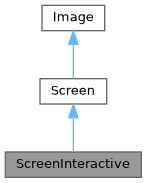
Public Types | |
| using | SelectionStyle = std::function<void(Pixel&)> |
Public Member Functions | |
| ~ScreenInteractive () override | |
| void | TrackMouse (bool enable=true) |
Set whether mouse is tracked and events reported. called outside of the main loop. E.g ScreenInteractive::Loop(...). | |
| void | HandlePipedInput (bool enable=true) |
| Enable or disable automatic piped input handling. When enabled, FTXUI will detect piped input and redirect stdin from /dev/tty for keyboard input, allowing applications to read piped data while still receiving interactive keyboard events. | |
| void | Loop (Component) |
| Execute the main loop. | |
| void | Exit () |
| Exit the main loop. | |
| Closure | ExitLoopClosure () |
| Return a function to exit the main loop. | |
| void | Post (Task task) |
| Add a task to the main loop. It will be executed later, after every other scheduled tasks. | |
| void | PostEvent (Event event) |
| Add an event to the main loop. It will be executed later, after every other scheduled events. | |
| void | RequestAnimationFrame () |
| Add a task to draw the screen one more time, until all the animations are done. | |
| CapturedMouse | CaptureMouse () |
| Try to get the unique lock about behing able to capture the mouse. | |
| Closure | WithRestoredIO (Closure) |
| Decorate a function. It executes the same way, but with the currently active screen terminal hooks temporarilly uninstalled during its execution. | |
| void | ForceHandleCtrlC (bool force) |
| Force FTXUI to handle or not handle Ctrl-C, even if the component catches the Event::CtrlC. | |
| void | ForceHandleCtrlZ (bool force) |
| Force FTXUI to handle or not handle Ctrl-Z, even if the component catches the Event::CtrlZ. | |
| std::string | GetSelection () |
| Returns the content of the current selection. | |
| void | SelectionChange (std::function< void()> callback) |
| std::string | ToString () const |
| void | Print () const |
| void | Clear () |
| 清除螢幕上的所有像素。 | |
| std::string | ResetPosition (bool clear=false) const |
| 返回一個字串,用於將游標位置重置到螢幕的開頭。 | |
| void | ApplyShader () |
| Cursor | cursor () const |
| void | SetCursor (Cursor cursor) |
| uint8_t | RegisterHyperlink (const std::string &link) |
| const std::string & | Hyperlink (uint8_t id) const |
| const SelectionStyle & | GetSelectionStyle () const |
| 返回當前選擇樣式。 | |
| void | SetSelectionStyle (SelectionStyle decorator) |
| 設置當前選擇樣式。 | |
| std::string & | at (int x, int y) |
| 存取給定位置的單元格中的字元。 | |
| const std::string & | at (int x, int y) const |
| 存取給定位置的單元格中的字元。 | |
| Pixel & | PixelAt (int x, int y) |
| 存取給定位置的單元格 (Pixel)。 | |
| const Pixel & | PixelAt (int x, int y) const |
| 存取給定位置的單元格 (Pixel)。 | |
| int | dimx () const |
| int | dimy () const |
Static Public Member Functions | |
| static ScreenInteractive | FixedSize (int dimx, int dimy) |
| static ScreenInteractive | Fullscreen () |
| static ScreenInteractive | FullscreenPrimaryScreen () |
| static ScreenInteractive | FullscreenAlternateScreen () |
| static ScreenInteractive | FitComponent () |
| static ScreenInteractive | TerminalOutput () |
| static ScreenInteractive * | Active () |
| Return the currently active screen, or null if none. | |
| static Screen | Create (Dimensions dimension) |
| 創建具有給定尺寸的螢幕。 | |
| static Screen | Create (Dimensions width, Dimensions height) |
| 沿著 x 軸和 y 軸創建具有給定尺寸的螢幕。 | |
Public Attributes | |
| friend | Private |
| Box | stencil |
Protected Attributes | |
| Cursor | cursor_ |
| std::vector< std::string > | hyperlinks_ = {""} |
| SelectionStyle | selection_style_ |
| int | dimx_ |
| int | dimy_ |
| std::vector< std::vector< Pixel > > | pixels_ |
Member Typedef Documentation
◆ SelectionStyle
|
inherited |
Definition at line 72 of file screen.hpp.
Constructor & Destructor Documentation
◆ ~ScreenInteractive()
|
overridedefault |
Member Function Documentation
◆ FixedSize()
|
static |
Definition at line 284 of file screen_interactive.cpp.
◆ Fullscreen()
|
static |
Create a ScreenInteractive taking the full terminal size. This is using the alternate screen buffer to avoid messing with the terminal content.
- Note
- This is the same as
ScreenInteractive::FullscreenAlternateScreen()
Definition at line 297 of file screen_interactive.cpp.
◆ FullscreenPrimaryScreen()
|
static |
Create a ScreenInteractive taking the full terminal size. The primary screen buffer is being used. It means if the terminal is resized, the previous content might mess up with the terminal content.
Definition at line 305 of file screen_interactive.cpp.
◆ FullscreenAlternateScreen()
|
static |
Create a ScreenInteractive taking the full terminal size. This is using the alternate screen buffer to avoid messing with the terminal content.
Definition at line 318 of file screen_interactive.cpp.
◆ FitComponent()
|
static |
Create a ScreenInteractive whose width and height match the component being drawn.
Definition at line 346 of file screen_interactive.cpp.
◆ TerminalOutput()
|
static |
Create a ScreenInteractive whose width match the terminal output width and the height matches the component being drawn.
Definition at line 331 of file screen_interactive.cpp.
◆ TrackMouse()
| void TrackMouse | ( | bool | enable = true | ) |
Set whether mouse is tracked and events reported. called outside of the main loop. E.g ScreenInteractive::Loop(...).
- Parameters
-
enable Whether to enable mouse event tracking.
- Note
- This muse be called outside of the main loop. E.g. before calling
ScreenInteractive::Loop. - Mouse tracking is enabled by default.
- Mouse tracking is only supported on terminals that supports it.
Example
Definition at line 371 of file screen_interactive.cpp.
◆ HandlePipedInput()
| void HandlePipedInput | ( | bool | enable = true | ) |
Enable or disable automatic piped input handling. When enabled, FTXUI will detect piped input and redirect stdin from /dev/tty for keyboard input, allowing applications to read piped data while still receiving interactive keyboard events.
- Parameters
-
enable Whether to enable piped input handling. Default is true.
- Note
- This must be called before Loop().
- This feature is enabled by default.
- This feature is only available on POSIX systems (Linux/macOS).
Definition at line 383 of file screen_interactive.cpp.
◆ Active()
|
static |
Return the currently active screen, or null if none.
Definition at line 527 of file screen_interactive.cpp.
◆ Loop()
Execute the main loop.
- Parameters
-
component The component to draw.
Definition at line 429 of file screen_interactive.cpp.
◆ Exit()
| void Exit | ( | ) |
Exit the main loop.
Definition at line 1024 of file screen_interactive.cpp.
◆ ExitLoopClosure()
| Closure ExitLoopClosure | ( | ) |
Return a function to exit the main loop.
Definition at line 1019 of file screen_interactive.cpp.
◆ Post()
| void Post | ( | Task | task | ) |
Add a task to the main loop. It will be executed later, after every other scheduled tasks.
Definition at line 389 of file screen_interactive.cpp.
◆ PostEvent()
| void PostEvent | ( | Event | event | ) |
Add an event to the main loop. It will be executed later, after every other scheduled events.
Definition at line 397 of file screen_interactive.cpp.
◆ RequestAnimationFrame()
| void RequestAnimationFrame | ( | ) |
Add a task to draw the screen one more time, until all the animations are done.
Definition at line 403 of file screen_interactive.cpp.
◆ CaptureMouse()
| CapturedMouse CaptureMouse | ( | ) |
Try to get the unique lock about behing able to capture the mouse.
- Returns
- A unique lock if the mouse is not already captured, otherwise a null.
Definition at line 418 of file screen_interactive.cpp.
◆ WithRestoredIO()
Decorate a function. It executes the same way, but with the currently active screen terminal hooks temporarilly uninstalled during its execution.
- Parameters
-
fn The function to decorate.
Definition at line 493 of file screen_interactive.cpp.
◆ ForceHandleCtrlC()
| void ForceHandleCtrlC | ( | bool | force | ) |
Force FTXUI to handle or not handle Ctrl-C, even if the component catches the Event::CtrlC.
Definition at line 503 of file screen_interactive.cpp.
◆ ForceHandleCtrlZ()
| void ForceHandleCtrlZ | ( | bool | force | ) |
Force FTXUI to handle or not handle Ctrl-Z, even if the component catches the Event::CtrlZ.
Definition at line 509 of file screen_interactive.cpp.
◆ GetSelection()
| std::string GetSelection | ( | ) |
Returns the content of the current selection.
Definition at line 514 of file screen_interactive.cpp.
◆ SelectionChange()
| void SelectionChange | ( | std::function< void()> | callback | ) |
Definition at line 521 of file screen_interactive.cpp.
◆ Create() [1/2]
|
staticinherited |
創建具有給定尺寸的螢幕。
Definition at line 395 of file screen.cpp.
◆ Create() [2/2]
|
staticinherited |
沿著 x 軸和 y 軸創建具有給定尺寸的螢幕。
Definition at line 389 of file screen.cpp.
◆ ToString()
|
inherited |
生成一個可用於在終端上列印螢幕的 std::string。
- Note
- 不要忘記刷新 stdout。或者,您可以使用 Screen::Print();
Definition at line 412 of file screen.cpp.
◆ Print()
|
inherited |
Definition at line 449 of file screen.cpp.
◆ Clear()
|
inherited |
清除螢幕上的所有像素。
Definition at line 489 of file screen.cpp.
◆ ResetPosition()
|
inherited |
返回一個字串,用於將游標位置重置到螢幕的開頭。
- Returns
- 用於將游標位置重置到開頭的字串。
Definition at line 470 of file screen.cpp.
◆ ApplyShader()
|
inherited |
Definition at line 501 of file screen.cpp.
◆ cursor()
|
inlineinherited |
Definition at line 65 of file screen.hpp.
◆ SetCursor()
|
inlineinherited |
Definition at line 66 of file screen.hpp.
◆ RegisterHyperlink()
|
inherited |
Definition at line 528 of file screen.cpp.
◆ Hyperlink()
|
inherited |
Definition at line 541 of file screen.cpp.
◆ GetSelectionStyle()
|
inherited |
◆ SetSelectionStyle()
|
inherited |
◆ at() [1/2]
|
inherited |
◆ at() [2/2]
|
inherited |
◆ PixelAt() [1/2]
|
inherited |
◆ PixelAt() [2/2]
|
inherited |
◆ dimx()
◆ dimy()
Member Data Documentation
◆ Private
| friend Private |
Definition at line 176 of file screen_interactive.hpp.
◆ cursor_
|
protectedinherited |
Definition at line 77 of file screen.hpp.
◆ hyperlinks_
|
protectedinherited |
Definition at line 78 of file screen.hpp.
◆ selection_style_
|
protectedinherited |
Definition at line 81 of file screen.hpp.
◆ stencil
◆ dimx_
◆ dimy_
◆ pixels_
Function Documentation
◆ RequestAnimationFrame()
| void RequestAnimationFrame | ( | ) |
RequestAnimationFrame 是一個函式,它請求在下一個動畫週期中繪製新畫面。
- Note
- 此函式通常由需要隨時間更新其狀態或外觀的元件呼叫,例如動畫或轉場。 當變更不依賴於終端機接收到的事件,而是依賴於時間的推移時,這非常有用。
尚未完成動畫的元件可以呼叫此函式,以請求稍後繪製新畫面。
當沒有新事件且沒有動畫要完成時,不會繪製新畫面。
Definition at line 77 of file screen_interactive.cpp.
◆ Button() [1/2]
| Component Button | ( | ButtonOption | option | ) |
繪製一個按鈕。點擊時執行一個函數。
- Parameters
-
option 額外的可選參數。
- See also
- ButtonBase
範例
輸出
Definition at line 174 of file src/ftxui/component/button.cpp.
◆ Button() [2/2]
| Component Button | ( | ConstStringRef | label, |
| std::function< void()> | on_click, | ||
| ButtonOption | option ) |
繪製一個按鈕。點擊時執行一個函數。
- Parameters
-
label 按鈕的標籤。 on_click 點擊時要執行的動作。 option 額外的可選參數。
- See also
- ButtonBase
範例
輸出
Definition at line 202 of file src/ftxui/component/button.cpp.
◆ CatchEvent() [1/2]
傳回一個元件,使用 |on_event| 捕捉事件。當事件已處理時,此函式必須傳回 true,否則傳回 false。
- Parameters
-
child 被包裝的元件。 on_event 繪製介面的函式。
範例
Definition at line 53 of file catch_event.cpp.
◆ CatchEvent() [2/2]
| ComponentDecorator CatchEvent | ( | std::function< bool(Event)> | on_event | ) |
裝飾一個元件,使用 |on_event| 捕捉事件。當事件已處理時,此函式必須傳回 true,否則傳回 false。
- Parameters
-
on_event 繪製介面的函式。
範例
Definition at line 78 of file catch_event.cpp.
◆ Checkbox() [1/2]
| Component Checkbox | ( | CheckboxOption | option | ) |
- Parameters
-
option 額外的可選參數。
- See also
- CheckboxBase
範例
輸出
Definition at line 107 of file src/ftxui/component/checkbox.cpp.
◆ Checkbox() [2/2]
| Component Checkbox | ( | ConstStringRef | label, |
| bool * | checked, | ||
| CheckboxOption | option ) |
繪製可勾選元素。
- Parameters
-
label 複選框的標籤。 checked 複選框是否被選中。 option 額外的可選參數。
- See also
- CheckboxBase
範例
輸出
Definition at line 134 of file src/ftxui/component/checkbox.cpp.
◆ Vertical() [1/2]
| Component Vertical | ( | Components | children | ) |
一個元件列表,垂直地一個接一個繪製,並使用上/下箭頭鍵或 'j'/'k' 鍵進行垂直導航。
- Parameters
-
children 元件列表。
- See also
- ContainerBase
範例
Definition at line 315 of file container.cpp.
◆ Vertical() [2/2]
| Component Vertical | ( | Components | children, |
| int * | selector ) |
一個元件列表,垂直地一個接一個繪製,並使用上/下箭頭鍵或 'j'/'k' 鍵進行垂直導航。 這對於實作選單很有用。
- Parameters
-
children 元件列表。 selector 所選子元件索引的參考。
- See also
- ContainerBase
範例
Definition at line 336 of file container.cpp.
◆ Horizontal() [1/2]
| Component Horizontal | ( | Components | children | ) |
一個元件列表,水平地一個接一個繪製,並使用左/右箭頭鍵或 'h'/'l' 鍵進行水平導航。
- Parameters
-
children 元件列表。
- See also
- ContainerBase
範例
Definition at line 356 of file container.cpp.
◆ Horizontal() [2/2]
| Component Horizontal | ( | Components | children, |
| int * | selector ) |
一個元件列表,水平地一個接一個繪製,並使用左/右箭頭鍵或 'h'/'l' 鍵進行水平導航。
- Parameters
-
children 元件列表。 selector 所選子元件索引的參考。
- See also
- ContainerBase
範例
Definition at line 377 of file container.cpp.
◆ Tab()
| Component Tab | ( | Components | children, |
| int * | selector ) |
一個元件列表,一次只繪製一個並與之互動。|selector| 給出所選元件的索引。這對於實作分頁很有用。
- Parameters
-
children 元件列表。 selector 繪製中的子元件索引。
- See also
- ContainerBase
範例
Definition at line 398 of file container.cpp.
◆ Stacked()
| Component Stacked | ( | Components | children | ) |
一個元件列表,將彼此堆疊。 事件會傳播到第一個元件,如果未處理則傳播到第二個,依此類推。 元件以給定的相反順序繪製。 當一個元件獲得焦點時,它會被放到最前面,而不改變其他元素的相對順序。
這應該與 Window 元件一起使用。
- Parameters
-
children 元件列表。
- See also
- Window
範例
Definition at line 423 of file container.cpp.
◆ Dropdown() [1/2]
| Component Dropdown | ( | ConstStringListRef | entries, |
| int * | selected ) |
下拉式選單。
- Parameters
-
entries 要顯示的項目清單。 selected 選定項目的索引。
Definition at line 21 of file src/ftxui/component/dropdown.cpp.
◆ Dropdown() [2/2]
| Component Dropdown | ( | DropdownOption | option | ) |
◆ Hoverable() [1/6]
包裝一個元件。提供能力以判斷滑鼠是否懸停在其上方。
- Parameters
-
component 被包裝的元件。 hover 反映元件是否被懸停的值。
範例
Definition at line 41 of file hoverable.cpp.
◆ Hoverable() [2/6]
◆ Hoverable() [3/6]
| ComponentDecorator Hoverable | ( | bool * | hover | ) |
◆ Hoverable() [4/6]
| ComponentDecorator Hoverable | ( | std::function< void()> | on_enter, |
| std::function< void()> | on_leave ) |
◆ Hoverable() [5/6]
◆ Hoverable() [6/6]
| ComponentDecorator Hoverable | ( | std::function< void(bool)> | on_change | ) |
◆ Input() [1/3]
| Component Input | ( | InputOption | option | ) |
用於編輯文字的輸入框。
- Parameters
-
option 額外的可選參數。
- See also
- InputBase
Example
Output
Definition at line 570 of file src/ftxui/component/input.cpp.
◆ Input() [2/3]
| Component Input | ( | StringRef | content, |
| InputOption | option ) |
用於編輯文字的輸入框。
- Parameters
-
content 可編輯的內容。 option 額外的可選參數。
- See also
- InputBase
Example
Output
Definition at line 598 of file src/ftxui/component/input.cpp.
◆ Input() [3/3]
| Component Input | ( | StringRef | content, |
| StringRef | placeholder, | ||
| InputOption | option ) |
用於編輯文字的輸入框。
- Parameters
-
content 可編輯的內容。 placeholder 佔位符文字。 option 額外的可選參數。
- See also
- InputBase
Example
Output
Definition at line 625 of file src/ftxui/component/input.cpp.
◆ Maybe() [1/4]
裝飾一個組件 |child|。它只在 |show| 返回 true 時顯示。
- Parameters
-
child 要裝飾的組件。 show 一個函數,返回是否應顯示 |child|。
Definition at line 20 of file src/ftxui/component/maybe.cpp.
◆ Maybe() [2/4]
| ComponentDecorator Maybe | ( | std::function< bool()> | show | ) |
裝飾一個組件。它只在 |show| 函數返回 true 時顯示。
- Parameters
-
show 一個函數,返回是否應顯示被裝飾的組件。
範例
Definition at line 54 of file src/ftxui/component/maybe.cpp.
◆ Maybe() [3/4]
◆ Maybe() [4/4]
| ComponentDecorator Maybe | ( | const bool * | show | ) |
◆ Menu() [1/2]
| Component Menu | ( | MenuOption | option | ) |
文字列表。選定的元素會被聚焦。
- Parameters
-
option 包含所有參數的結構。
範例
輸出
Definition at line 512 of file src/ftxui/component/menu.cpp.
◆ Menu() [2/2]
| Component Menu | ( | ConstStringListRef | entries, |
| int * | selected, | ||
| MenuOption | option ) |
文字列表。選定的元素會被聚焦。
- Parameters
-
entries 菜單中的條目列表。 selected 當前選定元素的索引。 option 額外的可選參數。
範例
輸出
Definition at line 543 of file src/ftxui/component/menu.cpp.
◆ Toggle()
| Component Toggle | ( | ConstStringListRef | entries, |
| int * | selected ) |
元素的水平列表。使用者可以在其中導航。
- Parameters
-
entries 要顯示的可選條目列表。 selected 參考選定的條目。 另請參閱 |Menu|。
Definition at line 554 of file src/ftxui/component/menu.cpp.
◆ MenuEntry() [1/2]
| Component MenuEntry | ( | ConstStringRef | label, |
| MenuEntryOption | option ) |
一個特定的菜單條目。它們可以放入 Container::Vertical 中以形成菜單。
- Parameters
-
label 表示此元素的繪製文本。 option 額外的可選參數。
範例
輸出
Definition at line 583 of file src/ftxui/component/menu.cpp.
◆ MenuEntry() [2/2]
| Component MenuEntry | ( | MenuEntryOption | option | ) |
一個特定的菜單條目。它們可以放入 Container::Vertical 中以形成菜單。
- Parameters
-
option 參數。
範例
輸出
Definition at line 612 of file src/ftxui/component/menu.cpp.
◆ Modal() [1/2]
◆ Modal() [2/2]
| ComponentDecorator Modal | ( | Component | modal, |
| const bool * | show_modal ) |
◆ Radiobox() [1/2]
| Component Radiobox | ( | RadioboxOption | option | ) |
元素清單,只能選擇一個。
- Parameters
-
option 參數
- See also
- RadioboxBase
範例
輸出
NOLINTNEXTLINE
Definition at line 203 of file src/ftxui/component/radiobox.cpp.
◆ Radiobox() [2/2]
| Component Radiobox | ( | ConstStringListRef | entries, |
| int * | selected, | ||
| RadioboxOption | option ) |
元素清單,只能選擇一個。
- Parameters
-
entries 清單中的條目清單。 selected 當前選定元素的索引。 option 其他可選參數。
- See also
- RadioboxBase
範例
輸出
Definition at line 235 of file src/ftxui/component/radiobox.cpp.
◆ Renderer() [1/4]
建立一個元件,使用 |render| 來繪製其介面。
- Parameters
-
render 繪製介面的函式。
範例
Definition at line 28 of file src/ftxui/component/renderer.cpp.
◆ Renderer() [2/4]
回傳一個新的元件,類似於 |child|,但使用 |render| 作為 Component::Render() 事件。
- Parameters
-
child 用於轉發事件的元件。 render 繪製介面的函式。
範例
Definition at line 59 of file src/ftxui/component/renderer.cpp.
◆ Renderer() [3/4]
建立一個可聚焦的元件,使用 |render| 來繪製其介面。
- Parameters
-
render 繪製介面的函式,它接受一個布林值,表示該元件是否被聚焦。
範例
Definition at line 81 of file src/ftxui/component/renderer.cpp.
◆ Renderer() [4/4]
| ComponentDecorator Renderer | ( | ElementDecorator | decorator | ) |
裝飾一個元件,透過裝飾它所呈現的內容。
- Parameters
-
decorator 修改其呈現元素的函式。
範例
Definition at line 122 of file src/ftxui/component/renderer.cpp.
◆ ResizableSplitLeft()
兩個元件之間的水平分割,可透過滑鼠設定。
- Parameters
-
main 大小為 |main_size| 的主要元件,位於左側。 back 佔用剩餘空間的後端元件,位於右側。 main_size |main| 元件的大小。
Example
Output
Definition at line 198 of file src/ftxui/component/resizable_split.cpp.
◆ ResizableSplitRight()
兩個元件之間的水平分割,可透過滑鼠設定。
- Parameters
-
main 大小為 |main_size| 的主要元件,位於右側。 back 佔用剩餘空間的後端元件,位於左側。 main_size |main| 元件的大小。
Example
Output
Definition at line 231 of file src/ftxui/component/resizable_split.cpp.
◆ ResizableSplitTop()
兩個元件之間的垂直分割,可透過滑鼠設定。
- Parameters
-
main 大小為 |main_size| 的主要元件,位於上方。 back 佔用剩餘空間的後端元件,位於下方。 main_size |main| 元件的大小。
Example
Output
Definition at line 264 of file src/ftxui/component/resizable_split.cpp.
◆ ResizableSplitBottom()
兩個元件之間的垂直分割,可透過滑鼠設定。
- Parameters
-
main 大小為 |main_size| 的主要元件,位於下方。 back 佔用剩餘空間的後端元件,位於上方。 main_size |main| 元件的大小。
Example
Output
Definition at line 297 of file src/ftxui/component/resizable_split.cpp.
◆ Window()
| Component Window | ( | WindowOptions | option | ) |
一個可拖曳/可調整大小的視窗。要使用多個視窗,它們必須透過 Container::Stacked({...}) 元件堆疊。
- Parameters
-
option 包含所有參數的結構。
- See also
- Window
範例
Definition at line 312 of file src/ftxui/component/window.cpp.