Detailed Description
請查看 ftxui/screen 模組的 教學。
Namespaces | |
| namespace | ftxui::Dimension |
| 定義螢幕的維度外觀。 | |
Classes | |
| struct | Box |
| Box 是一個表示二維空間中矩形區域的結構。 More... | |
| class | Color |
| Color 是一個在終端使用者介面中表示顏色的類別。 More... | |
| struct | ColorInfo |
| ColorInfo 是一個結構,包含有關終端機 顏色調色盤的資訊。 More... | |
| class | Image |
| 像素的矩形網格。 More... | |
| struct | Pixel |
| 一個 Unicode 字元及其相關樣式。 More... | |
| class | Screen |
| 像素的矩形網格。 More... | |
| struct | Dimensions |
| Dimensions 是一個表示終端機大小的結構 More... | |
Enumerations | |
| enum | Color { Palette1 , Palette16 , Palette256 , TrueColor } |
| Color 是一個列舉,表示終端機的色彩支援 More... | |
Functions | |
| Dimensions | Size () |
| 獲取終端機大小。 | |
| Color | ColorSupport () |
| 獲取終端機的顏色支援。 | |
Class Documentation
◆ ftxui::Box
| struct ftxui::Box |
Box 是一個表示二維空間中矩形區域的結構。
它由其沿 x 軸和 y 軸的最小和最大座標定義。 請注意,座標是包含性的,這表示該框包含最小值和最大值。
Public Member Functions | |
| void | Shift (int x, int y) |
| bool | Contain (int x, int y) const |
| bool | IsEmpty () const |
| bool | operator== (const Box &other) const |
| bool | operator!= (const Box &other) const |
Static Public Member Functions | |
| static auto | Intersection (Box a, Box b) -> Box |
| static auto | Union (Box a, Box b) -> Box |
Public Attributes | |
| int | x_min = 0 |
| int | x_max = 0 |
| int | y_min = 0 |
| int | y_max = 0 |
Member Function Documentation
◆ Intersection()
◆ Union()
◆ Shift()
| void Shift | ( | int | x, |
| int | y ) |
◆ Contain()
| bool Contain | ( | int | x, |
| int | y ) const |
◆ IsEmpty()
◆ operator==()
| bool operator== | ( | const Box & | other | ) | const |
◆ operator!=()
| bool operator!= | ( | const Box & | other | ) | const |
Member Data Documentation
◆ x_min
◆ x_max
◆ y_min
◆ y_max
◆ ftxui::Color
| class ftxui::Color |
Color 是一個在終端使用者介面中表示顏色的類別。
Public Types | |
| enum | Palette1 : uint8_t { Default } |
| enum | Palette16 : uint8_t { Black = 0 , Red = 1 , Green = 2 , Yellow = 3 , Blue = 4 , Magenta = 5 , Cyan = 6 , GrayLight = 7 , GrayDark = 8 , RedLight = 9 , GreenLight = 10 , YellowLight = 11 , BlueLight = 12 , MagentaLight = 13 , CyanLight = 14 , White = 15 } |
| enum | Palette256 : uint8_t { Aquamarine1 = 122 , Aquamarine1Bis = 86 , Aquamarine3 = 79 , Blue1 = 21 , Blue3 = 19 , Blue3Bis = 20 , BlueViolet = 57 , CadetBlue = 72 , CadetBlueBis = 73 , Chartreuse1 = 118 , Chartreuse2 = 112 , Chartreuse2Bis = 82 , Chartreuse3 = 70 , Chartreuse3Bis = 76 , Chartreuse4 = 64 , CornflowerBlue = 69 , Cornsilk1 = 230 , Cyan1 = 51 , Cyan2 = 50 , Cyan3 = 43 , DarkBlue = 18 , DarkCyan = 36 , DarkGoldenrod = 136 , DarkGreen = 22 , DarkKhaki = 143 , DarkMagenta = 90 , DarkMagentaBis = 91 , DarkOliveGreen1 = 191 , DarkOliveGreen1Bis = 192 , DarkOliveGreen2 = 155 , DarkOliveGreen3 = 107 , DarkOliveGreen3Bis = 113 , DarkOliveGreen3Ter = 149 , DarkOrange = 208 , DarkOrange3 = 130 , DarkOrange3Bis = 166 , DarkRed = 52 , DarkRedBis = 88 , DarkSeaGreen = 108 , DarkSeaGreen1 = 158 , DarkSeaGreen1Bis = 193 , DarkSeaGreen2 = 151 , DarkSeaGreen2Bis = 157 , DarkSeaGreen3 = 115 , DarkSeaGreen3Bis = 150 , DarkSeaGreen4 = 65 , DarkSeaGreen4Bis = 71 , DarkSlateGray1 = 123 , DarkSlateGray2 = 87 , DarkSlateGray3 = 116 , DarkTurquoise = 44 , DarkViolet = 128 , DarkVioletBis = 92 , DeepPink1 = 198 , DeepPink1Bis = 199 , DeepPink2 = 197 , DeepPink3 = 161 , DeepPink3Bis = 162 , DeepPink4 = 125 , DeepPink4Bis = 89 , DeepPink4Ter = 53 , DeepSkyBlue1 = 39 , DeepSkyBlue2 = 38 , DeepSkyBlue3 = 31 , DeepSkyBlue3Bis = 32 , DeepSkyBlue4 = 23 , DeepSkyBlue4Bis = 24 , DeepSkyBlue4Ter = 25 , DodgerBlue1 = 33 , DodgerBlue2 = 27 , DodgerBlue3 = 26 , Gold1 = 220 , Gold3 = 142 , Gold3Bis = 178 , Green1 = 46 , Green3 = 34 , Green3Bis = 40 , Green4 = 28 , GreenYellow = 154 , Grey0 = 16 , Grey100 = 231 , Grey11 = 234 , Grey15 = 235 , Grey19 = 236 , Grey23 = 237 , Grey27 = 238 , Grey3 = 232 , Grey30 = 239 , Grey35 = 240 , Grey37 = 59 , Grey39 = 241 , Grey42 = 242 , Grey46 = 243 , Grey50 = 244 , Grey53 = 102 , Grey54 = 245 , Grey58 = 246 , Grey62 = 247 , Grey63 = 139 , Grey66 = 248 , Grey69 = 145 , Grey7 = 233 , Grey70 = 249 , Grey74 = 250 , Grey78 = 251 , Grey82 = 252 , Grey84 = 188 , Grey85 = 253 , Grey89 = 254 , Grey93 = 255 , Honeydew2 = 194 , HotPink = 205 , HotPink2 = 169 , HotPink3 = 132 , HotPink3Bis = 168 , HotPinkBis = 206 , IndianRed = 131 , IndianRed1 = 203 , IndianRed1Bis = 204 , IndianRedBis = 167 , Khaki1 = 228 , Khaki3 = 185 , LightCoral = 210 , LightCyan1Bis = 195 , LightCyan3 = 152 , LightGoldenrod1 = 227 , LightGoldenrod2 = 186 , LightGoldenrod2Bis = 221 , LightGoldenrod2Ter = 222 , LightGoldenrod3 = 179 , LightGreen = 119 , LightGreenBis = 120 , LightPink1 = 217 , LightPink3 = 174 , LightPink4 = 95 , LightSalmon1 = 216 , LightSalmon3 = 137 , LightSalmon3Bis = 173 , LightSeaGreen = 37 , LightSkyBlue1 = 153 , LightSkyBlue3 = 109 , LightSkyBlue3Bis = 110 , LightSlateBlue = 105 , LightSlateGrey = 103 , LightSteelBlue = 147 , LightSteelBlue1 = 189 , LightSteelBlue3 = 146 , LightYellow3 = 187 , Magenta1 = 201 , Magenta2 = 165 , Magenta2Bis = 200 , Magenta3 = 127 , Magenta3Bis = 163 , Magenta3Ter = 164 , MediumOrchid = 134 , MediumOrchid1 = 171 , MediumOrchid1Bis = 207 , MediumOrchid3 = 133 , MediumPurple = 104 , MediumPurple1 = 141 , MediumPurple2 = 135 , MediumPurple2Bis = 140 , MediumPurple3 = 97 , MediumPurple3Bis = 98 , MediumPurple4 = 60 , MediumSpringGreen = 49 , MediumTurquoise = 80 , MediumVioletRed = 126 , MistyRose1 = 224 , MistyRose3 = 181 , NavajoWhite1 = 223 , NavajoWhite3 = 144 , NavyBlue = 17 , Orange1 = 214 , Orange3 = 172 , Orange4 = 58 , Orange4Bis = 94 , OrangeRed1 = 202 , Orchid = 170 , Orchid1 = 213 , Orchid2 = 212 , PaleGreen1 = 121 , PaleGreen1Bis = 156 , PaleGreen3 = 114 , PaleGreen3Bis = 77 , PaleTurquoise1 = 159 , PaleTurquoise4 = 66 , PaleVioletRed1 = 211 , Pink1 = 218 , Pink3 = 175 , Plum1 = 219 , Plum2 = 183 , Plum3 = 176 , Plum4 = 96 , Purple = 129 , Purple3 = 56 , Purple4 = 54 , Purple4Bis = 55 , PurpleBis = 93 , Red1 = 196 , Red3 = 124 , Red3Bis = 160 , RosyBrown = 138 , RoyalBlue1 = 63 , Salmon1 = 209 , SandyBrown = 215 , SeaGreen1 = 84 , SeaGreen1Bis = 85 , SeaGreen2 = 83 , SeaGreen3 = 78 , SkyBlue1 = 117 , SkyBlue2 = 111 , SkyBlue3 = 74 , SlateBlue1 = 99 , SlateBlue3 = 61 , SlateBlue3Bis = 62 , SpringGreen1 = 48 , SpringGreen2 = 42 , SpringGreen2Bis = 47 , SpringGreen3 = 35 , SpringGreen3Bis = 41 , SpringGreen4 = 29 , SteelBlue = 67 , SteelBlue1 = 75 , SteelBlue1Bis = 81 , SteelBlue3 = 68 , Tan = 180 , Thistle1 = 225 , Thistle3 = 182 , Turquoise2 = 45 , Turquoise4 = 30 , Violet = 177 , Wheat1 = 229 , Wheat4 = 101 , Yellow1 = 226 , Yellow2 = 190 , Yellow3 = 148 , Yellow3Bis = 184 , Yellow4 = 100 , Yellow4Bis = 106 } |
Public Member Functions | |
| Color () | |
| 建立一個透明的顏色。 | |
| Color (Palette1 index) | |
| 建立一個透明的顏色。 | |
| Color (Palette16 index) | |
| 使用 Palette16 顏色建立一個顏色。 | |
| Color (Palette256 index) | |
| 使用 Palette256 顏色建立一個顏色。 | |
| Color (uint8_t red, uint8_t green, uint8_t blue, uint8_t alpha=255) | |
| 從 RGB 表示建立一個顏色。 https://en.wikipedia.org/wiki/RGB_color_model | |
| bool | operator== (const Color &rhs) const |
| bool | operator!= (const Color &rhs) const |
| std::string | Print (bool is_background_color) const |
| bool | IsOpaque () const |
Static Public Member Functions | |
| static Color | RGB (uint8_t red, uint8_t green, uint8_t blue) |
| 從 RGB 表示建立一個顏色。 https://en.wikipedia.org/wiki/RGB_color_model | |
| static Color | HSV (uint8_t hue, uint8_t saturation, uint8_t value) |
| 從 HSV 表示建立一個顏色。 https://en.wikipedia.org/wiki/HSL_and_HSV | |
| static Color | RGBA (uint8_t red, uint8_t green, uint8_t blue, uint8_t alpha) |
| 從 RGBA 表示建立一個顏色。 https://en.wikipedia.org/wiki/RGB_color_model | |
| static Color | HSVA (uint8_t hue, uint8_t saturation, uint8_t value, uint8_t alpha) |
| 從 HSV 表示建立一個顏色。 https://en.wikipedia.org/wiki/HSL_and_HSV | |
| static Color | Interpolate (float t, const Color &a, const Color &b) |
| static Color | Blend (const Color &lhs, const Color &rhs) |
| 使用 alpha 色版將兩種顏色混合在一起。 | |
Member Enumeration Documentation
◆ Palette1
◆ Palette16
| enum Palette16 : uint8_t |
◆ Palette256
| enum Palette256 : uint8_t |
Constructor & Destructor Documentation
◆ Color() [1/5]
|
default |
建立一個透明的顏色。
◆ Color() [2/5]
建立一個透明的顏色。
Definition at line 80 of file screen/color.cpp.
◆ Color() [3/5]
使用 Palette16 顏色建立一個顏色。
Definition at line 83 of file screen/color.cpp.
◆ Color() [4/5]
| Color | ( | Palette256 | index | ) |
使用 Palette256 顏色建立一個顏色。
Definition at line 87 of file screen/color.cpp.
◆ Color() [5/5]
| Color | ( | uint8_t | red, |
| uint8_t | green, | ||
| uint8_t | blue, | ||
| uint8_t | alpha = 255 ) |
從 RGB 表示建立一個顏色。 https://en.wikipedia.org/wiki/RGB_color_model
- Parameters
-
red 紅色的量 [0,255] green 綠色的量 [0,255] blue 藍色的量 [0,255] alpha alpha 的量 [0,255]
Definition at line 103 of file screen/color.cpp.
Member Function Documentation
◆ RGB()
|
static |
從 RGB 表示建立一個顏色。 https://en.wikipedia.org/wiki/RGB_color_model
- Parameters
-
red 紅色的量 [0,255] green 綠色的量 [0,255] blue 藍色的量 [0,255]
Definition at line 147 of file screen/color.cpp.
◆ HSV()
|
static |
從 HSV 表示建立一個顏色。 https://en.wikipedia.org/wiki/HSL_and_HSV
- Parameters
-
h 顏色的色相 [0,255] s 「色彩豐富度」 [0,255]。 v 「亮度」 [0,255]
Definition at line 198 of file screen/color.cpp.
◆ RGBA()
|
static |
從 RGBA 表示建立一個顏色。 https://en.wikipedia.org/wiki/RGB_color_model
- Parameters
-
red 紅色的量 [0,255] green 綠色的量 [0,255] blue 藍色的量 [0,255] alpha alpha 的量 [0,255]
- See also
- Color::RGB
Definition at line 159 of file screen/color.cpp.
◆ HSVA()
|
static |
從 HSV 表示建立一個顏色。 https://en.wikipedia.org/wiki/HSL_and_HSV
- Parameters
-
h 顏色的色相 [0,255] s 「色彩豐富度」 [0,255]。 v 「亮度」 [0,255] alpha alpha 的量 [0,255]
Definition at line 171 of file screen/color.cpp.
◆ Interpolate()
Definition at line 203 of file screen/color.cpp.
◆ Blend()
使用 alpha 色版將兩種顏色混合在一起。
Definition at line 272 of file screen/color.cpp.
◆ operator==()
| bool operator== | ( | const Color & | rhs | ) | const |
Definition at line 37 of file screen/color.cpp.
◆ operator!=()
| bool operator!= | ( | const Color & | rhs | ) | const |
Definition at line 42 of file screen/color.cpp.
◆ Print()
| std::string Print | ( | bool | is_background_color | ) | const |
Definition at line 46 of file screen/color.cpp.
◆ IsOpaque()
◆ ftxui::ColorInfo
| struct ftxui::ColorInfo |
ColorInfo 是一個結構,包含有關終端機 顏色調色盤的資訊。
Definition at line 16 of file color_info.hpp.
Public Attributes | |
| const char * | name |
| uint8_t | index_256 |
| uint8_t | index_16 |
| uint8_t | red |
| uint8_t | green |
| uint8_t | blue |
| uint8_t | hue |
| uint8_t | saturation |
| uint8_t | value |
Member Data Documentation
◆ name
| const char* name |
Definition at line 17 of file color_info.hpp.
◆ index_256
| uint8_t index_256 |
Definition at line 18 of file color_info.hpp.
◆ index_16
| uint8_t index_16 |
Definition at line 19 of file color_info.hpp.
◆ red
| uint8_t red |
Definition at line 20 of file color_info.hpp.
◆ green
| uint8_t green |
Definition at line 21 of file color_info.hpp.
◆ blue
| uint8_t blue |
Definition at line 22 of file color_info.hpp.
◆ hue
| uint8_t hue |
Definition at line 23 of file color_info.hpp.
◆ saturation
| uint8_t saturation |
Definition at line 24 of file color_info.hpp.
◆ value
| uint8_t value |
Definition at line 25 of file color_info.hpp.
◆ ftxui::Image
| class ftxui::Image |
 Inheritance diagram for Image: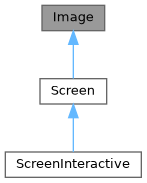
Public Member Functions | |
| Image ()=delete | |
| Image (int dimx, int dimy) | |
| virtual | ~Image ()=default |
| std::string & | at (int x, int y) |
| 存取給定位置的單元格中的字元。 | |
| const std::string & | at (int x, int y) const |
| 存取給定位置的單元格中的字元。 | |
| Pixel & | PixelAt (int x, int y) |
| 存取給定位置的單元格 (Pixel)。 | |
| const Pixel & | PixelAt (int x, int y) const |
| 存取給定位置的單元格 (Pixel)。 | |
| int | dimx () const |
| int | dimy () const |
| void | Clear () |
| 清除螢幕上的所有像素。 | |
Public Attributes | |
| Box | stencil |
Protected Attributes | |
| int | dimx_ |
| int | dimy_ |
| std::vector< std::vector< Pixel > > | pixels_ |
Constructor & Destructor Documentation
◆ Image() [1/2]
|
delete |
◆ Image() [2/2]
◆ ~Image()
|
virtualdefault |
Member Function Documentation
◆ at() [1/2]
| std::string & at | ( | int | x, |
| int | y ) |
◆ at() [2/2]
| const std::string & at | ( | int | x, |
| int | y ) const |
◆ PixelAt() [1/2]
| Pixel & PixelAt | ( | int | x, |
| int | y ) |
◆ PixelAt() [2/2]
| const Pixel & PixelAt | ( | int | x, |
| int | y ) const |
◆ dimx()
◆ dimy()
◆ Clear()
Member Data Documentation
◆ stencil
◆ dimx_
◆ dimy_
◆ pixels_
◆ ftxui::Pixel
| struct ftxui::Pixel |
一個 Unicode 字元及其相關樣式。
Public Member Functions | |
| Pixel () | |
Public Attributes | |
| bool | blink: 1 |
| bool | bold: 1 |
| bool | dim: 1 |
| bool | italic: 1 |
| bool | inverted: 1 |
| bool | underlined: 1 |
| bool | underlined_double: 1 |
| bool | strikethrough: 1 |
| bool | automerge: 1 |
| uint8_t | hyperlink = 0 |
| std::string | character = "" |
| Color | background_color = Color::Default |
| Color | foreground_color = Color::Default |
Constructor & Destructor Documentation
◆ Pixel()
Member Data Documentation
◆ blink
◆ bold
| bool bold |
◆ dim
◆ italic
◆ inverted
◆ underlined
| bool underlined |
◆ underlined_double
| bool underlined_double |
- Examples
- examples/component/selection.cpp.
◆ strikethrough
◆ automerge
◆ hyperlink
◆ character
◆ background_color
| Color background_color = Color::Default |
◆ foreground_color
| Color foreground_color = Color::Default |
◆ ftxui::Screen
| class ftxui::Screen |
像素的矩形網格。
- Examples
- examples/dom/gauge.cpp, and examples/dom/gauge_direction.cpp.
Definition at line 26 of file screen.hpp.
Inheritance diagram for Screen: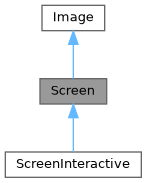
Public Types | |
| using | SelectionStyle = std::function<void(Pixel&)> |
Public Member Functions | |
| Screen (int dimx, int dimy) | |
| ~Screen () override=default | |
| std::string | ToString () const |
| void | Print () const |
| void | Clear () |
| 清除螢幕上的所有像素。 | |
| std::string | ResetPosition (bool clear=false) const |
| 返回一個字串,用於將游標位置重置到螢幕的開頭。 | |
| void | ApplyShader () |
| Cursor | cursor () const |
| void | SetCursor (Cursor cursor) |
| uint8_t | RegisterHyperlink (const std::string &link) |
| const std::string & | Hyperlink (uint8_t id) const |
| const SelectionStyle & | GetSelectionStyle () const |
| 返回當前選擇樣式。 | |
| void | SetSelectionStyle (SelectionStyle decorator) |
| 設置當前選擇樣式。 | |
| std::string & | at (int x, int y) |
| 存取給定位置的單元格中的字元。 | |
| const std::string & | at (int x, int y) const |
| 存取給定位置的單元格中的字元。 | |
| Pixel & | PixelAt (int x, int y) |
| 存取給定位置的單元格 (Pixel)。 | |
| const Pixel & | PixelAt (int x, int y) const |
| 存取給定位置的單元格 (Pixel)。 | |
| int | dimx () const |
| int | dimy () const |
Static Public Member Functions | |
| static Screen | Create (Dimensions dimension) |
| 創建具有給定尺寸的螢幕。 | |
| static Screen | Create (Dimensions width, Dimensions height) |
| 沿著 x 軸和 y 軸創建具有給定尺寸的螢幕。 | |
Public Attributes | |
| Box | stencil |
Protected Attributes | |
| Cursor | cursor_ |
| std::vector< std::string > | hyperlinks_ = {""} |
| SelectionStyle | selection_style_ |
| int | dimx_ |
| int | dimy_ |
| std::vector< std::vector< Pixel > > | pixels_ |
Member Typedef Documentation
◆ SelectionStyle
| using SelectionStyle = std::function<void(Pixel&)> |
Definition at line 72 of file screen.hpp.
Constructor & Destructor Documentation
◆ Screen()
| Screen | ( | int | dimx, |
| int | dimy ) |
Definition at line 399 of file screen.cpp.
◆ ~Screen()
|
overridedefault |
Member Function Documentation
◆ Create() [1/2]
|
static |
創建具有給定尺寸的螢幕。
Definition at line 395 of file screen.cpp.
◆ Create() [2/2]
|
static |
沿著 x 軸和 y 軸創建具有給定尺寸的螢幕。
Definition at line 389 of file screen.cpp.
◆ ToString()
| std::string ToString | ( | ) | const |
生成一個可用於在終端上列印螢幕的 std::string。
- Note
- 不要忘記刷新 stdout。或者,您可以使用 Screen::Print();
Definition at line 412 of file screen.cpp.
◆ Print()
| void Print | ( | ) | const |
Definition at line 449 of file screen.cpp.
◆ Clear()
| void Clear | ( | ) |
清除螢幕上的所有像素。
Definition at line 489 of file screen.cpp.
◆ ResetPosition()
| std::string ResetPosition | ( | bool | clear = false | ) | const |
返回一個字串,用於將游標位置重置到螢幕的開頭。
- Returns
- 用於將游標位置重置到開頭的字串。
Definition at line 470 of file screen.cpp.
◆ ApplyShader()
| void ApplyShader | ( | ) |
Definition at line 501 of file screen.cpp.
◆ cursor()
|
inline |
Definition at line 65 of file screen.hpp.
◆ SetCursor()
|
inline |
Definition at line 66 of file screen.hpp.
◆ RegisterHyperlink()
| std::uint8_t RegisterHyperlink | ( | const std::string & | link | ) |
Definition at line 528 of file screen.cpp.
◆ Hyperlink()
| const std::string & Hyperlink | ( | uint8_t | id | ) | const |
Definition at line 541 of file screen.cpp.
◆ GetSelectionStyle()
| const Screen::SelectionStyle & GetSelectionStyle | ( | ) | const |
◆ SetSelectionStyle()
| void SetSelectionStyle | ( | SelectionStyle | decorator | ) |
◆ at() [1/2]
|
inherited |
◆ at() [2/2]
|
inherited |
◆ PixelAt() [1/2]
|
inherited |
◆ PixelAt() [2/2]
|
inherited |
◆ dimx()
◆ dimy()
Member Data Documentation
◆ cursor_
|
protected |
Definition at line 77 of file screen.hpp.
◆ hyperlinks_
|
protected |
Definition at line 78 of file screen.hpp.
◆ selection_style_
|
protected |
Definition at line 81 of file screen.hpp.
◆ stencil
◆ dimx_
◆ dimy_
◆ pixels_
◆ ftxui::Dimensions
| struct ftxui::Dimensions |
Dimensions 是一個表示終端機大小的結構
Definition at line 11 of file terminal.hpp.
Public Attributes | |
| int | dimx |
| int | dimy |
Member Data Documentation
◆ dimx
| int dimx |
Definition at line 12 of file terminal.hpp.
◆ dimy
| int dimy |
Definition at line 13 of file terminal.hpp.
Enumeration Type Documentation
◆ Color
| enum Color |
Color 是一個列舉,表示終端機的色彩支援
| Enumerator | |
|---|---|
| Palette1 | |
| Palette16 | |
| Palette256 | |
| TrueColor | |
Definition at line 22 of file terminal.hpp.
Function Documentation
◆ Size()
| Dimensions Size | ( | ) |
◆ ColorSupport()
| Color ColorSupport | ( | ) |
獲取終端機的顏色支援。
Definition at line 125 of file terminal.cpp.