此模組定義了一組分層的 ftxui::Element。元素管理佈局,並能響應終端尺寸的變化。請注意以下範例,其中此模組用於創建一個帶有多個操作符的簡單佈局:
Example 部分提供了一系列範例。
Example:
...
Element document =
vbox({
text("The footer")
});
document = border(document);
document = document | border.
document |= border
...
}
Element text(std::wstring text)
顯示一段 Unicode 文字。
Element gauge(float progress)
繪製一個高解析度進度條。
Decorator color(Color)
使用前景顏色進行裝飾。
Element vbox(Elements)
一個垂直一個接一個顯示元素的容器。
元素列表
所有元素的列表都已包含,可以透過包含相應的頭文件來訪問:
#ifndef FTXUI_DOM_ELEMENTS_HPP
#define FTXUI_DOM_ELEMENTS_HPP
#include <functional>
#include <memory>
class Node;
using Element = std::shared_ptr<Node>;
};
Color unselected_color,
Color selected_color);
Color unselected_color,
Color selected_color);
Element canvas(
int width,
int height, std::function<
void(Canvas&)>);
Dimensions
Fit(
Element&,
bool extend_beyond_screen =
false);
}
}
#include "ftxui/dom/take_any_args.hpp"
#endif
Decorator bgcolor(Color)
使用背景顏色進行裝飾。
Element window(Element title, Element content, BorderStyle border=ROUNDED)
繪製帶有標題和邊框的視窗。
Element borderDouble(Element)
在元素周圍繪製雙線邊框。
Element focusCursorBarBlinking(Element)
與 focus 相同,但將游標形狀設置為閃爍條狀。
Element xflex(Element)
在 X 軸上盡可能擴展/在需要時最小化。
Element gaugeDirection(float progress, Direction direction)
繪製一個指定方向的高解析度進度條。
Decorator focusPositionRelative(float x, float y)
在 frame 內部使用,這會強制視圖滾動到給定位置。該位置以請求大小的比例表示。
Element separatorStyled(BorderStyle)
在兩個元素之間繪製垂直或水平分隔線。
Element xflex_grow(Element)
在 X 軸上盡可能擴展。
Element underlinedDouble(Element)
對文字應用雙底線。
Element clear_under(Element element)
在繪製 |child| 之前,清除下方的像素。這在與 dbox 結合使用時非常有用。
Element borderDashed(Element)
在元素周圍繪製虛線邊框。
Element separatorEmpty()
使用 EMPTY 樣式在兩個元素之間繪製垂直或水平分隔線。
Element vscroll_indicator(Element)
在右側顯示一個垂直捲軸。 顏色與內容一致。
Element nothing(Element element)
一個什麼都不做的裝飾器。
Decorator size(WidthOrHeight, Constraint, int value)
限制元素的大小。
Direction
Direction 是一個列舉,表示四個主要方向。
Element flex(Element)
使子元素按比例擴展以佔據容器中剩餘的空間。
Element paragraphAlignRight(const std::string &text)
回傳一個在多行上繪製段落並靠右對齊的元素。
Element gaugeRight(float progress)
繪製一個從左到右進展的高解析度進度條。
Element focusCursorUnderlineBlinking(Element)
與 focus 相同,但將游標形狀設置為閃爍底線。
Element bold(Element)
使用粗體字型,用於需要更多強調的元素。
Element separatorLight()
使用 LIGHT 樣式在兩個元素之間繪製垂直或水平分隔線。
Element spinner(int charset_index, size_t image_index)
用於表示時間和/或事件的效果。這將顯示 一個 ASCII 藝術「影片」。
Element borderRounded(Element)
在元素周圍繪製圓角邊框。
Element yflex(Element)
在 Y 軸上盡可能擴展/在需要時最小化。
Element flex_shrink(Element)
在需要時最小化。
Element focusCursorBar(Element)
與 focus 相同,但將游標形狀設置為靜止條狀。
Element focusCursorBlock(Element)
與 focus 相同,但將游標形狀設置為靜止方塊。
Element underlined(Element)
為給定元素加上底線。
Element center(Element)
水平與垂直置中一個元素。
Element focusCursorUnderline(Element)
與 focus 相同,但將游標形狀設置為靜止底線。
Element borderHeavy(Element)
在元素周圍繪製粗邊框。
Element inverted(Element)
添加一個濾鏡,它將反轉前景和背景 顏色。
Element paragraphAlignCenter(const std::string &text)
回傳一個在多行上繪製段落並置中對齊的元素。
Element gaugeUp(float progress)
繪製一個從下到上進展的高解析度進度條。
Element align_right(Element)
將元素靠右對齊。
Decorator focusPosition(int x, int y)
在 frame 內部使用,這會強制視圖滾動到給定位置。該位置以單元格數表示。
Element yflex_grow(Element)
在 Y 軸上盡可能擴展。
Element hscroll_indicator(Element)
在底部顯示一個水平捲軸。 顏色與內容一致。
Element flex_grow(Element)
盡可能擴展。
Element separatorDashed()
使用 DASHED 樣式在兩個元素之間繪製垂直或水平分隔線。
Element notflex(Element)
使元素不可伸縮。
Element strikethrough(Element)
對文字應用刪除線。
Element italic(Element)
將文字套用斜體。
Element dbox(Elements)
將多個元素堆疊在一起。
Element xflex_shrink(Element)
在 X 軸上在需要時最小化。
Element gaugeLeft(float progress)
繪製一個從右到左進展的高解析度進度條。
Element separatorCharacter(std::string)
在兩個元素之間繪製垂直或水平分隔線。
Element vtext(std::wstring text)
垂直顯示一段 Unicode 文字。
Element borderLight(Element)
在元素周圍繪製細邊框。
Element focus(Element)
將 child 設置為其同級元素中被聚焦的元素。
Element paragraphAlignLeft(const std::string &text)
回傳一個在多行上繪製段落並靠左對齊的元素。
Decorator borderWith(const Pixel &)
與 border 相同,但在元素周圍使用恆定的像素。
Decorator borderStyled(BorderStyle)
與 border 相同,但具有不同的樣式。
Element separator()
在兩個元素之間繪製垂直或水平分隔線。
Element filler()
一個元素,它會按比例擴展以佔據容器中剩餘的空間。
Element dim(Element)
使用淺色字體,適用於不那麼強調的元素。
Element automerge(Element child)
啟用字符自動與附近其他字符合併。
Decorator hyperlink(std::string link)
使用超連結裝飾。 當用戶點擊時,連結將被開啟。 此功能僅在有限的終端模擬器中受支援。 List: https://github.com/Alhadis/OSC8-Adoption/
Element blink(Element)
繪製的文字在可見和隱藏之間交替。
Element vcenter(Element)
垂直置中一個元素。
Element separatorDouble()
使用 DOUBLE 樣式在兩個元素之間繪製垂直或水平分隔線。
Element focusCursorBlockBlinking(Element)
與 focus 相同,但將游標形狀設置為閃爍方塊。
Element paragraphAlignJustify(const std::string &text)
回傳一個在多行上繪製段落並使用左右對齊的元素。
Element border(Element)
在元素周圍繪製邊框。
Element separatorHeavy()
使用 HEAVY 樣式在兩個元素之間繪製垂直或水平分隔線。
Element borderEmpty(Element)
在元素周圍繪製空邊框。
Element yflex_shrink(Element)
在 Y 軸上在需要時最小化。
Element hcenter(Element)
水平置中一個元素。
BorderStyle
BorderStyle 是一個列舉,表示可以應用於終端機 UI 元素的不同邊框樣式。
Element gaugeDown(float progress)
繪製一個從上到下進展的高解析度進度條。
FTXUI 的 ftxui::Dimension:: 命名空間
Dimensions Fit(Element &, bool extend_beyond_screen=false)
std::function< Element(Element)> Decorator
Element flexbox(Elements, FlexboxConfig config=FlexboxConfig())
一個容器,用於在行/列中顯示元素,並在滿時能夠換行到下一列/行。
Element separatorVSelector(float up, float down, Color unselected_color, Color selected_color)
繪製一個垂直條,其中上方/下方之間的區域以不同顏色顯示。
std::shared_ptr< Node > Element
Element xframe(Element)
與 frame 相同,但僅限於 x 軸。
Element hflow(Elements)
一個容器,用於從左到右在行中顯示元素。當填滿時,它會在下方的新行開始。
Decorator selectionStyle(std::function< void(Pixel &)> style)
設定元素被選取時的樣式。
Element separatorHSelector(float left, float right, Color unselected_color, Color selected_color)
繪製一個水平條,其中左右兩側之間的區域以不同顏色顯示。
Element hbox(Elements)
一個逐一水平顯示元素的容器。
std::vector< Element > Elements
Decorator selectionForegroundColor(Color foreground)
設定元素被選取時的前景顏色。 請注意,此樣式會應用在現有樣式之上。
Component operator|(Component component, ComponentDecorator decorator)
Decorator selectionBackgroundColor(Color foreground)
設定元素被選取時的背景顏色。 請注意,此樣式會應用在現有樣式之上。
Element separatorRounded()
Element yframe(Element)
與 frame 相同,但僅限於 y 軸。
Decorator selectionColor(Color foreground)
設定元素被選取時的顏色。
Element select(Element e)
將 child 設置為其同級元素中被聚焦的元素。
Element selectionStyleReset(Element)
重設元素的選取樣式。
Element canvas(ConstRef< Canvas >)
Decorator reflect(Box &box)
std::function< std::vector< int >(int, int)> GraphFunction
Element gridbox(std::vector< Elements > lines)
顯示元素網格的容器。
Elements paragraph(std::wstring text)
Element frame(Element)
允許元素顯示在「虛擬」區域內。其大小可以大於其容器。在這種情況下,只會顯示較小的一部分。視圖可滾動以使聚焦元素可見。
Component & operator|=(Component &component, ComponentDecorator decorator)
Element vflow(Elements)
一個容器,用於從上到下在行中顯示元素。當填滿時,它會在右側的新列開始。 filled, it starts on a new row. is full, it starts a new row.
Element graph(GraphFunction)
使用 GraphFunction 繪製圖形。
text
最簡單的小部件。它顯示一段文字。
text("I am a piece of text");
vtext
與 ftxui::text 相同,但垂直顯示。
Code:
Terminal output:
paragraph
類似於 ftxui::text,但單詞會根據其容器的寬度自動換行到多行。
範例程式碼:
paragraph("A very long text")
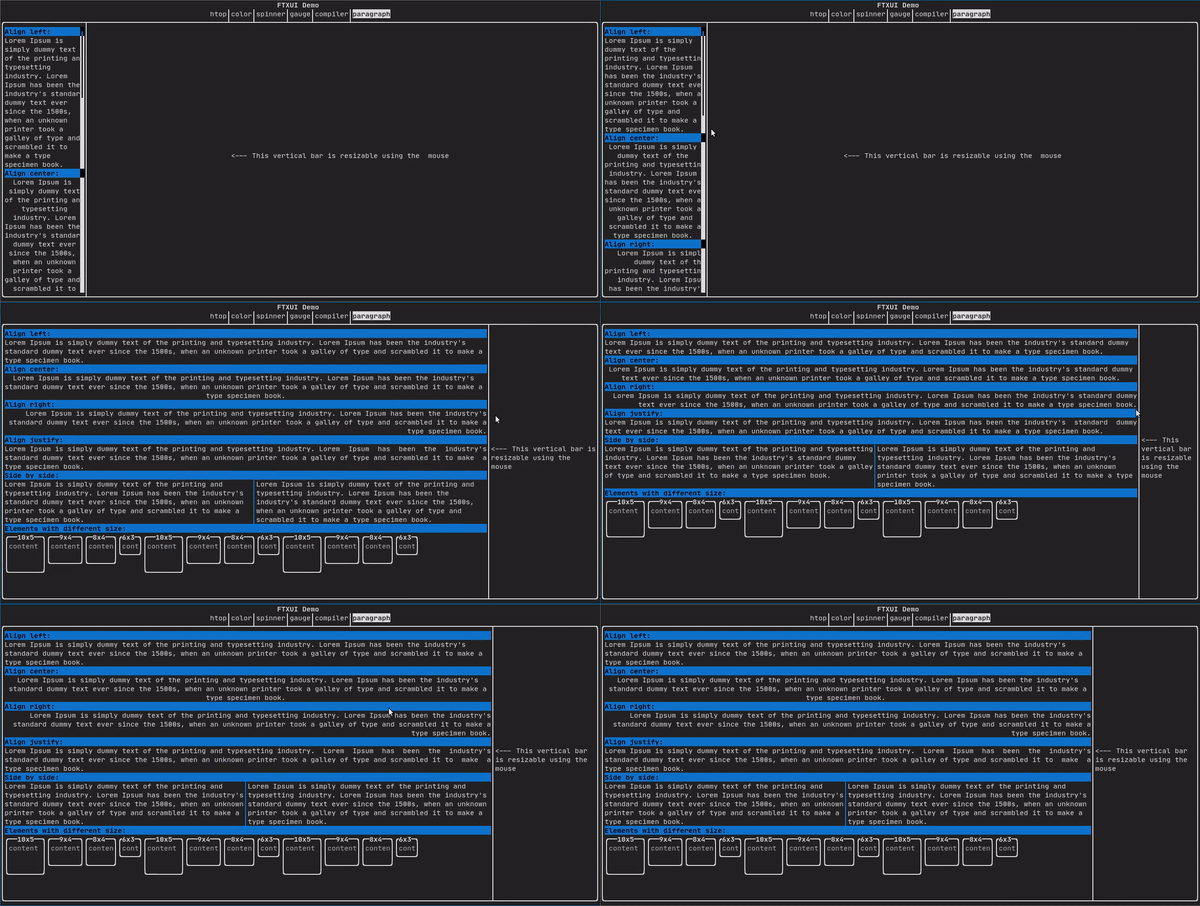
有關更詳細的範例,請參閱 詳細範例。Paragraph 還包括以下所示的其他變體:
border
為元素添加邊框。
Code:
border(text("The element"))
Terminal output:
┌───────────┐
│The element│
└───────────┘
- Note
- 您可以使用 pipe 運算符實現相同的行為。
程式碼: text("The element") | border
Border 也支援多種樣式,如下所示:
window
ftxui::window 是一個 ftxui::border,但帶有額外的標頭。要為元素添加視窗,請將其包裹並指定一個字串作為標頭。 程式碼:
window("The window", text("The element"))
Terminal output:
┌The window─┐
│The element│
└───────────┘
separator
顯示垂直/水平線,以視覺上將容器的內容一分為二。
Code:
border(
hbox({
text("Left"),
separator(),
text("Right")
})
)
Terminal output:
┌────┬─────┐
│left│right│
└────┴─────┘
分隔線有多種樣式,如下所示:
Color background,
Color foreground);
Color background,
Color foreground);
}
gauge
這是一個表示進度比例的視覺元素。
Code:
Terminal output:
┌────────────────────────────────────────────────────────────────────────────┐
│██████████████████████████████████████ │
└────────────────────────────────────────────────────────────────────────────┘
量規可以以多種方向顯示,如下所示:
namespace {
Element gauge(float ratio);
Element gaugeLeft(float ratio);
Element gaugeRight(float ratio);
Element gaugeUp(float ratio);
Element gaugeDown(float ratio);
Element gaugeDirection(float ratio, GaugeDirection);
}
graph
詳見:
Element graph(GraphFunction);
顏色
大多數終端控制台都可以顯示彩色文本和彩色背景。FTXUI 支援所有調色板:
Decorator color(Color);
Decorator bgcolor(Color);
Color gallery: 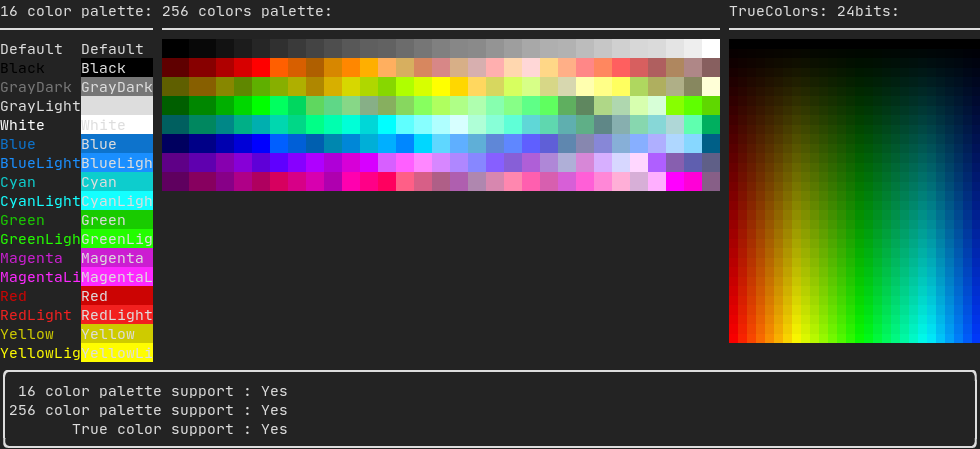
16色調色板
大多數終端都支援以下顏色:
- Default
- Black
- GrayDark
- GrayLight
- White
- Blue
- BlueLight
- Cyan
- CyanLight
- Green
- GreenLight
- Magenta
- MagentaLight
- Red
- RedLight
- Yellow
- YellowLight
Example use of the above colors using the pipe operator:
text("Blue foreground") | color(Color::Blue);
text("Blue background") | bgcolor(Color::Blue);
text("Black on white") | color(Color::Black) | bgcolor(Color::White);
256色調色板
在支援 256 種顏色的終端上。
text("HotPink") | color(Color::HotPink);
TrueColor (真彩色)
在支援 TrueColor 的終端上,您可以直接使用 24 位 RGB 顏色空間:
使用以下構造函數來指定顏色的 RGB 或 HSV 值:
有兩個構造函數:
static Color HSV(uint8_t hue, uint8_t saturation, uint8_t value)
從 HSV 表示建立一個顏色。 https://en.wikipedia.org/wiki/HSL_and_HSV
static Color RGB(uint8_t red, uint8_t green, uint8_t blue)
從 RGB 表示建立一個顏色。 https://en.wikipedia.org/wiki/RGB_color_model
線性漸層
FTXUI 支援線性漸層。無論是在前景還是背景上。
Decorator color(const LinearGradient&);
Decorator bgcolor(const LinearGradient&);
ftxui::LinearGradient 由角度(以度為單位)和顏色停止點列表定義。
auto gradient = LinearGradient()
.Angle(45)
.AddStop(0.0, Color::Red)
.AddStop(0.5, Color::Green)
.AddStop(1.0, Color::Blue);
您也可以使用簡化的構造函數:
LinearGradient(Color::Red, Color::Blue);
LinearGradient(45, Color::Red, Color::Blue);
See demo.
樣式
除了彩色文本和彩色背景之外。許多終端還支援文本效果,例如:bold(粗體)、italic(斜體)、dim(變暗)、underlined(底線)、inverted(反轉)、blink(閃爍)。
Element bold(Element);
Element italic(Element);
Element dim(Element);
Element inverted(Element);
Element underlined(Element);
Element underlinedDouble(Element);
Element strikethrough(Element);
Element blink(Element);
Decorator color(Color);
Decorator bgcolor(Color);
Decorator colorgrad(LinearGradient);
Decorator bgcolorgrad(LinearGradient);
Example

要使用這些效果,只需將您的元素包裹在您想要的效果中:
underlined(bold(text("This text is bold and underlined")))
或者,使用 pipe 運算符將其鏈接到您的元素上:
text("This text is bold") | bold | underlined
佈局
使元素可以透過以下方式排列:
- 水平 使用
ftxui::hbox
- 垂直 使用
ftxui::vbox
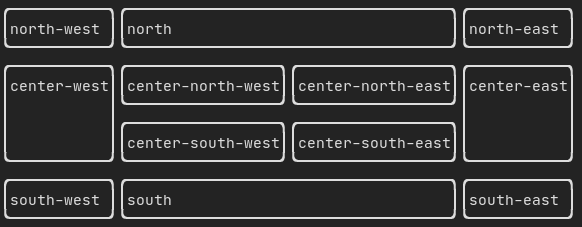
- 在網格內部 使用
ftxui::gridbox
- 沿一個方向換行 使用
ftxui::flexbox。
Example using ftxui::hbox, ftxui::vbox and ftxui::filler.
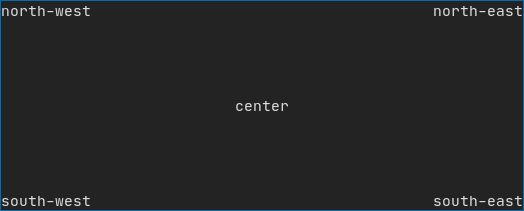
Example using ftxui::gridbox:
Example using flexbox:
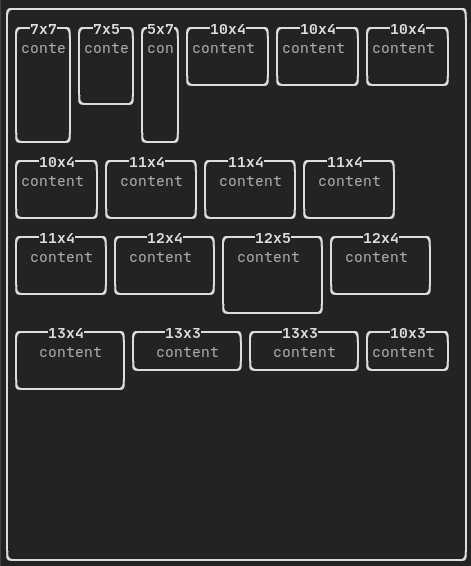
Checkout this example and the associated demo.
元素也可以使用 ftxui::flex 裝飾器變得靈活。
Code:
hbox({
text("left") | border ,
text("middle") | border | flex,
text("right") | border,
});
Terminal output:
┌────┐┌─────────────────────────────────────────────────────┐┌─────┐
│left││middle ││right│
└────┘└─────────────────────────────────────────────────────┘└─────┘
Code:
hbox({
text("left") | border ,
text("middle") | border | flex,
text("right") | border | flex,
});
Terminal output:
┌────┐┌───────────────────────────────┐┌───────────────────────────────┐
│left││middle ││right │
└────┘└───────────────────────────────┘└───────────────────────────────┘
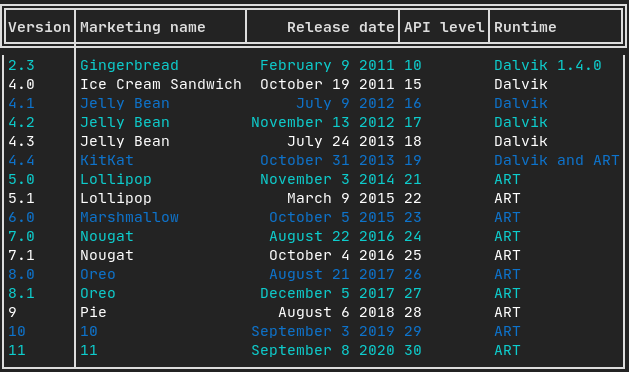
表格
能夠輕鬆將資料格式化為整齊的表格狀視覺形式。
Code example:
畫布
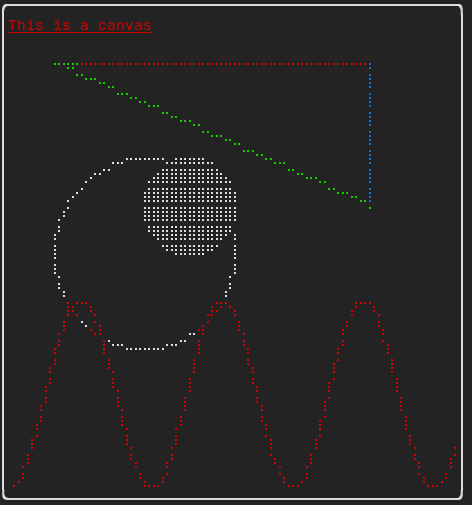
詳見 API <ftxui/dom/canvas.hpp>
auto c = Canvas(100, 100);
c.DrawPointLine(10, 10, 80, 10, Color::Red);
Element canvas(ConstRef< Canvas > canvas)
從 Canvas 或對 Canvas 的參考中產生一個元素。
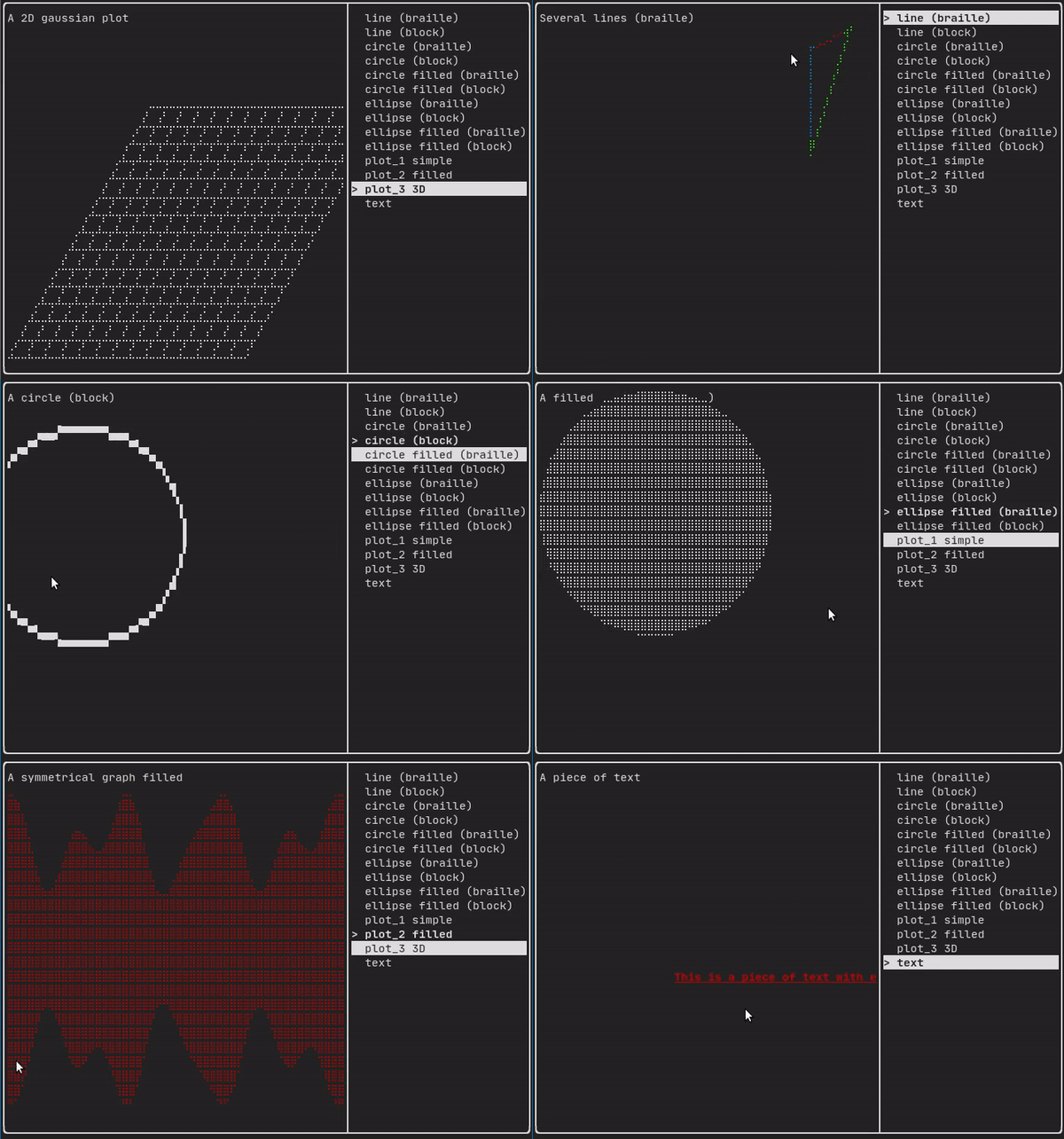
繪圖可以在 ftxui::Canvas 上執行,使用盲文、區塊或簡單字元:
Simple example:
Complex example: