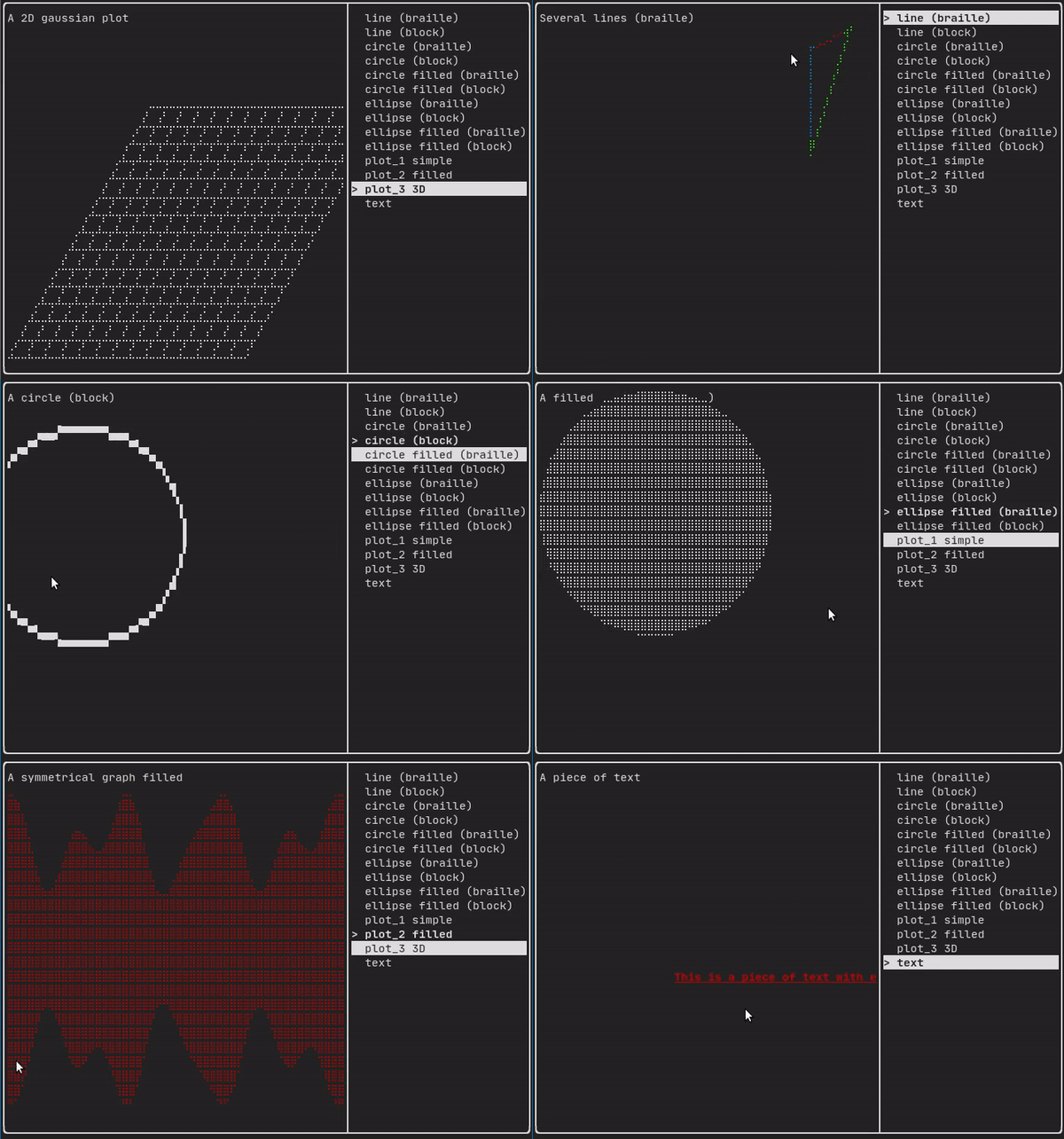
This module defines a hierarchical set of ftxui::Element. An element manages the layout and can be responsive to the terminal dimension changes. Note the following example where this module is used to create a simple layout with a number of operators:
The Example section provides a collection of examples.
Example:
...
Element document =
vbox({
text("The footer")
});
document = border(document);
document = document | border.
document |= border
...
}
Element text(std::wstring text)
Display a piece of unicode text.
Element gauge(float progress)
Draw a high definition progress bar.
Decorator color(Color)
Decorate using a foreground color.
Element vbox(Elements)
A container displaying elements vertically one by one.
The FTXUI ftxui:: namespace.
List of elements
The list of all elements are included and can be accessed by including the corresponding header file:
#ifndef FTXUI_DOM_ELEMENTS_HPP
#define FTXUI_DOM_ELEMENTS_HPP
#include <functional>
#include <memory>
class Node;
using Element = std::shared_ptr<Node>;
};
Color unselected_color,
Color selected_color);
Color unselected_color,
Color selected_color);
Element canvas(
int width,
int height, std::function<
void(Canvas&)>);
namespace Dimension {
Dimensions
Fit(
Element&,
bool extend_beyond_screen =
false);
}
}
#include "ftxui/dom/take_any_args.hpp"
#endif
Decorator bgcolor(Color)
Decorate using a background color.
Element window(Element title, Element content, BorderStyle border=ROUNDED)
Draw window with a title and a border around the element.
Element borderDouble(Element)
Draw a double border around the element.
Element focusCursorBarBlinking(Element)
Same as focus, but set the cursor shape to be a blinking bar.
Element xflex(Element)
Expand/Minimize if possible/needed on the X axis.
Element gaugeDirection(float progress, Direction direction)
Draw a high definition progress bar progressing in specified direction.
Decorator focusPositionRelative(float x, float y)
Used inside a frame, this force the view to be scrolled toward a a given position....
Element separatorStyled(BorderStyle)
Draw a vertical or horizontal separation in between two other elements.
Element xflex_grow(Element)
Expand if possible on the X axis.
Element underlinedDouble(Element)
Apply a underlinedDouble to text.
Element clear_under(Element element)
Before drawing |child|, clear the pixels below. This is useful in combination with dbox.
Element borderDashed(Element)
Draw a dashed border around the element.
Element separatorEmpty()
Draw a vertical or horizontal separation in between two other elements, using the EMPTY style.
Element vscroll_indicator(Element)
Display a vertical scrollbar on the right. Colors follow the content.
Element nothing(Element element)
A decoration doing absolutely nothing.
Decorator size(WidthOrHeight, Constraint, int value)
Apply a constraint on the size of an element.
Element flex(Element)
Make a child element to expand proportionally to the space left in a container.
Element paragraphAlignRight(const std::string &text)
Return an element drawing the paragraph on multiple lines, aligned on the right.
Element gaugeRight(float progress)
Draw a high definition progress bar progressing from left to right.
Element focusCursorUnderlineBlinking(Element)
Same as focus, but set the cursor shape to be a blinking underline.
Element bold(Element)
Use a bold font, for elements with more emphasis.
Element separatorLight()
Draw a vertical or horizontal separation in between two other elements, using the LIGHT style.
Element spinner(int charset_index, size_t image_index)
Useful to represent the effect of time and/or events. This displays an ASCII art "video".
Element borderRounded(Element)
Draw a rounded border around the element.
Element yflex(Element)
Expand/Minimize if possible/needed on the Y axis.
Element flex_shrink(Element)
Minimize if needed.
Element focusCursorBar(Element)
Same as focus, but set the cursor shape to be a still block.
Element focusCursorBlock(Element)
Same as focus, but set the cursor shape to be a still block.
Element underlined(Element)
Underline the given element.
Element center(Element)
Center an element horizontally and vertically.
Element focusCursorUnderline(Element)
Same as focus, but set the cursor shape to be a still underline.
Element borderHeavy(Element)
Draw a heavy border around the element.
Element inverted(Element)
Add a filter that will invert the foreground and the background colors.
Element paragraphAlignCenter(const std::string &text)
Return an element drawing the paragraph on multiple lines, aligned on the center.
Element gaugeUp(float progress)
Draw a high definition progress bar progressing from bottom to top.
Element align_right(Element)
Align an element on the right side.
Decorator focusPosition(int x, int y)
Used inside a frame, this force the view to be scrolled toward a a given position....
Element yflex_grow(Element)
Expand if possible on the Y axis.
Element hscroll_indicator(Element)
Display a horizontal scrollbar at the bottom. Colors follow the content.
Element flex_grow(Element)
Expand if possible.
Element separatorDashed()
Draw a vertical or horizontal separation in between two other elements, using the DASHED style.
Element notflex(Element)
Make the element not flexible.
Element strikethrough(Element)
Apply a strikethrough to text.
Element italic(Element)
Apply a underlinedDouble to text.
Element dbox(Elements)
Stack several element on top of each other.
Element xflex_shrink(Element)
Minimize if needed on the X axis.
Element gaugeLeft(float progress)
Draw a high definition progress bar progressing from right to left.
Element separatorCharacter(std::string)
Draw a vertical or horizontal separation in between two other elements.
Element vtext(std::wstring text)
Display a piece unicode text vertically.
Element borderLight(Element)
Draw a light border around the element.
Element focus(Element)
Set the child to be the one focused among its siblings.
Element paragraphAlignLeft(const std::string &text)
Return an element drawing the paragraph on multiple lines, aligned on the left.
Decorator borderWith(const Pixel &)
Same as border but with a constant Pixel around the element.
Decorator borderStyled(BorderStyle)
Same as border but with different styles.
Element separator()
Draw a vertical or horizontal separation in between two other elements.
Element filler()
An element that will take expand proportionally to the space left in a container.
Element dim(Element)
Use a light font, for elements with less emphasis.
Element automerge(Element child)
Enable character to be automatically merged with others nearby.
Decorator hyperlink(std::string link)
Decorate using a hyperlink. The link will be opened when the user clicks on it. This is supported onl...
Element blink(Element)
The text drawn alternates in between visible and hidden.
Element vcenter(Element)
Center an element vertically.
Element separatorDouble()
Draw a vertical or horizontal separation in between two other elements, using the DOUBLE style.
Element focusCursorBlockBlinking(Element)
Same as focus, but set the cursor shape to be a blinking block.
Element paragraphAlignJustify(const std::string &text)
Return an element drawing the paragraph on multiple lines, aligned using a justified alignment....
Element border(Element)
Draw a border around the element.
Element separatorHeavy()
Draw a vertical or horizontal separation in between two other elements, using the HEAVY style.
Element borderEmpty(Element)
Draw an empty border around the element.
Element yflex_shrink(Element)
Minimize if needed on the Y axis.
Element hcenter(Element)
Center an element horizontally.
Element gaugeDown(float progress)
Draw a high definition progress bar progressing from top to bottom.
Dimensions Fit(Element &, bool extend_beyond_screen=false)
std::function< Element(Element)> Decorator
Element flexbox(Elements, FlexboxConfig config=FlexboxConfig())
A container displaying elements on row/columns and capable of wrapping on the next column/row when fu...
Element separatorVSelector(float up, float down, Color unselected_color, Color selected_color)
Draw an vertical bar, with the area in between up/downcolored differently.
std::shared_ptr< Node > Element
Element xframe(Element)
Same as frame, but only on the x-axis.
Element hflow(Elements)
A container displaying elements in rows from left to right. When filled, it starts on a new row below...
Decorator selectionStyle(std::function< void(Pixel &)> style)
Set the style of an element when selected.
Element separatorHSelector(float left, float right, Color unselected_color, Color selected_color)
Draw a horizontal bar, with the area in between left/right colored differently.
Element hbox(Elements)
A container displaying elements horizontally one by one.
Element canvas(ConstRef< Canvas >)
Produce an element from a Canvas, or a reference to a Canvas.
std::vector< Element > Elements
Decorator selectionForegroundColor(Color foreground)
Set the foreground color of an element when selected. Note that the style is applied on top of the ex...
Component operator|(Component component, ComponentDecorator decorator)
Decorator selectionBackgroundColor(Color foreground)
Set the background color of an element when selected. Note that the style is applied on top of the ex...
Element yframe(Element)
Same as frame, but only on the y-axis.
Decorator selectionColor(Color foreground)
Set the color of an element when selected.
Element select(Element e)
Set the child to be the one focused among its siblings.
Element selectionStyleReset(Element)
Reset the selection style of an element.
Decorator reflect(Box &box)
std::function< std::vector< int >(int, int)> GraphFunction
Element gridbox(std::vector< Elements > lines)
A container displaying a grid of elements.
Elements paragraph(std::wstring text)
Element frame(Element)
Allow an element to be displayed inside a 'virtual' area. It size can be larger than its container....
Component & operator|=(Component &component, ComponentDecorator decorator)
Element vflow(Elements)
A container displaying elements in rows from top to bottom. When filled, it starts on a new columns o...
Element graph(GraphFunction)
Draw a graph using a GraphFunction.
text
The most simple widget. It displays a text.
text("I am a piece of text");
vtext
Identical to ftxui::text, but displayed vertically.
Code:
Terminal output:
paragraph
Similar to ftxui::text, but the individual word are wrapped along multiple lines, depending on the width of its container.
Sample Code:
paragraph("A very long text")
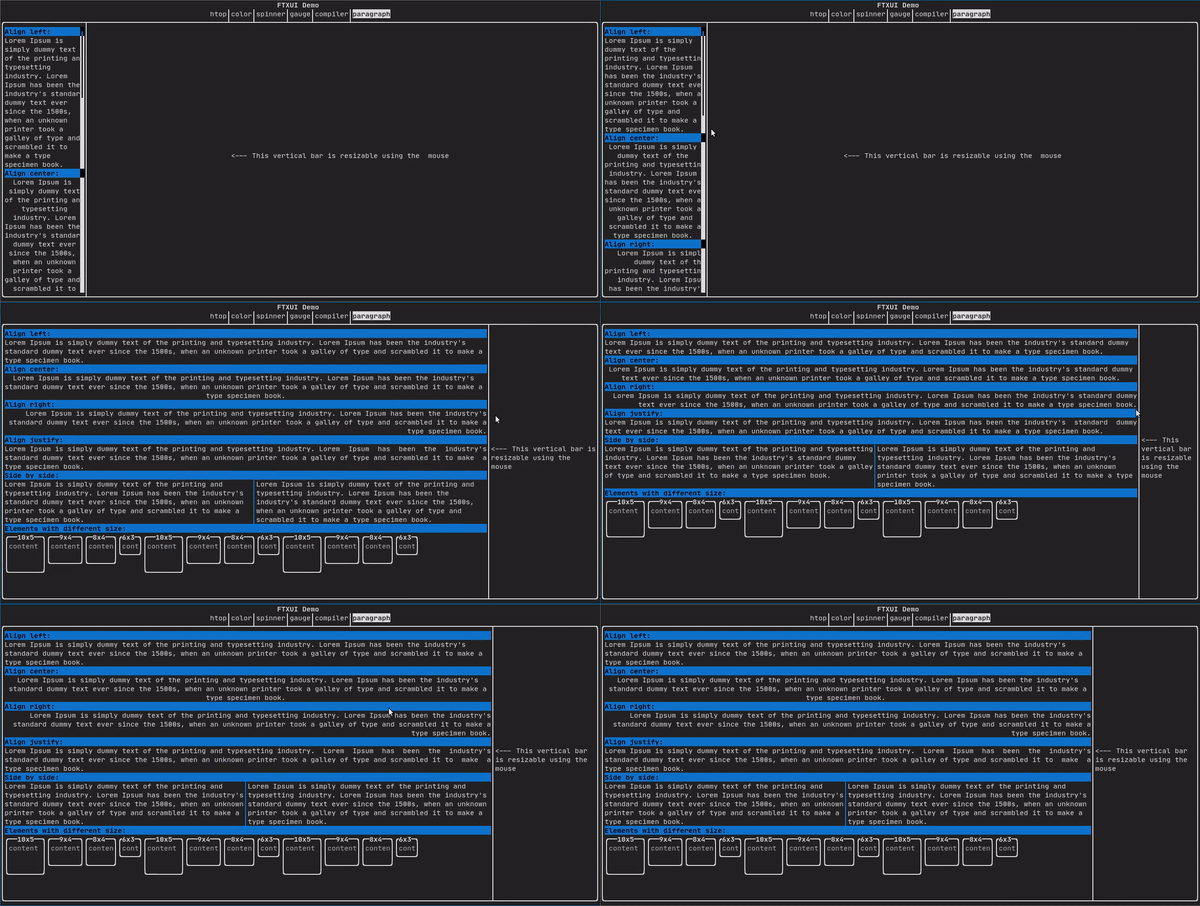
For a more detailed example refer to detailed example. Paragraph also includes a number of other variants as shown below:
border
Adds a border around an element.
Code:
border(text("The element"))
Terminal output:
┌───────────┐
│The element│
└───────────┘
- Note
- You can achieve the same behavior by using the pipe operator.
Code: text("The element") | border
Border also comes in a variety of styles as shown below:
window
A ftxui::window is a ftxui::border, but with an additional header. To add a window around an element, wrap it and specify a string as the header. Code:
window("The window", text("The element"))
Terminal output:
┌The window─┐
│The element│
└───────────┘
separator
Displays a vertical/horizontal line to visually split the content of a container in two.
Code:
border(
hbox({
text("Left"),
separator(),
text("Right")
})
)
Terminal output:
┌────┬─────┐
│left│right│
└────┴─────┘
Separators come in a variety of flavors as shown below:
Color background,
Color foreground);
Color background,
Color foreground);
}
gauge
This is a visual element that represents a ratio of progress.
Code:
Terminal output:
┌────────────────────────────────────────────────────────────────────────────┐
│██████████████████████████████████████ │
└────────────────────────────────────────────────────────────────────────────┘
Gauges can be displayed in many orientations as shown below:
namespace {
Element gauge(float ratio);
Element gaugeLeft(float ratio);
Element gaugeRight(float ratio);
Element gaugeUp(float ratio);
Element gaugeDown(float ratio);
Element gaugeDirection(float ratio, GaugeDirection);
}
graph
See:
Element graph(GraphFunction);
Colors
Most terminal consoles can display colored text and colored backgrounds. FTXUI supports every color palette:
Decorator color(Color);
Decorator bgcolor(Color);
Color gallery: 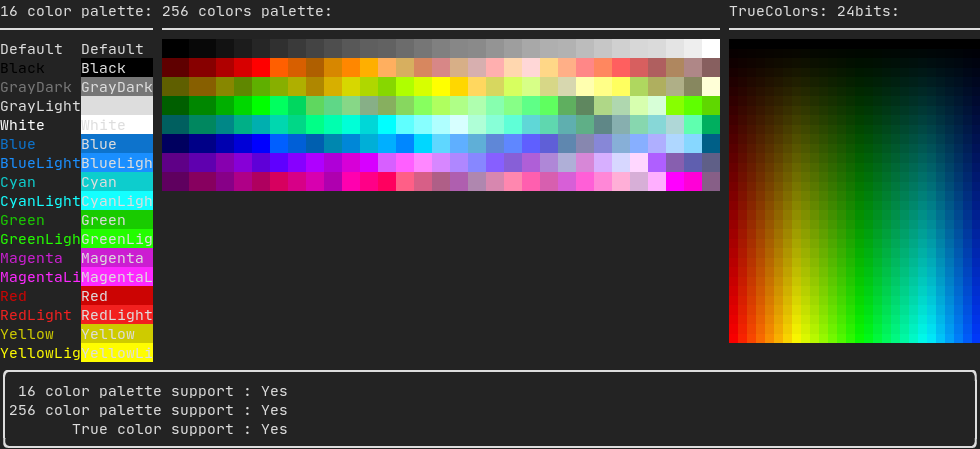
Palette16
On most terminals the following colors are supported:
- Default
- Black
- GrayDark
- GrayLight
- White
- Blue
- BlueLight
- Cyan
- CyanLight
- Green
- GreenLight
- Magenta
- MagentaLight
- Red
- RedLight
- Yellow
- YellowLight
Example use of the above colors using the pipe operator:
text("Blue foreground") | color(Color::Blue);
text("Blue background") | bgcolor(Color::Blue);
text("Black on white") | color(Color::Black) | bgcolor(Color::White);
Palette256
On terminal supporting 256 colors.
text("HotPink") | color(Color::HotPink);
TrueColor
On terminal supporting trueColor, you can directly use the 24bit RGB color space:
Use the constructors below to specify the RGB or HSV values for your color:
There are two constructors:
static Color HSV(uint8_t hue, uint8_t saturation, uint8_t value)
Build a Color from its HSV representation. https://en.wikipedia.org/wiki/HSL_and_HSV.
static Color RGB(uint8_t red, uint8_t green, uint8_t blue)
Build a Color from its RGB representation. https://en.wikipedia.org/wiki/RGB_color_model.
LinearGradient
FTXUI supports linear gradient. Either on the foreground or the background.
Decorator color(const LinearGradient&);
Decorator bgcolor(const LinearGradient&);
A ftxui::LinearGradient is defined by an angle in degree, and a list of color stops.
auto gradient = LinearGradient()
.Angle(45)
.AddStop(0.0, Color::Red)
.AddStop(0.5, Color::Green)
.AddStop(1.0, Color::Blue);
You can also use simplified constructors:
LinearGradient(Color::Red, Color::Blue);
LinearGradient(45, Color::Red, Color::Blue);
See demo.
Style
In addition to colored text and colored backgrounds. Many terminals support text effects such as: bold, italic, dim, underlined, inverted, blink.
Element bold(Element);
Element italic(Element);
Element dim(Element);
Element inverted(Element);
Element underlined(Element);
Element underlinedDouble(Element);
Element strikethrough(Element);
Element blink(Element);
Decorator color(Color);
Decorator bgcolor(Color);
Decorator colorgrad(LinearGradient);
Decorator bgcolorgrad(LinearGradient);
Example

To use these effects, simply wrap your elements with your desired effect:
underlined(bold(text("This text is bold and underlined")))
Alternatively, use the pipe operator to chain it on your element:
text("This text is bold") | bold | underlined
Layout
Enables elements to be arranged in the following ways:
- Horizontally with
ftxui::hbox
- Vertically with
ftxui::vbox
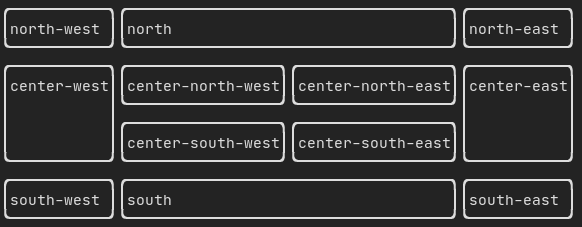
- Inside a grid with
ftxui::gridbox
- Wrapped along one direction using the
ftxui::flexbox.
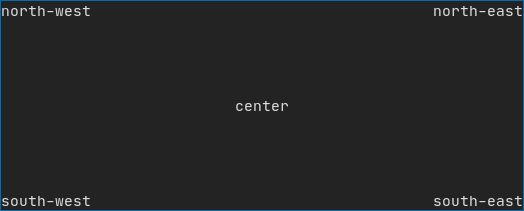
Example using ftxui::hbox, ftxui::vbox and ftxui::filler.
Example using ftxui::gridbox:
Example using flexbox:
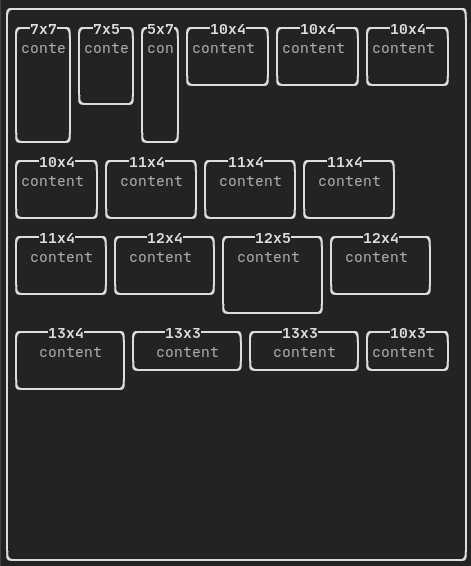
Checkout this example and the associated demo.
Element can also become flexible using the ftxui::flex decorator.
Code:
hbox({
text("left") | border ,
text("middle") | border | flex,
text("right") | border,
});
Terminal output:
┌────┐┌─────────────────────────────────────────────────────┐┌─────┐
│left││middle ││right│
└────┘└─────────────────────────────────────────────────────┘└─────┘
Code:
hbox({
text("left") | border ,
text("middle") | border | flex,
text("right") | border | flex,
});
Terminal output:
┌────┐┌───────────────────────────────┐┌───────────────────────────────┐
│left││middle ││right │
└────┘└───────────────────────────────┘└───────────────────────────────┘
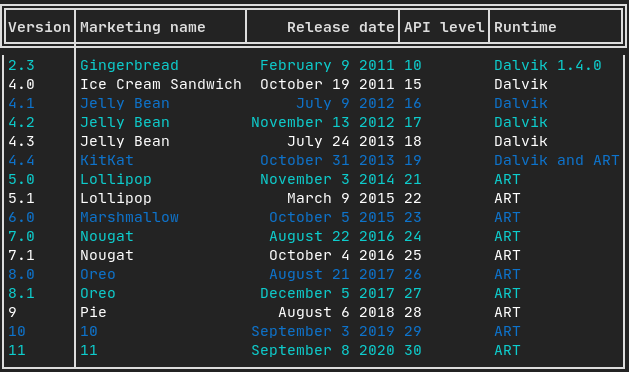
Table
Enables easy formatting of data into a neat table like visual form.
Code example:
Canvas
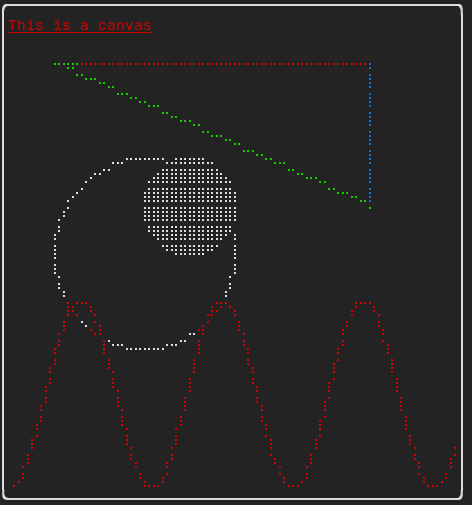
See the API <ftxui/dom/canvas.hpp>
auto c = Canvas(100, 100);
c.DrawPointLine(10, 10, 80, 10, Color::Red);
auto element = canvas(c);
Drawing can be performed on a ftxui::Canvas, using braille, block, or simple characters:
Simple example:
Complex example: