
---------------------------------------
All elements have volume  8.3333333E+01
---------------------------------------
      4800 total elements evaluated.

ATTRIBUTE NAME         MIN               MAX         DIFFERENCE    LENGTH
 imt1                        1                4               3      1122
The following commands are almost always used in preparation of writing FEHM model files. They are not always needed but using them will cause no harm. It is good practice to include in case they are needed.
- Set cell colors to 1. FEHM uses properties assigned to the voronoi volumes around the mesh vertices (nodes). Though cell colors are better for images, they are not used in FEHM simulations. It is good practice to set the element attribute **itetclr** to 1. This avoids routines looking for multi-material elements.
- Reset the itp array when materials are changed. This array is important to some routines.
- The [**`resetpts/parent`**](https://lanl.github.io/LaGriT/pages/docs/commands/RESETPT.html) command will remove the parent-child relationship is established in the settets command.
- Sometimes during the meshing process there will be duplicate or double-defined nodes created. Use the `filter` command to find and tag nodes as `dudded`.
- IMPORTANT: Nodes tagged for removal will not be deleted from the mesh object until `rmpoint/compress` is called. This will remove any dudded nodes and adjust the connectivity.
```
cmo/select/mo_tet
cmo/setatt/mo_tet itetclr 1
resetpts/itp
cmo/select/mo_tet
resetpts/parent
filter/1,0,0
rmpoint/compress
```
## Write default FEHM files
By default, all 7 FEHM files are written with rootname "tet".
```
dump/fehm/ tet /mo_tet/ keepatt
dump/avs/tet_fehm.inp/mo_tet
```
Note: We normally do not use multiple material regions for FEHM so the `interface.zone` will be empty. (If itetclr=1 and resetpts/itp was called). If the node imt materials are a single value, the `multi_mat.zone` will also be empty.
-rw-rw-r-- 1 tamiller sft 372523 Apr  2 18:29 step_04/tet.fehmn
-rw-rw-r-- 1 tamiller sft 203060 Apr  2 18:29 step_04/tet.stor
-rw-rw-r-- 1 tamiller sft  12486 Apr  2 18:29 step_04/tet_material.zone
-rw-rw-r-- 1 tamiller sft   8067 Apr  2 18:29 step_04/tet_outside.zone
-rw-rw-r-- 1 tamiller sft  45739 Apr  2 18:29 step_04/tet_outside_vor.area
-rw-rw-r-- 1 tamiller sft  32600 Apr  2 18:29 step_04/tet_multi_mat.zone
-rw-rw-r-- 1 tamiller sft      0 Apr  2 18:28 step_04/tet_interface.zone
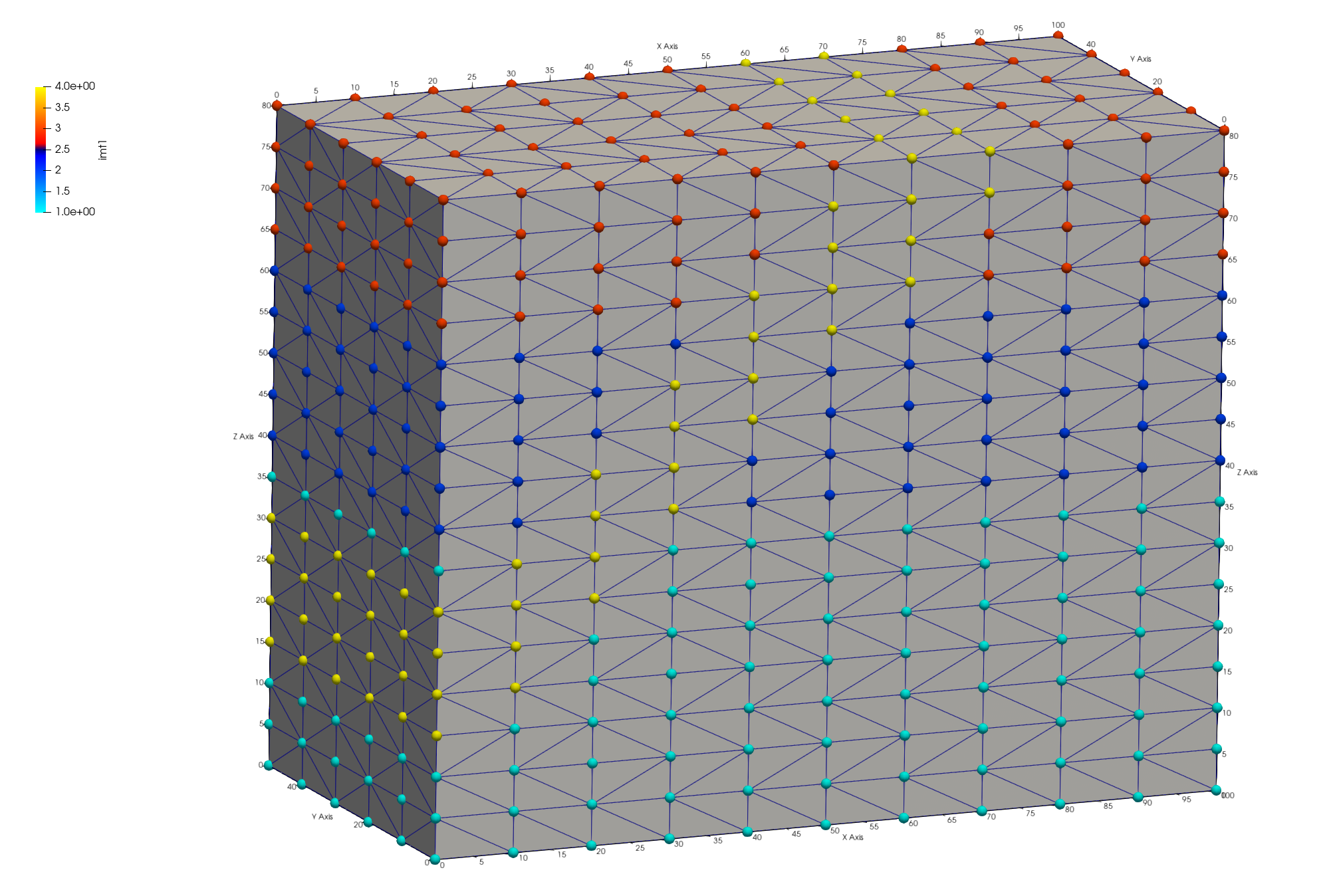
The `_material.zone` file contains zones listing node ids for each integer value found in the mesh **imt** attribute. This is a single file separated by id, "nnum" and total for each list. See right image below. The **keepatt** keyword will keep attributes normally deleted after writing files. The 6 outside attribute names are added to the mesh object with the names and integer id based on normal directions: - 1 = top = top = positive z direction (0,0,1) - 2 = bottom = bottom = negative z direction (0,0,-1) - 3 = left_w = left or west = negative x direction (-1,0,0) - 4 = front_s = front or south = negative y direction (0,-1,0) - 5 = right_e = right or east = positive x direction (1,0,0) - 6 = back_n = back or north = positive y direction (0,1,0) Note: A node can occur in multiple zones. For instance, a node located on a top corner of the mesh can be found in zones for top, front_s, and left_w. See left image below.
Paraview images showing mesh node attributes w_left mesh boundary (left) and node imt materials (right)

*********dump_material_lists********
Minimum material ID value =      1
Maximum material ID value =      4
Total possible materials  =      4
Material      1 has       468 nodes. #nodes/nnodes is   0.417112290859
Material      2 has       270 nodes. #nodes/nnodes is   0.240641713142
Material      3 has       204 nodes. #nodes/nnodes is   0.181818187237
Material      4 has       180 nodes. #nodes/nnodes is   0.160427808762
The routine `AMatbld3d_stor` generates a report summary regarding the voronoi volumes and number of coefficients.
AMatbld3d_stor: *****Zero Negative Coefficients ******
AMatbld3d_stor: Number of 'zero' (< compress_eps) coefs  0
AMatbld3d_stor: npoints =     1122  ncoefs =       7144
AMatbld3d_stor: Number of unique coefs =              6
AMatbld3d_stor: Maximum num. connections to a node =  7
AMatbld3d_stor: Volume min =   6.2500000E+01
AMatbld3d_stor: Volume max =   5.0000000E+02
Negative coefficients can occur on non-convex boundaries or with unstructured complex meshes. If they occur, these negative coefficients are stored in a node attribute named `ccoef`. Viewing this attribute can provide help in finding areas of the mesh that need adjustment. It is possible that a mesh has ccoef values at or very close to zero, in which case they can be ignored. The following pset commands can help find ccoef values of concern. Note. The `cmo/addatt` command is called but will not be used if the `AMatbld3d_stor` routine creates it. We create it just in case it does not exist so the commands using it do not fail with an Error. ``` cmo/addatt/mo_tet/ccoef/VDOUBLE/scalar/nnodes/linear/ cmo select mo_tet pset pin attribute itp 1,0,0 lt 10 pset pneg attribute ccoef 1,0,0 lt -.0001 pset pBAD inter pin pneg cmo printatt mo_tet ccoef minmax cmo printatt mo_tet -all- minmax ``` ## Create zone file for vertical well Zones for simulations can be created and written by using the `pset` commands. In this example a single column of nodes is selected to represent a well. There are numerous ways to create a set, in this example we use a geometric region in box shape. A cylinder would also work. Regions are defined by surfaces, here we use a box surface around the node column at 50,10 X,Y. The region is defined as an inside the box surface but can be combined with other surfaces for more complex regions. A pset is formed of all points within the `r_bx` region and written to a zone file. Write the list of nodes to a zone file Assign a zone number larger than max material ``` cmo select mo_tet surface / s_box / reflect / box / 49.5 19.5 -1. / 50.5 20.5 100. region/ r_box / le s_box pset/pwell/ region / r_box # check extents of the well nodes cmo/printatt/mo_tet/-xyz/ minmax/ pset,get,pwell pset/pwell/ zone / tet_well_nodes.zone / ascii / 11 ``` There should be 13 nodes found within the region. Check the xyz extents to see that one column is selected at the intended elevations.
 THE PSET  pwell  HAS         13 POINTS

cmo/printatt/mo_tet/-xyz-/minmax/pset,get,pwell
ATTRIBUTE NAME         MIN               MAX         DIFFERENCE    LENGTH
 xic           5.000000000E+01  5.000000000E+01 0.000000000E+00      1122
 yic           2.000000000E+01  2.000000000E+01 0.000000000E+00      1122
 zic           2.000000000E+01  8.000000000E+01 6.000000000E+01      1122
## Add Mesh Attributes for Mesh Views When inspecting the mesh and to create informative figures, it helps to add attributes. For this example, a node attribute named **iwell** is created and assigned the value 11. The elevation is nice to see and is created by copying the **zic** attribute to a new attribute named **elev**. ``` cmo/addatt/mo_tet iwell/VINT/scalar/nnodes/linear/permanent//0 cmo/setatt/mo_tet/ iwell /pset,get,pwell/ 11 cmo/printatt/mo_tet/ iwell/ minmax cmo/addatt/mo_tet elev/VDOUBLE/scalar/nnodes/ cmo/copyatt/ mo_tet mo_tet / elev zic cmo/set_id/mo_tet/node/ id_node dump/avs/tet_attributes.inp/ mo_tet cmo/printatt/mo_tet/-all- minmax cmo/status/mo_tet ``` The command `cmo/printatt` is used with the **minmax** keyword to check attributes and values in the mesh object. In this example, added attributes include the 6 boundary directions, iwell, elev, and id_node.
ATTRIBUTE NAME              MIN               MAX         DIFFERENCE    LENGTH
 -def-              0.000000000E+00  0.000000000E+00 0.000000000E+00      1122
 scalar                           1                1               0         1
 vector                           3                3               0         1
 nnodes                        1122             1122               0         1
 nedges                           0                0               0         1
 nfaces                           0                0               0         1
 nelements                     4800             4800               0         1
...
 imt1                             1                4               3      1122
 itp1                             0               10              10      1122
 icr1                             0                0               0      1122
 isn1                             0                0               0      1122
 xic                0.000000000E+00  1.000000000E+02 1.000000000E+02      1122
 yic                0.000000000E+00  5.000000000E+01 5.000000000E+01      1122
 zic                0.000000000E+00  8.000000000E+01 8.000000000E+01      1122
 itetclr                          1                1               0      4800
...
 top                             -5                1               6      1122
 bottom                          -5                2               7      1122
 left_w                          -5                3               8      1122
 right_e                         -5                5              10      1122
 back_n                          -5                6              11      1122
 front_s                         -5                4               9      1122
 ccoef              0.000000000E+00  0.000000000E+00 0.000000000E+00      1122
 ncon50                        2500             2500               0         1
 nconbnd                          1                1               0         1
 icontab                          0                2               2      2500
 iwell                            0               11              11      1122
 elev               0.000000000E+00  8.000000000E+01 8.000000000E+01      1122
 id_node                          1             1122            1121      1122
## Check Well Zone It can be difficult to view mesh nodes within a mesh, it helps to write the points as a separate view file. The mesh nodes (without elements) are copied to a `motmp` mesh object which has all nodes removed except the well nodes. These can be written to any file format, but the AVS UCD pnt type is recognized by Paraview for easier point displays. This is part of the `dump/avs` options that can be set after the mesh object name. These options are provided to enable a user the flexibility of writing ASCII files with desired information. For this example, "1 3 1 0 0" means 1= nodes are written, 3 = elements are written of type "pnt", 1 = node attributes are written, 0 = cell attributes are not written, and 0 = model attributes are not written. ``` cmo/create/motmp copypts/motmp/mo_tet cmo/select/motmp pset/pduds/attribute iwell/1,0,0/ ne 11 rmpoint/pset,get,pduds rmpoint/compress dump/avs/tet_well_pnts.inp/ motmp / 1 3 1 0 0 cmo/printatt/motmp/-all- minmax ``` These Paraview images show the mesh clipped to the well (left) and the well nodes (right). Check the well nodes are located correctly with respect to the mesh materials. Use Paraview to Query a well node to check attributes such as **imt** material and **elev**. Note when the well points are subset from the full mesh, the node ID changes but the attribute **node_id** has the original mesh node ID saved.

